Minecraft version
Back to mods 
CurseForge · Minecraft mod
TinTeaTech
A mod include mechines, pipes and useful tools.
Choose a version Pick your version below, then grab the matching file.
Quick answer
Which TinTeaTech release should I use?
beta file TinTeaTech-0.1.0
Game version 1.20.1
Loader NeoForge, Forge
TinTeaTech-0.1.0 targets 1.20.1 with NeoForge, Forge. The project page does not say whether this file belongs on the client, dedicated server, or both. No extra mods listed for this file.
Where it goes
Is TinTeaTech required on the client, server, or both?
The project page does not say whether this file belongs on the client, dedicated server, or both.
Client Source doesn’t say
Dedicated server Source doesn’t say
Loader for this release NeoForge, Forge
Required install it here Optional supported, not mandatory Not supported do not install here Source doesn’t say do not assume
The source does not explicitly classify this release as client-only or server-only.
What else does TinTeaTech-0.1.0 need?
TinTeaTech-0.1.0. Change the file and its required mods may change too.
This file does not list any required mods. Do not add a library just because a different file uses it.
This file does not list any required or optional mods.
Before you install it
Add TinTeaTech without breaking your instance.
Built for TinTeaTech-0.1.0. Pick another file and the loader, install side or required mods may change.
- 01
Stick to this file
Use TinTeaTech-0.1.0. It targets 1.20.1 with NeoForge, Forge; another release may have different loader, side or dependency requirements.
- 02
Bring the mods it needs
This file does not list any required mods. Do not add a library just because a different file uses it.
- 03
Put it on the correct side
The project page does not say whether this file belongs on the client, dedicated server, or both.
- 04
Pick the file you checked
Use the “Get this file” button beside TinTeaTech-0.1.0. It opens that exact file at the source.
About this project
What does TinTeaTech add?
TinTeaTech
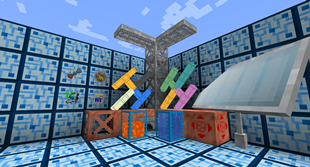
github: https://github.com/xkball/TinTeaTech
Introduction
Tin Tea Technology is a Minecraft mod. Support Minecraft 1.20.1 Forge.(including Forge 47.1.0)
This mod plans to create a formed machine system, multi-block machines, pipes and non-pipeline logistics, energy, terrain generation, auxiliary functions, etc.
The currently completed part (updated on 2023.9.9):
HoloGlass,head equipment, is essentially a manager of HUD and auxiliary functions. The auxiliary functions that have been implemented include orientation indication, block information display (similar to top or jade), forced display of eternal night or eternal day, elimination of player inertia, etc.
Pipes, including items, fluids, ender items, ender fluids, FE, steam (an energy system being written), logistics robots (actually non-pipeline logistics being written) version support oblique connections, in other words each pipe Can be connected with 18 other directions
Fluid Storage Tank, Boiler (verification of implementation of single block machine)
Iron scaffolding, a kind of scaffolding that is more powerful than the original version
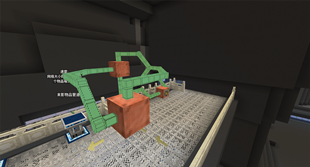
License
The contents of this repository are licensed as follows: - in the case of original source code from tin_tea_tech or compiled artifacts generated from it, under LGPL-3.0. - in the case of original art assets from tin_tea_tech, under CC BY-NC 4.0. - Special case: The art assets under the namespace tectech come from https://github.com/GTNewHorizons/TecTech/tree/master, using the MIT license
Project description from CurseForge.
Pick your setup
TinTeaTech by Minecraft version and loader
Choose the version and loader you play, then open the matching release.
Check the dependencies, then try the file in a copied instance before changing a world you care about.
Recent files
TinTeaTech versions and loaders
TinTeaTech-0.1.0
tin_tea_tech-0.1.0.jar
19 Sept 2023
Client Source doesn’t say Server Source doesn’t say Dependencies No extras listed Listed on Release listing
Check the 1.20.1 · NeoForge setup NeoForge1.20.1Forge beta
Looking for an older file? The official CurseForge project page is in Resources.
 mod
mod CurseForge + Modrinth · Minecraft
Transponder Snails
Transponder Snails from the series One Piece, in Minecraft. (via Simple Voice Chat)
 mod
mod CurseForge + Modrinth · Minecraft
Old School Levels
This is an overhaul to the progression system of Minecraft based on Old School Runescape!
 mod
mod CurseForge · Minecraft
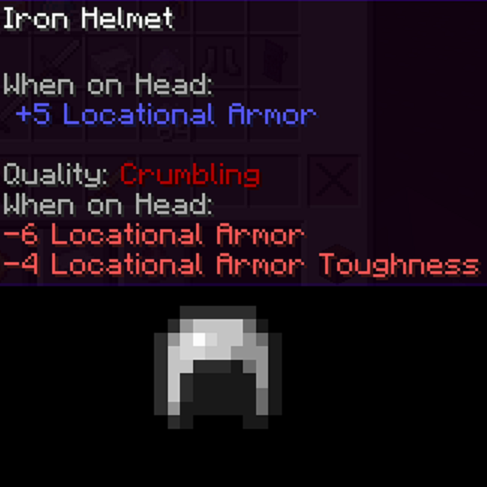
Quality Equipment Forked
Forked version of Quality Equipment with improved mechanics for modpack developers