Minecraft version
Back to mods 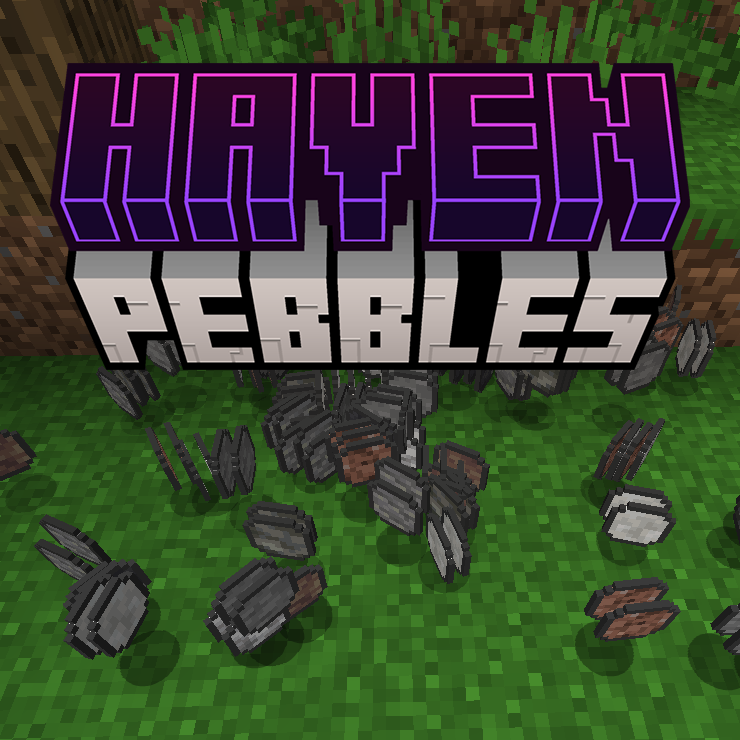
CurseForge · Minecraft mod
Haven Pebbles
Generate pebbles on right clicking dirt/grass/netherrack, great for challenge modpacks!
Choose a version Pick your version below, then grab the matching file.
Quick answer
Which Haven Pebbles release matches 1.18.2 Forge?
Best match for your filters HavenPebbles-1.18.2-1.0.6.jar
Game version 1.18.2
Loader Forge
Haven Pebbles HavenPebbles-1.18.2-1.0.6.jar targets 1.18.2 with Forge. The project page does not say whether this file belongs on the client, dedicated server, or both. No extra mods listed for this file.
Where it goes
Is Haven Pebbles required on the client, server, or both?
The project page does not say whether this file belongs on the client, dedicated server, or both.
Client Source doesn’t say
Dedicated server Source doesn’t say
Loader for this release Forge
Required install it here Optional supported, not mandatory Not supported do not install here Source doesn’t say do not assume
The source does not explicitly classify this release as client-only or server-only.
What else does Haven Pebbles HavenPebbles-1.18.2-1.0.6.jar need?
HavenPebbles-1.18.2-1.0.6.jar on 1.18.2 Forge. Every mod below is checked against that same setup.
This file does not list any required mods. Do not add a library just because a different file uses it.
This file does not list any required or optional mods.
Before you install it
Add Haven Pebbles without breaking your instance.
Built for Haven Pebbles HavenPebbles-1.18.2-1.0.6.jar on 1.18.2 Forge. Pick another file and the loader, install side or required mods may change.
- 01
Stick to this file
Use HavenPebbles-1.18.2-1.0.6.jar. It targets 1.18.2 with Forge; another release may have different loader, side or dependency requirements.
- 02
Bring the mods it needs
This file does not list any required mods. Do not add a library just because a different file uses it.
- 03
Put it on the correct side
The project page does not say whether this file belongs on the client, dedicated server, or both.
- 04
Pick the file you checked
Use the “Get this file” button beside HavenPebbles-1.18.2-1.0.6.jar. It opens that exact file at the source.
About this project
What does Haven Pebbles add?

What is Haven Pebbles?
It's a mod where you can Crouch and Right click on Dirt, Grass or Netherrack to generate Pebbles.
It's highly customizable to enable Dimensional Generation or not.
All the pebbles can be crafted into their respective blocks, for example 4 Stone Pebbles crafts into 1 Cobblestone.
You can disable sound when the pebbles generate.
You can adjust volume Ingame with the sound option Player.
You can adjust each specific Pebble by adding, removing or adjusting the weight in the config.
You can add ANY item to pop out from ANY block you desire, just look at the default config on how to set it up.
It can generate:
- Andesite (from dirt/grass)
- Calcite (from dirt/grass)
- Deepslate (from dirt/grass)
- Diorite (from dirt/grass)
- Dripstone (from dirt/grass)
- Granite (from dirt/grass)
- Stone (from dirt/grass)
- Tuff (from dirt/grass)
- Netherrack (from netherrack)
- Basalt (from netherrack)
- Blackstone (from netherrack)
Default Config:
#Each pebble has its own effect type when consumed.
#Use "none" to disable effects for a pebble.
[pebbleEffects]
    andesite_pebble = "default"
    basalt_pebble = "default"
    blackstone_pebble = "random"
    calcite_pebble = "default"
    deepslate_pebble = "default"
    diorite_pebble = "default"
    dripstone_pebble = "default"
    granite_pebble = "default"
    netherrack_pebble = "default"
    stone_pebble = "default"
    tuff_pebble = "default"

#Each type contains an all or random type and a list of effects.
[pebbleEffectTypes]

    [pebbleEffectTypes.random]
        #Using 'all' will add all effects in the list, using 'random' will randomly give one effect.
        type = "random"
        #Effect format: [effect, durationTicks, amplifier, chancePercent].
        effects = [
            ["minecraft:slowness", 600, 0, 75.0],
            ["minecraft:mining_fatigue", 600, 0, 75.0]
        ]

    [pebbleEffectTypes.default]
        #Using 'all' will add all effects in the list, using 'random' will randomly give one effect.
        type = "all"
        #Effect format: [effect, durationTicks, amplifier].
        effects = [
            ["minecraft:slowness", 600, 0],
            ["minecraft:mining_fatigue", 600, 0]
        ]

[gathering.overworld]
    #Dimension whitelist, supports * for every dimension.
    dimensions = [
        "minecraft:overworld"
    ]
    #Blocks that can be crouch-right-clicked with an empty main hand.
    useBlocks = [
        "minecraft:dirt",
        "minecraft:grass_block"
    ]
    #Output format: [item, weight, count].
    outputs = [
        ["havenpebbles:andesite_pebble", 15, 1],
        ["havenpebbles:calcite_pebble", 10, 1],
        ["havenpebbles:deepslate_pebble", 10, 1],
        ["havenpebbles:diorite_pebble", 10, 1],
        ["havenpebbles:dripstone_pebble", 10, 1],
        ["havenpebbles:granite_pebble", 10, 1],
        ["havenpebbles:tuff_pebble", 10, 1],
        ["havenpebbles:stone_pebble", 40, 1]
    ]

[gathering.nether]
    #Dimension whitelist, supports * for every dimension.
    dimensions = [
        "minecraft:the_nether"
    ]
    #Blocks that can be crouch-right-clicked with an empty main hand.
    useBlocks = [
        "minecraft:netherrack"
    ]
    #Output format: [item, weight, count].
    outputs = [
        ["havenpebbles:netherrack_pebble", 90, 1],
        ["havenpebbles:basalt_pebble", 10, 1],
        ["havenpebbles:blackstone_pebble", 5, 1]
    ]
Project description from CurseForge.
Pick your setup
Haven Pebbles by Minecraft version and loader
Choose the version and loader you play, then open the matching release.
Minecraft version
1.21.4
1 loader buildMinecraft version
1.21.3
1 loader buildMinecraft version
1.21.2
1 loader buildMinecraft version
1.21.1
1 loader buildMinecraft version
1.21
1 loader buildMinecraft version
1.20.4
1 loader buildMinecraft version
1.20.3
1 loader buildMinecraft version
1.20.2
1 loader buildMinecraft version
1.20.1
1 loader buildMinecraft version
1.19.2
1 loader buildMinecraft version
1.18.2
1 loader buildCheck the dependencies, then try the file in a copied instance before changing a world you care about.
Recent files
Haven Pebbles versions and loaders
HavenPebbles-1.18.2-1.0.6.jar
21 May 2024
Client Source doesn’t say Server Source doesn’t say Dependencies No extras listed Listed on Release listing
Check the 1.18.2 · Forge setup 1.18.2Forge release
HavenPebbles-1.18.2-1.0.5.jar
16 Apr 2024
Client Source doesn’t say Server Source doesn’t say Dependencies No extras listed Listed on Release listing
Check the 1.18.2 · Forge setup 1.18.2Forge release
HavenPebbles-1.0.4-1.18.2.jar
25 Dec 2023
Client Source doesn’t say Server Source doesn’t say Dependencies No extras listed Listed on Release listing
Check the 1.18.2 · Forge setup 1.18.2Forge release
HavenPebbles-1.0.3-1.18.2.jar
18 Dec 2023
Client Source doesn’t say Server Source doesn’t say Dependencies No extras listed Listed on Release listing
Check the 1.18.2 · Forge setup 1.18.2Forge release
HavenPebbles-1.0.2-1.18.2.jar
30 Oct 2023
Client Source doesn’t say Server Source doesn’t say Dependencies No extras listed Listed on Release listing
Check the 1.18.2 · Forge setup 1.18.2Forge release
Looking for an older file? The official CurseForge project page is in Resources.
 mod
Modrinth · Minecraft
Quick World Settings
This mod lets you easily change the time and weather!
 mod
CurseForge + Modrinth · Minecraft
TofuCraftReload
This mod is a remake of Old Mod TofuCraft made by tsuteto. add soybean As a new all-purpose food!
 mod
Modrinth · Minecraft
Create: Eat Andesite
Create add-on that lets you hold right-click to eat andesite (and any block you pick), for a little hunger and some Slowness. Fully configurable.