Minecraft version
Back to mods 
CurseForge · Minecraft mod
Server Redstone Block
Never have a broken redstone contraption due to server restarts again!
Choose a version Pick your version below, then grab the matching file.
Quick answer
Which Server Redstone Block release matches 1.20.1 Forge?
beta file ServerRedstoneBlock v1.0.0 Forge for 1.20.1
Game version 1.20.1
Loader Forge
Server Redstone Block ServerRedstoneBlock v1.0.0 Forge for 1.20.1 targets 1.20.1 with Forge. The project page does not say whether this file belongs on the client, dedicated server, or both. No extra mods listed for this file.
Where it goes
Is Server Redstone Block required on the client, server, or both?
The project page does not say whether this file belongs on the client, dedicated server, or both.
Client Source doesn’t say
Dedicated server Source doesn’t say
Loader for this release Forge
Required install it here Optional supported, not mandatory Not supported do not install here Source doesn’t say do not assume
The source does not explicitly classify this release as client-only or server-only.
What else does Server Redstone Block ServerRedstoneBlock v1.0.0 Forge for 1.20.1 need?
ServerRedstoneBlock v1.0.0 Forge for 1.20.1 on 1.20.1 Forge. Every mod below is checked against that same setup.
This file does not list any required mods. Do not add a library just because a different file uses it.
This file does not list any required or optional mods.
Before you install it
Add Server Redstone Block without breaking your instance.
Built for Server Redstone Block ServerRedstoneBlock v1.0.0 Forge for 1.20.1 on 1.20.1 Forge. Pick another file and the loader, install side or required mods may change.
- 01
Stick to this file
Use ServerRedstoneBlock v1.0.0 Forge for 1.20.1. It targets 1.20.1 with Forge; another release may have different loader, side or dependency requirements.
- 02
Bring the mods it needs
This file does not list any required mods. Do not add a library just because a different file uses it.
- 03
Put it on the correct side
The project page does not say whether this file belongs on the client, dedicated server, or both.
- 04
Pick the file you checked
Use the “Get this file” button beside ServerRedstoneBlock v1.0.0 Forge for 1.20.1. It opens that exact file at the source.
About this project
What does Server Redstone Block add?
Server Redstone Block

Description
Ever had redstone contraptions break on you due to a server restart?
This block acts as a normal redstone block but the server admins can trigger a warning state and an off state at will. This can give time for the contraptions to shut down gracefully before a server shutdown.
Usage
You have to have it installed both on the server and the client side as it adds a new block.
Why do you need it on the client side too?
Believe me, I've tried to make this a server-only mod. The issue is: player experience. Using only vanilla items and solutions that work from 1.18.2 upwards makes it very difficult to create a solution that is easy to grasp as a player. Imagine using a bunch of redstone blocks in your build but one of them is a "special" block that gets turned off. We need some sort of a visual clue so that you could identify the block in question.
With the client side present, we have the option of custom textures and custom block behaviour which makes it very straight forward to use.
Do you think you can solve this issue?
If you're a mod developer and you think you have a solution for this, please get in touch. I'm very interested in a good solution!
Player
As a player, you can use the block as a normal redstone block.
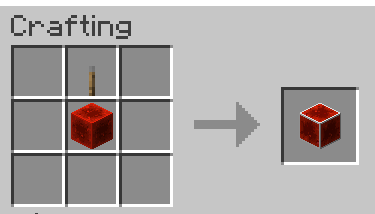
Crafting
You can craft it with a regular redstone block and a lever.
Redstone Output
- On: 15 power
- Warning: 1 power
- Off: 0 power
Recommended use for players
Use the above power states to react. Things that usually break the most on a restart are minecart and flying machine based contraptions. You can use the block to add in a check if you should start a next run of your system. You could outright use it as a power source that will shut off when need to. Just make sure that your system doesn't run longer than the time it warns you of an impeding restart.
Admin
To control the block, you need to have a permission level of 4.
When the server starts, the blocks always start in the ON state.
Commands
/srs on: Sets the block to the on state/srs warning: Sets the block to the warning state/srs off: Sets the block to the off state
Recommended use
If you have scheduled restarts on your server, I recommend having the automation issue a srs warning 5 minutes before the restart. That signals to the contraptions that if it's a fast system, it could still run. Otherwise caution.
Around 1-2 minutes before the restart/shutdown, you should issue a srs off to make sure that all running contraptions have time to settle down.
Telemetry
The mod collects minimal anonymous telemetry to help the decision making when maintaining the mod. You can see what is collected here)
Get in touch
I'm very curious to learn how you use this. Please drop by discord if you have any questions or feedback https://discord.gg/dvg3tcQCPW
I'd also like to hear from server owners if there's anything else I could help with.
Project description from CurseForge.
Pick your setup
Server Redstone Block by Minecraft version and loader
Choose the version and loader you play, then open the matching release.
Minecraft version
1.21
3 loader buildsMinecraft version
1.20.2
3 loader buildsMinecraft version
1.20.1
3 loader buildsMinecraft version
1.19.4
3 loader buildsMinecraft version
1.19.3
3 loader buildsMinecraft version
1.19.2
3 loader buildsMinecraft version
1.19.1
3 loader buildsMinecraft version
1.19
3 loader buildsMinecraft version
1.18.2
3 loader buildsCheck the dependencies, then try the file in a copied instance before changing a world you care about.
Recent files
Server Redstone Block versions and loaders
ServerRedstoneBlock v1.0.0 Forge for 1.20.1
ServerRedstoneBlock-forge-1.0.0.jar
5 Oct 2023
Client Source doesn’t say Server Source doesn’t say Dependencies No extras listed Listed on Release listing
Check the 1.20.1 · Forge setup 1.20.1Forge beta
Looking for an older file? The official CurseForge project page is in Resources.
 mod
Modrinth · Minecraft
InventoryProg
edit player inventory,change profile switch
 mod
Modrinth · Minecraft
Jujutsu Kaisen++ (Jujutsu Origins)
A Jujutsu Kaisen addon for Tehen's Jujutsu Verse, focused on expanding the gameplay and making the mod more fun to play.
 mod
Modrinth · Minecraft
TslatEntityStatus
View entity health and other statuses. Make smacking things fun again!