Minecraft version
Back to mods 
Modrinth · Minecraft mod
Book and Quick Save
Saving your writing progress when you can't. Never discard your text without confirmation ever again!
Choose a version Pick your version below, then grab the matching file.
Quick answer
Which Book and Quick Save release should I use?
Latest stable file 1.2+26.1.2
Game version 26.1.2
Loader Fabric
Book and Quick Save 1.2+26.1.2 targets 26.1.2 with Fabric. It must be installed on the client. Do not install it on the dedicated server. No extra mods listed for this file.
Where it goes
Is Book and Quick Save required on the client, server, or both?
It must be installed on the client. Do not install it on the dedicated server.
Client Required
Dedicated server Not supported
Loader for this release Fabric
Required install it here Optional supported, not mandatory Not supported do not install here Source doesn’t say do not assume
This file is marked client-only.
What else does Book and Quick Save 1.2+26.1.2 need?
1.2+26.1.2. Change the file and its required mods may change too.
This file does not list any required mods. Do not add a library just because a different file uses it.
This file does not list any required or optional mods.
Before you install it
Add Book and Quick Save without breaking your instance.
Built for Book and Quick Save 1.2+26.1.2. Pick another file and the loader, install side or required mods may change.
- 01
Stick to this file
Use 1.2+26.1.2. It targets 26.1.2 with Fabric; another release may have different loader, side or dependency requirements.
- 02
Bring the mods it needs
This file does not list any required mods. Do not add a library just because a different file uses it.
- 03
Put it on the correct side
It must be installed on the client. Do not install it on the dedicated server.
- 04
Pick the file you checked
Use the “Get this file” button beside 1.2+26.1.2. It opens that exact file at the source.
About this project
What does Book and Quick Save add?
Book and Quick Save
Experience peace of mind while writing your books in Minecraft. Your progress will never be lost without proper confirmation due to accidental actions, i.e. ESC-presses or disconnections. Rest easy knowing your hard work will be saved to the hardcover!
✅ Features
- Confirmation Screen will prompt you whether you meant to discard your changes when pressing ESC or E after editing your Book and Quill.
- Automatic Save when you've made changes and the GUI closes without confirmation, for instance when you get timed out, kicked or die.
- Client-side, so that only you need to have the mod, not the server
📷 Visuals
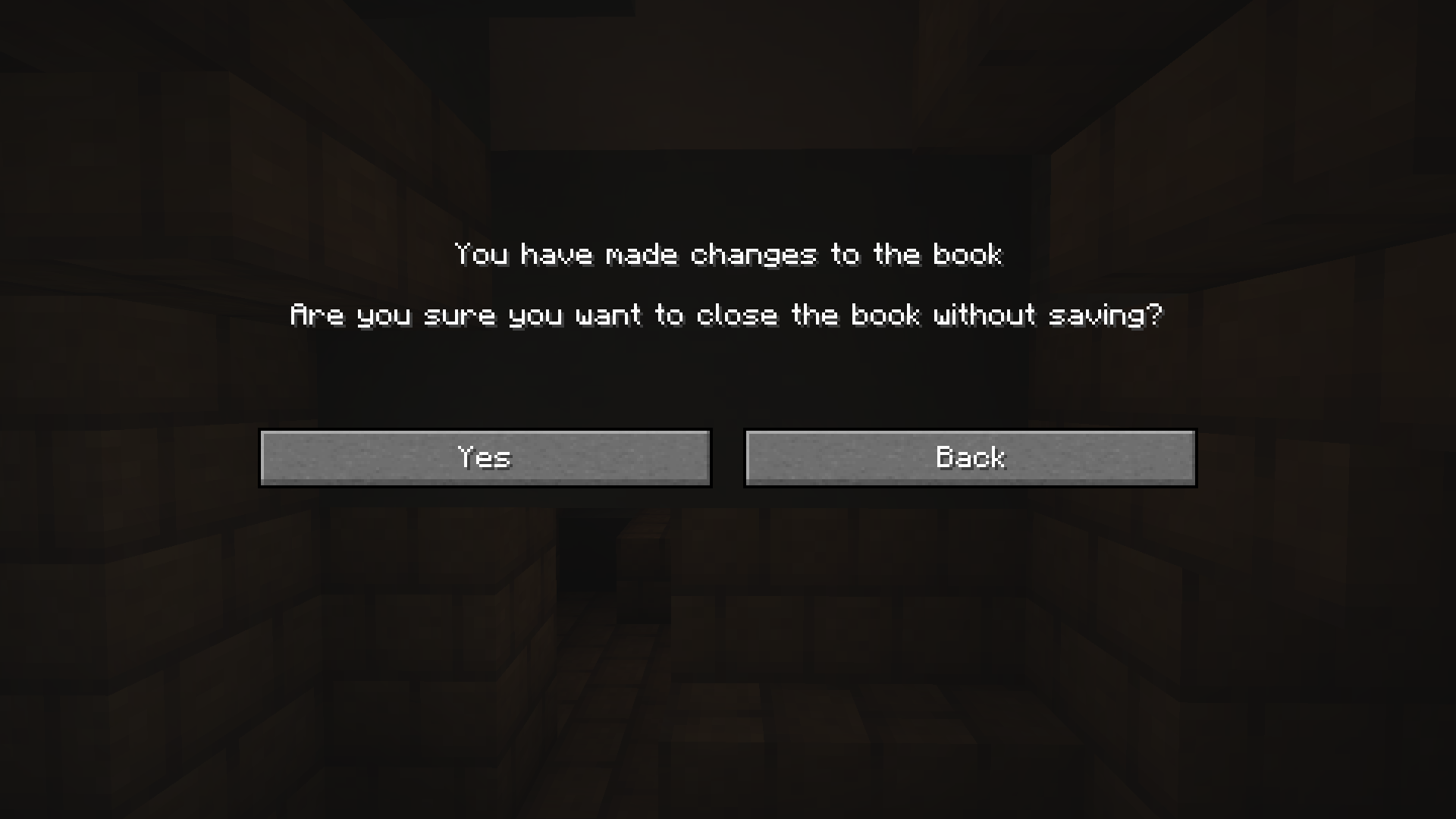
Project description from Modrinth.
Pick your setup
Book and Quick Save by Minecraft version and loader
Choose the version and loader you play, then open the matching release.
Minecraft version
1.21.11
1 loader buildMinecraft version
1.21.10
1 loader buildMinecraft version
1.21.9
1 loader buildMinecraft version
1.21.8
1 loader buildMinecraft version
1.21.7
1 loader buildMinecraft version
1.21.6
1 loader buildMinecraft version
1.21.5
1 loader buildMinecraft version
1.21.4
1 loader buildMinecraft version
1.21.3
1 loader buildMinecraft version
1.21.2
1 loader buildMinecraft version
1.21.1
1 loader buildShowing the newest 12 of 16 game versions. Older files are in the list below.
Check the dependencies, then try the file in a copied instance before changing a world you care about.
Recent files
Book and Quick Save versions and loaders
1.2+26.1.2
book-and-quick-save-1.2+26.1.2.jar
14 Apr 2026
Client Required Server Not supported Dependencies No extras listed Listed on Release listing
Check the 26.1.2 · Fabric setup 26.1.2Fabric release
1.2
book-and-quick-save-1.2.jar
17 Jun 2025
Client Required Server Not supported Dependencies 1 required · 1 unchecked Listed on Release listing
Check the 1.21.11 · Fabric setup 1.21.61.21.71.21.81.21.9 release
1.1
book_and_quick_save-1.1.jar
23 Apr 2024
Client Required Server Not supported Dependencies No extras listed Listed on Release listing
Check the 1.21.5 · Fabric setup 1.20.51.20.61.211.21.1 release
1.0
book_and_quick_save-1.0.jar
13 Feb 2024
Client Required Server Not supported Dependencies 1 required · 1 unchecked Listed on Release listing
Check the 1.20.4 · Fabric setup 1.20.4Fabric release
Looking for an older file? The official Modrinth project page is in Resources.
 mod
mod CurseForge + Modrinth · Minecraft
Adaptive Slot Cursor
Changes the cursor based on hovering slots or dragging items in inventories
 mod
mod Modrinth · Minecraft
Particle Interactions
Adds particles to more interactions in the game, such as placing blocks or stripping logs. Fully configurable and client side!
 mod
mod Modrinth · Minecraft
HerdsPanic
Herds just start to panic when a member panics