Fabric API Needed by Custom Capes 1.0.5+26.2
requiredMatching file found Matched file: 0.156.0+26.2
Modrinth · Minecraft mod
Allows players to upload their own capes and see them in game.
Quick answer
Custom Capes 1.0.5+26.2 targets 26.2 with Fabric. It must be installed on the client. Do not install it on the dedicated server. All 1 required mods have matching files.
Where it goes
It must be installed on the client. Do not install it on the dedicated server.
This file is marked client-only.
1.0.5+26.2. Change the file and its required mods may change too.
Install Fabric API first. We found matching files for this game-version and loader setup.
We only count dependency files that match this setup. A file for another loader does not fill the gap.
Before you install it
Built for Custom Capes 1.0.5+26.2. Pick another file and the loader, install side or required mods may change.
Use 1.0.5+26.2. It targets 26.2 with Fabric; another release may have different loader, side or dependency requirements.
Install Fabric API first. We found matching files for this game-version and loader setup.
It must be installed on the client. Do not install it on the dedicated server.
Use the “Get this file” button beside 1.0.5+26.2. It opens that exact file at the source.
About this project
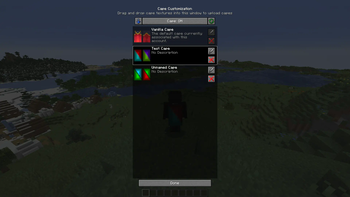
This mod lets you use and upload custom cape textures and see them in-game, without going out to the browser.
To open the Cape Customization menu, go to settings, then open Skin Customization, and then click Cape Settings.
To get capes from other cape services, click the blue arrow which will add capes that you have. Currently this will only get capes from Optifine and add them to your capes.
Open the Cape Customization menu, and drag-and-drop a cape texture, which you can make yourself or download an already made one.
You can edit the name and description of the cape you uploaded by clicking the Edit button next to the cape, after you edited the input fields, press Done. That will update the cape name and description.
To delete a cape you have to press the X button on the cape which you uploaded.
To show a cape, simply click a cape you uploaded in the Cape Customization menu, this will show the cape. To go back to the default cape, click the Vanilla Cape.
To hide or show a player's cape, open the Social Interactions menu, and click the red or green button on the player, this will hide or show the player's cape, click it again to reverse the action.
All players using this mod will be able to see capes you are currently using through this mod.
This mod does not support non-premium accounts, and it is not going to.
You can use this mod in modpacks.
Project description from Modrinth.
Pick your setup
Choose the version and loader you play, then open the matching release.
Showing the newest 12 of 22 game versions. Older files are in the list below.
Check the dependencies, then try the file in a copied instance before changing a world you care about.
Recent files
ep-custom-capes-fabric-1.0.5-26.2.jar
25 Jul 2026
ep-custom-capes-fabric-1.0.5-26.1.2.jar
25 Jul 2026
ep-custom-capes-fabric-1.0.4-26.2.jar
25 Jun 2026
ep-custom-capes-fabric-1.0.4-26.1.2.jar
10 Jun 2026
ep-custom-capes-fabric-1.0.4-1.21.11.jar
25 Jan 2026
ep-custom-capes-fabric-1.0.4-1.21.9.jar
25 Jan 2026
ep-custom-capes-1.0.3.jar
14 Jul 2025
ep-custom-capes-1.0.3.jar
4 May 2025
ep-custom-capes-1.0.3.jar
3 May 2025
ep-custom-capes-1.0.3.jar
3 May 2025
ep-custom-capes-1.0.3.jar
15 Jun 2024
ep-custom-capes-1.0.3.jar
8 May 2024
Looking for an older file? The official Modrinth project page is in Resources.

