Minecraft version
Back to mods 
CurseForge · Minecraft mod
tetracelium
Adds mod compatability for Tetra
Choose a version Pick your version below, then grab the matching file.
Quick answer
Which tetracelium release should I use?
Latest stable file tetracelium-1.20.1-1.3.2.jar
Game version 1.20.1
Loader Forge, NeoForge
tetracelium-1.20.1-1.3.2.jar targets 1.20.1 with Forge, NeoForge. The project page does not say whether this file belongs on the client, dedicated server, or both. No extra mods listed for this file.
Where it goes
Is tetracelium required on the client, server, or both?
The project page does not say whether this file belongs on the client, dedicated server, or both.
Client Source doesn’t say
Dedicated server Source doesn’t say
Loader for this release Forge, NeoForge
Required install it here Optional supported, not mandatory Not supported do not install here Source doesn’t say do not assume
The source does not explicitly classify this release as client-only or server-only.
What else does tetracelium-1.20.1-1.3.2.jar need?
tetracelium-1.20.1-1.3.2.jar. Change the file and its required mods may change too.
This file does not list any required mods. Do not add a library just because a different file uses it.
This file does not list any required or optional mods.
Before you install it
Add tetracelium without breaking your instance.
Built for tetracelium-1.20.1-1.3.2.jar. Pick another file and the loader, install side or required mods may change.
- 01
Stick to this file
Use tetracelium-1.20.1-1.3.2.jar. It targets 1.20.1 with Forge, NeoForge; another release may have different loader, side or dependency requirements.
- 02
Bring the mods it needs
This file does not list any required mods. Do not add a library just because a different file uses it.
- 03
Put it on the correct side
The project page does not say whether this file belongs on the client, dedicated server, or both.
- 04
Pick the file you checked
Use the “Get this file” button beside tetracelium-1.20.1-1.3.2.jar. It opens that exact file at the source.
About this project
What does tetracelium add?
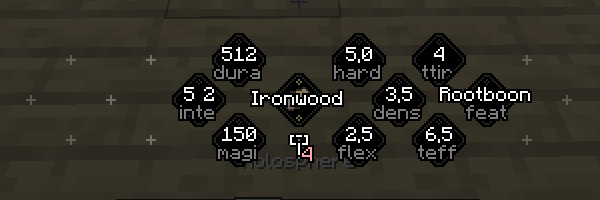
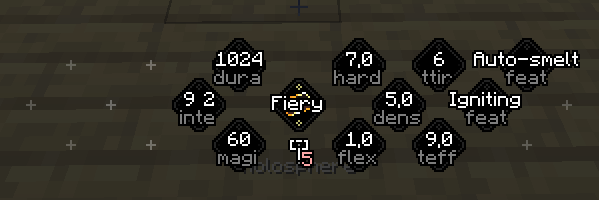
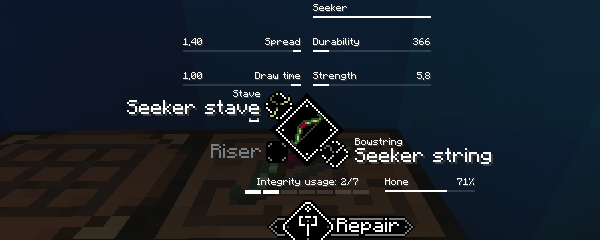
Adds compatability between tetra and other mods. Allows weapons and tools from other mods to be converted into tetra items, and for materials added by other mods to be used for modules and improvements in Tetra. Also adds in-depth integration for a small set of mods.
Generic materials
Most of the materials listed below are added through tags, materials become available in tetra as long as some mod adds an item with the matching tag.
Bone
- Dragon bone (Alex's mobs?)
- Wither bone (Alex's mobs?)
Fibre
- Hemp
Gemstone
- Agate
- Certus quartz (Applied energistics 2)
- Citrine
- Ruby
- Sapphire
Metal
- Bronze
- Copper
- Electrum
- Lead
- Nickel
- Osmium (Mekanism, ?)
- Silver
- Steel
- Tin
Wood
- Baobab
- Cherry
- Maple
- Treated wood (Immersive engineering, ?)
Farmer's Delight
Integrates with Farmer's Delight in a few different ways:
- Adds two new materials: Straw (fibre) and Canvas (fabric)
- The starter belt can be crafted from rope instead of string
- Adds canvas and rope variants for several belt modules
- Adds a knife module for the sword blade slot
- Knives can be converted into tetra items and Tetra knives can cut things on the cutting board
- Any tetra item used with the cutting board gain honing progression
Botania
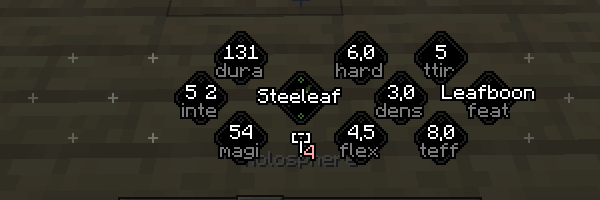
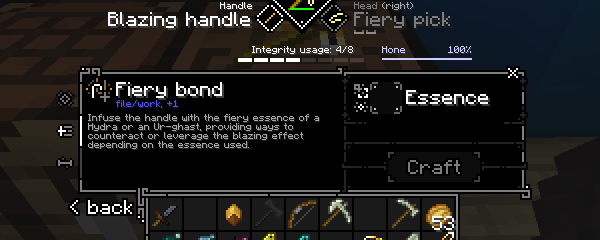
Allows several items in Botania to be used as materials in Tetra and for some Botania items to be converted into tetra items. Tetra items with major modules crafted from Botania materials repairs themselves using mana as if they were Botania items.
Fibre
- Mana string
Metal
- Manasteel
- Terrasteel
- Elementium
Wood
- Dreamwood
- Livingwood
Apotheosis
Allows items to retain their Apotheosis affixes and sockets when converted into a tetra item.
The Twilight Forest
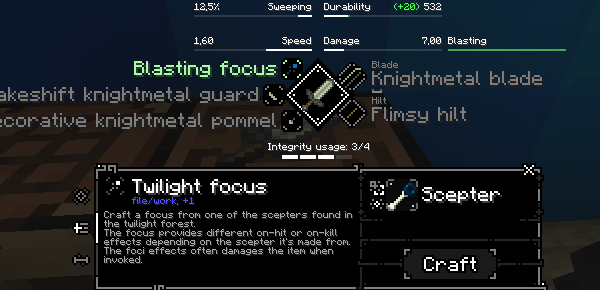
Allows materials from The Twilight Forest to be used with tetra, and for most weapons and tools to be converted into tetra items. Adds two new schematics that allow items from The Twilight Forest to be used to improve tetra items.

Support and Contributions
I develop and maintain tetra in my spare time, if you enjoy what you've seen so far and want to help me make it better please consider supporting me on patreon.

Discord
I've set up a discord server to talk about tetra: https://discord.gg/MyjK4Fx, jump on if you have questions, need some help, want talk about datapacks or mod integrations, or to get sneak-peeks at upcoming features.
Licensing & use
Feel free to use this in modpacks or compilations as long as it's distributed through modrinth or curseforge.
Project description from CurseForge.
Pick your setup
tetracelium by Minecraft version and loader
Choose the version and loader you play, then open the matching release.
Check the dependencies, then try the file in a copied instance before changing a world you care about.
Recent files
tetracelium versions and loaders
tetracelium-1.20.1-1.3.2.jar
12 Apr 2026
Client Source doesn’t say Server Source doesn’t say Dependencies No extras listed Listed on Release listing
Check the 1.20.1 · Forge setup 1.20.1ForgeNeoForge release
tetracelium-1.20.1-1.3.1.jar
25 Nov 2024
Client Source doesn’t say Server Source doesn’t say Dependencies No extras listed Listed on Release listing
Check the 1.20.1 · Forge setup 1.20.1ForgeNeoForge release
tetracelium-1.20.1-1.3.0.jar
18 Jul 2024
Client Source doesn’t say Server Source doesn’t say Dependencies No extras listed Listed on Release listing
Check the 1.20.1 · NeoForge setup NeoForge1.20.1Forge release
tetracelium-1.20.1-1.2.0.jar
6 Apr 2024
Client Source doesn’t say Server Source doesn’t say Dependencies No extras listed Listed on Release listing
Check the 1.20.1 · NeoForge setup NeoForge1.20.1Forge release
tetracelium-1.20.1-1.1.1.jar
11 Feb 2024
Client Source doesn’t say Server Source doesn’t say Dependencies 1 required · 1 unchecked Listed on Release listing
Check the 1.20.1 · NeoForge setup NeoForge1.20.1Forge release
tetracelium-1.20.1-1.1.0.jar
10 Feb 2024
Client Source doesn’t say Server Source doesn’t say Dependencies 1 required · 1 unchecked Listed on Release listing
Check the 1.20.1 · NeoForge setup NeoForge1.20.1Forge release
tetracelium-1.20.1-1.0.1.jar
1 Nov 2023
Client Source doesn’t say Server Source doesn’t say Dependencies 1 required · 1 unchecked Listed on Release listing
Check the 1.20.1 · NeoForge setup NeoForge1.20.1Forge beta
tetracelium-1.20.1-1.0.0.jar
29 Oct 2023
Client Source doesn’t say Server Source doesn’t say Dependencies 1 required · 1 unchecked Listed on Release listing
Check the 1.20.1 · NeoForge setup NeoForge1.20.1Forge beta
Looking for an older file? The official CurseForge project page is in Resources.
 mod
mod CurseForge · Minecraft
Interlace SpellWeaves: Iron's Spells and Spellbooks Addon
Introduces a series of mixed spells, new armor sets, spellbooks, and a powerful new boss
 mod
mod CurseForge + Modrinth · Minecraft
GeckoLib
A 3D animation library for entities, blocks, items, armor, and more!
 mod
mod CurseForge + Modrinth · Minecraft
Field Guide
Discover Plants, Animals and Monsters with a Spyglass. Collect them all and take notes in your personal Field Guide!