Minecraft version
Back to mods 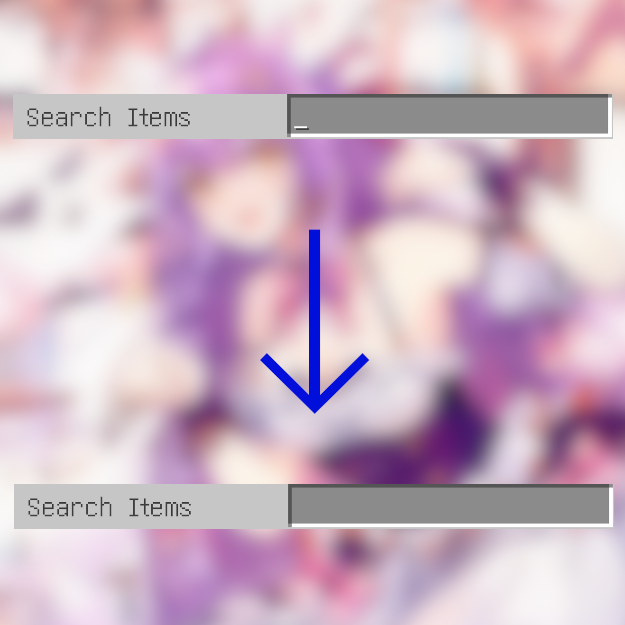
CurseForge · Minecraft mod
Passive SearchBar
When you click a tab with a search bar, the search bar will no longer be automatically focused, also loses its focus when clicked outside!
Choose a version Pick your version below, then grab the matching file.
Quick answer
Which Passive SearchBar release should I use?
Latest stable file PassiveSearchBar+Neo+1.21.0-1.0.0.jar
Game version 1.21
Loader NeoForge
Passive SearchBar PassiveSearchBar+Neo+1.21.0-1.0.0.jar targets 1.21 with NeoForge. The project page does not say whether this file belongs on the client, dedicated server, or both. No extra mods listed for this file.
Where it goes
Is Passive SearchBar required on the client, server, or both?
The project page does not say whether this file belongs on the client, dedicated server, or both.
Client Source doesn’t say
Dedicated server Source doesn’t say
Loader for this release NeoForge
Required install it here Optional supported, not mandatory Not supported do not install here Source doesn’t say do not assume
The source does not explicitly classify this release as client-only or server-only.
What else does Passive SearchBar PassiveSearchBar+Neo+1.21.0-1.0.0.jar need?
PassiveSearchBar+Neo+1.21.0-1.0.0.jar. Change the file and its required mods may change too.
This file does not list any required mods. Do not add a library just because a different file uses it.
This file does not list any required or optional mods.
Before you install it
Add Passive SearchBar without breaking your instance.
Built for Passive SearchBar PassiveSearchBar+Neo+1.21.0-1.0.0.jar. Pick another file and the loader, install side or required mods may change.
- 01
Stick to this file
Use PassiveSearchBar+Neo+1.21.0-1.0.0.jar. It targets 1.21 with NeoForge; another release may have different loader, side or dependency requirements.
- 02
Bring the mods it needs
This file does not list any required mods. Do not add a library just because a different file uses it.
- 03
Put it on the correct side
The project page does not say whether this file belongs on the client, dedicated server, or both.
- 04
Pick the file you checked
Use the “Get this file” button beside PassiveSearchBar+Neo+1.21.0-1.0.0.jar. It opens that exact file at the source.
About this project
What does Passive SearchBar add?
Some of the creative mode tabs(such as the vanilla "Search Items" tab) come with a search bar. The search bar is always focused when the tab is opened, so it recognizes most of the keyboard input as characters and puts them into the search bar, which is annoying for players (including the author >_<) who are used to using the E key to close the tabs.
This mod makes the search bar no longer autofocus when a tab is opened, and lose its focus when the player clicks outside the search bar.
The 1.12.2 version of this mod requires MixinBooter.
Project description from CurseForge.
Pick your setup
Passive SearchBar by Minecraft version and loader
Choose the version and loader you play, then open the matching release.
Minecraft version
1.20.4
3 loader buildsMinecraft version
1.20.3
2 loader buildsMinecraft version
1.20.2
2 loader buildsMinecraft version
1.20.1
2 loader buildsMinecraft version
1.20
2 loader buildsMinecraft version
1.19.2
2 loader buildsMinecraft version
1.19.1
2 loader buildsMinecraft version
1.19
2 loader buildsMinecraft version
1.18.2
2 loader buildsMinecraft version
1.16.5
1 loader buildMinecraft version
1.12.2
1 loader buildCheck the dependencies, then try the file in a copied instance before changing a world you care about.
Recent files
Passive SearchBar versions and loaders
PassiveSearchBar+Neo+1.21.0-1.0.0.jar
24 Jun 2024
Client Source doesn’t say Server Source doesn’t say Dependencies No extras listed Listed on Release listing
Check the 1.21 · NeoForge setup 1.21NeoForge release
PassiveSearchBar+Fabric+1.21-1.0.0.jar
24 Jun 2024
Client Source doesn’t say Server Source doesn’t say Dependencies No extras listed Listed on Release listing
Check the 1.21 · Fabric setup 1.21Fabric release
PassiveSearchBar+Neo+1.20.4-1.0.0.jar
26 Mar 2024
Client Source doesn’t say Server Source doesn’t say Dependencies No extras listed Listed on Release listing
Check the 1.20.4 · NeoForge setup NeoForge1.20.4 release
PassiveSearchBar+Forge+1.12.2-1.0.0.jar
11 Nov 2023
Client Source doesn’t say Server Source doesn’t say Dependencies No extras listed Listed on Release listing
Check the 1.12.2 · Forge setup Forge1.12.2 release
PassiveSearchBar+Forge+1.20.2-1.0.0.jar
31 Oct 2023
Client Source doesn’t say Server Source doesn’t say Dependencies No extras listed Listed on Release listing
Check the 1.20.4 · Forge setup 1.20.21.20.31.20.1Forge release
PassiveSearchBar+Fabric+1.20.2-1.0.0.jar
31 Oct 2023
Client Source doesn’t say Server Source doesn’t say Dependencies No extras listed Listed on Release listing
Check the 1.20.4 · Fabric setup 1.20.2Fabric1.20.31.20.1 release
PassiveSearchBar+Forge+1.18.2-1.19.2-1.0.0.jar
31 Oct 2023
Client Source doesn’t say Server Source doesn’t say Dependencies No extras listed Listed on Release listing
Check the 1.19.2 · Forge setup 1.18.21.19.2Forge1.19.1 release
PassiveSearchBar+Fabric+1.18.2-1.19.2-1.0.0.jar
31 Oct 2023
Client Source doesn’t say Server Source doesn’t say Dependencies No extras listed Listed on Release listing
Check the 1.19.2 · Fabric setup Fabric1.18.21.19.21.19.1 release
PassiveSearchBar+Forge+1.16.5-1.0.0.jar
31 Oct 2023
Client Source doesn’t say Server Source doesn’t say Dependencies No extras listed Listed on Release listing
Check the 1.16.5 · Forge setup 1.16.5Forge release
Looking for an older file? The official CurseForge project page is in Resources.
 mod
CurseForge · Minecraft
XiaoXiang Realms Expansion
An Expansion Of The Xiaoxiang Cultivation Mod. Tired Of One Long Silent Bar Between Breakthroughs? Ten Layers To Every Realm, Mortal Included — 99+ Breakthroughs Across. Every Requirement Is Yours To Set, And A Peak Route Past The Materials.
 mod
CurseForge · Minecraft
XiaoXiang Config Extension
An Extension Of The Xiaoxiang Cultivation Mod. Do You Want To Make Your Cultivation Journey Harder? Abysmal? Impossible? Well Now, You Can!!! With The XiaoXiang Config Extension. Every One Explained — And It Now Configures Every Other Mod In Your Pack Too.
 mod
CurseForge + Modrinth · Minecraft
Ariente
Ariente - a high-tech exploration and tech mod