Minecraft version
Back to mods 
CurseForge · Minecraft mod
Sky High
Take yourself back to the Nostalgic 2011 Skyblock!
Choose a version Pick your version below, then grab the matching file.
Quick answer
Which Sky High release should I use?
Latest stable file [1.20.1] Sky High 0.1 Forge
Game version 1.20.1
Loader Forge
Sky High [1.20.1] Sky High 0.1 Forge targets 1.20.1 with Forge. The project page does not say whether this file belongs on the client, dedicated server, or both. No extra mods listed for this file.
Where it goes
Is Sky High required on the client, server, or both?
The project page does not say whether this file belongs on the client, dedicated server, or both.
Client Source doesn’t say
Dedicated server Source doesn’t say
Loader for this release Forge
Required install it here Optional supported, not mandatory Not supported do not install here Source doesn’t say do not assume
The source does not explicitly classify this release as client-only or server-only.
What else does Sky High [1.20.1] Sky High 0.1 Forge need?
[1.20.1] Sky High 0.1 Forge. Change the file and its required mods may change too.
This file does not list any required mods. Do not add a library just because a different file uses it.
This file does not list any required or optional mods.
Before you install it
Add Sky High without breaking your instance.
Built for Sky High [1.20.1] Sky High 0.1 Forge. Pick another file and the loader, install side or required mods may change.
- 01
Stick to this file
Use [1.20.1] Sky High 0.1 Forge. It targets 1.20.1 with Forge; another release may have different loader, side or dependency requirements.
- 02
Bring the mods it needs
This file does not list any required mods. Do not add a library just because a different file uses it.
- 03
Put it on the correct side
The project page does not say whether this file belongs on the client, dedicated server, or both.
- 04
Pick the file you checked
Use the “Get this file” button beside [1.20.1] Sky High 0.1 Forge. It opens that exact file at the source.
About this project
What does Sky High add?

🌄 A message from ME!
This mod adds the original 2011 Skyblock inside of Minecraft without the use of custom maps!
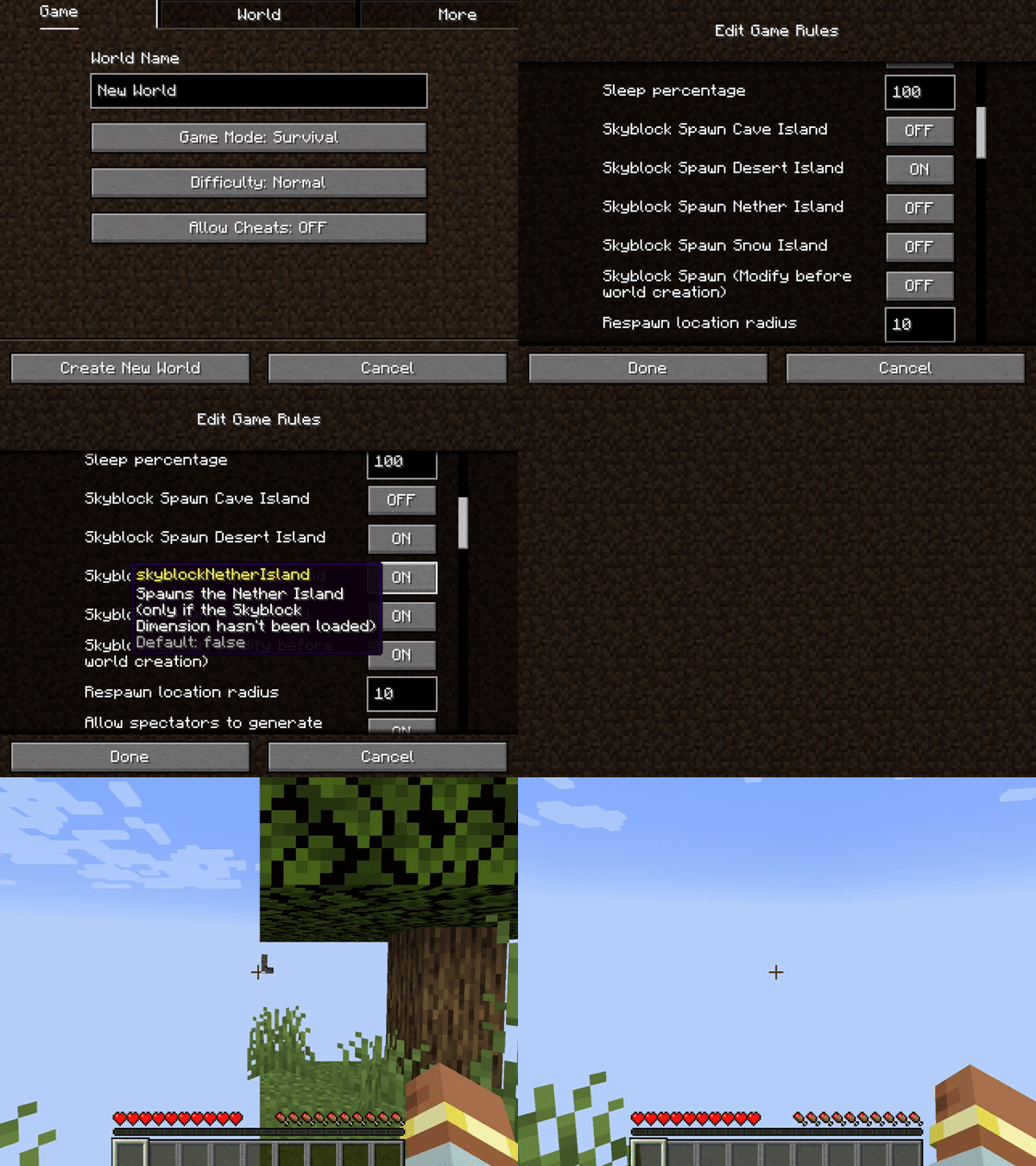
Here's how this works, before creating a world you have to go in the game-rules menu, you can enable custom configurable options for the mod in there. For example turning on the Skyblock Spawn gamerule will make you spawn in the Skyblock dimension (a dimension the skyblock islands are generated in) instead of the overworld!
🚪 Information
There are 5 different game-rules! Here are all of them: - Spawn Skyblock: Instead of spawning in the overworld, you will be spawning in the Skyblock dimension on the starter island! (works only if the world is brand new) 
- Spawn Skyblock Desert Island: Spawns the Desert Island in the Skyblock dimension (only if the dimension hasn't been loaded) 
- Spawn Skyblock Nether Island: Spawns the Nether Island in the Skyblock dimension (only if the dimension hasn't been loaded)
- Spawn Skyblock Cave Island: Spawns the Cave Island in the Skyblock dimension (only if the dimension hasn't been loaded)

- Spawn Skyblock Cave Island: - Spawns the Snow Island in the Skyblock dimension (only if the dimension hasn't been loaded)

All of them are configurable using gamerules in the gamerules menu during world creation!
(I suggest you to modify them before creating a world or before entering the Skyblock dimension.
Trying to modify these will NOT WORK if you've already entered the dimension. The Skyblock Spawn gamerule will only work for worlds that haven't been created yet.)
🔎 FAQ
- Can you leave the Skyblock dimension
Only when you have cheats on. You can type the /skyblock command to instantly be teleported to the overworld or the other way around!
- Does this work with multiplayer?
Yep!
- Can you make custom islands?
As of the latest version, no. I am hoping I will someday be able to make this possible!
Project description from CurseForge.
Pick your setup
Sky High by Minecraft version and loader
Choose the version and loader you play, then open the matching release.
Check the dependencies, then try the file in a copied instance before changing a world you care about.
Recent files
Sky High versions and loaders
[1.20.1] Sky High 0.1 Forge
skyhigh_1.20.1_0.1.jar
1 Nov 2023
Client Source doesn’t say Server Source doesn’t say Dependencies No extras listed Listed on Release listing
Check the 1.20.1 · Forge setup 1.20.1Forge release
Looking for an older file? The official CurseForge project page is in Resources.