EMI Needed by EMI: Create Schematics Create: EMI Schematics [1.1.0]
requiredMatching file found Matched file: emi-1.1.24+1.21.1+neoforge

CurseForge · Minecraft mod
Add schematic items to EMI Favourites list
Quick answer
EMI: Create Schematics Create: EMI Schematics [1.1.0] targets 1.21.1 with NeoForge. The project page does not say whether this file belongs on the client, dedicated server, or both. All 2 required mods have matching files.
Where it goes
The project page does not say whether this file belongs on the client, dedicated server, or both.
The source does not explicitly classify this release as client-only or server-only.
Create: EMI Schematics [1.1.0]. Change the file and its required mods may change too.
Install EMI, Create first. We found matching files for this game-version and loader setup.
We only count dependency files that match this setup. A file for another loader does not fill the gap.
Before you install it
Built for EMI: Create Schematics Create: EMI Schematics [1.1.0]. Pick another file and the loader, install side or required mods may change.
Use Create: EMI Schematics [1.1.0]. It targets 1.21.1 with NeoForge; another release may have different loader, side or dependency requirements.
Install EMI, Create first. We found matching files for this game-version and loader setup.
The project page does not say whether this file belongs on the client, dedicated server, or both.
Use the “Get this file” button beside Create: EMI Schematics [1.1.0]. It opens that exact file at the source.
About this project
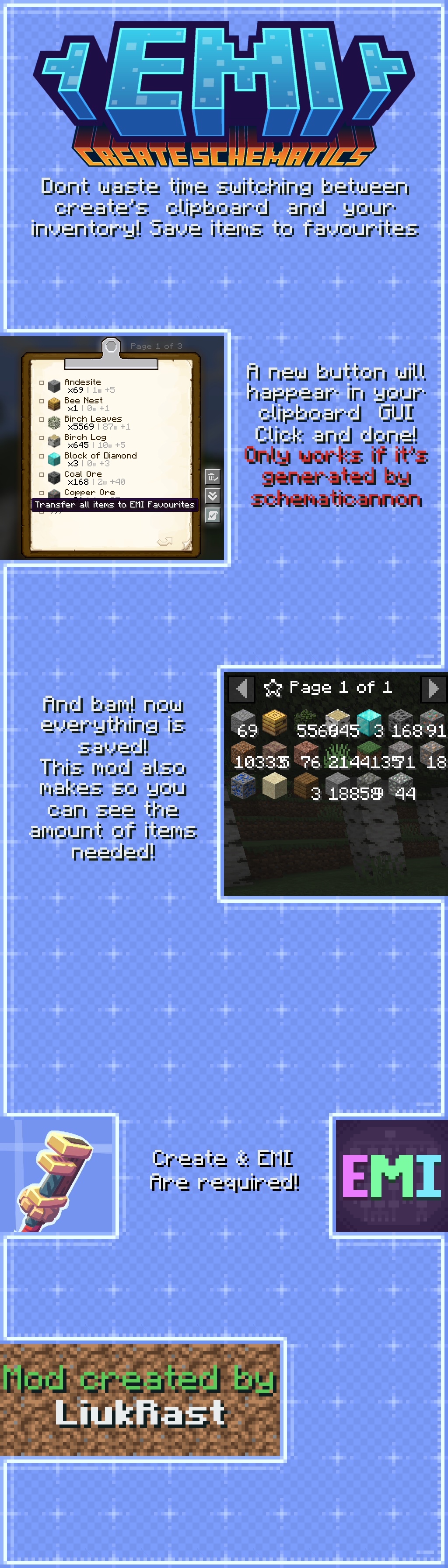
Presenting EMI: Create Schematics!
Don't waste time switching between create's clipboard and your inventory! Save items to favourites!
A new button will happear in your clipboard's GUI... You just click and done! **It only works if the clipboard was generated by a schematicannon! You can try to do it manually via NBT, but in case it finds an error, the button will not happear!**
And so... bam! Your items and item quantity has been saved to the EMI's favourite tab!
Enjoy!
Join the discord! https://discord.gg/pvn8zg9bNY
Project description from CurseForge.
Pick your setup
Choose the version and loader you play, then open the matching release.
Showing the newest 12 of 23 game versions. Older files are in the list below.
Check the dependencies, then try the file in a copied instance before changing a world you care about.
Recent files
emi_create_schematics-1.1.0.jar
1 Feb 2026
emi_create_schematics-1.0.4.jar
25 Nov 2025
emi_create_schematics-1.0.3.jar
25 Nov 2025
emi_create_schematics-1.0.3.jar
12 May 2025
5 May 2025
5 May 2025
emi_create_schematics-1.0.2.jar
5 May 2025
EMI Create Schematics [1.0.1 Fabric 1.19.2].jar
19 Aug 2024
EMI Create Schematics [1.0.1 Fabric 1.20.1].jar
13 Aug 2024
EMI Create Schematics [1.0.1 Forge 1.20.1].jar
12 Aug 2024
EMI Create Schematics [1.0.0 Forge 1.20.1].jar
28 Mar 2024
EMI Create Schematics [1.0.0 forge1.19.2].jar
28 Mar 2024
Looking for an older file? The official CurseForge project page is in Resources.
 mod
modAdds vanilla-like and physically realistic grappling hooks.
 mod
modBuild dialogue, GUI layouts, CustomNPCs shops, item-based currencies, HUDs, and NPC tools in-game.
 mod
modintroduces essential physiological needs and fluid mechanics into Minecraft