Just Enough Items (JEI) Optional for Unified Storage unifiedstorage-forge-0.10.1-mc1.20.4.jar
optionalMatching file found Matched file: jei-1.20.4-forge-17.3.1.5.jar
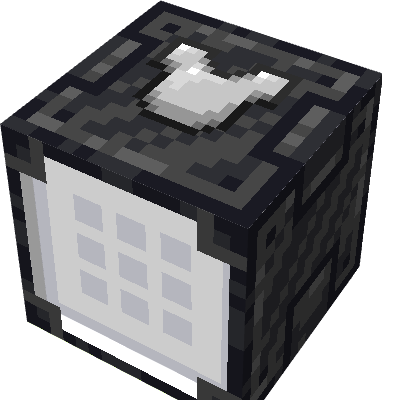
CurseForge · Minecraft mod
Say goodbye to complex cable networks - all you need are network cards to seamlessly link storage blocks for a unified storage system
Quick answer
Unified Storage unifiedstorage-forge-0.10.1-mc1.20.4.jar targets 1.20.4 with Forge. The project page does not say whether this file belongs on the client, dedicated server, or both. No extra mods listed for this file.
Where it goes
The project page does not say whether this file belongs on the client, dedicated server, or both.
The source does not explicitly classify this release as client-only or server-only.
unifiedstorage-forge-0.10.1-mc1.20.4.jar. Change the file and its required mods may change too.
This file does not list any required mods. Do not add a library just because a different file uses it.
We only count dependency files that match this setup. A file for another loader does not fill the gap.
Before you install it
Built for Unified Storage unifiedstorage-forge-0.10.1-mc1.20.4.jar. Pick another file and the loader, install side or required mods may change.
Use unifiedstorage-forge-0.10.1-mc1.20.4.jar. It targets 1.20.4 with Forge; another release may have different loader, side or dependency requirements.
This file does not list any required mods. Do not add a library just because a different file uses it.
The project page does not say whether this file belongs on the client, dedicated server, or both.
Use the “Get this file” button beside unifiedstorage-forge-0.10.1-mc1.20.4.jar. It opens that exact file at the source.
About this project

Management of items has never been easier!
"Say goodbye to complex cable networks - all you need are network cards to seamlessly link storage blocks for a unified storage system, with the ability to label storage grids using blocks like item frames, offering a unique and organized touch to your storage system"
This mod aims to be as simple as it could be, and also helping to keep your chest/any other storage block aesthetics in your world!
* This mod is inspired by Applied Energistics 2 & Refined Storage. However, I felt that players new to Minecraft Mods might not understand such an intricate system at the get-go. So, this mod is targeted mainly for early game setups, where you might not have enough understanding (for new players) to setup other mods' intricate storage systems.
This mod is still in beta for testing purposes. It should be ready to use in your worlds however, with no game-breaking bugs.
THIS VIDEO IS VERY OLD. FOR BETTER REPRESENTATION OF THE MOD, PLEASE SEE THE SCREENSHOTS BELOW!
Features


Planned Features
Recipes/Dyeing Storage Controllers
Recipes can be found in JEI
To dye Storage Controller blocks, simply right click a dye onto any colored Storage Controller Block. (Details can be found in JEI aswell)

Visual Item Structures/Animations
The amount of items you put into the visual item slot will affect the representation of the final rendered structure on the Storage Controller.
Floating Block (1 block count)
Item Representation (1 item count)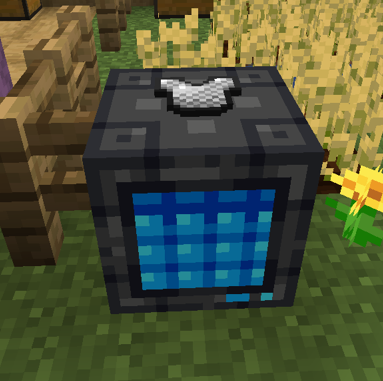
Door structure (2 block count)
3 Block Representation (3 block count)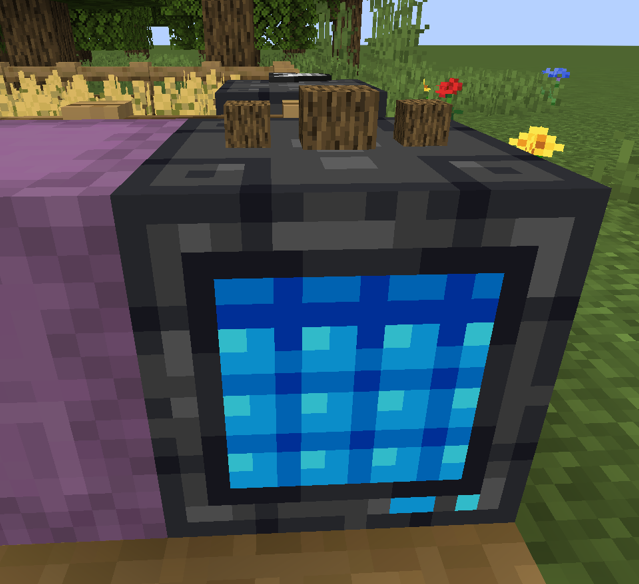
Mod Compatibility
This section explains which mod is tested for compatibility/developed with its API.
Just Enough Items (JEI) - Recipe transfer & GUI compatibility
Any storage block mods
Frequently Asked Questions
Q: I'm planning to add this mod in my server, will it be the cause of lag?
A: This mod has been tested for mods on a ~20-30 players modpack server with no trace of causing any lag.
Q: Does this mod force load any chunks?
A: Yes, but only when you open the Storage Controller's GUI. This is done to prevent lag on the server-side when searching for storages that are far away when extracting/inserting items. This can be disabled in the server config toml file however, this will make the Storage Controller avoid any storages that are in an unloaded chunk.
Q: Can I connect an external machine to this mod?
A: We have a block called the Storage Interface that allows you to extract/insert items from the Storage Controller's network. This allows external mod support.
Modpack Usage
Yes, you may. You don't need to ask for permission, you can include it in your modpacks.
Message from the author
This is my very first mod - well, if you don't count the silly & unserious mods that I have made in my childhood without actual skills. Please do support me and let me know where I can improve on!
How to Reach Me
If you want to report any issues about the mod, please head over here. For contributions, please make a pull request and I'll review it as soon as possible.
If you want to make a suggestion or just want to chat up with me, please head over to my Discord server here!
Project description from CurseForge.
Pick your setup
Choose the version and loader you play, then open the matching release.
Check the dependencies, then try the file in a copied instance before changing a world you care about.
Recent files
8 Apr 2024
8 Apr 2024
7 Apr 2024
7 Apr 2024
5 Feb 2024
5 Feb 2024
29 Jan 2024
unifiedstorage-0.9.3-BETA.jar
28 Jan 2024
unifiedstorage-0.9.3-BETA.jar
23 Jan 2024
unifiedstorage-0.9.2a-BETA.jar
22 Jan 2024
unifiedstorage-0.9.2-BETA.jar
21 Jan 2024
unifiedstorage-0.9-BETA.jar
17 Jan 2024
Looking for an older file? The official CurseForge project page is in Resources.
 mod
General RFTools blocks that don't fit in a more specific category
 mod
Introduces raid dens to Cobblemon!
 mod
Experience dynamic music that adapts to what happens in Minecraft!
