Minecraft version
Back to mods 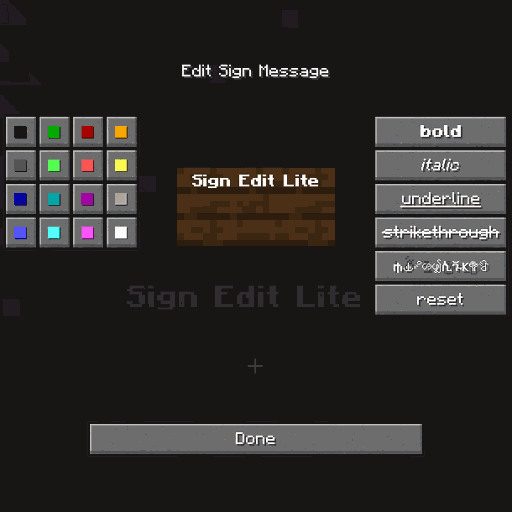
CurseForge · Minecraft mod
Sign Edit Lite
Add color and formatting options to signs.
Choose a version Pick your version below, then grab the matching file.
Quick answer
Which Sign Edit Lite release should I use?
Latest stable file signeditlite-1.0.14+neo+mc26.2.jar
Game version 26.2
Loader NeoForge
Sign Edit Lite signeditlite-1.0.14+neo+mc26.2.jar targets 26.2 with NeoForge. The project page does not say whether it belongs on the client. The project page does not say whether it belongs on the dedicated server. No extra mods listed for this file.
Where it goes
Is Sign Edit Lite required on the client, server, or both?
The project page does not say whether it belongs on the client. The project page does not say whether it belongs on the dedicated server.
Client Source doesn’t say
Dedicated server Source doesn’t say
Loader for this release NeoForge
Required install it here Optional supported, not mandatory Not supported do not install here Source doesn’t say do not assume
The source does not explicitly classify this release as client-only or server-only.
What else does Sign Edit Lite signeditlite-1.0.14+neo+mc26.2.jar need?
signeditlite-1.0.14+neo+mc26.2.jar. Change the file and its required mods may change too.
This file does not list any required mods. Do not add a library just because a different file uses it.
This file does not list any required or optional mods.
Before you install it
Add Sign Edit Lite without breaking your instance.
Built for Sign Edit Lite signeditlite-1.0.14+neo+mc26.2.jar. Pick another file and the loader, install side or required mods may change.
- 01
Stick to this file
Use signeditlite-1.0.14+neo+mc26.2.jar. It targets 26.2 with NeoForge; another release may have different loader, side or dependency requirements.
- 02
Bring the mods it needs
This file does not list any required mods. Do not add a library just because a different file uses it.
- 03
Put it on the correct side
The project page does not say whether it belongs on the client. The project page does not say whether it belongs on the dedicated server.
- 04
Pick the file you checked
Use the “Get this file” button beside signeditlite-1.0.14+neo+mc26.2.jar. It opens that exact file at the source.
About this project
What does Sign Edit Lite add?
Sign Edit Lite (Fabric and NeoForge)
Add color and formatting options to signs.

The mod comes with usual Mod Menu integration.

An additional extra for nerds, who prefer typing raw formatting codes, is the option to enable the insertion of the formatting character '§' by pressing Ctrl+[.
Requires (Fabric)
- Fabric API
- Cloth Config API
- Optional, but recommended Mod Menu
License
Standard MIT license. Feel free to learn from it and incorporate it in your own projects.
Some parts of the code are based on the source code of Text Utilities, which is LGPL-3 licensed.
Source code
Available on GitLab or on GitHub.
The source code has lots of comments to help learning Minecraft modding.
Related projects
- Text Utilities adds color and formatting options to signs, book and anvils, but unfortunately it has not been updated to Minecraft 1.21.5 version at the time of writing, and it is a Fabric only mod.
- Iron Signs adds vibrant, high contrast, painted signs, which can be colored and formatted similarily. It also enables coloring and formatting Vanilla wooden signs exactly the same way as this mod. I wonder who wrote that mod.
Thanks
Thanks to Chaws for making available the source code of Text Utilities.
See also
My other mods on Modrinth and on CurseForge.
Project description from CurseForge.
Pick your setup
Sign Edit Lite by Minecraft version and loader
Choose the version and loader you play, then open the matching release.
Minecraft version
26.1.1
2 loader buildsMinecraft version
26.1
2 loader buildsMinecraft version
1.21.11
2 loader buildsMinecraft version
1.21.10
2 loader buildsMinecraft version
1.21.9
2 loader buildsMinecraft version
1.21.8
2 loader buildsMinecraft version
1.21.7
2 loader buildsMinecraft version
1.21.6
2 loader buildsMinecraft version
1.21.5
2 loader buildsMinecraft version
1.21.4
1 loader buildMinecraft version
1.21.3
1 loader buildShowing the newest 12 of 20 game versions. Older files are in the list below.
Check the dependencies, then try the file in a copied instance before changing a world you care about.
Recent files
Sign Edit Lite versions and loaders
signeditlite-1.0.14+neo+mc26.2.jar
2 Aug 2026
Client Source doesn’t say Server Source doesn’t say Dependencies No extras listed Listed on Release listing
Check the 26.2 · NeoForge setup NeoForge26.2 release
signeditlite-1.0.14+fabric+mc26.2.jar
2 Aug 2026
Client Source doesn’t say Server Source doesn’t say Dependencies 2 required · 2 unchecked Listed on Release listing
Check the 26.2 · Fabric setup Fabric26.2 release
signeditlite-1.0.13+neo+mc26.2.jar
11 Jul 2026
Client Source doesn’t say Server Source doesn’t say Dependencies No extras listed Listed on Release listing
Check the 26.2 · NeoForge setup NeoForge26.2 release
signeditlite-1.0.13+fabric+mc26.2.jar
11 Jul 2026
Client Source doesn’t say Server Source doesn’t say Dependencies 2 required · 2 unchecked Listed on Release listing
Check the 26.2 · Fabric setup Fabric26.2 release
signeditlite-1.0.12+neo+mc26.1.2.jar
11 Jul 2026
Client Source doesn’t say Server Source doesn’t say Dependencies No extras listed Listed on Release listing
Check the 26.1.1 · NeoForge setup NeoForge26.1.1 release
signeditlite-1.0.12+fabric+mc26.1.2.jar
11 Jul 2026
Client Source doesn’t say Server Source doesn’t say Dependencies 2 required · 2 unchecked Listed on Release listing
Check the 26.1.1 · Fabric setup Fabric26.1.1 release
signeditlite-1.0.12+neo+mc26.1.1.jar
11 Jul 2026
Client Source doesn’t say Server Source doesn’t say Dependencies No extras listed Listed on Release listing
Check the 26.1.1 · NeoForge setup NeoForge26.1.1 release
signeditlite-1.0.12+fabric+mc26.1.1.jar
11 Jul 2026
Client Source doesn’t say Server Source doesn’t say Dependencies 2 required · 2 unchecked Listed on Release listing
Check the 26.1.1 · Fabric setup Fabric26.1.1 release
signeditlite-1.0.11+neo+mc26.1.1.jar
5 Apr 2026
Client Source doesn’t say Server Source doesn’t say Dependencies No extras listed Listed on Release listing
Check the 26.1.1 · NeoForge setup NeoForge26.126.1.1 release
signeditlite-1.0.11+fabric+mc26.1.1.jar
5 Apr 2026
Client Source doesn’t say Server Source doesn’t say Dependencies 2 required · 2 unchecked Listed on Release listing
Check the 26.1.1 · Fabric setup Fabric26.126.1.1 release
signeditlite-1.0.10+neo+mc1.21.11.jar
3 Apr 2026
Client Source doesn’t say Server Source doesn’t say Dependencies No extras listed Listed on Release listing
Check the 1.21.11 · NeoForge setup NeoForge1.21.11 release
signeditlite-1.0.10+fabric+mc1.21.11.jar
3 Apr 2026
Client Source doesn’t say Server Source doesn’t say Dependencies 2 required · 2 unchecked Listed on Release listing
Check the 1.21.11 · Fabric setup Fabric1.21.11 release
Looking for an older file? The official CurseForge project page is in Resources.
 mod
mod CurseForge · Minecraft
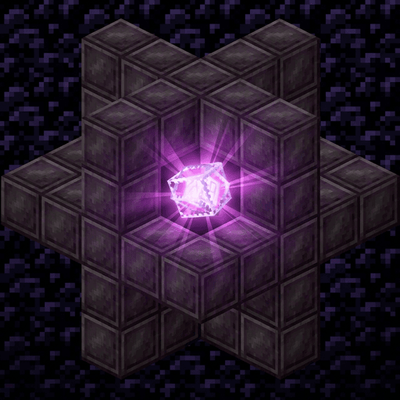
Mob Conduit
Building a conduit out of netherite blocks (configurable) and placing an end crystal in the middle will result in a conduit that prevents mob spawning in a radius.
 mod
mod CurseForge · Minecraft
More ftb quest shortcuts
More quick-access features for FTB quests.
 mod
mod CurseForge · Minecraft
TNTUtils
More control over explosions