Minecraft version
Back to mods 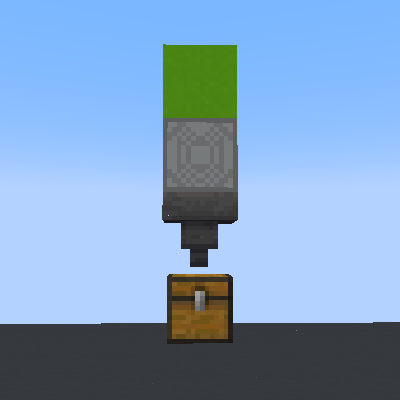
CurseForge · Minecraft mod
Infinite Blocks
Adds a block that infinitely generates blocks if they are tagged properly.
Choose a version Pick your version below, then grab the matching file.
Quick answer
Which Infinite Blocks release should I use?
Latest stable file InfiniteBlocksJAR1.01.jar
Game version 1.20.1
Loader Forge
Infinite Blocks InfiniteBlocksJAR1.01.jar targets 1.20.1 with Forge. The project page does not say whether this file belongs on the client, dedicated server, or both. No extra mods listed for this file.
Where it goes
Is Infinite Blocks required on the client, server, or both?
The project page does not say whether this file belongs on the client, dedicated server, or both.
Client Source doesn’t say
Dedicated server Source doesn’t say
Loader for this release Forge
Required install it here Optional supported, not mandatory Not supported do not install here Source doesn’t say do not assume
The source does not explicitly classify this release as client-only or server-only.
What else does Infinite Blocks InfiniteBlocksJAR1.01.jar need?
InfiniteBlocksJAR1.01.jar. Change the file and its required mods may change too.
This file does not list any required mods. Do not add a library just because a different file uses it.
This file does not list any required or optional mods.
Before you install it
Add Infinite Blocks without breaking your instance.
Built for Infinite Blocks InfiniteBlocksJAR1.01.jar. Pick another file and the loader, install side or required mods may change.
- 01
Stick to this file
Use InfiniteBlocksJAR1.01.jar. It targets 1.20.1 with Forge; another release may have different loader, side or dependency requirements.
- 02
Bring the mods it needs
This file does not list any required mods. Do not add a library just because a different file uses it.
- 03
Put it on the correct side
The project page does not say whether this file belongs on the client, dedicated server, or both.
- 04
Pick the file you checked
Use the “Get this file” button beside InfiniteBlocksJAR1.01.jar. It opens that exact file at the source.
About this project
What does Infinite Blocks add?
This mod adds 2 blocks, an Infinite Block Generator and Blackest Stone. Blackest Stone is just a pure black building block and is used to craft the Infinite Block Generator.
HOW IT WORKS
Place the Infinite Block Generator underneath the block you want to generate.
The block you wish to generate must have the block tag of "infinite_blocks:infinite_blocks".
The Infinite Block Generator will generate the block type as an item in its internal inventory.
By default anything in the block tags "minecraft:dirt", "forge:stone", and the Blackest Stone block are all tagged as "infinite_blocks:infinite_blocks".
BLOCK TAGS, NOT ITEM TAGS!
No config is available but it works off tags, so you can easily have a tag editor like KubsJS to have a basic script to do so. There is a basic "how to" below, but if you are unfimiliar with it and the below still doesn't help, there is plenty of detailed documentation offered from their page.
Below is a basic KubeJS script to add tags to blocks. This is a Server Script to go in the server_scripts folder. You can name the anything you want as long as it is a .js file, like tags.js or anything else. A code editor is not needed, but can be used, otherwise a notepad file is fine as long as it is placed in the correct folder and is a .js file type (you may need to turn on the ability to change file extensions as most devices do not have that on by default). If this is not enough information please check their documentation. Below is the filepath of where to place the file.
whereverCurseforgeIsInstalledOnYourPC\curseforge\minecraft\Instances\yourModpackName\kubejs\server_scripts\thisIsTheFileJustNameItWhateverYouWant.js"
// Listen to block tag event
ServerEvents.tags('block', event => {
event.add('infinite_blocks:infinite_blocks', [
'xtonesreworked:xtone_tile',
'#forge:concrete',
'#minecraft:terracotta',
])
})
Project description from CurseForge.
Pick your setup
Infinite Blocks by Minecraft version and loader
Choose the version and loader you play, then open the matching release.
Check the dependencies, then try the file in a copied instance before changing a world you care about.
Recent files
Infinite Blocks versions and loaders
InfiniteBlocksJAR1.01.jar
4 Feb 2024
Client Source doesn’t say Server Source doesn’t say Dependencies No extras listed Listed on Release listing
Check the 1.20.1 · Forge setup 1.20.1Forge release
InfiniteBlocksJAR.jar
24 Dec 2023
Client Source doesn’t say Server Source doesn’t say Dependencies No extras listed Listed on Release listing
Check the 1.20.1 · Forge setup 1.20.1Forge release
Looking for an older file? The official CurseForge project page is in Resources.
 mod
CurseForge + Modrinth · Minecraft
Industrial Foregoing
A collection of machines to make your minecraft builds easier to automate
 mod
CurseForge + Modrinth · Minecraft
Refined Wireless Upgrades
Expands your Refined Storage Wireless Grid with automatic inventory transfers, block picking, item collection, and additional energy capacity upgrades
 mod
CurseForge · Minecraft
Elytra Indicators
Provides Vanilla-style "fly by instrument" support for elytra flight