Minecraft version
Back to mods 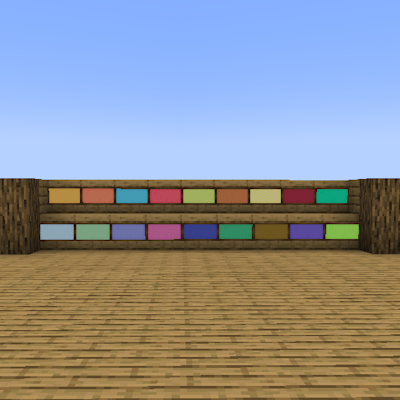
CurseForge · Minecraft mod
QFS Extra Resources
QFS Extra Resources
Choose a version Pick your version below, then grab the matching file.
Quick answer
Which QFS Extra Resources release should I use?
Latest stable file QFSExtras-0.0.3-1.18.2.jar
Game version 1.18.2
Loader Forge
QFS Extra Resources QFSExtras-0.0.3-1.18.2.jar targets 1.18.2 with Forge. The project page does not say whether this file belongs on the client, dedicated server, or both. No extra mods listed for this file.
Where it goes
Is QFS Extra Resources required on the client, server, or both?
The project page does not say whether this file belongs on the client, dedicated server, or both.
Client Source doesn’t say
Dedicated server Source doesn’t say
Loader for this release Forge
Required install it here Optional supported, not mandatory Not supported do not install here Source doesn’t say do not assume
The source does not explicitly classify this release as client-only or server-only.
What else does QFS Extra Resources QFSExtras-0.0.3-1.18.2.jar need?
QFSExtras-0.0.3-1.18.2.jar. Change the file and its required mods may change too.
This file does not list any required mods. Do not add a library just because a different file uses it.
This file does not list any required or optional mods.
Before you install it
Add QFS Extra Resources without breaking your instance.
Built for QFS Extra Resources QFSExtras-0.0.3-1.18.2.jar. Pick another file and the loader, install side or required mods may change.
- 01
Stick to this file
Use QFSExtras-0.0.3-1.18.2.jar. It targets 1.18.2 with Forge; another release may have different loader, side or dependency requirements.
- 02
Bring the mods it needs
This file does not list any required mods. Do not add a library just because a different file uses it.
- 03
Put it on the correct side
The project page does not say whether this file belongs on the client, dedicated server, or both.
- 04
Pick the file you checked
Use the “Get this file” button beside QFSExtras-0.0.3-1.18.2.jar. It opens that exact file at the source.
About this project
What does QFS Extra Resources add?

This mod contains additional resources, all resources are not craftable, they are only decorative and intended to be used in creative mode. This mod contains the following items:
Amber colored sign
Apricot colored sign
Aqua colored sign
Bubblegum colored sign
Citrine colored sign
Coral colored sign
Cream colored sign
Crimson colored sign
Emerald colored sign
Ice Blue colored sign
Mint Green colored sign
Periwinkle colored sign
Rose colored sign
Royal Blue colored sign
Seagreen colored sign
Sienna colored sign
Slate Blue colored sign
Spooky Green colored sign
All signs maintain the same properties of regular sign entities but come in a variety of colors you can choose from when you feel like the classic sign colors aren't enough.

QFS3 - QSMPFanSrv
An unofficial, multilingual QSMP fan modpack + community server
🌐 Website: qsmpfansrv.com
💬 Discord: discord.gg/4k377rdSwN
🎮 Server IP: qfs3.qsmpfansrv.com
QSMPFanSrv is a community built around the QSMP-like experience for fans to enjoy alongside their favorite streamers. Our community has been running since August 1st, 2023. We follow QSMP2's footsteps with a similar map, lore, and characters. You're free to be part of the story or play your own way - this is a relaxed server that won't force interaction if you'd rather opt out.
- QFS3 Translations - built-in chat translation so players speaking different languages can communicate seamlessly
- Aeronautics - build and pilot full-physics airships
- Active dev team - custom mods, frequent updates, responsive to feedback
▶ Play with us
Join our Discord - translations in game, custom launcher and mods.
- How to join: qsmpfansrv.com/getting-started
- Live map: qsmpfansrv.com/map
- Leaderboards: qsmpfansrv.com/leaderboards
🛠️ Support & troubleshooting
- Guides & fixes: qsmpfansrv.com/help
- Live help: join our Discord, channel #curseforge-support
❤️ Support the server
- Patreon: patreon.com/QFS3
- Ko-Fi: ko-fi.com/qsmpfansrv
- Paypal: paypal.me/QSMPFanSrv
QFS3 / QSMPFanSrv is an unofficial fan project. Not affiliated with QSMP or Quackity Studios.
Project description from CurseForge.
Pick your setup
QFS Extra Resources by Minecraft version and loader
Choose the version and loader you play, then open the matching release.
Check the dependencies, then try the file in a copied instance before changing a world you care about.
Recent files
QFS Extra Resources versions and loaders
QFSExtras-0.0.3-1.18.2.jar
13 Feb 2024
Client Source doesn’t say Server Source doesn’t say Dependencies No extras listed Listed on Release listing
Check the 1.18.2 · Forge setup 1.18.2Forge release
QFSExtras-0.0.2-1.18.2.jar
29 Jan 2024
Client Source doesn’t say Server Source doesn’t say Dependencies 1 required · 1 unchecked Listed on Release listing
Check the 1.18.2 · Forge setup 1.18.2Forge release
QFSExtras-0.0.1-1.18.2.jar
30 Dec 2023
Client Source doesn’t say Server Source doesn’t say Dependencies No extras listed Listed on Release listing
Check the 1.18.2 · Forge setup 1.18.2Forge release
Looking for an older file? The official CurseForge project page is in Resources.
 mod
CurseForge · Minecraft
Weltenwurzel
Grow 620 crops, trade with herbalists, craft remedies, and unlock Windstep by healing your wolf, with rescue missions and rift exploration planned.
 mod
CurseForge · Minecraft
Pannotia Companion
Companion mod for the World of Pannotia modpack
 mod
CurseForge · Minecraft
Next Update Now
Get content from the next update on the current version!