Spell Power Attributes Optional for PlayerEx • 5.1.0+1.21.1-neoforge
optionalMatching file found Matched file: 1.6.0+1.21.1
CurseForge · Minecraft mod
Adds RPG progression with character levels, attributes, spell schools and equipment leveling. Includes built-in WizardEx and RelicEx features, relic loot and a redesigned character screen for Fabric and NeoForge.
Quick answer
PlayerEx • 5.1.0+1.21.1-neoforge targets 1.21.1 with NeoForge. The project page does not say whether this file belongs on the client, dedicated server, or both. 3 required mods need checking.
Where it goes
The project page does not say whether this file belongs on the client, dedicated server, or both.
The source does not explicitly classify this release as client-only or server-only.
5.1.0+1.21.1-neoforge. Change the file and its required mods may change too.
Install Kotlin for Forge, Fzzy Config, Data Attributes •, project hYykXjDp and 2 more first. 3 required mods still need checking for this exact setup. 8 come through another mod in the chain.
8 extra mods were pulled in by other dependencies. Indented rows show who needs each one. We only count dependency files that match this setup. A file for another loader does not fill the gap.
Before you install it
Built for PlayerEx • 5.1.0+1.21.1-neoforge. Pick another file and the loader, install side or required mods may change.
Use 5.1.0+1.21.1-neoforge. It targets 1.21.1 with NeoForge; another release may have different loader, side or dependency requirements.
Install Kotlin for Forge, Fzzy Config, Data Attributes •, project hYykXjDp and 2 more first. 3 required mods still need checking for this exact setup. 8 come through another mod in the chain.
The project page does not say whether this file belongs on the client, dedicated server, or both.
Use the “Get this file” button beside 5.1.0+1.21.1-neoforge. It opens that exact file at the source.
About this project





Source code · Discord community
Spend Minecraft XP to level your character, invest in six attributes, and improve weapons and armor through combat. Find relics, infuse their bonuses into armor, or train in spell schools from the magic mods you install. This Minecraft 1.21.1 version runs on Fabric and NeoForge. It carries forward PlayerEx: Director's Cut, with WizardEx and RelicEx content built in, a new character screen, and support for the magic and accessory mods you choose to install. WizardEx and RelicEx are deprecated as standalone addons. Their features have been built into PlayerEx since 5.0.0. Do not install the old addon JARs alongside this release.
Casting requirements and dimension caps are off by default. Use matching PlayerEx versions on the server and clients.
Open the character screen with P, or click its tab beside your inventory. Collect vanilla experience, then spend your XP levels to raise your separate PlayerEx level. Each level gives one skill point by default, which you can put into your attributes. Level costs and the number of points awarded are configurable.
Click the gold button beside your inventory to open the character screen. Hover over it to see the PlayerEx tooltip, or press P to open the screen directly. 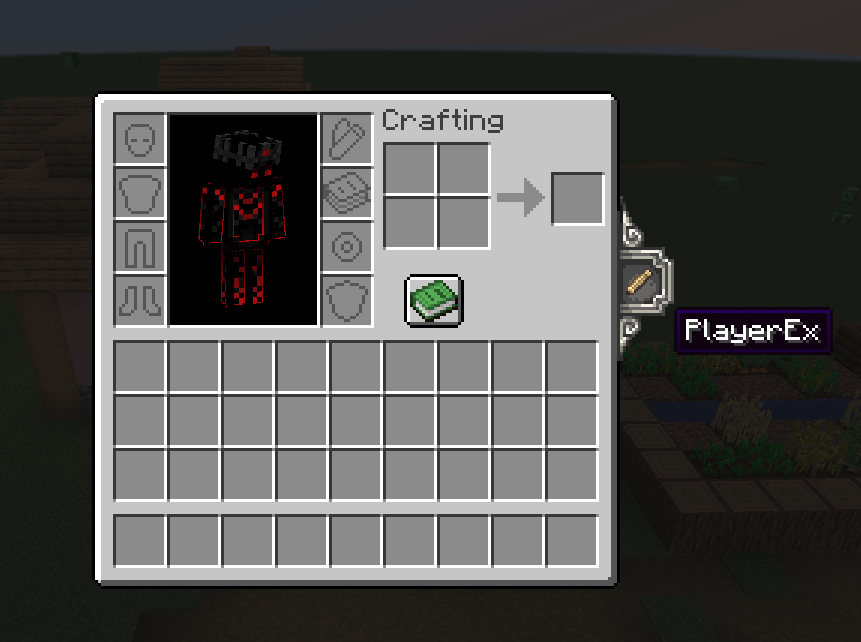 You decide how to build your character. Put points into Constitution if you want more health and armor, lean into Strength for melee damage, or develop Intelligence and individual spell schools for a magic-focused setup. You can mix attributes freely; there is no class selection that locks you into one path. Changing your mind is part of the process. Refund points let you take owned allocations back and spend those skill points elsewhere. Refund points are separate from skill points, so rebuilding a character has its own cost.
The default relationships give each primary attribute a different role:
| Attribute | What it helps with |
|---|---|
| Constitution | Maximum health, armor, oxygen bonuses and poison resistance. With compatible magic attributes installed, it also contributes to magic resistance. |
| Strength | Melee attack damage, melee critical damage, knockback resistance and block-breaking speed. |
| Dexterity | Attack speed and ranged critical damage, plus ranged damage and haste when Ranged Weapon API is installed. |
| Intelligence | Experience dropped by defeated entities, Wither resistance and compatible spell haste, critical damage and school power. |
| Luckiness | Luck, evasion and critical chance for melee, ranged and compatible spell combat. |
| Focus | Passive health regeneration, healing amplification, and Fire, Freeze and Lightning resistance. |
These are the supplied defaults. Data Attributes lets pack authors change the relationships, limits and scaling. Some bonuses use diminishing returns, so a percentage stat may grow more slowly as you invest more points. Focus regeneration is passive, but it starts small. With the default relationships, one Focus point gives 0.015 health per second. It is gradual recovery, rather than an instant replacement for food or healing items.
Attributes and Combat Stats are always available. Magic pages appear for the installed, enabled systems:
The pages use the supplied stone frame, gold icons, ivy and themed resource bars. Tooltips explain the values, while the bottom of the screen keeps your level and next-level XP cost close to the leveling controls.
Your main character page: choose your attributes, manage skill points and check health, oxygen and resistances. 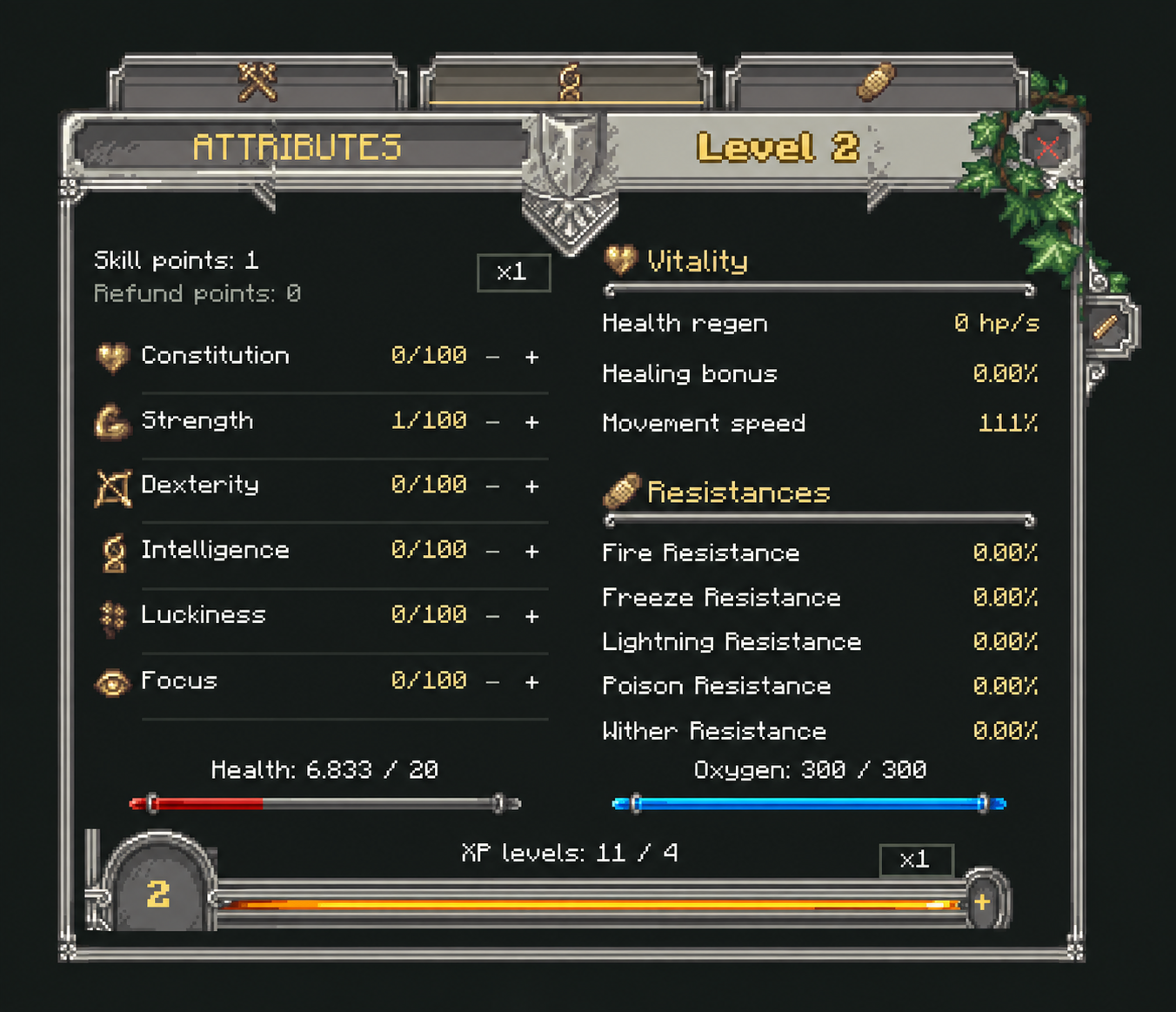
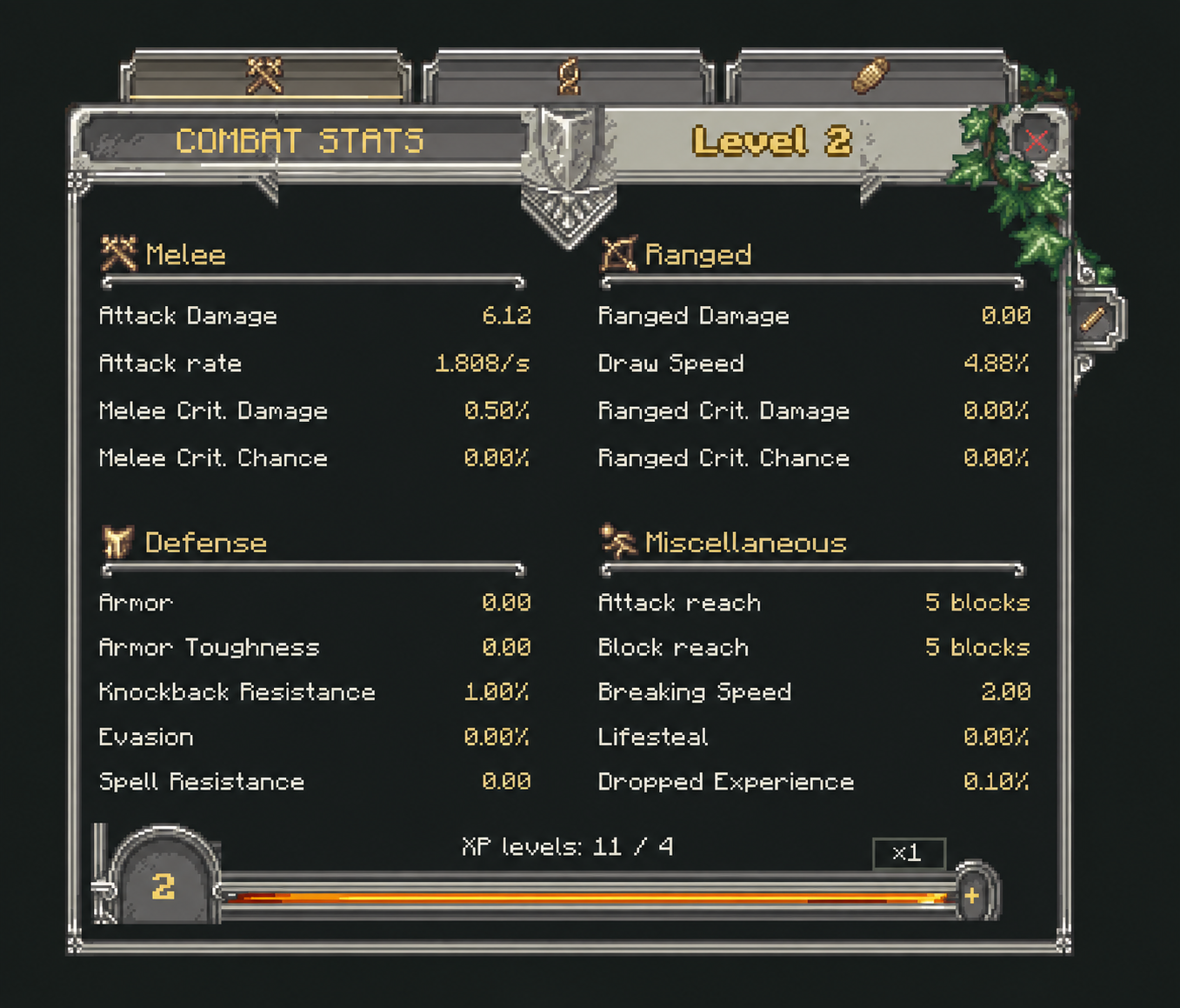
| Combat Stats | Spell Schools |
|---|---|
 |
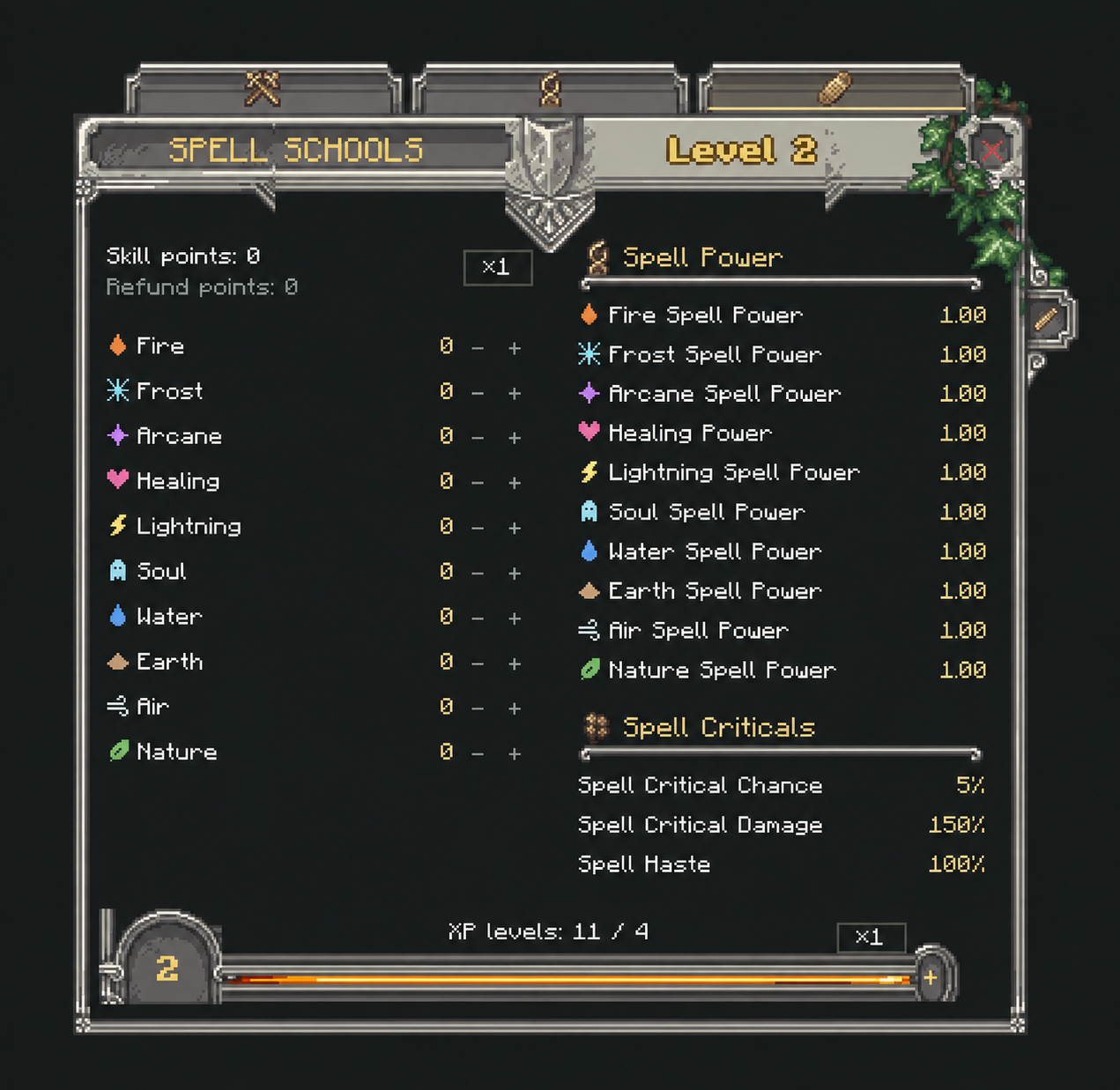 |
| Check your combat bonuses and defenses. | Allocate school points and inspect available spell power. |
Click a screenshot to view it at full size.
Weapons and equipped armor can gain experience from kills and improve as they level. Weapons gain damage bonuses; armor gains armor and configurable damage reduction. Their leveling rules are separate, so a pack can change or disable one without changing the other. Item tooltips show the equipment's level and progress. You can choose a compact display, expand details with Shift, and adjust tooltip colors in the client settings. Relic rarity colors help you tell different tiers apart at a glance. Eligible items can survive reaching zero durability as broken equipment. A broken item shows an X in the inventory and stops providing its normal combat benefits until repaired. The number of times an item can survive breaking, infinite preservation and break notifications are configurable. Eligibility is controlled by item tags; preservation is not automatically applied to every item from every mod.
RelicEx content is included in PlayerEx. There is no separate RelicEx addon to install for this version. Find rings, amulets, head relics and chest relics with randomly rolled attribute bonuses. Relics have seven rarity tiers and can carry one to five distinct attributes. Their rolls stay with the item, so an existing relic does not reroll when you equip it again or change the loot settings. Rings and amulets use Trinkets on Fabric or Curios on NeoForge. Head and chest relics can also transfer their bonuses to matching armor in an anvil. Infusion costs no XP, consumes the relic and preserves the target armor's existing components. Armor that is already infused cannot receive another infusion. Relic armor uses native rendering with armor-trim support. The loot pool also includes:
Chest loot, mob drops, rarity weights and dimension rules are configurable. Pack authors can control how often these items appear and where players are likely to find them.
WizardEx progression is also built in. Add Spell Power Attributes and compatible spell content to connect your character's development to magic. PlayerEx supports Fire, Frost, Arcane, Healing, Lightning and Soul, plus Water, Earth, Air and Nature through More RPG Library. Available schools have their own allocation controls and icons. Intelligence contributes to available school power, while other attributes help shape spell criticals and related bonuses. Only schools supplied by your installed mods become available. PlayerEx supplies progression and compatibility; the libraries and spell-content mods provide their spells, casting rules and external attributes. If you remove an optional school provider, saved allocations remain available for refunds.
Iron's Spells 'n Spellbooks is optional and NeoForge-only. With it installed, PlayerEx adds a separate school page for Fire, Ice, Lightning, Holy, Ender, Blood, Evocation, Nature and Eldritch. If RPG Series magic is also present, each system gets its own tab; if only one is present, only that magic tab appears. Attributes remains the main page. The server's PlayerEx: Magic compatibility config controls Intelligence and Focus bonuses to Iron's maximum mana, spell power, cast-time reduction, summon damage, mana regeneration and cooldown reduction. School allocations have separately configurable power bonuses. Iron's continues to own its mana, casting and cooldown systems. Optional spell-level requirements can make school investment necessary for higher-level spells. They are off by default to preserve existing characters' access. Enable them and edit each school's point thresholds in-game or in config/playerex/magic.json5. Defaults unlock spell levels 1–10 at 0, 10, 20, …, 90 allocated points. Scroll restrictions, creative bypass and spell exemptions are configurable. Requirements use owned points, so equipment cannot bypass them. Native Iron's learning, mana and cooldown checks still apply. The integration mode can show RPG Series, Iron's, both, or neither. This controls PlayerEx school access and Iron's bonuses; it does not disable another mod's spells. Existing RPG Series attribute relationships remain editable through Data Attributes. PlayerEx does not bundle Iron's or its dependencies.
With Spell Engine and Mana Attributes installed on Fabric, eligible spells can use mana when you do not have enough of their required consumable runes. Existing runes are preferred, and eligible More RPG rune stones are supported too. Ordinary reagents and arrows are not replaced with mana. Mana Attributes supplies the mana pool, regeneration and its HUD. PlayerEx handles the connection to eligible Spell Engine costs. The minimum automatic mana cost is 20, with stronger or repeated spell launches costing more. Set enough mana capacity through your gear or configuration: installing the integration alone does not guarantee that a fresh character can afford a cast. Mana Attributes integration is Fabric-only. On NeoForge, the optional Iron's integration uses Iron's own mana system instead.
The Dimension-unlocked level caps group is available in the server config on both loaders. It is off by default. Enable it and set a starting cap plus a dimension-to-level map, for example:
{
  "minecraft:overworld": 10,
  "minecraft:the_nether": 20,
  "minecraft:the_end": -1
}
This is the value of dimensionLevelCaps in config/playerex/config.json5, and the same map is editable in-game. Visiting the Nether unlocks level 20 permanently, including after returning home, dying or reconnecting. -1 unlocks the global Data Attributes level maximum; unlisted dimensions leave the cap unchanged. Add modded dimension IDs in the same way. Existing levels are never removed. Config edits re-evaluate the saved visits, so lowering a rule can prevent further leveling until a higher cap is unlocked. Older saves begin tracking visits with this update; dimensions visited before installing it must be visited again. Server and clients need matching PlayerEx versions.
Use Minecraft 1.21.1 and Java 21, then install the PlayerEx file for your loader on the server and each client. Required dependencies:
Remnant 3.0.0 is required and already bundled inside PlayerEx as a separate nested JAR. It does not need a separate download. Crunch is bundled too. Optional integrations depend on the features you want:
Install the 1.21.1 versions and their own required dependencies. This port supports Fabric and NeoForge directly; legacy Forge and Quilt are not listed as supported loaders for this build.
Configure player and equipment level costs, skill points per level, death resets, item break behavior, loot chances and more. Data Attributes controls attribute relationships and scaling; PlayerEx's grouped configuration handles its gameplay settings. Gameplay rules belong to the server. Tooltip presentation, sound volumes and other display preferences belong to the client. Operators can use commands to inspect or adjust progression, including:
/playerex level get <player>
/playerex level add <player> [amount]
/playerex skill <id> add <player> [amount]
/playerex refund add <player> [amount]
/playerex reset <player> [retain]
These commands require operator permission level 2. Administrative level and skill grants do not charge the target's XP or skill points. The optional reset value is the percentage of progression to retain.
The 1.21.1 port uses a new save system. Old 1.20.1 PlayerEx progression, configuration files and legacy RelicEx item data are not automatically imported. Plan a fresh setup or your own migration rather than expecting an old world to carry those values across unchanged. Earlier 1.21.1 development saves use the current attachment and item-component formats. Read the version's changelog before updating, and use matching mod files on both sides of a multiplayer connection.
PlayerEx builds on CleverNucleus's original PlayerEx and the work of the PlayerEx: Director's Cut contributors. This version also carries forward WizardEx and RelicEx content. Thanks to the original authors, translators, artists and everyone helping test the port. Found a problem? Include your PlayerEx version, loader, relevant mod list and latest log in an issue. A clear screenshot or short recording helps with interface and rendering bugs. PlayerEx uses BML-1.1. See the license and the preserved third-party license files in the source repository.
Use code bareminimum to get 25% off your first month!
Project description from CurseForge.
Pick your setup
Choose the version and loader you play, then open the matching release.
Check the dependencies, then try the file in a copied instance before changing a world you care about.
Recent files
PlayerEx-5.1.0-neoforge-1.21.1.jar
22 Nov 2026
PlayerEx-5.1.0-fabric-1.21.1.jar
22 Nov 2026
PlayerEx-5.0.1-neoforge-1.21.1.jar
7 Oct 2026
PlayerEx-5.0.1-fabric-1.21.1.jar
7 Oct 2026
PlayerEx-5.0.0-fabric-1.21.1.jar
7 Oct 2026
PlayerEx-5.0.0-neoforge-1.21.1.jar
7 Oct 2026
playerex-directors-cut-4.0.5+1.20.1.jar
21 Nov 2025
playerex-directors-cut-4.0.4+1.20.1.jar
20 Nov 2025
playerex-directors-cut-4.0.3+1.20.1.jar
22 Sept 2025
playerex-directors-cut-4.0.3+1.20.1.jar
19 May 2025
playerex-directors-cut-4.0.2+1.20.1.jar
20 Dec 2024
playerex-directors-cut-4.0.1+1.20.1.jar
17 Dec 2024
Looking for an older file? The official CurseForge project page is in Resources.
 mod
A Minecraft mod that adds customizable timestamps to chat!
 mod
Proper shop screens for NeoForge. The shop plugin thousands of servers have run since 2012, rebuilt as a mod.
 mod
A guided first-launch setup screen that picks your keybinds, video quality, audio and shader settings for you, with a custom loading screen and title screen.