Minecraft version
Back to mods 
CurseForge · Minecraft mod
Create Custom Commands
Allow you create custom commands
Choose a version Pick your version below, then grab the matching file.
Quick answer
Which Create Custom Commands release matches 1.16.5 Forge?
Best match for your filters create_custom_command-1.16.5v2.0.jar
Game version 1.16.5
Loader Forge
Create Custom Commands create_custom_command-1.16.5v2.0.jar targets 1.16.5 with Forge. The project page does not say whether this file belongs on the client, dedicated server, or both. No extra mods listed for this file.
Where it goes
Is Create Custom Commands required on the client, server, or both?
The project page does not say whether this file belongs on the client, dedicated server, or both.
Client Source doesn’t say
Dedicated server Source doesn’t say
Loader for this release Forge
Required install it here Optional supported, not mandatory Not supported do not install here Source doesn’t say do not assume
The source does not explicitly classify this release as client-only or server-only.
What else does Create Custom Commands create_custom_command-1.16.5v2.0.jar need?
create_custom_command-1.16.5v2.0.jar on 1.16.5 Forge. Every mod below is checked against that same setup.
This file does not list any required mods. Do not add a library just because a different file uses it.
This file does not list any required or optional mods.
Before you install it
Add Create Custom Commands without breaking your instance.
Built for Create Custom Commands create_custom_command-1.16.5v2.0.jar on 1.16.5 Forge. Pick another file and the loader, install side or required mods may change.
- 01
Stick to this file
Use create_custom_command-1.16.5v2.0.jar. It targets 1.16.5 with Forge; another release may have different loader, side or dependency requirements.
- 02
Bring the mods it needs
This file does not list any required mods. Do not add a library just because a different file uses it.
- 03
Put it on the correct side
The project page does not say whether this file belongs on the client, dedicated server, or both.
- 04
Pick the file you checked
Use the “Get this file” button beside create_custom_command-1.16.5v2.0.jar. It opens that exact file at the source.
About this project
What does Create Custom Commands add?
Tired because your typing skill is so slow? because commands too long? or because your keyboard crashed? This is what you need.
Features:
Create your own custom commands with simple text and speed up your time
Bind many commands to one key word, unlimited commands, config is super easy to use
Set the required permission level for each command (normally 4 = op), or use a LuckPerms permission node
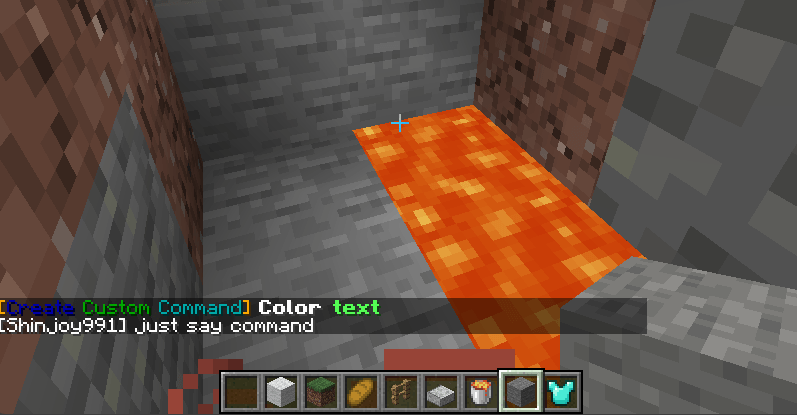
Toggle each command's feedback, or customize it with colored text (& color codes), players receive your message instead of the vanilla one
Cooldown per command and per player (for example a /feed command for a VIP rank)
Clickable link command: players type a command and get a clickable URL, only they see it
Works from player chat, console, command blocks and functions, and keeps /execute context (position, dimension)
Normal players can run powerful commands safely, for example teleport to a set location, without being op
/reload applies config changes, no restart needed
Server-side only, players do not need the mod installed
Config file: config/createcustomcommands/createcustomcommands_config.json
Keys of each command:
- permission: a level 0-4 (default 4), or a LuckPerms permission node
- permissionlevel: fallback level used with a custom node (default 4)
- notify: yes or no, command feedback
- notifystring: your own feedback message, & color codes supported
- cooldown: seconds per player (default 0)
- cooldownmessage: message while on cooldown, {time} shows the time left
- url, urltext: clickable link (http or https only) and its text
- command1, command2, ...: the commands to run, @s is the player who typed it
Example:
"feed": {
"permission": "vip.feed",
"permissionlevel": "4",
"notifystring": "&aYou have been fed!",
"cooldown": "300",
"cooldownmessage": "&cYou can use /feed again in {time}.",
"command1": "effect give @s minecraft:saturation 1 19 true"
},
"discord": {
"permission": "0",
"url": "https://discord.gg/yourcode",
"urltext": "&b&l[Click here to join our Discord]"
},
"spawn": {
"permission": "0",
"cooldown": "60",
"command1": "execute in minecraft:overworld run tp @s 0 100 0"
}
LuckPerms (optional):
- Every command has the node create_custom_command.command.<key>, for example /lp group vip permission set create_custom_command.command.feed true
- Or write your own node in "permission", for example "vip.feed", then /lp group vip permission set vip.feed true. Several commands can share one node
- A node that is not set falls back to the permission level. Without LuckPerms only the level is used
- A new node name added while the server is running works with LuckPerms after a restart, until then the level is used
Notes:
- Cooldowns are not saved when the server restarts
- Existing configs from older versions keep working
Some pre-definition:
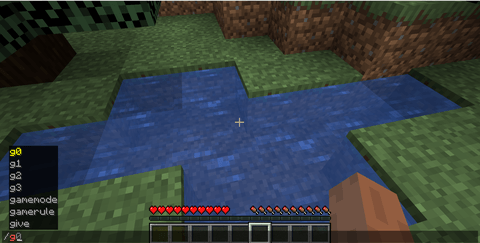
/g0 : gamemode survival
/g1 : gamemode creative
/g2 /g3
/d0 : difficulty peacefull
/d1 : difficulty easy
/d2 : difficulty normal
/d3 : difficulty hard
/d : time set day
/n : time set night
/k : kill all entity EXCEPT players
/ki : kill all items
/km : kill all mobs
/wea : clear sky
/heal: full heath and sarturation
Config:
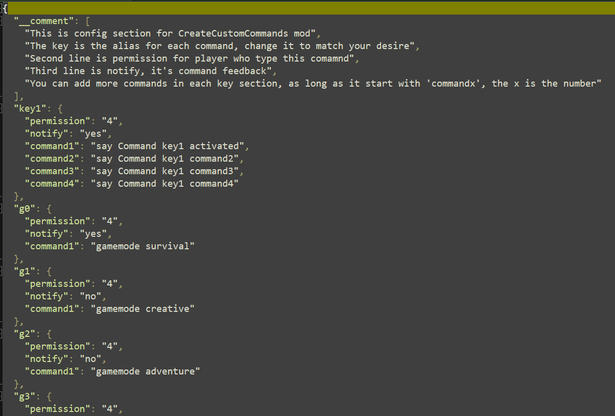
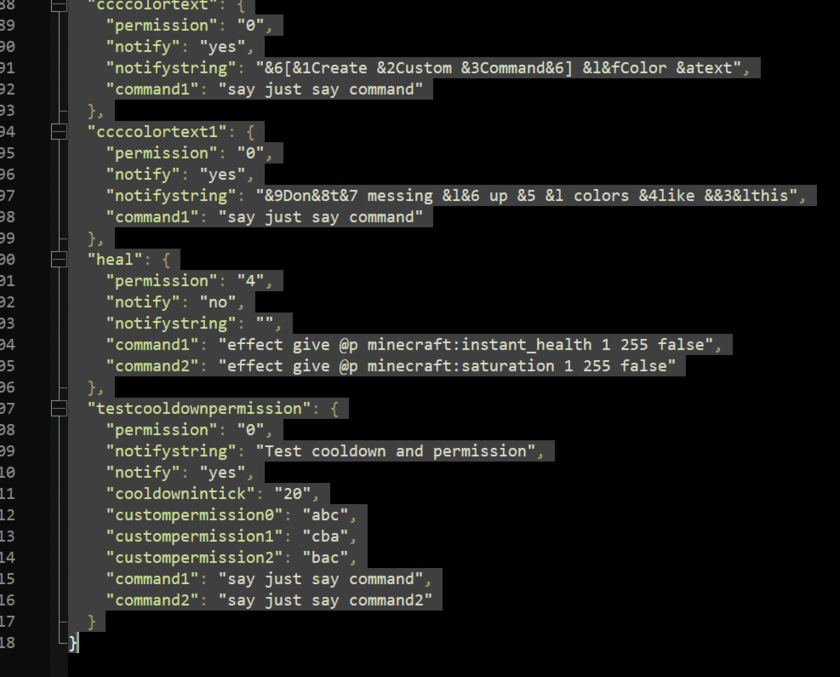
In game:
Project description from CurseForge.
Pick your setup
Create Custom Commands by Minecraft version and loader
Choose the version and loader you play, then open the matching release.
Minecraft version
1.20.4
1 loader buildMinecraft version
1.20.2
1 loader buildMinecraft version
1.20.1
1 loader buildMinecraft version
1.19.4
1 loader buildMinecraft version
1.19.2
1 loader buildMinecraft version
1.19.1
1 loader buildMinecraft version
1.18.2
1 loader buildMinecraft version
1.18.1
1 loader buildMinecraft version
1.18
1 loader buildMinecraft version
1.16.5
1 loader buildCheck the dependencies, then try the file in a copied instance before changing a world you care about.
Recent files
Create Custom Commands versions and loaders
create_custom_command-1.16.5v2.0.jar
4 Mar 2025
Client Source doesn’t say Server Source doesn’t say Dependencies No extras listed Listed on Release listing
Check the 1.16.5 · Forge setup 1.16.5Forge release
createcustomcommands-1.16.5v1.2.jar
7 Jun 2024
Client Source doesn’t say Server Source doesn’t say Dependencies No extras listed Listed on Release listing
Check the 1.16.5 · Forge setup 1.16.5Forge release
createcustomcommands-3.0.jar
27 Mar 2024
Client Source doesn’t say Server Source doesn’t say Dependencies No extras listed Listed on Release listing
Check the 1.16.5 · Forge setup 1.16.5Forge release
Looking for an older file? The official CurseForge project page is in Resources.
 mod
CurseForge + Modrinth · Minecraft
Block Duplicator Tree
DUPLICATE YOUR BLOCKS AND GET OP QUICKLY. Inspired by the Orespawn tree.
 mod
CurseForge · Minecraft
Jeff's Pets
Adds completely client-sided pets to your game. Supports every vanilla mob, some custom ones, and will work on any server, including in singleplayer!
 mod
CurseForge + Modrinth · Minecraft
Litematica Tool (Forge and Fabric)
this mod adds a simple item into the game which can be used instead of a stick in litematica. (1.17)