Minecraft version
Back to mods 
CurseForge · Minecraft mod
Additional Enchantments
Adds new enchantments to the game
Choose a version Pick your version below, then grab the matching file.
Quick answer
Which Additional Enchantments release matches 1.19.2 Forge?
Best match for your filters Additional Enchantments 1.19.2 - 1.3.0
Game version 1.19.2
Loader Forge
Additional Enchantments 1.19.2 - 1.3.0 targets 1.19.2 with Forge. The project page does not say whether this file belongs on the client, dedicated server, or both. No extra mods listed for this file.
Where it goes
Is Additional Enchantments required on the client, server, or both?
The project page does not say whether this file belongs on the client, dedicated server, or both.
Client Source doesn’t say
Dedicated server Source doesn’t say
Loader for this release Forge
Required install it here Optional supported, not mandatory Not supported do not install here Source doesn’t say do not assume
The source does not explicitly classify this release as client-only or server-only.
What else does Additional Enchantments 1.19.2 - 1.3.0 need?
Additional Enchantments 1.19.2 - 1.3.0 on 1.19.2 Forge. Every mod below is checked against that same setup.
This file does not list any required mods. Do not add a library just because a different file uses it.
This file does not list any required or optional mods.
Before you install it
Add Additional Enchantments without breaking your instance.
Built for Additional Enchantments 1.19.2 - 1.3.0 on 1.19.2 Forge. Pick another file and the loader, install side or required mods may change.
- 01
Stick to this file
Use Additional Enchantments 1.19.2 - 1.3.0. It targets 1.19.2 with Forge; another release may have different loader, side or dependency requirements.
- 02
Bring the mods it needs
This file does not list any required mods. Do not add a library just because a different file uses it.
- 03
Put it on the correct side
The project page does not say whether this file belongs on the client, dedicated server, or both.
- 04
Pick the file you checked
Use the “Get this file” button beside Additional Enchantments 1.19.2 - 1.3.0. It opens that exact file at the source.
About this project
What does Additional Enchantments add?

FAQ
- 1.19.2 documentation can be found here
- 1.20.1 documentation can be found here
- 1.21.1 / 26.1.2 documentation with better formatting can be found here
- The description below is for 1.21.1 and 26.1.2
Further enchantments are planned
- Hunter
- Confusion (maybe)
- Voiding (maybe)
- Straight Shot (maybe)
- …?
General Technical Definitions
New trigger point for enchantment effects
equipment_change_trigger: When changing any equipped item- Most enchantments in this mod apply data attachments to the target entity, which handle the logic
- Meaning it is unlikely that they work well with other trigger points for enchantments
New loot item conditions
entity_typematch_item_entity
Entity Type
Allows broader checks for entities
EntityType (LootItemCondition)
{
  "type": Type,           // [Mandatory] ||
  "entity": EntityTarget  // [Mandatory] || Which entity of the loot context is checked
}
Type
living_entity: Entities that extend theLivingEntityclass (i.e., noMinecarts,Itemsetc.)enemy: Entities that implement theEnemyinterface or are of the mob categoryMONSTERtamed: Entities that extend theTamableAnimalclass and are tamedanimal: Entities that extend theAnimalclassitem: Entities that extend theItemEntityclassexperience_orb: Entities that extend theExperienceOrbclass
EntityTarget
thisattackerdirect_attackerattacking_player
Match Item Entity
Allows using ItemPredicates to check the item of the Item Entity
{
  "predicate": ItemPredicate, // [Optional] || To match the item of the item entity, all are valid if left empty
  "target": EntityTarget      // [Optional] || Which entity of the loot context is checked (Default: 'this')
}
Additional explanations
- ItemPredicate: Check the
predicatedefinition of match_tool
EntityTarget
thisattackerdirect_attackerattacking_player
Fluid Vision
- Improves visibility through fluids from above
- Improves visibility while within the fluids
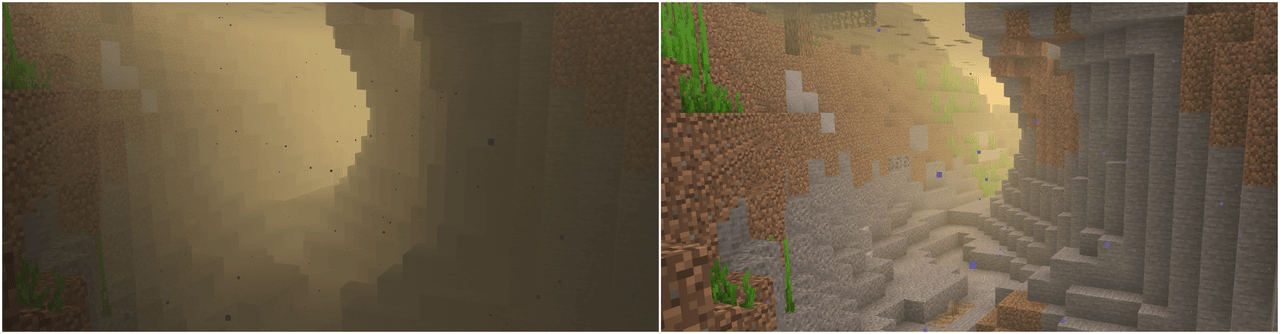
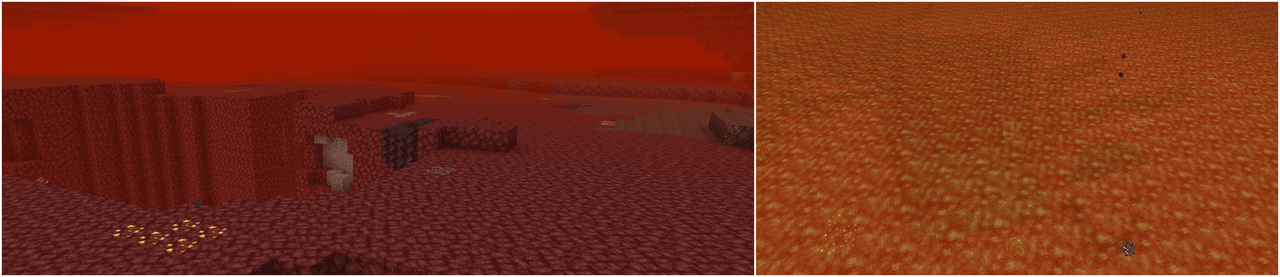
Default Effects
Level 1:
- Improves visibility in water
Level 2:
- Improves visibility in lava
- Improves visibility in
createfluids (#additional_enchantments:createfluid type tag) - Improves visibility in
the_bumblezonefluids (#additional_enchantments:bumblezonefluid type tag) - Better visibility
Level 3:
- Fluids from
Level 1andLevel 2 - Better visibility
Level 4:
- Fluids from
Level 1andLevel 2 - Better visibility
Technical Definition
{
  "vision": {                                     // [Mandatory] ||
    "values": [                                   // [Mandatory] ||
      {
        "level_range": {                          // [Mandatory] || Defines at which enchantment levels this effect will apply
          "min": integer,                         // [Optional]  ||
          "max": integer                          // [Optional]  ||
        },
        "value": [                                // [Mandatory] ||
          {
            "id": ResourceLocation,               // [Mandatory] || Unique identifier for the effect
            "fluid_types": HolderSet<FluidType>,  // [Mandatory] || Defines to which fluids this effect will apply to
            "percentage": LevelBasedValue         // [Mandatory] || Defines how see-through the fluid will be and by how much the viewing distance within the fluid will be improved
          }
        ]
      }
    ]
  }
}
Additional explanations
Homing
- Causes the projectile to home in on targets
- Entities closest to the camera focus are prioritized (i.e., the entity you look at)
- Friendly entities (your tamed animals, allies or their tamed animals, players if pvp is disabled) are ignored
- The target definition with the highest priority is checked first
Default Effects
All Levels:
- Living entities (priority 0)
- Except
minecraft:villager,minecraft:iron_golemandminecraft:enderman
- Except
- Animals (priority 1)
- Enemies (priority 2)
- Except
minecraft:enderman
- Except
- Bosses (priority 3)
#c:bossesandminecraft:warden
Level 2
- Improved search range, velocity and turn angle per tick
Level 3:
- Improved search range, velocity and turn angle per tick
Technical Definition
{
  "homing": {                                       // [Mandatory] ||
    "values": [                                     // [Mandatory] ||
      {
        "level_range": {                            // [Mandatory] || Defines at which enchantment levels this effect will apply
          "min": integer,                           // [Optional]  ||
          "max": integer                            // [Optional]  ||
        },
        "value": [                                  // [Mandatory] ||
          {
            "id": ResourceLocation,                 // [Mandatory] || Unique identifier for the effect
            "projectiles": HolderSet<EntityType>,   // [Optional]  || Projectiles this effect applies to (none specified = all)
            "target_condition": LootItemCondition,  // [Mandatory] || Determines which entities are targeted
            "search_range": {                       // [Mandatory] || Specifies the search range used to pick targets
                "front": LevelBasedValue,           // [Optional]  || (Default: 0)
                "back": LevelBasedValue,            // [Optional]  || (Default: 0)
                "left": LevelBasedValue,            // [Optional]  || (Default: 0)
                "right": LevelBasedValue,           // [Optional]  || (Default: 0)
                "up": LevelBasedValue,              // [Optional]  || (Default: 0)
                "down": LevelBasedValue             // [Optional]  || (Default: 0)
              },
            "velocity_multiplier": LevelBasedValue, // [Mandatory] || A multiplier that is applied per tick to the projectiles velocity
            "max_turn_per_tick": LevelBasedValue,   // [Optional]  || The maximum amount of degrees the projectile can turn per tick (Default: 180, meaning it will snap directly to the target)
            "priority": integer                     // [Optional]  || The priority of this effect (Default: 0)
          }
        ]
      }
    ]
  }
}
Additional explanations
- ResourceLocation
- HolderSet
- LootItemCondition
thisentity relates to the targeted entityoriginrelates to the position of the targeted entityattacking_entityrelates to the owner of the projectiledirect_attacking_entityrelates to the actual projectile
- LevelBasedValue
Perception
- Displays entities as glowing using custom colors, see below to which entities are affected by default
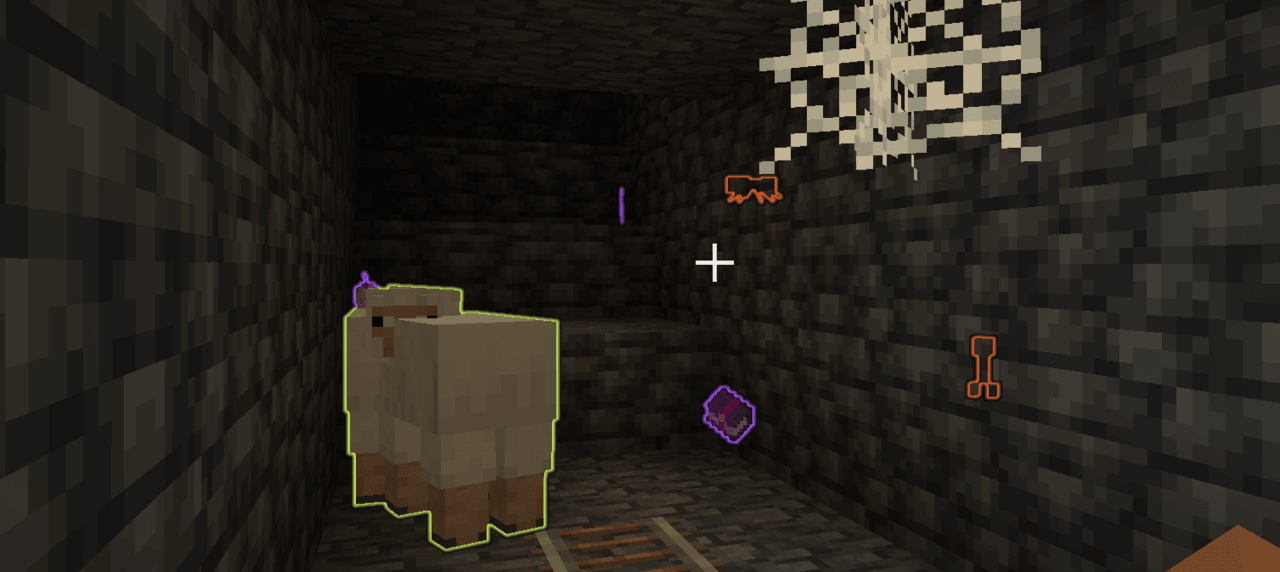
Default Effects
Level 1:
- Highlights valuable items (
#additional_enchantments:valuablesitem tag) - Highlights enchanted items
- Highlights enemies
- Highlights animals
Level 2:
- Highlights valuable items (
#additional_enchantments:valuablesitem tag) - Highlights enchanted items
- Highlights enemies
- Highlights animals
- Highlights bosses
Level 3:
- Highlights valuable items in a limited form (
#additional_enchantments:limited_valuablesitem tag) - Highlights enchanted books containing useful enchantments (e.g.,
Unbreaking IIorMending) - Highlights enemies
- Highlights animals
- Highlights bosses
Technical Definition
{
  "perception": {                           // [Mandatory] ||
    "values": [                             // [Mandatory] ||
      {
        "level_range": {                    // [Mandatory] || Defines at which enchantment levels this effect will apply
          "min": integer,                   // [Optional]  ||
          "max": integer                    // [Optional]  ||
        },
        "value": [                          // [Mandatory] ||
          {
            "key": ResourceLocation,        // [Mandatory] || Unique identifier for the effect
            "condition": LootItemCondition, // [Mandatory] || Checks which entities this effect will apply to
            "range": LevelBasedValue,       // [Mandatory] || Defines up to which distance the entities will be affected at
            "color": ShiftingColor          // [Mandatory] || The colors of the effect
          }
        ]
      }
    ]
  }
}
ShiftingColor
{
  "colors": [                 // [Mandatory] || The colors defined in here will be smoothly cycled through based on the specified shift rate
    {
      "color": TextColor,     // [Mandatory] ||
      "alpha": float          // [Optional]  || The alpha value of the color (0..1) (Default: 1)
    }
  ],
  "color_shift_rate": double, // [Optional]  || At which speed the colors will be cycled through (Default: 1.0)
  "priority": integer         // [Optional]  || Which color to be picked - the entry with the highest priority will be picked (Default: 0)
}
Additional explanations
- TextColor: Either a named minecraft color or Hex codes
- ResourceLocation
- LootItemCondition
thisentity context relates to the targeted entity that would receive the glow effectoriginrelates to the position of the targeted entity
- LevelBasedValue
Treasure Finder
- Will highlight blocks using different ways, see below for more information
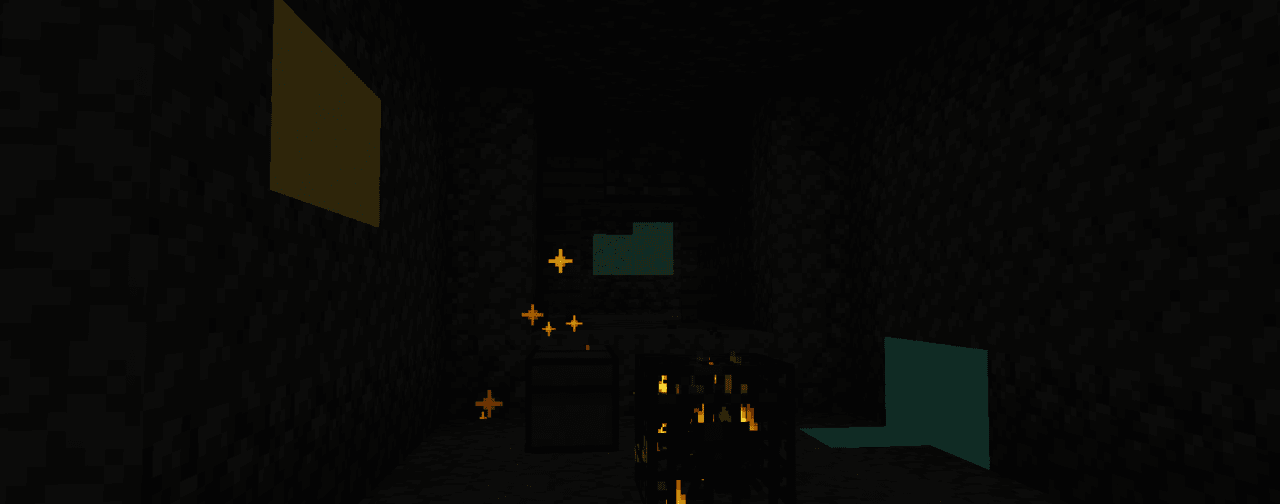
(Compression combined with a still image makes this look worse than it actually is)
Default Effects
All levels:
treasures, using theparticlesdisplay type
Level 1:
- (Uses
simple_shaderfor all ores) - Copper ore
- Iron ore
- Zinc ore
- Silver ore
Level 2:
- (Uses
simple_shaderfor all ores) - Iron ore
- Zinc ore
- Silver ore
- Lapis ore
- Gold ore
Level 3:
- (Uses
simple_shaderfor all ores) - Lapis ore
- Gold ore
- Emerald ore
- Diamond ore
Level 4:
- (Uses
outlinefor all ores) - Emerald ore
- Diamond ore
- Netherite ore
Technical Definition
{
  "vision": {                             // [Mandatory] ||
    "values": [                           // [Mandatory] ||
      {
        "level_range": {                  // [Mandatory] || Defines at which enchantment levels this effect will apply
          "min": integer,                 // [Optional]  ||
          "max": integer                  // [Optional]  ||
        },
        "value": [                        // [Mandatory] ||
          {
            "id": ResourceLocation,       // [Mandatory] || Unique identifier for the effect
            "blocks": BlockDefinition,    // [Mandatory] || Defines to which blocks this effect will apply to
            "range": LevelBasedValue,     // [Mandatory] || Defines up to which distance the blocks will be affected at
            "display_type": DisplayType,  // [Mandatory] || Defines how the effect will be displayed
            "particle_rate": integer,     // [Optional]  || The rate at which particles will be spawned (only applicable to 'particles' display type) (Default: 0)
            "color": ShiftingColor        // [Mandatory] || The colors of the effect
          }
        ]
      }
    ]
  }
}
ShiftingColor
{
  "colors": [                 // [Mandatory] || The colors defined in here will be smoothly cycled through based on the specified shift rate
    {
      "color": TextColor,     // [Mandatory] ||
      "alpha": float          // [Optional]  || The alpha value of the color (0..1) (Default: 1)
    }
  ],
  "color_shift_rate": double, // [Optional]  || At which speed the colors will be cycled through (Default: 1.0)
  "priority": integer         // [Optional]  || Which color to be picked - the entry with the highest priority will be picked (Default: 0)
}
Additional explanations
- BlockDefinition allows either one of these two
treasures: Unopened loot containers (included inadditional_enchantment:treasuresblock tag)- HolderSet of type
Block
- DisplayType
outline: Outline around the block, visible through wallsparticles: Spawns particles at the block positionsimple_shader: A glow effect around the block
- TextColor: Either a named minecraft color or Hex codes
- ResourceLocation
- HolderSet
- LevelBasedValue
Climbing
- Allows climbing on most blocks, no ladder required
- At further levels also disables the automatic sliding down and even allows climbing on ceilings
Default Effects
Level 1:
- Allows climbing if the block matches:
- Is not air
- Is solid
- Is not a fluid
- Is not
#additional_enchantments:slippery(ice / glass)
Level 2:
- Enables sticking to walls
Level 3:
- Enables ceiling climbing
Technical Definition
{
  "climbable": {                            // [Mandatory] ||
    "values": [                             // [Mandatory] ||
      {
        "level_range": {                    // [Mandatory] || Defines at which enchantment levels this effect will apply
          "min": integer,                   // [Optional]  ||
          "max": integer                    // [Optional]  ||
        },
        "value": [                          // [Mandatory] ||
          {
            "key": ResourceLocation,        // [Mandatory] || Unique identifier for the effect
            "blocks": BlockPredicate,       // [Mandatory] || Defines which blocks are climbable
            "can_stick_to_walls": boolean,  // [Optional]  || If enabled the entity will not automatically slide down the wall (press SHIFT to be able to climb downwards)
            "can_climb_ceilings": boolean   // [Optional]  || If enabled the entity will be able to climb along the ceiling
          }
        ]
      }
    ]
  }
}
Additional explanations
Green Foot
- Applies a bonemeal effect on the blocks you walk on and around you
- For saplings and crops the effect will also damage the enchanted item per application
Default Effects
Level 1:
- Any block: Constant 1% chance
#minecraft:saplings: 10% chance, + 7.5% chance per level#minecraft:crops: 30% chance, + 10% chance per level
Level 2:
- Increased range
- Increased probability
Level 3:
- Increased range
- Increased probability
Technical Definition
{
  "growth_entries": [                 // [Mandatory] ||
    {
      "predicate": BlockPredicate,    // [Mandatory] || Checks which block to apply this effect to
      "probability": LevelBasedValue, // [Mandatory] || The chance for this effect to be applied, checked separately before each attempt for every position
      "priority": integer,            // [Optional]  || Which effect to pick if multiple predicates match - the highest priority is selected (Default: 0)
      "damage": integer               // [Mandatory] || The amount the enchanted item will be damaged from each successful effect attempt
    }
  ],
  "extra_range": LevelBasedValue      // [Mandatory] || The extra range (radius) around the player this effect will apply to, in addition to the origin position
}
Additional explanations
Project description from CurseForge.
Pick your setup
Additional Enchantments by Minecraft version and loader
Choose the version and loader you play, then open the matching release.
Minecraft version
1.21.1
1 loader buildMinecraft version
1.21
1 loader buildMinecraft version
1.20.1
2 loader buildsMinecraft version
1.20
2 loader buildsMinecraft version
1.19.2
1 loader buildCheck the dependencies, then try the file in a copied instance before changing a world you care about.
Recent files
Additional Enchantments versions and loaders
Additional Enchantments 1.19.2 - 1.3.0
additional_enchantments-1.19.2-1.3.0-all.jar
17 Dec 2025
Client Source doesn’t say Server Source doesn’t say Dependencies No extras listed Listed on Release listing
Check the 1.19.2 · Forge setup Forge1.19.2 release
Additional Enchantments 1.19.2 - 1.2.1
additional_enchantments-1.19.2-1.2.1-all.jar
2 Apr 2025
Client Source doesn’t say Server Source doesn’t say Dependencies No extras listed Listed on Release listing
Check the 1.19.2 · Forge setup 1.19.2Forge release
Additional Enchantments 1.19.2 - 1.1.5
additional_enchantments-1.19.2-1.1.5-all.jar
18 Oct 2024
Client Source doesn’t say Server Source doesn’t say Dependencies No extras listed Listed on Release listing
Check the 1.19.2 · Forge setup 1.19.2Forge release
Additional Enchantments 1.19.2 - 1.1.4
additional_enchantments-1.19.2-1.1.4-all.jar
18 Oct 2024
Client Source doesn’t say Server Source doesn’t say Dependencies No extras listed Listed on Release listing
Check the 1.19.2 · Forge setup 1.19.2Forge release
Additional Enchantments 1.19.2 - 1.1.3
additional_enchantments-1.19.2-1.1.3-all.jar
17 Jun 2024
Client Source doesn’t say Server Source doesn’t say Dependencies No extras listed Listed on Release listing
Check the 1.19.2 · Forge setup 1.19.2Forge release
Additional Enchantments 1.19.2 - 1.1.2
additional_enchantments-1.19.2-1.1.2-all.jar
4 Mar 2024
Client Source doesn’t say Server Source doesn’t say Dependencies No extras listed Listed on Release listing
Check the 1.19.2 · Forge setup 1.19.2Forge release
Additional Enchantments 1.19.2 - 1.1.1
additional_enchantments-1.19.2-1.1.1-all.jar
23 Feb 2024
Client Source doesn’t say Server Source doesn’t say Dependencies No extras listed Listed on Release listing
Check the 1.19.2 · Forge setup 1.19.2Forge release
Additional Enchantments 1.19.2 - 1.1.0
additional_enchantments-1.19.2-1.1.0-all.jar
15 Feb 2024
Client Source doesn’t say Server Source doesn’t say Dependencies No extras listed Listed on Release listing
Check the 1.19.2 · Forge setup 1.19.2Forge release
Additional Enchantments 1.19.2 - 1.0.2
additional_enchantments-1.19.2-1.0.2-all.jar
1 Feb 2024
Client Source doesn’t say Server Source doesn’t say Dependencies No extras listed Listed on Release listing
Check the 1.19.2 · Forge setup 1.19.2Forge release
Additional Enchantments 1.19.2 - 1.0.1
additional_enchantments-1.19.2-1.0.1-all.jar
30 Jan 2024
Client Source doesn’t say Server Source doesn’t say Dependencies No extras listed Listed on Release listing
Check the 1.19.2 · Forge setup 1.19.2Forge release
Additional Enchantments 1.19.2 - 1.0.0
additional_enchantments-1.19.2-1.0.0-all.jar
29 Jan 2024
Client Source doesn’t say Server Source doesn’t say Dependencies No extras listed Listed on Release listing
Check the 1.19.2 · Forge setup 1.19.2Forge release
Additional Enchantments 1.19.2 - 0.4.2
additional_enchantments-1.19.2-0.4.2-all.jar
28 Jan 2024
Client Source doesn’t say Server Source doesn’t say Dependencies No extras listed Listed on Release listing
Check the 1.19.2 · Forge setup 1.19.2Forge beta
Looking for an older file? The official CurseForge project page is in Resources.
 mod
mod CurseForge + Modrinth · Minecraft
Rebind Narrator
it's 2021 and you can't change the narrator key UPDATE: it's 2022 and you still can't change the narrator key UPDATE: it's 2023 and you still can't change the narrator key UPDATE: it's 2024 and you still can't change the narrator key UPDATE: it's 2025 and
 mod
mod CurseForge · Minecraft
Freecam
A simple, standalone freecam mod.
 mod
mod Modrinth · Minecraft
[IV/MTS]Q.M.P [Qawsed Military pack]
Military vehicles content pack.