Minecraft version
Back to mods 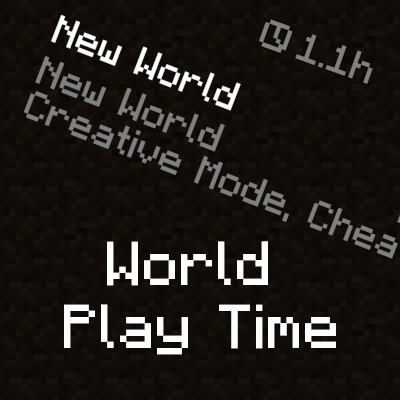
CurseForge · Minecraft mod
World Play Time
Displays the world's play time in the world selection menu.
Choose a version Pick your version below, then grab the matching file.
Quick answer
Which World Play Time release should I use?
Latest stable file [Fabric] World Play Time 1.2.4 - 26.1
Game version 26.1
Loader Fabric
World Play Time [Fabric] World Play Time 1.2.4 - 26.1 targets 26.1 with Fabric. The project page does not say whether this file belongs on the client, dedicated server, or both. No extra mods listed for this file.
Where it goes
Is World Play Time required on the client, server, or both?
The project page does not say whether this file belongs on the client, dedicated server, or both.
Client Source doesn’t say
Dedicated server Source doesn’t say
Loader for this release Fabric
Required install it here Optional supported, not mandatory Not supported do not install here Source doesn’t say do not assume
The source does not explicitly classify this release as client-only or server-only.
What else does World Play Time [Fabric] World Play Time 1.2.4 - 26.1 need?
[Fabric] World Play Time 1.2.4 - 26.1. Change the file and its required mods may change too.
This file does not list any required mods. Do not add a library just because a different file uses it.
This file does not list any required or optional mods.
Before you install it
Add World Play Time without breaking your instance.
Built for World Play Time [Fabric] World Play Time 1.2.4 - 26.1. Pick another file and the loader, install side or required mods may change.
- 01
Stick to this file
Use [Fabric] World Play Time 1.2.4 - 26.1. It targets 26.1 with Fabric; another release may have different loader, side or dependency requirements.
- 02
Bring the mods it needs
This file does not list any required mods. Do not add a library just because a different file uses it.
- 03
Put it on the correct side
The project page does not say whether this file belongs on the client, dedicated server, or both.
- 04
Pick the file you checked
Use the “Get this file” button beside [Fabric] World Play Time 1.2.4 - 26.1. It opens that exact file at the source.
About this project
What does World Play Time add?

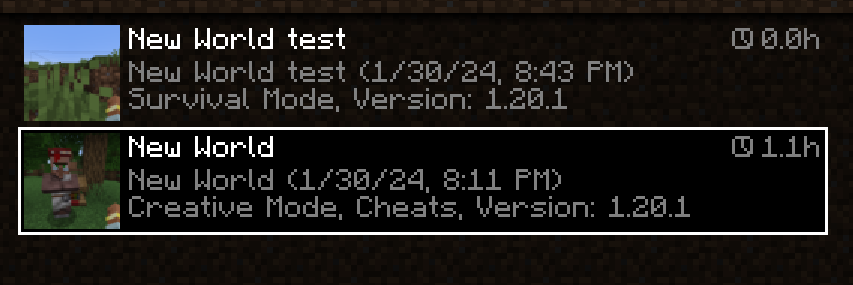
World Play Time is a mod that displays the amount of time you've spent on a given Minecraft world in the world selection screen, in the top-right corner of each world entry. It does this by checking the "Play Time" statistic for the world, so playtime will be displayed for existing worlds that were created without the mod as well. The mod is client-side only, and does nothing on the server-side.

Would you like to support me, or the mod?
Here is how you can do that:
- Donate on Ko-Fi!
- Use my promo code khajiitos on BisectHosting for 25% off!
- Contribute code, let me know of issues or add a star on the mod's GitHub page!
Thanks a lot!

Whether you're looking for a server for your modpack, or just to mess around with your friends - BisectHosting is one of the most reliable and affordable options you can get! It makes installing modpacks just a couple of clicks. 25% off with code khajiitos!
Project description from CurseForge.
Pick your setup
World Play Time by Minecraft version and loader
Choose the version and loader you play, then open the matching release.
Minecraft version
1.21.11
2 loader buildsMinecraft version
1.21.10
2 loader buildsMinecraft version
1.21.9
2 loader buildsMinecraft version
1.21.8
2 loader buildsMinecraft version
1.21.7
2 loader buildsMinecraft version
1.21.6
2 loader buildsMinecraft version
1.21.5
2 loader buildsMinecraft version
1.21.4
2 loader buildsMinecraft version
1.21.3
2 loader buildsMinecraft version
1.21.2
2 loader buildsMinecraft version
1.21.1
2 loader buildsShowing the newest 12 of 19 game versions. Older files are in the list below.
Check the dependencies, then try the file in a copied instance before changing a world you care about.
Recent files
World Play Time versions and loaders
[Fabric] World Play Time 1.2.4 - 26.1
worldplaytime-1.2.4-26.1-FABRIC.jar
27 Mar 2026
Client Source doesn’t say Server Source doesn’t say Dependencies No extras listed Listed on Release listing
Check the 26.1 · Fabric setup Fabric26.1 release
[NeoForge] World Play Time 1.2.4 - 26.1
worldplaytime-1.2.4-26.1-NEOFORGE.jar
27 Mar 2026
Client Source doesn’t say Server Source doesn’t say Dependencies No extras listed Listed on Release listing
Check the 26.1 · NeoForge setup NeoForge26.1 release
[NeoForge] World Play Time 1.2.4 - 1.21.10
worldplaytime-1.2.4-1.21.10-NEOFORGE.jar
23 Oct 2025
Client Source doesn’t say Server Source doesn’t say Dependencies No extras listed Listed on Release listing
Check the 1.21.11 · NeoForge setup NeoForge1.21.91.21.101.21.11 release
[Fabric] World Play Time 1.2.4 - 1.21.10
worldplaytime-1.2.4-1.21.10-FABRIC.jar
23 Oct 2025
Client Source doesn’t say Server Source doesn’t say Dependencies No extras listed Listed on Release listing
Check the 1.21.11 · Fabric setup Fabric1.21.91.21.101.21.11 release
[NeoForge] World Play Time 1.2.4 - 1.21.8
worldplaytime-1.2.4-1.21.8-NEOFORGE.jar
27 Jul 2025
Client Source doesn’t say Server Source doesn’t say Dependencies No extras listed Listed on Release listing
Check the 1.21.8 · NeoForge setup 1.21.8NeoForge1.21.71.21.6 release
[Fabric] World Play Time 1.2.4 - 1.21.8
worldplaytime-1.2.4-1.21.8-FABRIC.jar
27 Jul 2025
Client Source doesn’t say Server Source doesn’t say Dependencies No extras listed Listed on Release listing
Check the 1.21.8 · Fabric setup Fabric1.21.81.21.71.21.6 release
[NeoForge] World Play Time 1.2.4 - 1.21.5
worldplaytime-1.2.4-1.21.5-NEOFORGE.jar
12 Apr 2025
Client Source doesn’t say Server Source doesn’t say Dependencies No extras listed Listed on Release listing
Check the 1.21.5 · NeoForge setup 1.21.5NeoForge release
[Fabric] World Play Time 1.2.4 - 1.21.5
worldplaytime-1.2.4-1.21.5-FABRIC.jar
12 Apr 2025
Client Source doesn’t say Server Source doesn’t say Dependencies No extras listed Listed on Release listing
Check the 1.21.5 · Fabric setup 1.21.5Fabric release
[Fabric] World Play Time 1.2.4 - 1.21.4
worldplaytime-1.2.4-1.21.4-FABRIC.jar
2 Jan 2025
Client Source doesn’t say Server Source doesn’t say Dependencies No extras listed Listed on Release listing
Check the 1.21.4 · Fabric setup Fabric1.21.4 release
[NeoForge] World Play Time 1.2.4 - 1.21.4
worldplaytime-1.2.4-1.21.4-NEOFORGE.jar
2 Jan 2025
Client Source doesn’t say Server Source doesn’t say Dependencies No extras listed Listed on Release listing
Check the 1.21.4 · NeoForge setup 1.21.4NeoForge release
[Forge] World Play Time 1.2.3 - 1.20.1
worldplaytime-1.2.3-1.20.x-FORGE.jar
19 Nov 2024
Client Source doesn’t say Server Source doesn’t say Dependencies No extras listed Listed on Release listing
Check the 1.20.1 · Forge setup 1.20.1Forge1.20 release
[Fabric] World Play Time 1.2.3 - 1.20.1
worldplaytime-1.2.3-1.20.x-FABRIC.jar
19 Nov 2024
Client Source doesn’t say Server Source doesn’t say Dependencies No extras listed Listed on Release listing
Check the 1.20.1 · Fabric setup Fabric1.20.11.20 release
Looking for an older file? The official CurseForge project page is in Resources.
 mod
mod CurseForge + Modrinth · Minecraft
PMweather Aeronautics compat
This mod allows sable objects to be influenced by the wind and weather from Protomanly's Weather mod
 mod
mod CurseForge · Minecraft
touhou little maid: maid manager
An add-on for the Touhou Little Maid mod that introduces a handheld "Maid Management Tablet" and a "Work Block," allowing maids to be centrally managed, remotely summoned, dispatched in batches, and safely stored.
 mod
mod CurseForge · Minecraft
Enderberry teleport animals or villagers, temporary alternative to Carry On
temporary alternative to Carry On . The Enderberry allows players to bind and teleport animals, villagers, and aquatic creatures to desired locations, simplifying mob logistics.move mobs,portable mob,relocate,pick up