Cloth Config API (Fabric/Forge/NeoForge) Needed by Compass3D [Fabric 1.20.4] 2.2.0
requiredMatching file found Matched file: [Fabric 1.20(.1)] v11.1.136
CurseForge · Minecraft mod
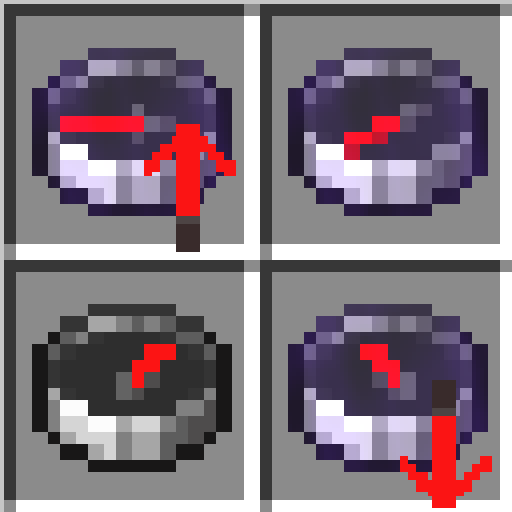
A small fabric mod that displays an icon showing the y-axis direction of a compass in a slot.
Quick answer
Compass3D [Fabric 1.20.4] 2.2.0 targets 1.20.2, 1.20.3, 1.20.1 with Fabric. The project page does not say whether this file belongs on the client, dedicated server, or both. All 2 required mods have matching files.
Where it goes
The project page does not say whether this file belongs on the client, dedicated server, or both.
The source does not explicitly classify this release as client-only or server-only.
[Fabric 1.20.4] 2.2.0 on 1.20. Every mod below is checked against that same setup.
Install Cloth Config API (Fabric/Forge/NeoForge), Cloth Config API first. We found matching files for this game-version and loader setup.
We only count dependency files that match this setup. A file for another loader does not fill the gap.
Before you install it
Built for Compass3D [Fabric 1.20.4] 2.2.0 on 1.20. Pick another file and the loader, install side or required mods may change.
Use [Fabric 1.20.4] 2.2.0. It targets 1.20.2, 1.20.3, 1.20.1 with Fabric; another release may have different loader, side or dependency requirements.
Install Cloth Config API (Fabric/Forge/NeoForge), Cloth Config API first. We found matching files for this game-version and loader setup.
The project page does not say whether this file belongs on the client, dedicated server, or both.
Use the “Get this file” button beside [Fabric 1.20.4] 2.2.0. It opens that exact file at the source.
About this project

This mod renders an arrow over compasses in the inventory/hotbar. This arrow points up or down, showing you which direction (on the Y axis) you need to travel to reach the coordinate.
As of v2.0.0, this also applies to compasses placed in Item Frames. These arrows have their own configs for placement. This features works by default with all compasses except the Recovery Compass. You can install another mod Framed Recovery Compass Fix to make it work.
I had the idea for this mod when working on the tracking compass for my Server Side Commands mod. I realized that you had no way to determine the Y value of the coordinates of a compass. So, I did some research, and found the mod Simple Shulker Preview, which did something similar to what I wanted, and forked it. That project was under the LGPL-3.0 license so click here for a list of the changes I made.
This mod also supports several mods. See the Mod Support List for a list of supported mods, or to suggest new mods to support.

This mod gives you the ability to configure the size and placement of arrows, as well as the arrow type for each supported compass. The config menu is fairly self-explanatory, so I will not elaborate on that further here.
This mod comes with the Cloth Config API built in to implement configs (there should be no need to download it yourself). You need to install Cloth Config API in order for this project to work. I would recommend installing ModMenu alongside it if you actually want to use them though, because I didn't want to create yet another config mapping for such a simple mod.
I made a couple resource packs with alternate icons if you want. You can download them here.
If you don't like the textures and want to make a resource pack to change them, here are the paths to the textures. Please let me know if you do (via a GitHub issue) so I can link them there.
assets/compass3d/textures/item/up_arrow.pngassets/compass3d/textures/item/down_arrow.pngassets/compass3d/textures/item/recovery_up_arrow.pngassets/compass3d/textures/item/recovery_down_arrow.pngThere are also other arrows for modded compasses. Check the directory on GitHub to see them all.
compass3d:*_arrow?So to add the arrow overlays, I had to register a nonexistent item on the client side. However, I discovered in testing that it shows up in autocomplete when doing /give. This generates an error when used in multiplayer, but as the item doesn't exist you shouldn't worry about it.
Project description from CurseForge.
Pick your setup
Choose the version and loader you play, then open the matching release.
Check the dependencies, then try the file in a copied instance before changing a world you care about.
Recent files
compass3d-2.2.0.jar
1 Mar 2024
compass3d-2.1.0.jar
29 Feb 2024
compass3d-2.0.0.jar
28 Feb 2024
compass3d-1.9.0.jar
23 Feb 2024
compass3d-1.8.0.jar
16 Feb 2024
compass3d-1.7.0.jar
10 Feb 2024
compass3d-1.6.0.jar
9 Feb 2024
compass3d-1.5.0.jar
7 Feb 2024
compass3d-1.4.0.jar
6 Feb 2024
6 Feb 2024
compass3d-1.3.0.jar
12 Jun 2023
compass3d-1.2.2.jar
10 Jun 2023
Looking for an older file? The official CurseForge project page is in Resources.
 mod
Dialogue tree library for Minecraft mods
 mod
Kilns that take real in-game days to finish, and Waystones that send items to each other over days. Things age while the player is off doing something else and come back as cider, cheese, mossy stone and music discs.
 mod
Type [item], [armor], [inv] or [ender] in chat to link held items, armor, Shulker Boxes, Bundles, inventory & Ender chest. Server-side — vanilla clients supported!
