Minecraft version
Back to mods 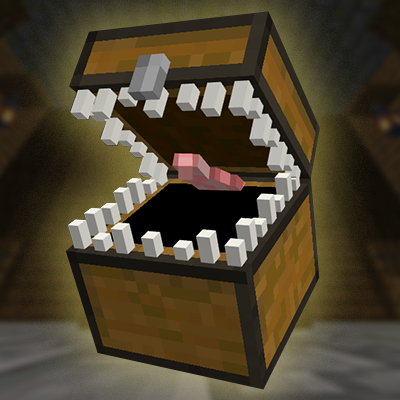
CurseForge · Minecraft mod
Chest Mimic
Addition of the Mimic creature along with other new items and gear related to the mimic.
Choose a version Pick your version below, then grab the matching file.
Quick answer
Which Chest Mimic release should I use?
Latest stable file Mimic's Mod
Game version 1.20.1
Loader Forge
Chest Mimic Mimic's Mod targets 1.20.1 with Forge. The project page does not say whether this file belongs on the client, dedicated server, or both. No extra mods listed for this file.
Where it goes
Is Chest Mimic required on the client, server, or both?
The project page does not say whether this file belongs on the client, dedicated server, or both.
Client Source doesn’t say
Dedicated server Source doesn’t say
Loader for this release Forge
Required install it here Optional supported, not mandatory Not supported do not install here Source doesn’t say do not assume
The source does not explicitly classify this release as client-only or server-only.
What else does Chest Mimic Mimic's Mod need?
Mimic's Mod. Change the file and its required mods may change too.
This file does not list any required mods. Do not add a library just because a different file uses it.
This file does not list any required or optional mods.
Before you install it
Add Chest Mimic without breaking your instance.
Built for Chest Mimic Mimic's Mod. Pick another file and the loader, install side or required mods may change.
- 01
Stick to this file
Use Mimic's Mod. It targets 1.20.1 with Forge; another release may have different loader, side or dependency requirements.
- 02
Bring the mods it needs
This file does not list any required mods. Do not add a library just because a different file uses it.
- 03
Put it on the correct side
The project page does not say whether this file belongs on the client, dedicated server, or both.
- 04
Pick the file you checked
Use the “Get this file” button beside Mimic's Mod. It opens that exact file at the source.
About this project
What does Chest Mimic add?
Dive into Minecraft with a twist of surprise and suspense with the Mimic Mod. Unlike traditional chests found scattered throughout the game, these mischievous creatures lurk in the shadows, waiting for unsuspecting adventurers to fall into their trap.
Mimic Menace: Prepare to face a new threat in the form of the Chest Mimic. Disguised as ordinary chests, these cunning creatures lie in wait, ready to pounce on any player who dares to approach them without caution.
Deceptive Design: With their intricate camouflage, Chest Mimics seamlessly blend into their surroundings, making them indistinguishable from genuine chests at first glance. Only the keenest of eyes can discern the subtle differences that betray their true nature. Lurking Lairs: Encounter Chest Mimics in a variety of locations, from dark dungeons to sprawling caverns. No chest is safe from their clutches, adding an element of uncertainty to every loot-filled excursion. Mimicry Mastery: Master the art of identifying Chest Mimics and outsmarting their tricks to claim the treasures they guard. With practice and perseverance, players can turn the tables on these wily creatures and emerge victorious in their battles of wit and strategy.
Prepare yourself for an adventure like no other as you explore the world of Minecraft and encounter the enigmatic Chest Mimic. Will you fall victim to their cunning schemes, or will you emerge triumphant in the face of deception? The choice is yours in the thrilling world of the Mimicry Mod.
Project description from CurseForge.
Pick your setup
Chest Mimic by Minecraft version and loader
Choose the version and loader you play, then open the matching release.
Check the dependencies, then try the file in a copied instance before changing a world you care about.
Recent files
Chest Mimic versions and loaders
Mimic's Mod
mimic_mod-1.0.0.jar
17 Feb 2024
Client Source doesn’t say Server Source doesn’t say Dependencies No extras listed Listed on Release listing
Check the 1.20.1 · Forge setup 1.20.1Forge release
Looking for an older file? The official CurseForge project page is in Resources.
 mod
CurseForge + Modrinth · Minecraft
Curios API
A flexible and expandable accessory/equipment API for users and developers.
 mod
CurseForge + Modrinth · Minecraft
Tinkers' Gadgets
A lightweight Tinkers' Construct addon featuring tools, new materials, and exclusive projectile traits.
 mod
CurseForge · Minecraft
Spawn Structures
Sets the default spawn point to be inside a custom structure!