Minecraft version
Back to mods 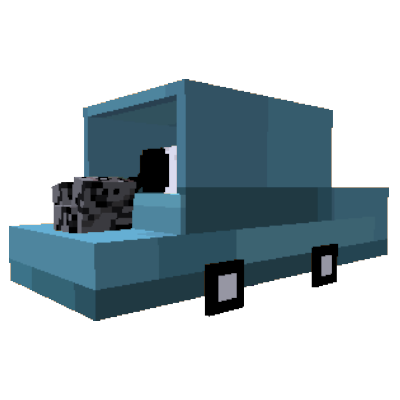
CurseForge · Minecraft mod
DarkCars[FORGE / FABRIC]
a simple cars with manual gear shifting
Choose a version Pick your version below, then grab the matching file.
Quick answer
Which DarkCars[FORGE / FABRIC] release should I use?
Latest stable file darkcars-1.0.4-FORGE
Game version 1.20.4
Loader Forge
DarkCars[FORGE / FABRIC] darkcars-1.0.4-FORGE targets 1.20.4 with Forge. The project page does not say whether this file belongs on the client, dedicated server, or both. No extra mods listed for this file.
Where it goes
Is DarkCars[FORGE / FABRIC] required on the client, server, or both?
The project page does not say whether this file belongs on the client, dedicated server, or both.
Client Source doesn’t say
Dedicated server Source doesn’t say
Loader for this release Forge
Required install it here Optional supported, not mandatory Not supported do not install here Source doesn’t say do not assume
The source does not explicitly classify this release as client-only or server-only.
What else does DarkCars[FORGE / FABRIC] darkcars-1.0.4-FORGE need?
darkcars-1.0.4-FORGE. Change the file and its required mods may change too.
This file does not list any required mods. Do not add a library just because a different file uses it.
This file does not list any required or optional mods.
Before you install it
Add DarkCars[FORGE / FABRIC] without breaking your instance.
Built for DarkCars[FORGE / FABRIC] darkcars-1.0.4-FORGE. Pick another file and the loader, install side or required mods may change.
- 01
Stick to this file
Use darkcars-1.0.4-FORGE. It targets 1.20.4 with Forge; another release may have different loader, side or dependency requirements.
- 02
Bring the mods it needs
This file does not list any required mods. Do not add a library just because a different file uses it.
- 03
Put it on the correct side
The project page does not say whether this file belongs on the client, dedicated server, or both.
- 04
Pick the file you checked
Use the “Get this file” button beside darkcars-1.0.4-FORGE. It opens that exact file at the source.
About this project
What does DarkCars[FORGE / FABRIC] add?
DarkCars, is a simple cars, and support Manual gear shifting, and fuel, and Damage count, and can be crafted!, and here some tips and features and how to control the car:
controll car:
to set gear up, press "v" with right click
to set gear down, press "v" with left click
keys:
"w": forward
"s": brake
"d": right
"a": left
"v": clutch
to start the car, first you must have engine, then ride the car, and then press "w" key to start.
when the car is started you must to press clutch "v" key, because if you dont press the clutch, the engine will stop, and if you want to move the car forward, stop pressing clutch and press the "w" fastly, and if you want to brake, stop pressing the "w" key and press the clutch and brake fastly
features:
1 -manually car
2 -colorable
3 - 6 gear shifting
4- engines and wheels
5- fuels
6- more than 3 car models
7 - and more thing..
tips:
1-you ought to downlload REI to see all recipes.
2-to repair car, right click in car hitbox with oak_planks
1 - to craft a car:
open a crafting and add 8 oak planks, and in the center 1 block of white wool
this will give you a car crafter block,
place the car crafter ,
2- to craft a car body
to make a car body, open crafting and add 8 oak planks, like the car body, see in REI, if you downloaded,
then but body car in the car crafter, and click car crafter in your empty hand, and will spawn up the car crafter,
but you must to add part, like an engine, and wheels, make it in Crafting
Project description from CurseForge.
Pick your setup
DarkCars[FORGE / FABRIC] by Minecraft version and loader
Choose the version and loader you play, then open the matching release.
Check the dependencies, then try the file in a copied instance before changing a world you care about.
Recent files
DarkCars[FORGE / FABRIC] versions and loaders
darkcars-1.0.4-FORGE
darkcars-1.0.4.jar
7 Mar 2024
Client Source doesn’t say Server Source doesn’t say Dependencies No extras listed Listed on Release listing
Check the 1.20.4 · Forge setup Forge1.20.4 release
darkcars-1.0.0-forge
darkcars-1.0.0.jar
4 Mar 2024
Client Source doesn’t say Server Source doesn’t say Dependencies No extras listed Listed on Release listing
Check the 1.20.4 · Forge setup Forge1.20.4 alpha
darkcars-1.0.3
darkcars-1.0.3.jar
1 Mar 2024
Client Source doesn’t say Server Source doesn’t say Dependencies No extras listed Listed on Release listing
Check the 1.20.4 · Fabric setup Fabric1.20.4 release
darkcars-1.0.1
darkcars-1.0.1.jar
29 Feb 2024
Client Source doesn’t say Server Source doesn’t say Dependencies No extras listed Listed on Release listing
Check the 1.20.4 · Fabric setup Fabric1.20.4 release
DarkCars-1.0.0-alpha
darkcars-1.0.0.jar
29 Feb 2024
Client Source doesn’t say Server Source doesn’t say Dependencies No extras listed Listed on Release listing
Check the 1.20.4 · Fabric setup Fabric1.20.4 alpha
Looking for an older file? The official CurseForge project page is in Resources.
 mod
CurseForge + Modrinth · Minecraft
The Boreal
The Boreal is a mod that adds a whole new boreal-themed dimension, which new blocks, items, mobs, new weapons, awesome terrain and a lot more.
 mod
CurseForge · Minecraft
Create: City Power
Turn Create rotation into electricity and power an entire city with cables, wireless relays, electric motors, batteries, lighting and a shared grid controller.
 mod
CurseForge · Minecraft
Paragons
Paragons turns eligible creatures into elite mobs with distinctive combinations of traits.