Fzzy Config Needed by Particle Core 0.2.5+1.20.6
requiredMatching file found Matched file: fzzy_config-0.5.9+1.20.6

CurseForge · Minecraft mod
Particle optimizations: Culling, rendering optimizations, configurable particle-type-specific spawn reduction, and potion particle disabling. Compatible with Sodium, improves performance over Sodium alone.
Quick answer
Particle Core 0.2.5+1.20.6 targets 1.20.5, 1.20.6 with Fabric, Quilt. It must be installed on the client. Do not install it on the dedicated server. All 5 required mods have matching files.
Where it goes
It must be installed on the client. Do not install it on the dedicated server.
This file is marked client-only.
0.2.5+1.20.6 on 1.20.6. Every mod below is checked against that same setup.
Install Fzzy Config, Fabric API, Fabric Language Kotlin, Fabric Language Kotlin and 1 more first. We found matching files for this game-version and loader setup. 2 come through another mod in the chain.
2 extra mods were pulled in by other dependencies. Indented rows show who needs each one. We only count dependency files that match this setup. A file for another loader does not fill the gap.
Before you install it
Built for Particle Core 0.2.5+1.20.6 on 1.20.6. Pick another file and the loader, install side or required mods may change.
Use 0.2.5+1.20.6. It targets 1.20.5, 1.20.6 with Fabric, Quilt; another release may have different loader, side or dependency requirements.
Install Fzzy Config, Fabric API, Fabric Language Kotlin, Fabric Language Kotlin and 1 more first. We found matching files for this game-version and loader setup. 2 come through another mod in the chain.
It must be installed on the client. Do not install it on the dedicated server.
Use the “Get this file” button beside 0.2.5+1.20.6. It opens that exact file at the source.
About this project

Particle Core focuses on one thing: Optimizing particles. Vanilla Minecraft is quite inefficient with particles in a variety of ways. Particle Core aims to improve this.



The biggest performance improvement overall, Particle Core doesn't render particles you can't see. Makes sense! Only about a 12th of the lightbox is visible at standard FOVs, why render the 11/12 of particles you can't even see?
Particles that are rendered are optimized. Vertex transformations and lightmap polling are optimized. Vertex optimizations defer to Sodium.
Three methods are provided to either completely disable or reduce spawning of specific particle types. Any particle you can add via the /particle command is eligible.
particle_core:excluded_particles to completely disable those particle types. Server Owners: this will disable those particles for every client that joins the server, use with caution!particle type identifier to chance double.Unlike invis-particle resource packs, this actually prevents the particles from spawning at all, improving performance.
Two config options are provided that can fine-tune the standard vanilla options of ALL, DECREASED, and MINIMAL. One is effectively a dial between ALL and DECREASED, the second a dial between DECREASED and MINIMAL. If you simply want to tweak particle spawning a bit, for example if your computer runs fine with DECREASED but you personally don't like how many particles are still on screen, you can dial DECREASED back without going all the way to MINIMAL.
Particle Core provides a config covering every feature added. locate the config in the standard .mincraft config folder. Config name is particle_core_config_v[x].json, where [x] is the current version number.
The config has a comprehensive "comment" section at the top of the file. Please read it for guidance on config usage.
To some, potion particles are extremely annoying. Use this setting to turn them off.
A dial to tweak particle spawning between the ALL and DECREASED Minecraft setting.
A dial to tweak particle spawning between the DECREASED and MINIMAL Minecraft setting.
Completely disable all client-side particle spawning.
Map to reduce specific particle spawning.
minecraft:smoke.If any feature in Particle Core is causing a conflict or it is simply undesired, every feature can be individually disabled by adding it's string key to this list. See comment for instructions.
Without Particle Core, world rendering is at 41% of CPU time, with renderParticles the lions share of that at 25% of CPU time.

With Particle Core, rendering is now at only 16% of CPU time, particle rendering basically a non-item.

Improves performance over Sodium by itself. Top section of the screenshot with Particle Core, the bottom section is without it. About 5% CPU time improvement, or 50% relative improvement.
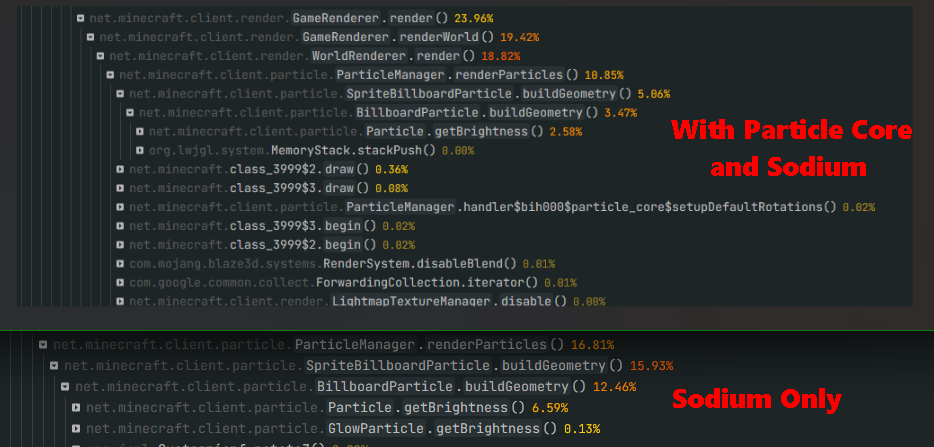
Project description from CurseForge.
Pick your setup
Choose the version and loader you play, then open the matching release.
Showing the newest 12 of 21 game versions. Older files are in the list below.
Check the dependencies, then try the file in a copied instance before changing a world you care about.
Recent files
particle_core-0.2.5+1.20.6.jar
16 Sept 2024
particle_core-0.2.4+1.20.6.jar
29 Jul 2024
particle_core-0.2.3+1.20.5.jar
27 Apr 2024
Looking for an older file? The official CurseForge project page is in Resources.
 mod
All-in-one mod that improves performance, reduces memory usage, and fixes many bugs. Compatible with all your favorite performance mods!
 mod
Revive your friends.
 mod
A configurable visual representation of your reach and hit distances