Minecraft version
Back to mods 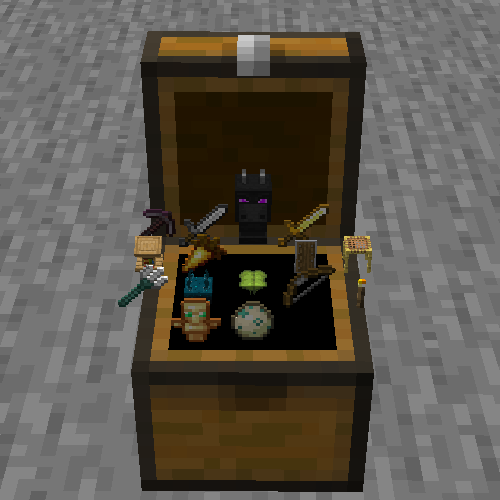
CurseForge · Minecraft mod
No Gui Chest
You can use a new chest and hopper without GUI!
Choose a version Pick your version below, then grab the matching file.
Quick answer
Which No Gui Chest release should I use?
Latest stable file NGC-1.20.1-1.4.6-forge.jar
Game version 1.20.1
Loader Forge
No Gui Chest NGC-1.20.1-1.4.6-forge.jar targets 1.20.1 with Forge. The project page does not say whether this file belongs on the client, dedicated server, or both. No extra mods listed for this file.
Where it goes
Is No Gui Chest required on the client, server, or both?
The project page does not say whether this file belongs on the client, dedicated server, or both.
Client Source doesn’t say
Dedicated server Source doesn’t say
Loader for this release Forge
Required install it here Optional supported, not mandatory Not supported do not install here Source doesn’t say do not assume
The source does not explicitly classify this release as client-only or server-only.
What else does No Gui Chest NGC-1.20.1-1.4.6-forge.jar need?
NGC-1.20.1-1.4.6-forge.jar. Change the file and its required mods may change too.
This file does not list any required mods. Do not add a library just because a different file uses it.
This file does not list any required or optional mods.
Before you install it
Add No Gui Chest without breaking your instance.
Built for No Gui Chest NGC-1.20.1-1.4.6-forge.jar. Pick another file and the loader, install side or required mods may change.
- 01
Stick to this file
Use NGC-1.20.1-1.4.6-forge.jar. It targets 1.20.1 with Forge; another release may have different loader, side or dependency requirements.
- 02
Bring the mods it needs
This file does not list any required mods. Do not add a library just because a different file uses it.
- 03
Put it on the correct side
The project page does not say whether this file belongs on the client, dedicated server, or both.
- 04
Pick the file you checked
Use the “Get this file” button beside NGC-1.20.1-1.4.6-forge.jar. It opens that exact file at the source.
About this project
What does No Gui Chest add?
Let's remove the GUI and see something more immersive!
When lid is not open, you can right-click the top of the chest to open the lid.
Items will appear in the chest!
Right click on the item in Chest to swap it with the item in your hand.
Right click on the other side to close the lid.
Of course, you can still use GUI
When Chest is not open, you can right-click on all faces of Chest to open the GUI,
except for the top, which is used to open the lid.
Some possible issues
If the model of the item is too large, it will block other items, such as the Dragon Head.
A regular Chest has 27 slots, but it's not easy to arrange them into long squares, so I only rendered 25, and I chose not to render the other two.
Other block?
Creating.
Completed:chest、hopper、brewing table、dropper、dispenser.
Project description from CurseForge.
Pick your setup
No Gui Chest by Minecraft version and loader
Choose the version and loader you play, then open the matching release.
Minecraft version
1.20.3
1 loader buildMinecraft version
1.20.2
1 loader buildMinecraft version
1.20.1
1 loader buildCheck the dependencies, then try the file in a copied instance before changing a world you care about.
Recent files
No Gui Chest versions and loaders
NGC-1.20.1-1.4.6-forge.jar
3 Jun 2024
Client Source doesn’t say Server Source doesn’t say Dependencies No extras listed Listed on Release listing
Check the 1.20.1 · Forge setup 1.20.1Forge release
NGC-1.20.1-1.4.5-forge.jar
3 Jun 2024
Client Source doesn’t say Server Source doesn’t say Dependencies No extras listed Listed on Release listing
Check the 1.20.1 · Forge setup 1.20.1Forge release
NGC-1.20.1-1.4.3-forge.jar
2 Jun 2024
Client Source doesn’t say Server Source doesn’t say Dependencies No extras listed Listed on Release listing
Check the 1.20.1 · Forge setup 1.20.1Forge alpha
NGC-1.20.1-1.4.2-forge.jar
1 Jun 2024
Client Source doesn’t say Server Source doesn’t say Dependencies No extras listed Listed on Release listing
Check the 1.20.1 · Forge setup 1.20.1Forge release
NGC-1.20.1-1.3.3-forge.jar
8 Apr 2024
Client Source doesn’t say Server Source doesn’t say Dependencies No extras listed Listed on Release listing
Check the 1.20.1 · Forge setup 1.20.1Forge release
NGC-1.20.1-1.3.2-forge.jar
7 Apr 2024
Client Source doesn’t say Server Source doesn’t say Dependencies No extras listed Listed on Release listing
Check the 1.20.1 · Forge setup 1.20.1Forge release
NGC-1.20.1-1.3.1-forge.jar
7 Apr 2024
Client Source doesn’t say Server Source doesn’t say Dependencies No extras listed Listed on Release listing
Check the 1.20.1 · Forge setup 1.20.1Forge alpha
NGC-1.20.1-1.3.0-forge.jar
24 Mar 2024
Client Source doesn’t say Server Source doesn’t say Dependencies No extras listed Listed on Release listing
Check the 1.20.1 · Forge setup 1.20.1Forge release
NGC-1.20.1-1.2.2-forge.jar
23 Mar 2024
Client Source doesn’t say Server Source doesn’t say Dependencies No extras listed Listed on Release listing
Check the 1.20.1 · Forge setup 1.20.1Forge release
NGC-1.20.1-1.1.2-forge.jar
21 Mar 2024
Client Source doesn’t say Server Source doesn’t say Dependencies No extras listed Listed on Release listing
Check the 1.20.1 · Forge setup 1.20.1Forge release
NGC-1.20.1-1.1.1-forge.jar
19 Mar 2024
Client Source doesn’t say Server Source doesn’t say Dependencies No extras listed Listed on Release listing
Check the 1.20.1 · Forge setup 1.20.1Forge release
NGC-1.20.1-1.1.0-forge.jar
18 Mar 2024
Client Source doesn’t say Server Source doesn’t say Dependencies No extras listed Listed on Release listing
Check the 1.20.1 · Forge setup 1.20.1Forge release
Looking for an older file? The official CurseForge project page is in Resources.
 mod
CurseForge + Modrinth · Minecraft
NEEPMeat
A tech mod with pipes, computers, guns, rusty machinery and meat.
 mod
CurseForge + Modrinth · Minecraft
Combatlog
An attempt to prevent people from logging out while in combat
 mod
CurseForge + Modrinth · Minecraft
Reliable Replacer
A lightweight utility for replacing one block with another, both during worldgen and afterward.