Minecraft version
Back to mods 
CurseForge · Minecraft mod
Too Many Paintings!
More paintings for Minecraft, includes popular paintings too!
Choose a version Pick your version below, then grab the matching file.
Quick answer
Which Too Many Paintings! release should I use?
Latest stable file Too Many Paintings! 26.09.15 - 26.1+
Game version 26.1, 26.1.1, 26.1.2
Loader Fabric
Too Many Paintings! 26.09.15 - 26.1+ targets 26.1, 26.1.1, 26.1.2 with Fabric. The project page does not say whether this file belongs on the client, dedicated server, or both. No extra mods listed for this file.
Where it goes
Is Too Many Paintings! required on the client, server, or both?
The project page does not say whether this file belongs on the client, dedicated server, or both.
Client Source doesn’t say
Dedicated server Source doesn’t say
Loader for this release Fabric
Required install it here Optional supported, not mandatory Not supported do not install here Source doesn’t say do not assume
The source does not explicitly classify this release as client-only or server-only.
What else does Too Many Paintings! 26.09.15 - 26.1+ need?
Too Many Paintings! 26.09.15 - 26.1+. Change the file and its required mods may change too.
This file does not list any required mods. Do not add a library just because a different file uses it.
This file does not list any required or optional mods.
Before you install it
Add Too Many Paintings! without breaking your instance.
Built for Too Many Paintings! 26.09.15 - 26.1+. Pick another file and the loader, install side or required mods may change.
- 01
Stick to this file
Use Too Many Paintings! 26.09.15 - 26.1+. It targets 26.1, 26.1.1, 26.1.2 with Fabric; another release may have different loader, side or dependency requirements.
- 02
Bring the mods it needs
This file does not list any required mods. Do not add a library just because a different file uses it.
- 03
Put it on the correct side
The project page does not say whether this file belongs on the client, dedicated server, or both.
- 04
Pick the file you checked
Use the “Get this file” button beside Too Many Paintings! 26.09.15 - 26.1+. It opens that exact file at the source.
About this project
What does Too Many Paintings! add?
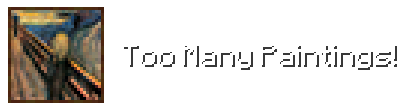
Make over 50+ new paintings instantly available in your Minecraft world! Tired of the limited painting options? Well this is the paintings update you've been looking for.

🖼️ More Paintings:
- Popular Paintings: Decorate your Minecraft halls with iconic works from legendary artists like Van Gogh, da Vinci, and more!
- Works with Your Current World: This mod seamlessly integrates with your existing world, allowing you to instant place the new paintings anywhere.
Check out my new mod!
Project description from CurseForge.
Pick your setup
Too Many Paintings! by Minecraft version and loader
Choose the version and loader you play, then open the matching release.
Minecraft version
26.2
4 loader buildsForge Too Many Paintings! 26.08.16 - 26.1+ 2
stable files
· 2 total · 16 Aug 2026Fabric Too Many Paintings! 26.09.15 - 26.1+ 3
stable files
· 3 total · 15 Sept 2026Quilt Too Many Paintings! 26.08.16 - 26.1+ 2
stable files
· 2 total · 16 Aug 2026NeoForge Too Many Paintings! 26.08.16 - 26.1+ 3
stable files
· 3 total · 16 Aug 2026
Minecraft version
26.1.2
4 loader buildsForge Too Many Paintings! 26.08.16 - 26.1+ 2
stable files
· 2 total · 16 Aug 2026Fabric Too Many Paintings! 26.09.15 - 26.1+ 3
stable files
· 3 total · 15 Sept 2026Quilt Too Many Paintings! 26.08.16 - 26.1+ 2
stable files
· 2 total · 16 Aug 2026NeoForge Too Many Paintings! 26.08.16 - 26.1+ 3
stable files
· 3 total · 16 Aug 2026
Minecraft version
26.1.1
4 loader buildsForge Too Many Paintings! 26.08.16 - 26.1+ 2
stable files
· 2 total · 16 Aug 2026Fabric Too Many Paintings! 26.09.15 - 26.1+ 3
stable files
· 3 total · 15 Sept 2026Quilt Too Many Paintings! 26.08.16 - 26.1+ 2
stable files
· 2 total · 16 Aug 2026NeoForge Too Many Paintings! 26.08.16 - 26.1+ 3
stable files
· 3 total · 16 Aug 2026
Minecraft version
26.1
4 loader buildsForge Too Many Paintings! 26.08.16 - 26.1+ 2
stable files
· 2 total · 16 Aug 2026Fabric Too Many Paintings! 26.09.15 - 26.1+ 3
stable files
· 3 total · 15 Sept 2026Quilt Too Many Paintings! 26.08.16 - 26.1+ 2
stable files
· 2 total · 16 Aug 2026NeoForge Too Many Paintings! 26.08.16 - 26.1+ 3
stable files
· 3 total · 16 Aug 2026
Minecraft version
1.21.11
4 loader buildsForge Too Many Paintings! 26.08.16 - 1.21.3+ 2
stable files
· 2 total · 16 Aug 2026Fabric Too Many Paintings! 26.08.16 - 1.21.2+ 2
stable files
· 2 total · 16 Aug 2026Quilt Too Many Paintings! 26.08.16 - 1.21.2+ 2
stable files
· 2 total · 16 Aug 2026NeoForge Too Many Paintings! 26.08.16 - 1.21.2+ 2
stable files
· 2 total · 16 Aug 2026
Minecraft version
1.21.10
4 loader buildsForge Too Many Paintings! 26.08.16 - 1.21.3+ 3
stable files
· 3 total · 16 Aug 2026Fabric Too Many Paintings! 26.08.16 - 1.21.2+ 4
stable files
· 4 total · 16 Aug 2026Quilt Too Many Paintings! 26.08.16 - 1.21.2+ 4
stable files
· 4 total · 16 Aug 2026NeoForge Too Many Paintings! 26.08.16 - 1.21.2+ 4
stable files
· 4 total · 16 Aug 2026
Minecraft version
1.21.9
4 loader buildsForge Too Many Paintings! 26.08.16 - 1.21.3+ 3
stable files
· 3 total · 16 Aug 2026Fabric Too Many Paintings! 26.08.16 - 1.21.2+ 4
stable files
· 4 total · 16 Aug 2026Quilt Too Many Paintings! 26.08.16 - 1.21.2+ 4
stable files
· 4 total · 16 Aug 2026NeoForge Too Many Paintings! 26.08.16 - 1.21.2+ 4
stable files
· 4 total · 16 Aug 2026
Minecraft version
1.21.8
4 loader buildsForge Too Many Paintings! 26.08.16 - 1.21.3+ 3
stable files
· 3 total · 16 Aug 2026Fabric Too Many Paintings! 26.08.16 - 1.21.2+ 4
stable files
· 4 total · 16 Aug 2026Quilt Too Many Paintings! 26.08.16 - 1.21.2+ 4
stable files
· 4 total · 16 Aug 2026NeoForge Too Many Paintings! 26.08.16 - 1.21.2+ 4
stable files
· 4 total · 16 Aug 2026
Minecraft version
1.21.7
4 loader buildsForge Too Many Paintings! 26.08.16 - 1.21.3+ 4
stable files
· 4 total · 16 Aug 2026Fabric Too Many Paintings! 26.08.16 - 1.21.2+ 4
stable files
· 4 total · 16 Aug 2026Quilt Too Many Paintings! 26.08.16 - 1.21.2+ 4
stable files
· 4 total · 16 Aug 2026NeoForge Too Many Paintings! 26.08.16 - 1.21.2+ 4
stable files
· 4 total · 16 Aug 2026
Minecraft version
1.21.6
4 loader buildsForge Too Many Paintings! 26.08.16 - 1.21.3+ 4
stable files
· 4 total · 16 Aug 2026Fabric Too Many Paintings! 26.08.16 - 1.21.2+ 4
stable files
· 4 total · 16 Aug 2026Quilt Too Many Paintings! 26.08.16 - 1.21.2+ 4
stable files
· 4 total · 16 Aug 2026NeoForge Too Many Paintings! 26.08.16 - 1.21.2+ 4
stable files
· 4 total · 16 Aug 2026
Minecraft version
1.21.5
4 loader buildsForge Too Many Paintings! 26.08.16 - 1.21.3+ 4
stable files
· 4 total · 16 Aug 2026Fabric Too Many Paintings! 26.08.16 - 1.21.2+ 4
stable files
· 4 total · 16 Aug 2026Quilt Too Many Paintings! 26.08.16 - 1.21.2+ 4
stable files
· 4 total · 16 Aug 2026NeoForge Too Many Paintings! 26.08.16 - 1.21.2+ 4
stable files
· 4 total · 16 Aug 2026
Showing the newest 12 of 29 game versions. Older files are in the list below.
Check the dependencies, then try the file in a copied instance before changing a world you care about.
Recent files
Too Many Paintings! versions and loaders
Too Many Paintings! 26.09.15 - 26.1+
toomanypaintings-26.09.15-26.1-fabric.jar
15 Sept 2026
Client Source doesn’t say Server Source doesn’t say Dependencies No extras listed Listed on Release listing
Check the 26.3 · Fabric setup Fabric26.126.1.126.1.2 release
Too Many Paintings! 26.08.16 - 26.1+
toomanypaintings-26.08.16-26.1-neoforge.jar
16 Aug 2026
Client Source doesn’t say Server Source doesn’t say Dependencies No extras listed Listed on Release listing
Check the 26.3 · NeoForge setup NeoForge26.126.1.126.1.2 release
Too Many Paintings! 26.08.16 - 1.21.2+
toomanypaintings-26.08.16-1.21.3-neoforge.jar
16 Aug 2026
Client Source doesn’t say Server Source doesn’t say Dependencies No extras listed Listed on Release listing
Check the 1.21.11 · NeoForge setup 1.21.81.21.51.21.41.21.6 release
Too Many Paintings! 26.08.16 - 1.21+
toomanypaintings-26.08.16-1.21-neoforge.jar
16 Aug 2026
Client Source doesn’t say Server Source doesn’t say Dependencies No extras listed Listed on Release listing
Check the 1.21.1 · NeoForge setup 1.211.21.1NeoForge release
Too Many Paintings! 26.08.16 - 26.1+
toomanypaintings-26.08.16-26.1-forge.jar
16 Aug 2026
Client Source doesn’t say Server Source doesn’t say Dependencies No extras listed Listed on Release listing
Check the 26.2 · Forge setup Forge26.126.1.126.1.2 release
Too Many Paintings! 26.08.16 - 1.21.3+
toomanypaintings-26.08.16-1.21.3-forge.jar
16 Aug 2026
Client Source doesn’t say Server Source doesn’t say Dependencies No extras listed Listed on Release listing
Check the 1.21.11 · Forge setup 1.21.81.21.51.21.4Forge release
Too Many Paintings! 26.08.16 - 1.21+
toomanypaintings-26.08.16-1.21-forge.jar
16 Aug 2026
Client Source doesn’t say Server Source doesn’t say Dependencies No extras listed Listed on Release listing
Check the 1.21.1 · Forge setup 1.21Forge1.21.1 release
Too Many Paintings! 26.08.16 - 1.20.6
toomanypaintings-26.08.16-1.20.6-forge.jar
16 Aug 2026
Client Source doesn’t say Server Source doesn’t say Dependencies No extras listed Listed on Release listing
Check the 1.20.6 · Forge setup Forge1.20.6NeoForge release
Too Many Paintings! 26.08.16 - 1.20+
toomanypaintings-26.08.16-1.20-forge.jar
16 Aug 2026
Client Source doesn’t say Server Source doesn’t say Dependencies No extras listed Listed on Release listing
Check the 1.20.4 · Forge setup 1.20.21.20.1Forge1.20 release
Too Many Paintings! 26.08.16 - 1.19+
toomanypaintings-26.08.16-1.19-forge.jar
16 Aug 2026
Client Source doesn’t say Server Source doesn’t say Dependencies No extras listed Listed on Release listing
Check the 1.19.4 · Forge setup 1.19.31.19.4Forge1.19.1 release
Too Many Paintings! 26.08.16 - 26.1+
toomanypaintings-26.08.16-26.1-fabric.jar
16 Aug 2026
Client Source doesn’t say Server Source doesn’t say Dependencies No extras listed Listed on Release listing
Check the 26.2 · Fabric setup FabricQuilt26.126.1.1 release
Too Many Paintings! 26.08.16 - 1.21.2+
toomanypaintings-26.08.16-1.21.2-fabric.jar
16 Aug 2026
Client Source doesn’t say Server Source doesn’t say Dependencies No extras listed Listed on Release listing
Check the 1.21.11 · Fabric setup Fabric1.21.81.21.51.21.4 release
Looking for an older file? The official CurseForge project page is in Resources.
 mod
mod CurseForge + Modrinth · Minecraft
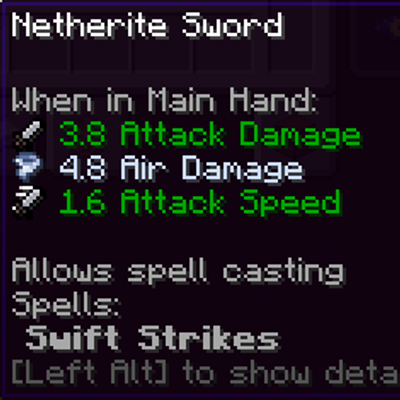
Spell Powered Weapons
Makes weapons found & crafted to have a chance to get an elemental damage instance!
 mod
mod CurseForge · Minecraft
Top Down View
Play Minecraft from an isometric perspective inspired by ARPGs like Path of Exile or Diablo.
 mod
mod CurseForge · Minecraft
Profet's Veinminer
Sneak, mine one ore, and the whole vein comes out in a chain reaction. Respects Fortune, Silk Touch, tool tier and durability. Only needed on the server.