Minecraft version
Back to mods 
CurseForge · Minecraft mod
GenMogrify
Modify blocks, entities and/or items as they are generated.
Choose a version Pick your version below, then grab the matching file.
Quick answer
Which GenMogrify release should I use?
Latest stable file genmogrify-1.20.1-0.2.0.jar
Game version 1.20.1
Loader NeoForge, Forge
genmogrify-1.20.1-0.2.0.jar targets 1.20.1 with NeoForge, Forge. The project page does not say whether this file belongs on the client, dedicated server, or both. No extra mods listed for this file.
Where it goes
Is GenMogrify required on the client, server, or both?
The project page does not say whether this file belongs on the client, dedicated server, or both.
Client Source doesn’t say
Dedicated server Source doesn’t say
Loader for this release NeoForge, Forge
Required install it here Optional supported, not mandatory Not supported do not install here Source doesn’t say do not assume
The source does not explicitly classify this release as client-only or server-only.
What else does genmogrify-1.20.1-0.2.0.jar need?
genmogrify-1.20.1-0.2.0.jar. Change the file and its required mods may change too.
This file does not list any required mods. Do not add a library just because a different file uses it.
This file does not list any required or optional mods.
Before you install it
Add GenMogrify without breaking your instance.
Built for genmogrify-1.20.1-0.2.0.jar. Pick another file and the loader, install side or required mods may change.
- 01
Stick to this file
Use genmogrify-1.20.1-0.2.0.jar. It targets 1.20.1 with NeoForge, Forge; another release may have different loader, side or dependency requirements.
- 02
Bring the mods it needs
This file does not list any required mods. Do not add a library just because a different file uses it.
- 03
Put it on the correct side
The project page does not say whether this file belongs on the client, dedicated server, or both.
- 04
Pick the file you checked
Use the “Get this file” button beside genmogrify-1.20.1-0.2.0.jar. It opens that exact file at the source.
About this project
What does GenMogrify add?
World gen transmogrification.... change the world as it is generated.
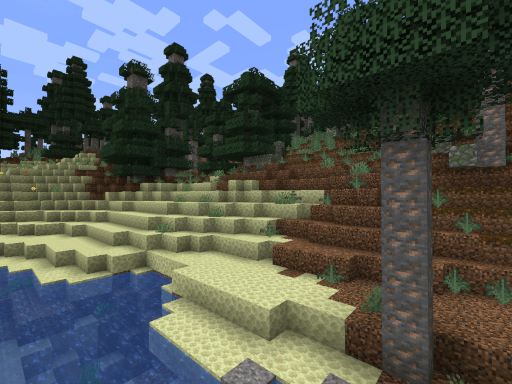
Blocks, entitities and items can be altered as they are generated. This mod is intended to be used in mod packs that wish to gate items behind altered recipes to prevent those items from being naturally found in the world. Want to make furnaces difficult to obtain? Then you probably don't want them scattered randomly in various structures.
In addition to preventing select things from generating, this mod could be used just to make desired changes you want to see in the world. Want all grass blocks to be replaced by endstone? Well, you probably don't. But if you did, you could. In fact, the default configuration of changes does just that.... so you probably want to change things to how you want them to be. The default configuration is generated when loading a world without a configuration already in place.
Documentation is available. The default configuration can be used as an aid to understanding how the genmogrifications are defined.
Enjoy.
Project description from CurseForge.
Pick your setup
GenMogrify by Minecraft version and loader
Choose the version and loader you play, then open the matching release.
Minecraft version
1.20.1
2 loader buildsCheck the dependencies, then try the file in a copied instance before changing a world you care about.
Recent files
GenMogrify versions and loaders
genmogrify-1.20.1-0.2.0.jar
6 May 2024
Client Source doesn’t say Server Source doesn’t say Dependencies No extras listed Listed on Release listing
Check the 1.20.1 · NeoForge setup NeoForge1.20.1Forge release
genmogrify-neo-1.20.4-0.2.0.jar
6 May 2024
Client Source doesn’t say Server Source doesn’t say Dependencies No extras listed Listed on Release listing
Check the 1.20.4 · NeoForge setup NeoForge1.20.4 release
genmogrify-forge-1.20.4-0.2.0.jar
6 May 2024
Client Source doesn’t say Server Source doesn’t say Dependencies No extras listed Listed on Release listing
Check the 1.20.4 · Forge setup Forge1.20.4 release
genmogrify-neo-1.20.4-0.1.1.jar
4 Apr 2024
Client Source doesn’t say Server Source doesn’t say Dependencies No extras listed Listed on Release listing
Check the 1.20.4 · NeoForge setup NeoForge1.20.4 beta
GenMogrify-forge-1.20.4-0.1.0.jar
genmogrify-forge-1.20.4-0.1.0.jar
26 Mar 2024
Client Source doesn’t say Server Source doesn’t say Dependencies No extras listed Listed on Release listing
Check the 1.20.4 · Forge setup Forge1.20.4 beta
GenMogrify-1.20.1-0.1.0.jar
genmogrify-1.20.1-0.1.0.jar
26 Mar 2024
Client Source doesn’t say Server Source doesn’t say Dependencies No extras listed Listed on Release listing
Check the 1.20.1 · NeoForge setup NeoForge1.20.1Forge beta
Looking for an older file? The official CurseForge project page is in Resources.
 mod
CurseForge · Minecraft
DMZ Ultra WorldGen Fix
Universal worldgen compatibility fix for DMZ Ultra (0.5+, 0.6.1 & 0.7.0+) on Forge 1.20.1 — fixes Terralith & modded worldgen for [bleach.places], QuincyChapel, FittedSites, Tokyo Jujutsu High, and remaining StructureGuard edge cases.
 mod
CurseForge · Minecraft
Raw's Chunk Generation
Automatic chunk generation extension. Generates a buffer zone around online players, and generates around recent player activity when no players are online.
 mod
CurseForge · Minecraft
Earth Platform
The Earth in Minecraft at 1:1 scale