Fabric API Needed by Colored Slime Blocks 1.13.0
requiredMatching file found Matched file: 0.166.2+26.3

Modrinth · Minecraft mod
Adds new slime and honey block colors through dye.
Quick answer
Colored Slime Blocks 1.13.0 targets 26.3 with Fabric. Installation on the client is optional. Installation on the dedicated server is optional. All 1 required mods have matching files.
Where it goes
Installation on the client is optional. Installation on the dedicated server is optional.
The source marks this as usable on both the client and server.
1.13.0. Change the file and its required mods may change too.
Install Fabric API first. We found matching files for this game-version and loader setup.
We only count dependency files that match this setup. A file for another loader does not fill the gap.
Before you install it
Built for Colored Slime Blocks 1.13.0. Pick another file and the loader, install side or required mods may change.
Use 1.13.0. It targets 26.3 with Fabric; another release may have different loader, side or dependency requirements.
Install Fabric API first. We found matching files for this game-version and loader setup.
Installation on the client is optional. Installation on the dedicated server is optional.
Use the “Get this file” button beside 1.13.0. It opens that exact file at the source.
About this project
This mod allows you to create colored variants of Slime and Honey Blocks using any of Minecraft's standard dyes.
Colored Slime Blocks do not stick to Slime Blocks of other colors or any Honey Blocks - and vice-versa, allowing for more variation in complex builds.
To craft Colored Slime or Honey Blocks, place any dye in the center of a 3x3 crafting grid and surround it by 8 Slime or Honey Blocks.
If you have any questions or comments, please create an issue on GitHub.
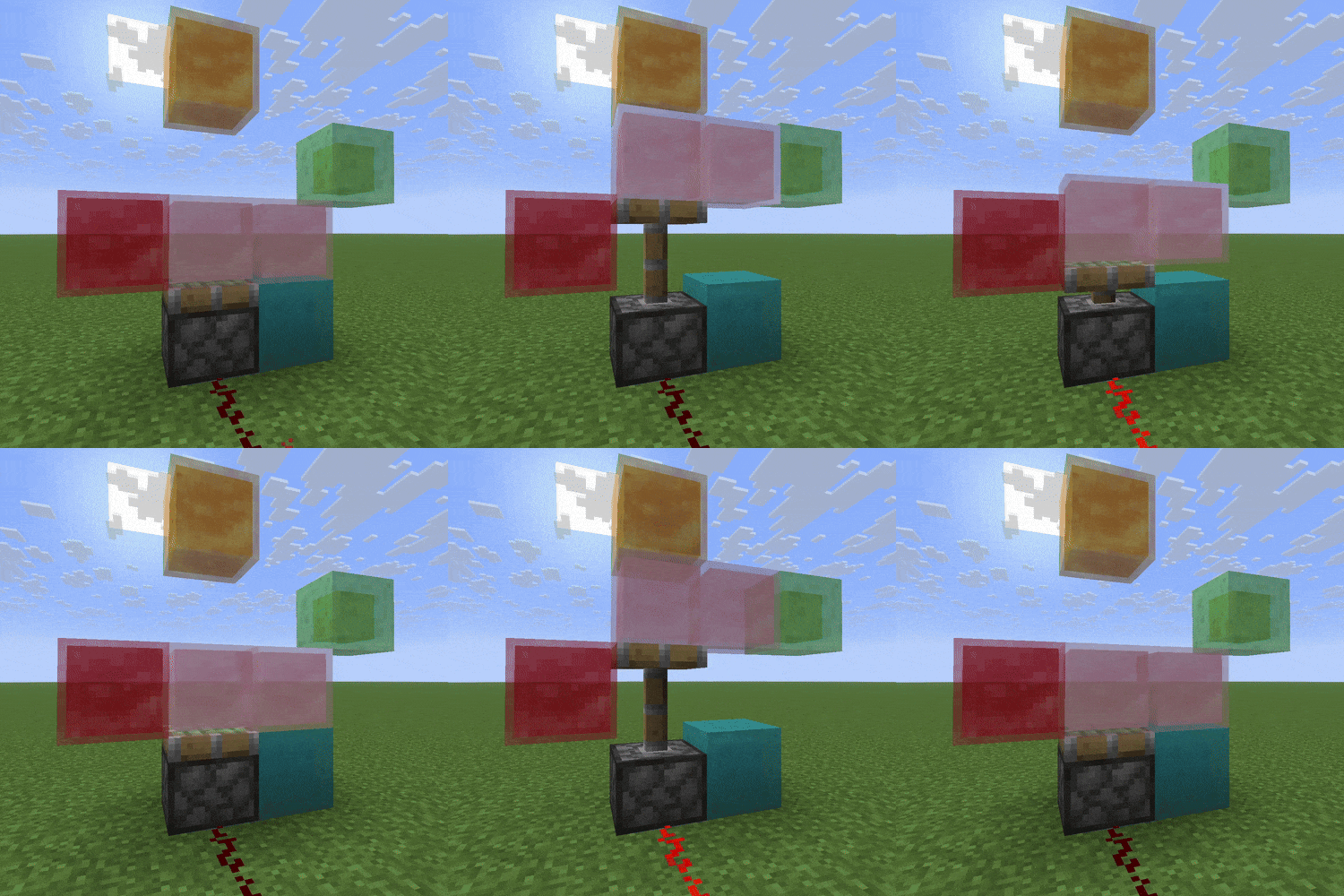

Project description from Modrinth.
Pick your setup
Choose the version and loader you play, then open the matching release.
Showing the newest 12 of 37 game versions. Older files are in the list below.
Check the dependencies, then try the file in a copied instance before changing a world you care about.
Recent files
coloredslime-1.13.0+mc26.3.jar
16 Sept 2026
coloredslime-1.12.0+mc26.1.jar
25 Mar 2026
coloredslime-1.11.3+mc1.21.6.jar
17 Mar 2026
coloredslime-1.10.3+mc1.21.4.jar
17 Mar 2026
coloredslime-1.9.3+mc1.21.2.jar
17 Mar 2026
coloredslime-1.8.3+mc1.21.1.jar
17 Mar 2026
coloredslime-1.7.3+mc1.20.6.jar
17 Mar 2026
coloredslime-1.6.3+mc1.20.1.jar
17 Mar 2026
coloredslime-1.5.3+mc1.19.2.jar
17 Mar 2026
coloredslime-1.11.2.jar
4 Oct 2025
coloredslime-1.10.2.jar
4 Oct 2025
coloredslime-1.9.2.jar
4 Oct 2025
Looking for an older file? The official Modrinth project page is in Resources.
 mod
Create: Plushie Factory adds Create compatibility to automate all your favorite Plushie mods!
 mod
Unique names for weapons, tools, armour and items found throughout your world.
 mod
Disposable public fixture for testing the Modpacks.ch GitHub catalogue flow