


Minecraft version
Back to mods 
Modrinth · Minecraft mod
Tab List
A Fabric and NeoForge Minecraft mod that customizes the player list (tab list) header, footer, and message of the day.
Choose a version Pick your version below, then grab the matching file.
Quick answer
Which Tab List release matches 26.1.2 NeoForge?
Best match for your filters 2.2.0+26.1.2-neoforge
Game version 26.1.2
Loader NeoForge
Tab List 2.2.0+26.1.2-neoforge targets 26.1.2 with NeoForge. Do not install it on the client. It must be installed on the dedicated server. No extra mods listed for this file.
Where it goes
Is Tab List required on the client, server, or both?
Do not install it on the client. It must be installed on the dedicated server.
Client Not supported
Dedicated server Required
Loader for this release NeoForge
Required install it here Optional supported, not mandatory Not supported do not install here Source doesn’t say do not assume
This file is marked server-only.
What else does Tab List 2.2.0+26.1.2-neoforge need?
2.2.0+26.1.2-neoforge on 26.1.2 NeoForge. Every mod below is checked against that same setup.
This file does not list any required mods. Do not add a library just because a different file uses it.
This file does not list any required or optional mods.
Before you install it
Add Tab List without breaking your instance.
Built for Tab List 2.2.0+26.1.2-neoforge on 26.1.2 NeoForge. Pick another file and the loader, install side or required mods may change.
- 01
Stick to this file
Use 2.2.0+26.1.2-neoforge. It targets 26.1.2 with NeoForge; another release may have different loader, side or dependency requirements.
- 02
Bring the mods it needs
This file does not list any required mods. Do not add a library just because a different file uses it.
- 03
Put it on the correct side
Do not install it on the client. It must be installed on the dedicated server.
- 04
Pick the file you checked
Use the “Get this file” button beside 2.2.0+26.1.2-neoforge. It opens that exact file at the source.
About this project
What does Tab List add?
Tab List
Customize your Minecraft server's tab list header, footer, and welcome message — on Fabric and NeoForge.
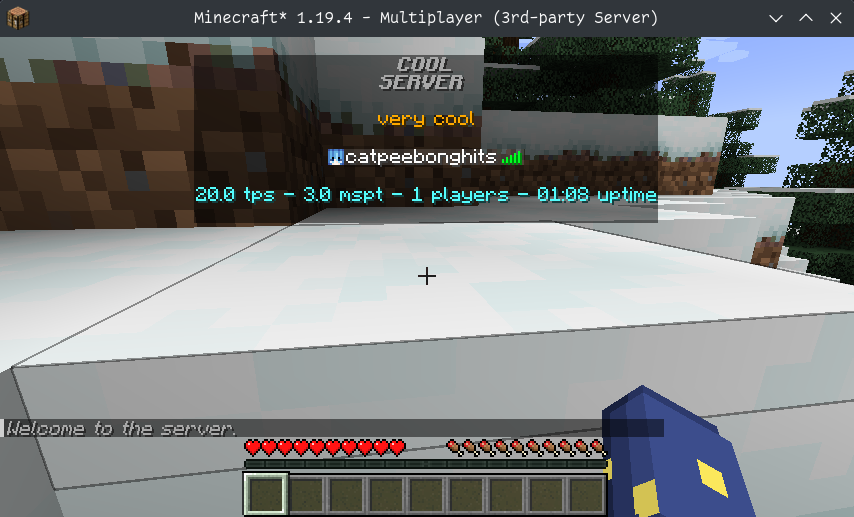
Tab List is a lightweight, server-side Minecraft mod for Fabric and NeoForge. It lets you
replace the player list header and footer with your own text, colors, and live server stats, and
send a message of the day when players join. No client mod is required.
Features
- Custom tab list header and footer
- MOTD sent on player login
- Live placeholders for TPS, MSPT, player count, and uptime
- Full Minecraft formatting code support (
§colors and styles, plus#Nfor new lines) - Adjustable refresh interval
- Works on Fabric and NeoForge
- Same simple JSON config on both loaders
Installation
- Install Fabric Loader or NeoForge on your Minecraft server.
- Download the jar for your Minecraft version from Modrinth or
GitHub Releases. - Put the jar in your server's
mods/folder. - On Fabric, also install Fabric API.
- Start the server. The config file is created at
config/fabric-tab.json. - Edit the config and restart the server.
This is a server-side mod. Players do not need to install anything.
Supported versions
| Loader | Minecraft versions |
|---|---|
| Fabric | 1.16.5, 1.18–1.18.2, 1.19–1.19.4, 1.20–1.20.1, 1.21–1.21.11, 26.1–26.3 |
| NeoForge | 1.21.1, 1.21.4, 1.21.8, 1.21.11, 26.1.2, 26.2, 26.3 |
Use the jar that matches your Minecraft version. NeoForge 26.1 support is for 26.1.2;
NeoForge does not publish builds for 26.1 or 26.1.1.
Configuration
The config file is config/fabric-tab.json:
{
  "configVersion": 2,
  "header": "§7§l§oCOOL#N      SERVER       #N#N§6very cool§f#N",
  "footer": "#N§b#TPS tps - #MSPT mspt - #PLAYERCOUNT players - #UPTIME uptime#N",
  "motd": "§7§oWelcome to the server.§f",
  "refreshTickInterval": 20,
  "enabled": true
}
| Key | Type | Description |
|---|---|---|
configVersion |
number | Internal version. Do not change. |
header |
string | Text shown above the player list. |
footer |
string | Text shown below the player list. |
motd |
string | Message sent to players when they join. |
refreshTickInterval |
number | Ticks between header/footer updates. 20 = about 1 second. Values of 0 or less fall back to 20. |
enabled |
boolean | Enables or disables the mod. |
The config is loaded at server startup, so restart the server after editing it.
On Minecraft 1.16.5–1.19.4 the config uses configVersion 1 and only contains header,footer, and motd; the tab list is refreshed every tick on those versions.
The MOTD is sent as-is: placeholders are not processed inside motd.
Placeholders
Use these inside header and footer:
| Placeholder | Replaced with |
|---|---|
#TPS |
Current server TPS (capped at 20) |
#MSPT |
Average milliseconds per tick |
#PLAYERCOUNT |
Number of online players |
#UPTIME |
Server process uptime |
#N |
A new line |
Placeholders are case-sensitive.
Example footer:
#N§b#TPS tps §7| §b#MSPT mspt §7| §b#PLAYERCOUNT players §7| §b#UPTIME uptime#N
Formatting
Minecraft legacy formatting codes work normally:
§0 black       §1 dark blue    §2 dark green   §3 dark aqua
§4 dark red    §5 dark purple  §6 gold         §7 gray
§8 dark gray   §9 blue         §a green        §b aqua
§c red         §d light purple §e yellow       §f white

§k obfuscated  §l bold         §m strikethrough
§n underline   §o italic       §r reset
FAQ
Does this work on a client?
No client mod is needed. Install it on the server only.
Does Fabric require Fabric API?
Yes. NeoForge does not need an extra API mod.
Do changes apply without a restart?
No. The config is read at startup, so restart the server after editing it.
Can I use the MOTD placeholders?
No. Placeholders apply to the header and footer only. The MOTD is sent exactly as written.
Where do I report bugs or request features?
Use the issue tracker.
Links
License
GPL-3.0. See LICENSE.
Project description from Modrinth.
Pick your setup
Tab List by Minecraft version and loader
Choose the version and loader you play, then open the matching release.
Minecraft version
26.2
2 loader buildsMinecraft version
26.1.2
2 loader buildsMinecraft version
26.1.1
1 loader buildMinecraft version
26.1
1 loader buildMinecraft version
1.21.11
2 loader buildsMinecraft version
1.21.10
1 loader buildMinecraft version
1.21.9
1 loader buildMinecraft version
1.21.8
2 loader buildsMinecraft version
1.21.7
1 loader buildMinecraft version
1.21.6
1 loader buildMinecraft version
1.21.5
1 loader buildShowing the newest 12 of 28 game versions. Older files are in the list below.
Check the dependencies, then try the file in a copied instance before changing a world you care about.
Recent files
Tab List versions and loaders
2.2.0+26.1.2-neoforge
fabric-tab-2.2.0+mc26.1.2-neoforge.jar
27 Nov 2026
Client Not supported Server Required Dependencies No extras listed Listed on Release listing
Check the 26.1.2 · NeoForge setup 26.1.2NeoForge release
Looking for an older file? The official Modrinth project page is in Resources.
 mod
CurseForge + Modrinth · Minecraft
Plague's Chat Timestamps
A Minecraft mod that adds customizable timestamps to chat!
 mod
Modrinth · Minecraft
JsMacros Community Edition
JsMacros Community Edition (JsMacrosCE) is a community-maintained fork of JsMacros. Write and run client-side scripts in various languages.
 mod
Modrinth · Minecraft
QDC Quantum Enchanter
Easily Add, Remove and Upgrade Enchantments on an Enchantable Item.