Cloth Config API Optional for Camerapture 1.10.15+mc26.3
optionalMatching file found Matched file: 26.3.159+neoforge

Modrinth · Minecraft mod
Take pictures using a working camera, show them to other players and hang them on your wall in picture frames!
Quick answer
Camerapture 1.10.15+mc26.3 targets 26.3 with Fabric, NeoForge, Quilt. Installation on the client is optional. Installation on the dedicated server is optional. All 1 required mods have matching files.
Where it goes
Installation on the client is optional. Installation on the dedicated server is optional.
The source marks this as usable on both the client and server.
1.10.15+mc26.3. Change the file and its required mods may change too.
Install Fabric API first. We found matching files for this game-version and loader setup.
We only count dependency files that match this setup. A file for another loader does not fill the gap.
Before you install it
Built for Camerapture 1.10.15+mc26.3. Pick another file and the loader, install side or required mods may change.
Use 1.10.15+mc26.3. It targets 26.3 with Fabric, NeoForge, Quilt; another release may have different loader, side or dependency requirements.
Install Fabric API first. We found matching files for this game-version and loader setup.
Installation on the client is optional. Installation on the dedicated server is optional.
Use the “Get this file” button beside 1.10.15+mc26.3. It opens that exact file at the source.
About this project
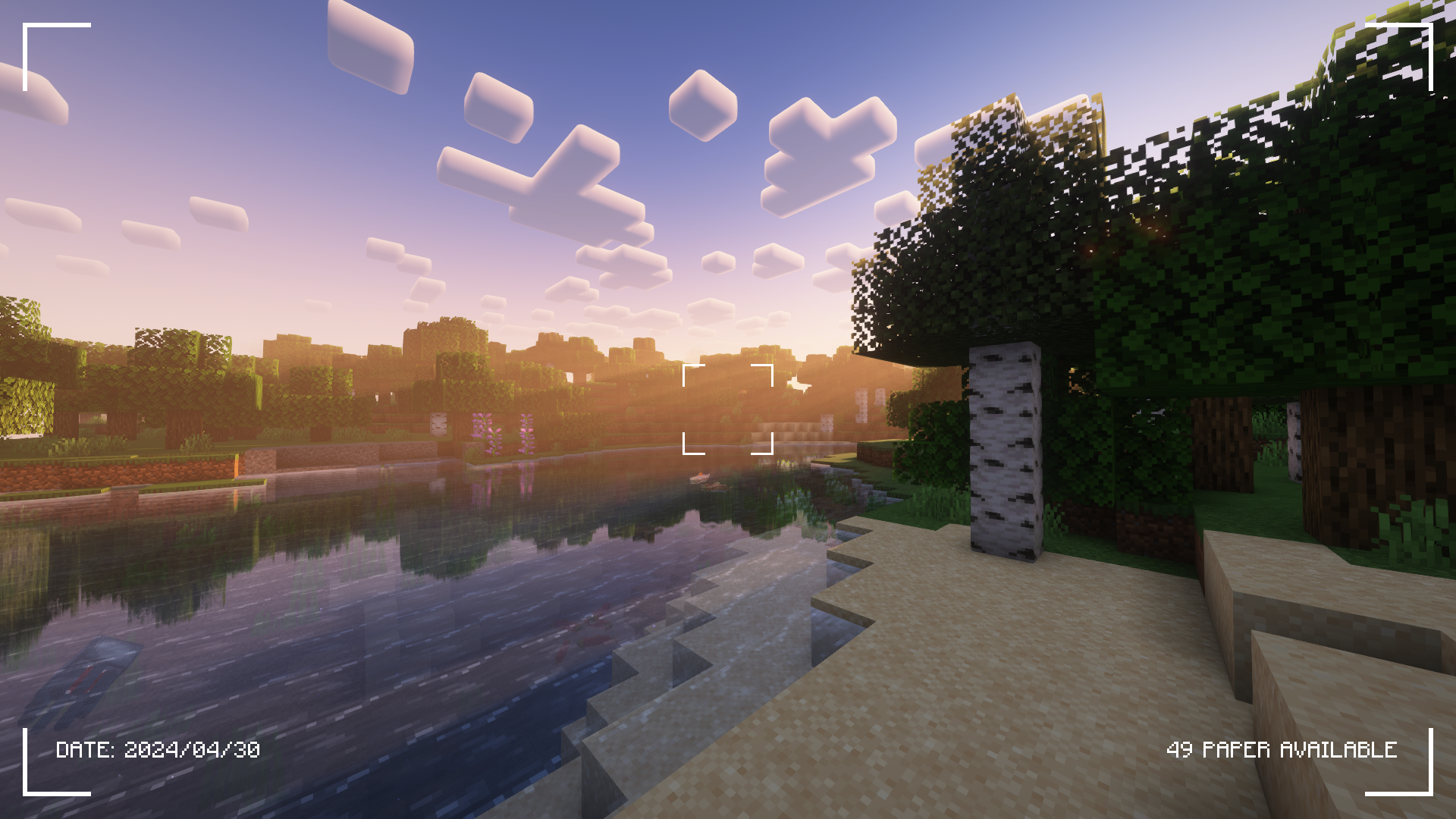
Check the Gallery tab for more screenshots!
Camerapture is a camera / picture mod for Fabric! It adds working cameras that can take actual pictures of what you see in-game. You can also upload custom pictures using the camera! These pictures can be shared with other players and hung up on the wall to be viewed by everyone.
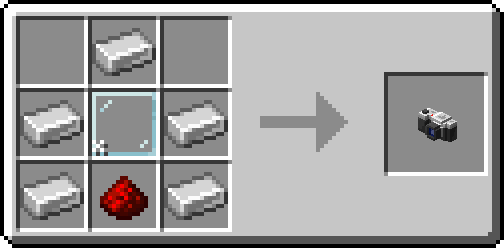
After crafting your camera, put some paper in your inventory and get to photographing!
You can hang a picture on the wall by sneak + right-clicking. To resize the picture frame, just sneak + right-click again on the picture!
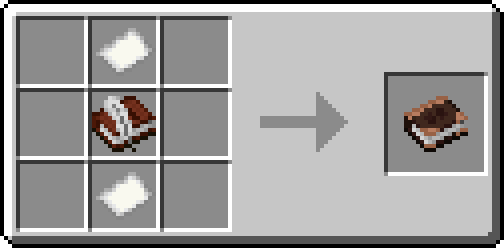
Alternatively, craft an album and collect your pictures into a single book!
Project description from Modrinth.
Pick your setup
Choose the version and loader you play, then open the matching release.
Showing the newest 12 of 19 game versions. Older files are in the list below.
Check the dependencies, then try the file in a copied instance before changing a world you care about.
Recent files
camerapture-1.10.15+mc26.3.jar
18 Sept 2026
camerapture-1.10.15+mc26.2.jar
8 Jul 2026
camerapture-1.10.14+mc26.2.jar
19 Jun 2026
camerapture-1.10.14+mc26.1.2.jar
11 Apr 2026
camerapture-1.10.13+mc26.1.1.jar
3 Apr 2026
camerapture-1.10.13+mc26.1.jar
27 Mar 2026
Camerapture-1.10.12+mc1.20.1-forge.jar
24 Jan 2026
Camerapture-1.10.12+mc1.20.1-fabric.jar
24 Jan 2026
Camerapture-1.10.12+mc1.21.11-fabric.jar
24 Jan 2026
Camerapture-1.10.12+mc1.21.11-neoforge.jar
24 Jan 2026
Camerapture-1.10.12+mc1.21.1-neoforge.jar
24 Jan 2026
Camerapture-1.10.12+mc1.21.1-fabric.jar
24 Jan 2026
Looking for an older file? The official Modrinth project page is in Resources.
 mod
modA cyberpunk-inspired experience featuring powerful cyberware, time dilation, enhanced vision, combat upgrades, and cybernetic enemies.
 mod
modTraffic lights, traffic signs, road markings more & more...
 mod
modReal-time music visualizer lamps with equalizer modes, RGB effects, and particles.