Create Needed by Create: Peaceful 2.0.4
requiredMatching file found Matched file: 6.0.10+mc1.21.1

Modrinth · Minecraft mod
A lightweight Create addon that lets you farm all monster drops in Peaceful mode.
Quick answer
Create: Peaceful 2.0.4 targets 1.21, 1.21.1 with NeoForge. Do not install it on the client. It must be installed on the dedicated server. All 1 required mods have matching files.
Where it goes
Do not install it on the client. It must be installed on the dedicated server.
This file is marked server-only.
2.0.4. Change the file and its required mods may change too.
Install Create first. We found matching files for this game-version and loader setup.
We only count dependency files that match this setup. A file for another loader does not fill the gap.
Before you install it
Built for Create: Peaceful 2.0.4. Pick another file and the loader, install side or required mods may change.
Use 2.0.4. It targets 1.21, 1.21.1 with NeoForge; another release may have different loader, side or dependency requirements.
Install Create first. We found matching files for this game-version and loader setup.
Do not install it on the client. It must be installed on the dedicated server.
Use the “Get this file” button beside 2.0.4. It opens that exact file at the source.
About this project

This Create addon for (Neo)Forge and Fabric adds compatibility with Peaceful difficulty, letting you farm pretty much all mob drops using Create machines.
Whether you're tired of building mob farms or simply don't feel like killing things, this mod offers alternative ways to obtain most animal and monster drops through peaceful means.

Mob Essences are dropped by most passive creatures on death.

Tier I Mob Essences can be compacted into Tier II Mob Essences...

...which in turn can be compacted into Tier III Mob Essences.

Tier I Essences can be milled or crushed into common overworld mob loot.

Alternatively, they can be processed into Experience Nuggets.

Tier II Mob Essences can be crushed into more valuable mob loot.

Tier III Mob Essences have an extremely low probability of yielding boss loot.
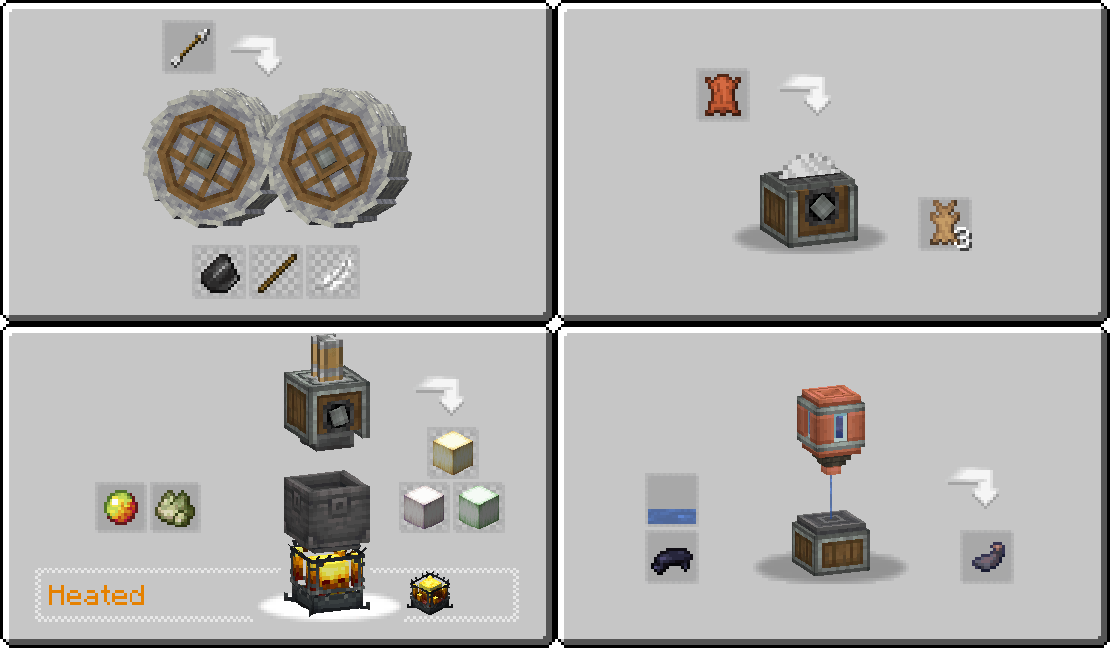
Many drops from passive creatures are now craftable for easier resource gathering (see below for full list).
Mixing Animal Essence
- Requires 1 Animal Essence and 1 Gold Nugget
- Produces 1 Experience Nugget
Milling Tier I Mob Essence
- Rotten Flesh (chance 0.08)
- Bone (chance 0.07)
- Gunpowder (chance 0.05)
- Spider Eye (chance 0.03)
Crushing Tier I Mob Essence
- Rotten Flesh (chance 0.15)
- Bone (chance 0.14)
- Gunpowder (chance 0.11)
- Spider Eye (chance 0.09)
- Phantom Membrane (chance 0.07)
Crushing Tier II Mob Essence
- Magma Cream (chance 0.21)
- Blaze Rod (chance 0.17)
- Ghast Tear (chance 0.13)
- Ender Pearl (chance 0.11)
- Breeze Rod (chance 0.09)
- Trial Key (chance 0.06)
Crushing Tier III Mob Essence
- Dragon Egg (chance 0.001)
- Nether Star (chance 0.003)
- Dragon Breath (chance 0.01)
- Ominous Trial Key (chance 0.01)
Crafting Shulker Shell
- Requires 4 Purpur Blocks and 1 Nautilus Shell
- Produces 1 Shulker Shell
Crafting Echo Shard
- Requires 6 Flints and 1 Ender Pearl
- Produces 1 Echo Shard
Crafting String
- Requires 1 Wool (any wool color will work)
- Produces 1 String
Smelting Rotten Flesh
- 1 Rotten Flesh can be smelted into 1 Leather piece
- Works both in vanilla Furnace and Create Bulk Blasting
Cutting Leather
- Requires 1 Leather piece
- Produces 3 Rabbit Hides
Filling Black Dye
- Requires 1 Black Dye and 100mb Water
- Produces 1 Ink Sac
Crushing Arrows (any arrow type will work)
- Flint (chance 0.16)
- Stick (chance 0.14)
- Feather (chance 0.11)
Crafting Froglight
- Requires 1 Magma Cream and 1 Tier I Essence
- Produces 1 Froglight (random color, chance 0.15)
All custom textures used (if any) are either created by me or have a license that allows modification and distribution.
I make every effort to comply with project license obligations and to always credit the original owners. If you believe your name is missing from the credits or if you decide to change your project's license, please contact me.
Credits:
- Malcolmriley's Repository (CC License) for the animal essence texture.
Only the base Create mod is required for this one to work.
JEI is recommended but not required.
Add the .jar mod file into your mods folder.
Alternatively, you can browse the Modrinth launcher for the mod (if it doesn't show up, try typing the autor's name). Once found, click "Install" to add it to your modpack.
You are free to include this mod in any modpack, public or private.
 Download my projects on CurseForge
 Download my projects on Modrinth
Donate on Paypal
Project description from Modrinth.
Pick your setup
Choose the version and loader you play, then open the matching release.
Check the dependencies, then try the file in a copied instance before changing a world you care about.
Recent files
create_peaceful-2.0.4-neoforge-1.21.1.jar
4 Sept 2026
create_peaceful-2.0.3-neoforge-1.21.1.jar
20 Apr 2026
create_peaceful-2.0.2-neoforge-1.21.1.jar
28 Dec 2025
create_peaceful-2.0.1-neoforge-1.21.1.jar
8 Aug 2025
create_peaceful-2.0.0-neoforge-1.21.1.jar
6 Mar 2025
create_peaceful-2.0.0-fabric-1.20.1.jar
6 Mar 2025
create_peaceful-2.0.0-forge-1.20.1.jar
6 Mar 2025
create_peaceful-1.5.0-neoforge-1.21.1.jar
3 Mar 2025
create_peaceful-1.5.0-fabric-1.20.1.jar
20 Oct 2024
create_peaceful-1.5.0-forge-1.20.1.jar
20 Oct 2024
create_peaceful-1.5.0-fabric-1.19.2.jar
20 Oct 2024
create_peaceful-1.5.0-forge-1.19.2.jar
20 Oct 2024
Looking for an older file? The official Modrinth project page is in Resources.
 mod
modBig Bang is a space exploration mod for Minecraft. Travel through space, discover new planets, and experience galactic-themed content inspired by classic space mods like Galacticraft.
 mod
modA Stargate mod: build and dial working Stargates, fly a Puddle Jumper between worlds, and wake an Ancient outpost under the ice with Atlantis technology: control chair, drones and ZPMs.
 mod
modA realistic(-ish) electricity Create addon that focuses on the generation, transmission, distribution and utilization of electric energy. Also electric trains.