Minecraft version
Back to mods 
Modrinth · Minecraft mod
Pushing Doors
A vanilla-friendly physics mod that lets you seamlessly push and breach doors open with your body instead of right-clicking
Choose a version Pick your version below, then grab the matching file.
Quick answer
Which Pushing Doors release should I use?
Latest stable file 1.3.3-1.21.1
Game version 1.21.1
Loader NeoForge
Pushing Doors 1.3.3-1.21.1 targets 1.21.1 with NeoForge. Installation on the client is optional. Installation on the dedicated server is optional. No extra mods listed for this file.
Where it goes
Is Pushing Doors required on the client, server, or both?
Installation on the client is optional. Installation on the dedicated server is optional.
Client Optional
Dedicated server Optional
Loader for this release NeoForge
Required install it here Optional supported, not mandatory Not supported do not install here Source doesn’t say do not assume
The source marks this as usable on both the client and server.
What else does Pushing Doors 1.3.3-1.21.1 need?
1.3.3-1.21.1. Change the file and its required mods may change too.
This file does not list any required mods. Do not add a library just because a different file uses it.
This file does not list any required or optional mods.
Before you install it
Add Pushing Doors without breaking your instance.
Built for Pushing Doors 1.3.3-1.21.1. Pick another file and the loader, install side or required mods may change.
- 01
Stick to this file
Use 1.3.3-1.21.1. It targets 1.21.1 with NeoForge; another release may have different loader, side or dependency requirements.
- 02
Bring the mods it needs
This file does not list any required mods. Do not add a library just because a different file uses it.
- 03
Put it on the correct side
Installation on the client is optional. Installation on the dedicated server is optional.
- 04
Pick the file you checked
Use the “Get this file” button beside 1.3.3-1.21.1. It opens that exact file at the source.
About this project
What does Pushing Doors add?
You need to install geckolib
You need to install Player Animator [1.1]
🚪 Pushing Doors
Tired of constantly right-clicking every time you want to go through a door? Pushing Doors completely overhauls how you interact with doors in Minecraft.
Trapdoors got overhauled too [1.1]
This mod does not overwrite vanilla doors. [in 1.1 is automatically converted]
In the next update, all vanilla Minecraft doors will automatically convert into pushing doors
Core Features
Seamless Walk-Through (Physics-Based)
- Simply walk into any dynamic door, and your body will naturally push it open.
Lock
- You can lock the door by using lever (or as long it was redstone)
Barge In
- Sprint directly into a locked door to breach it open, This action deactivate any nearby levers or redstone power sources that were holding the lock. For trapdoor you need to hold sprint then jump to barge or stomp
Peek
- Hold right click at the door to peek, and move mouse up or down to move the player. [1.2] You can hold shift to peep at the keyhole in this state
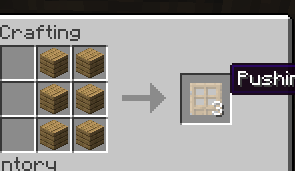
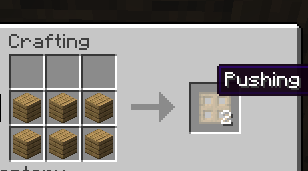
🛠️ Crafting
simply place any standard vanilla door into a crafting grid
[in 1.1 you can just simply put down any vanilla wood door to the ground to convert, or just craft the door and its converted already]
Supports all 11 vanilla wood variants (Oak, Spruce, Birch, Jungle, Acacia, Dark Oak, Mangrove, Cherry, Bamboo, Crimson, and Warped).
Project description from Modrinth.
Pick your setup
Pushing Doors by Minecraft version and loader
Choose the version and loader you play, then open the matching release.
Minecraft version
1.20.1
1 loader buildMinecraft version
1.19.2
1 loader buildCheck the dependencies, then try the file in a copied instance before changing a world you care about.
Recent files
Pushing Doors versions and loaders
1.3.3-1.21.1
pushingdoors-1.3.3-1.21.1.jar
27 Aug 2026
Client Optional Server Optional Dependencies No extras listed Listed on Release listing
Check the 1.21.1 · NeoForge setup 1.21.1NeoForge release
1.3.3-1.20.1
pushingdoors-1.3.3-1.20.1.jar
27 Aug 2026
Client Optional Server Optional Dependencies No extras listed Listed on Release listing
Check the 1.20.1 · Forge setup 1.20.1Forge release
1.3.3-1.19.2
pushingdoors-1.3.3-1.19.2.jar
27 Aug 2026
Client Optional Server Optional Dependencies No extras listed Listed on Release listing
Check the 1.19.2 · Forge setup 1.19.2Forge release
1.3-1.21.1
pushingdoors-1.3-1.21.1.jar
26 Aug 2026
Client Optional Server Optional Dependencies 2 required · 2 unchecked Listed on Release listing
Check the 1.21.1 · NeoForge setup 1.21.1NeoForge release
1.3-1.20.1
pushingdoors-1.3-1.20.1.jar
26 Aug 2026
Client Optional Server Optional Dependencies No extras listed Listed on Release listing
Check the 1.20.1 · Forge setup 1.20.1Forge release
1.3-1.19.2
pushingdoors-1.3-1.19.2.jar
26 Aug 2026
Client Optional Server Optional Dependencies No extras listed Listed on Release listing
Check the 1.19.2 · Forge setup 1.19.2Forge release
1.2.5-1.19.2
pushingdoors-1.2.5-1.19.2.jar
4 Jul 2026
Client Optional Server Optional Dependencies No extras listed Listed on Release listing
Check the 1.19.2 · Forge setup 1.19.2Forge release
1.2.5-1.20.1
pushingdoors-1.2.5-1.20.1.jar
30 Jun 2026
Client Optional Server Optional Dependencies No extras listed Listed on Release listing
Check the 1.20.1 · Forge setup 1.20.1Forge release
1.2-1.20.1
pushingdoors-1.2-1.20.1.jar
27 Jun 2026
Client Optional Server Optional Dependencies No extras listed Listed on Release listing
Check the 1.20.1 · Forge setup 1.20.1Forge release
1.1-1.20.1
pushingdoors-1.1-1.20.1.jar
26 Jun 2026
Client Optional Server Optional Dependencies No extras listed Listed on Release listing
Check the 1.20.1 · Forge setup 1.20.1Forge release
1.0-1.20.1
pushingdoors-1.0-1.20.1.jar
19 Jun 2026
Client Optional Server Optional Dependencies No extras listed Listed on Release listing
Check the 1.20.1 · Forge setup 1.20.1Forge release
Looking for an older file? The official Modrinth project page is in Resources.
 mod
mod Modrinth · Minecraft
Neo Vitae
Spill blood for power. Altars that consume life, sigils that bend the world, custom demons in an endless dungeon, sentient armor that drinks souls, a shield that pays your damage in essentia. Datapack-driven from the ground up.
 mod
mod Modrinth · Minecraft
Exile Respawn
Adds a game rule that respawns players at distant locations upon death.
 mod
mod Modrinth · Minecraft
Unlit Campfire
Placed campfires are unlit.