Minecraft version
Back to mods 
Modrinth · Minecraft mod
Door Locker
Adds the ability to lock doors, trapdoors, fance gates, levers and buttons. You can also make animated doors.
Choose a version Pick your version below, then grab the matching file.
Quick answer
Which Door Locker release should I use?
Latest stable file 1.7.1
Game version 1.20.2, 23w40a, 23w41a
Loader datapack
Door Locker 1.7.1 targets 1.20.2, 23w40a, 23w41a with datapack. Installation on the client is optional. Installation on the dedicated server is optional. No extra mods listed for this file.
Where it goes
Is Door Locker required on the client, server, or both?
Installation on the client is optional. Installation on the dedicated server is optional.
Client Optional
Dedicated server Optional
Loader for this release datapack
Required install it here Optional supported, not mandatory Not supported do not install here Source doesn’t say do not assume
The source marks this as usable on both the client and server.
What else does Door Locker 1.7.1 need?
1.7.1. Change the file and its required mods may change too.
This file does not list any required mods. Do not add a library just because a different file uses it.
This file does not list any required or optional mods.
Before you install it
Add Door Locker without breaking your instance.
Built for Door Locker 1.7.1. Pick another file and the loader, install side or required mods may change.
- 01
Stick to this file
Use 1.7.1. It targets 1.20.2, 23w40a, 23w41a with datapack; another release may have different loader, side or dependency requirements.
- 02
Bring the mods it needs
This file does not list any required mods. Do not add a library just because a different file uses it.
- 03
Put it on the correct side
Installation on the client is optional. Installation on the dedicated server is optional.
- 04
Pick the file you checked
Use the “Get this file” button beside 1.7.1. It opens that exact file at the source.
About this project
What does Door Locker add?
Description
This datapack adds the ability lock doors, trapdoors, fance gates, levers and buttons.
You can also make animated doors.
Recipes
Door Locker
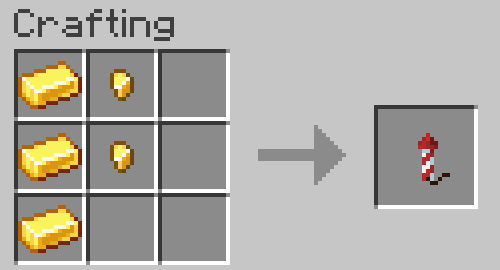
Sets the password for supported blocks. Before use, you must rename on the anvil. Must be applied on the inside of the block.
The locker owner can always open their locks without a password!
Tip: If you remove the name (just set the name as a space) then Door Locker will not have a password, which is good for double doors if you don't need a password.
Animated Door
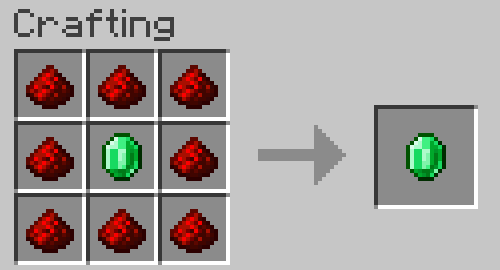
Turns a locked door into an animated version of the door. Doesn't change password. After that, the door cannot be opened / closed using redstone or villagers.
Works for doors only.
Delocker
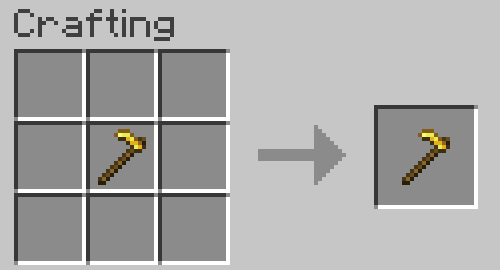
Allows the owner of the lock to completely remove the lock from the block. Door Locker will not be returned. When removing a lock from an animated door, the doors will be dropped as items.
For mapmakers
You can use this datapack in your project, just provide a link to this page in credits.
You can use any item with custom text in the item name as a key.
You can get Door Locker with key name in two ways:
- Take your key to the door in your main hand and run this command in chat:
loot give @s loot door_locker:door_locker
- Take your key in the second hand, and Door Locker in the main hand, then run this command in chat:
item modify entity @s weapon door_locker:copy_name
Also available such modifiers for keys:
Make the key one-time use:
item modify entity @s weapon door_locker:melt
Remove password for Door Locker:
item modify entity @s weapon door_locker:unlock
Remove password for Door Locker but without sounds and particles:
item modify entity @s weapon door_locker:unlock/no_sound
You can apply multiple modifiers to keys. The modifier will only work if the password matches. Door Locker checks only iten Name and does not check ID, Lore and any other data.
Project description from Modrinth.
Pick your setup
Door Locker by Minecraft version and loader
Choose the version and loader you play, then open the matching release.
Minecraft version
26.2
5 loader buildsMinecraft version
26.1.2
5 loader buildsMinecraft version
26.1.1
5 loader buildsMinecraft version
26.1
5 loader buildsMinecraft version
24w46a
1 loader buildMinecraft version
24w45a
1 loader buildMinecraft version
24w44a
1 loader buildMinecraft version
24w40a
1 loader buildMinecraft version
24w39a
1 loader buildMinecraft version
24w38a
1 loader buildMinecraft version
24w37a
1 loader buildShowing the newest 12 of 92 game versions. Older files are in the list below.
Check the dependencies, then try the file in a copied instance before changing a world you care about.
Recent files
Door Locker versions and loaders
1.7.1
Door Locker 1.7.1.zip
17 Oct 2026
Client Optional Server Optional Dependencies No extras listed Listed on Release listing
Check the 26.3 · datapack setup 1.20.223w40a23w41a23w42a release
1.7.1
Door Locker 1.7.1 [26.3].jar
17 Oct 2026
Client Optional Server Optional Dependencies No extras listed Listed on Release listing
Check the 26.3 · Fabric setup 26.3FabricForgeNeoForge release
1.7.1
Door Locker 1.7.1 [26.2].jar
17 Oct 2026
Client Optional Server Optional Dependencies No extras listed Listed on Release listing
Check the 26.2 · Fabric setup 26.2FabricForgeNeoForge release
1.7.1
Door Locker 1.7.1 [1.21.11-26.1.2].jar
17 Oct 2026
Client Optional Server Optional Dependencies No extras listed Listed on Release listing
Check the 26.1.2 · Fabric setup 1.21.1126.126.1.126.1.2 release
1.7.1
Door Locker 1.7.1 [1.21.5-1.21.10].jar
17 Oct 2026
Client Optional Server Optional Dependencies No extras listed Listed on Release listing
Check the 1.21.10 · Fabric setup 1.21.51.21.61.21.71.21.8 release
1.7.1
Door Locker 1.7.1 [1.21.4].jar
17 Oct 2026
Client Optional Server Optional Dependencies No extras listed Listed on Release listing
Check the 1.21.4 · Fabric setup 1.21.4FabricForgeNeoForge release
1.7.1
Door Locker 1.7.1 [1.21.2].jar
17 Oct 2026
Client Optional Server Optional Dependencies No extras listed Listed on Release listing
Check the 1.21.3 · Fabric setup 1.21.21.21.3FabricForge release
1.7.1
Door Locker 1.7.1 [1.21].jar
17 Oct 2026
Client Optional Server Optional Dependencies No extras listed Listed on Release listing
Check the 1.21.1 · Fabric setup 1.211.21.1FabricForge release
1.7.1
Door Locker 1.7.1 [1.20.5-1.20.6].jar
17 Oct 2026
Client Optional Server Optional Dependencies No extras listed Listed on Release listing
Check the 1.20.6 · Fabric setup 1.20.51.20.6FabricForge release
1.7
Door Locker 1.7.zip
27 Jan 2026
Client Optional Server Optional Dependencies No extras listed Listed on Release listing
Check the 24w46a · datapack setup 23w31a23w32a23w33a23w35a release
1.6
Door Locker v1.6.zip
10 Feb 2025
Client Optional Server Optional Dependencies No extras listed Listed on Release listing
Check the 1.21.4 · datapack setup 1.20.21.20.31.20.41.20.5 release
1.5.01
Door Locker v1.5.1 (1.20.2).zip
29 Dec 2023
Client Optional Server Optional Dependencies No extras listed Listed on Release listing
Check the 1.20.2 · datapack setup 1.20.2datapack release
Looking for an older file? The official Modrinth project page is in Resources.