Minecraft version
Back to mods 
Modrinth · Minecraft mod
ItemFinder
A Fabric mod to quickly locate items in nearby containers with visual guidance.
Choose a version Pick your version below, then grab the matching file.
Quick answer
Which ItemFinder release should I use?
Latest stable file 1.0.0
Game version 26.1
Loader Fabric
ItemFinder 1.0.0 targets 26.1 with Fabric. Installation on the client is optional. Installation on the dedicated server is optional. No extra mods listed for this file.
Where it goes
Is ItemFinder required on the client, server, or both?
Installation on the client is optional. Installation on the dedicated server is optional.
Client Optional
Dedicated server Optional
Loader for this release Fabric
Required install it here Optional supported, not mandatory Not supported do not install here Source doesn’t say do not assume
The source marks this as usable on both the client and server.
What else does ItemFinder 1.0.0 need?
1.0.0. Change the file and its required mods may change too.
This file does not list any required mods. Do not add a library just because a different file uses it.
This file does not list any required or optional mods.
Before you install it
Add ItemFinder without breaking your instance.
Built for ItemFinder 1.0.0. Pick another file and the loader, install side or required mods may change.
- 01
Stick to this file
Use 1.0.0. It targets 26.1 with Fabric; another release may have different loader, side or dependency requirements.
- 02
Bring the mods it needs
This file does not list any required mods. Do not add a library just because a different file uses it.
- 03
Put it on the correct side
Installation on the client is optional. Installation on the dedicated server is optional.
- 04
Pick the file you checked
Use the “Get this file” button beside 1.0.0. It opens that exact file at the source.
About this project
What does ItemFinder add?
🔍 Item Finder
Never lose track of your items again.
Item Finder lets you search for any item across all your nearby storage containers: press a key, pick the item, and the mod tells you exactly where it is, highlights it in the world, and guides you there with a particle trail.
📸 Screenshots
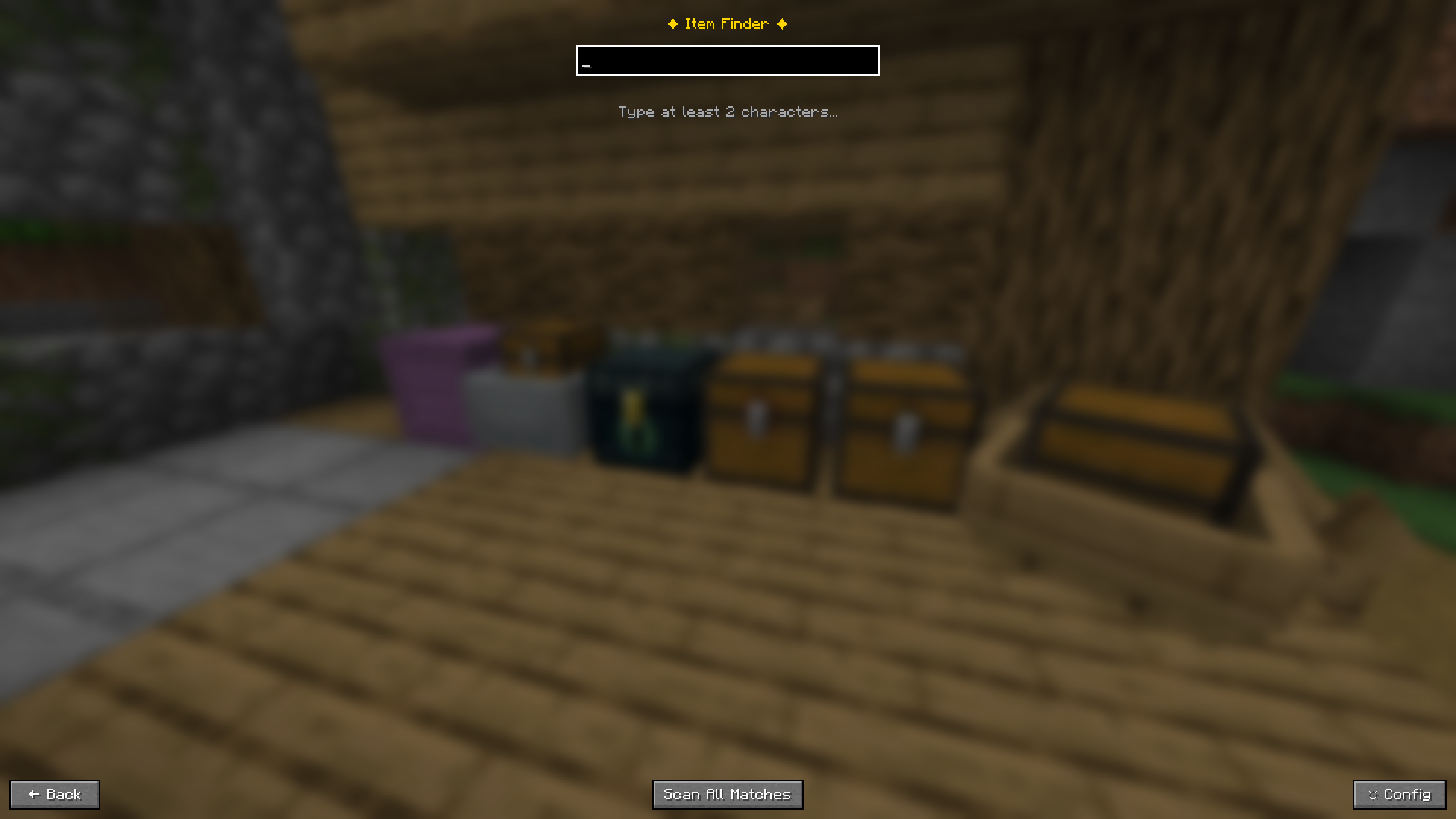
Open the search screen with a single keypress, the game keeps running in the background
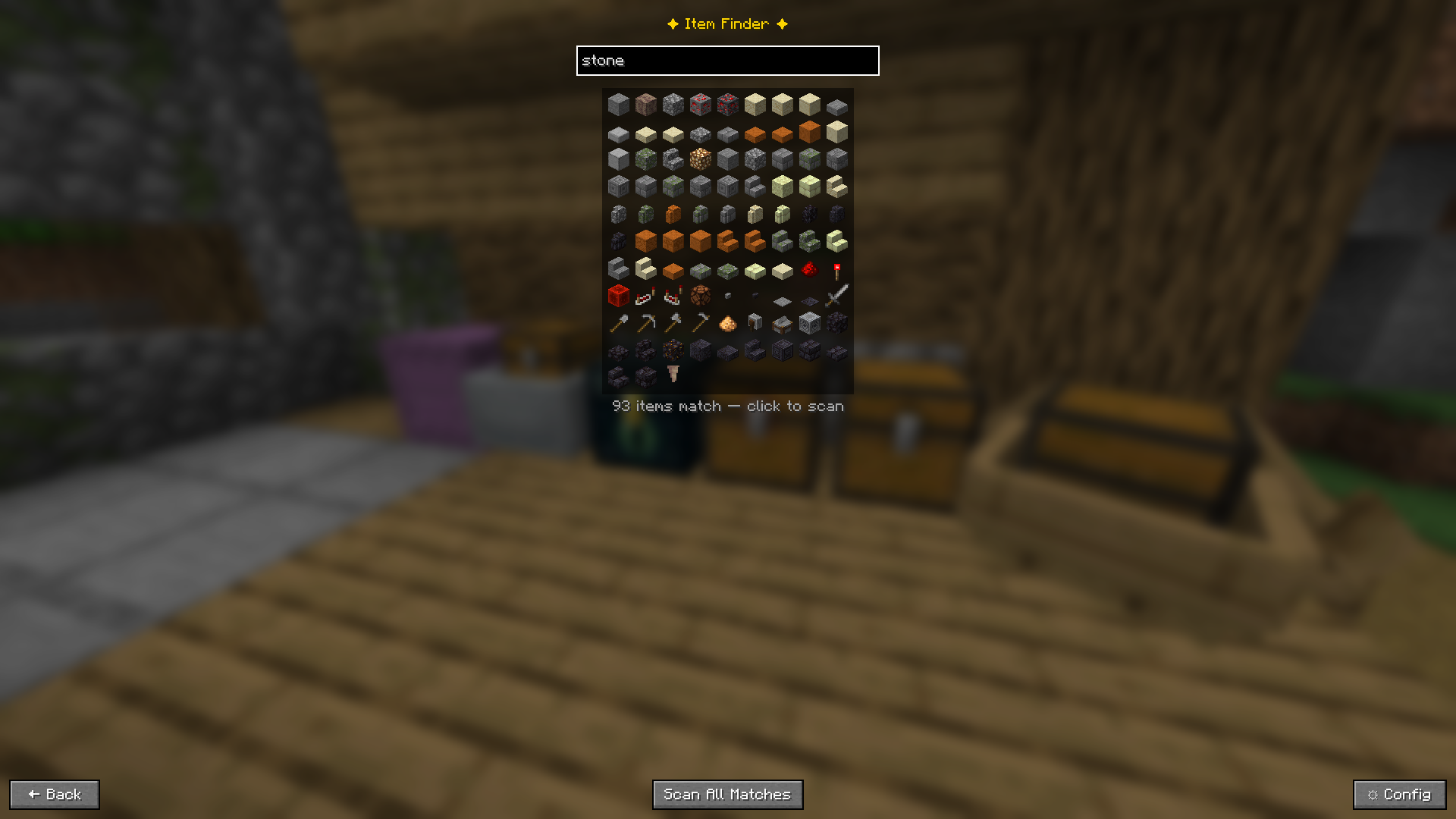
Type "stone" and see 93 matching items as icons. Click one to scan, or press Enter to search instantly
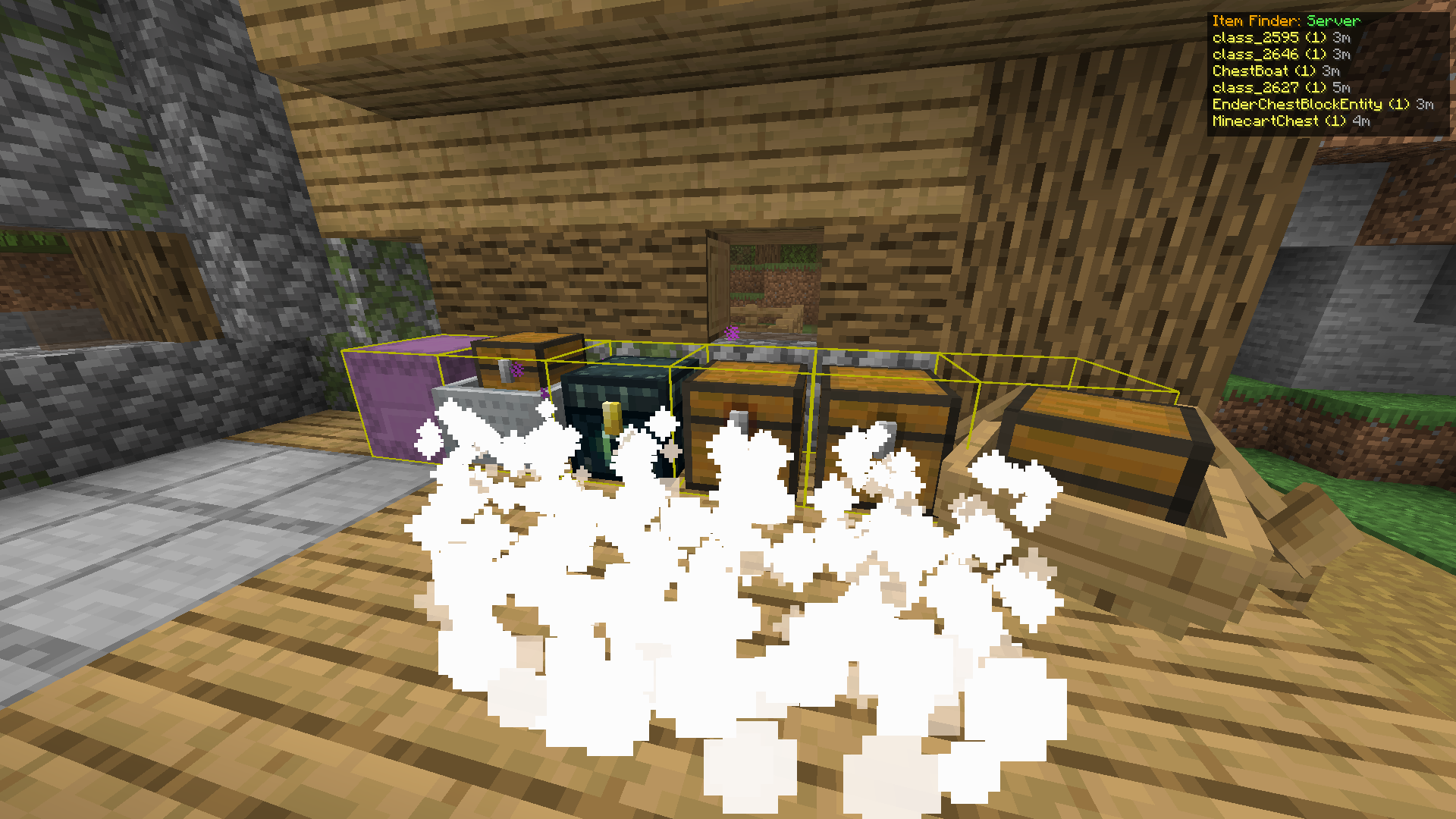
Found containers glow yellow. Particles stream toward them. The HUD shows name and distance for each
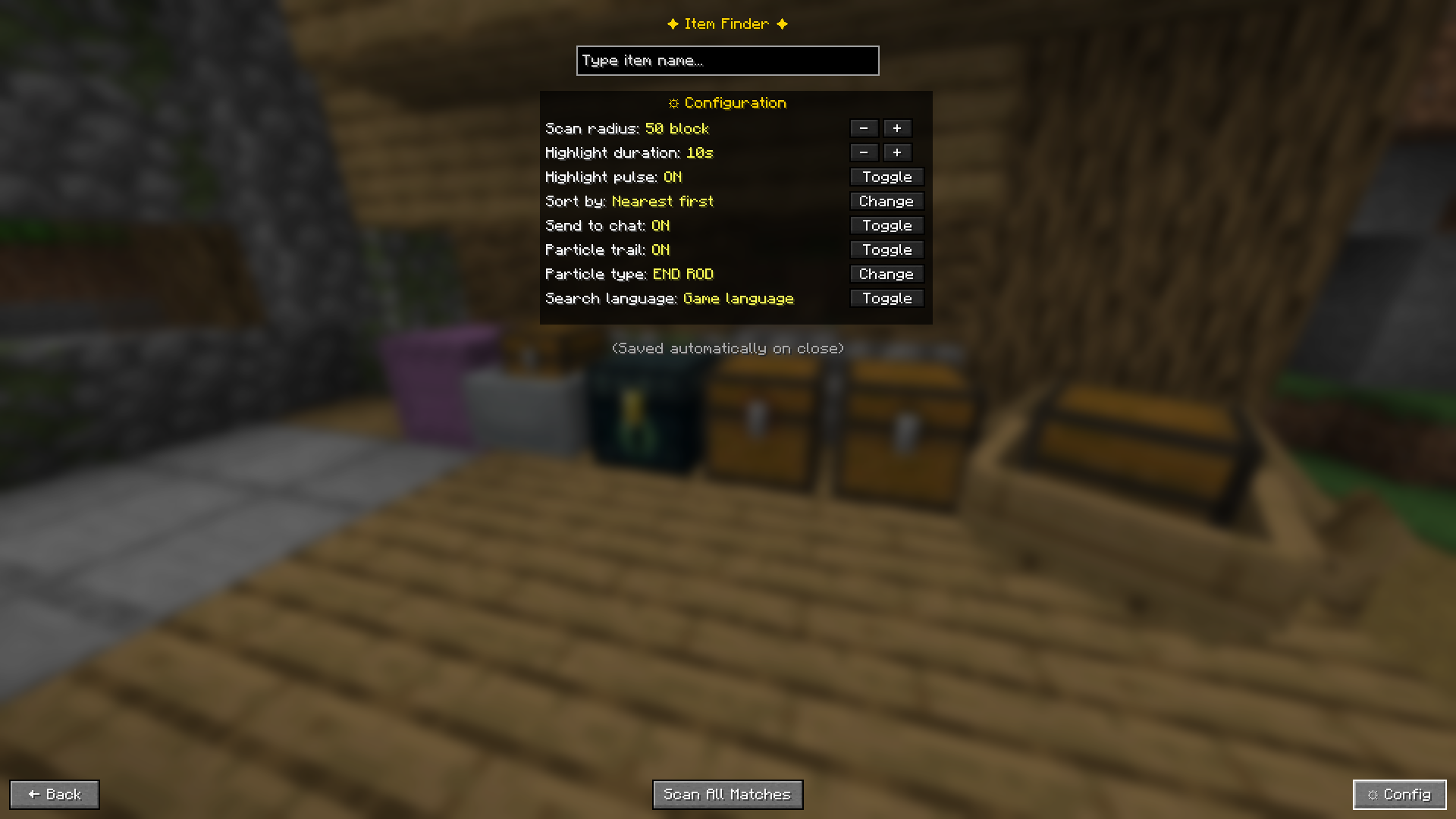
Everything is configurable in-game, no config files to edit
🎬 How It Works
- Press Y to open the search screen
- Type a keyword, a grid of matching items appears instantly
- Click an item to scan for that exact item, or press Enter to search without touching the mouse, or press Scan All Matches to find every container holding anything with that keyword
- Results appear in the GUI and optionally in chat
- Matching containers glow yellow in the world
- A particle trail flows from you toward each container
- Open a highlighted container and it automatically clears from the list
✨ Features
🔎 Smart Search
Two search modes:
- Exact pick: click an item icon from the visual grid for a precise match
- Scan All Matches: search by keyword across all containers at once, perfect when you only remember part of a name (type
oakto find oak logs, planks, and slabs all at once)
Enter key shortcut: configurable behavior when you press Enter:
- Off: Enter does nothing, use mouse as normal
- Pick first result: instantly scans for the top item in the grid without clicking
- Scan all matches: instantly runs a keyword scan across all containers
Search language toggle: search by English item IDs or your game's display language
📦 Supports All Storage Types
| Container | ✅ |
|---|---|
| Chest | ✅ |
| Trapped Chest | ✅ |
| Barrel | ✅ |
| Shulker Box | ✅ |
| Ender Chest | ✅ |
| Furnace | ✅ |
| Smoker | ✅ |
| Blast Furnace | ✅ |
| Hopper | ✅ |
| Dispenser | ✅ |
| Dropper | ✅ |
| Minecart with Chest | ✅ |
| Chest Boat | ✅ |
🟡 Container Highlighting
- Matching containers get a glowing yellow outline in the world
- Pulse animation (toggleable)
- Auto-fades after a configurable duration
✨ Particle Trail
- Particles stream from your position toward each found container
- The nearest container gets a stronger, brighter trail
- 8 particle types: Flame · Enchant · End Rod · Soul Fire · Witch · Dragon Breath · Portal · Happy Villager
📋 HUD Overlay
- Panel in the top-right corner shows container names and distances while highlights are active
- Shows whether results are from Server (real-time) or Cache (local)
- Disappears automatically when highlights expire
💾 Local Cache (Multiplayer without server mod)
When playing on a server without the mod installed server-side, Item Finder falls back to a local cache:
- Every container you open gets its contents saved locally
- Cache is persistent, data from weeks ago is still remembered
- Each server has its own separate cache file
- Results show how old the data is (e.g.
3d ago) so you know how fresh it is - A warning is always shown when results come from cache
⚙️ Configuration
Press ⚙ Config in the search screen, or access it via Mod Menu.
| Setting | Description | Default |
|---|---|---|
| Scan Radius | How many blocks away to search | 50 |
| Highlight Duration | How long the glow stays (seconds) | 10 |
| Highlight Pulse | Animate the outline | ON |
| Sort By | Nearest first or most items first | Nearest |
| Send to Chat | Print results in chat | ON |
| Particle Trail | Show particle path to containers | ON |
| Particle Type | Which particle effect to use | END ROD |
| Search Language | English ID or game display language | English |
| Enter Key | What pressing Enter does: Off / Pick first / Scan all | Pick First Result |
All settings save automatically when you close the config panel.
⌨️ Keyboard Controls
| Action | Default Key |
|---|---|
| Open Item Finder | Y |
| Search / Confirm | Enter (configurable behavior) |
| Back / Close | ESC |
Change the open key in Options → Controls → Key Binds → Item Finder.
🎮 Controller Support
Item Finder works with controllers via Controllify (install separately).
Once Controllify is installed, map the following in its settings:
| Action | Suggested Button |
|---|---|
| Open Item Finder | Y (Xbox) / Triangle (PlayStation) |
| Confirm / Enter | A (Xbox) / Cross (PlayStation) |
| Back / Close | B (Xbox) / Circle (PlayStation) |
Tip: Set Enter Key to "Pick first result" or "Scan all matches" in Item Finder config so you can search entirely without a mouse, just open, type, and press confirm on your controller.
🖥️ Server Support
| Scenario | Works? | Mode |
|---|---|---|
| Singleplayer | ✅ | Real-time scan |
| Open to LAN (you are host) | ✅ | Real-time scan |
| Server with mod + your client has mod | ✅ | Real-time scan |
| Server without mod + your client has mod | ✅ | Cache mode |
| Your client does not have mod | ❌ | — |
For server owners: install the mod
.jarin your server'smods/folder. Players who also have the mod will get real-time accurate results. Players without the mod are completely unaffected.
Cache mode note: only containers you have personally opened are searchable. Data may be outdated if others have changed contents since your last visit. A warning is always shown when results come from cache.
📥 Installation
- Install Fabric Loader for your Minecraft version
- Download Fabric API and put it in your
mods/folder - Download Item Finder (pick the file matching your Minecraft version from the Versions tab) and put it in
mods/ - Launch Minecraft with the Fabric profile
Optional but recommended:
- Mod Menu: access config from the mods list
- Controllify: controller support
Supported Minecraft versions and required Fabric Loader version are listed on the Versions tab.
🌐 Languages
Fully translated into 15 languages, follows your Minecraft language setting automatically.
English · Indonesian · Malay · Chinese (Simplified) · German · Japanese · Portuguese (Brazil) · Russian · Spanish · French · Italian · Korean · Dutch · Polish · Turkish
Change at Options → Language.
⚠️ Known Limitations
- In cache mode, only containers you have personally opened are searchable
- Cache data can be outdated if other players changed container contents
- Shulker Boxes inside your inventory are not scanned — only placed ones in the world
- Ender Chest shows only your own items
- Containers outside your loaded chunk radius cannot be detected
📜 License
This project is licensed under the MIT License.
You are free to use, modify, and include this project in modpacks.
Attribution is appreciated.
🐛 Issues & Feedback
Found a bug or have a suggestion? Open an issue on GitHub.
Please include your Minecraft version, mod version, and steps to reproduce.
Project description from Modrinth.
Pick your setup
ItemFinder by Minecraft version and loader
Choose the version and loader you play, then open the matching release.
Minecraft version
26.2
1 loader buildMinecraft version
26.1
1 loader buildMinecraft version
1.21.6
1 loader buildMinecraft version
1.21.5
1 loader buildCheck the dependencies, then try the file in a copied instance before changing a world you care about.
Recent files
ItemFinder versions and loaders
1.0.0
itemfinder-1.0.0+26.1.jar
13 Oct 2026
Client Optional Server Optional Dependencies No extras listed Listed on Release listing
Check the 26.1 · Fabric setup 26.1Fabric release
1.0.0
itemfinder-1.0.0+26.3.jar
25 Sept 2026
Client Optional Server Optional Dependencies 1 required · 1 unchecked Listed on Release listing
Check the 26.3 · Fabric setup 26.3Fabric release
1.0.0
itemfinder-1.0.0+26.2.jar
15 Sept 2026
Client Optional Server Optional Dependencies 1 required · 1 unchecked Listed on Release listing
Check the 26.2 · Fabric setup 26.2Fabric release
1.0.0
itemfinder-1.0.0+1.21.6.jar
9 Sept 2026
Client Optional Server Optional Dependencies 1 required · 1 unchecked Listed on Release listing
Check the 1.21.6 · Fabric setup 1.21.6Fabric release
1.0.0
itemfinder-1.0.0+1.21.5.jar
4 May 2026
Client Optional Server Optional Dependencies 1 required · 1 unchecked Listed on Release listing
Check the 1.21.5 · Fabric setup 1.21.5Fabric release
Looking for an older file? The official Modrinth project page is in Resources.