Mod Menu Optional for HitColor X 1.1.0-26.2
optionalMatching file found Matched file: 20.0.2

Modrinth · Minecraft mod
[26.2 SUPPORT IS HERE!] Fully Custom Hit Color - Toggle Armor, Body & Trim Tint - Custom Opacity - Hex Support - Presets, lightweight client-side Fabric mod for Minecraft 1.21.11 that lets you fully customize the hurt flash color when entities are hit.
Quick answer
HitColor X 1.1.0-26.2 targets 26.2 with Fabric. It must be installed on the client. Do not install it on the dedicated server. All 1 required mods have matching files.
Where it goes
It must be installed on the client. Do not install it on the dedicated server.
This file is marked client-only.
1.1.0-26.2. Change the file and its required mods may change too.
Install Fabric API first. We found matching files for this game-version and loader setup. 1 comes through another mod in the chain.
1 extra mod was pulled in by another dependency. Indented rows show who needs each one. We only count dependency files that match this setup. A file for another loader does not fill the gap.
Before you install it
Built for HitColor X 1.1.0-26.2. Pick another file and the loader, install side or required mods may change.
Use 1.1.0-26.2. It targets 26.2 with Fabric; another release may have different loader, side or dependency requirements.
Install Fabric API first. We found matching files for this game-version and loader setup. 1 comes through another mod in the chain.
It must be installed on the client. Do not install it on the dedicated server.
Use the “Get this file” button beside 1.1.0-26.2. It opens that exact file at the source.
About this project
Fully customize the hurt flash color on entities INCLUDING their ARMOR.
Built for PvP players who want clear, personalized visual feedback during combat.
Want this mod for another minecraft version? Want new custom features? Need any help with the mod?
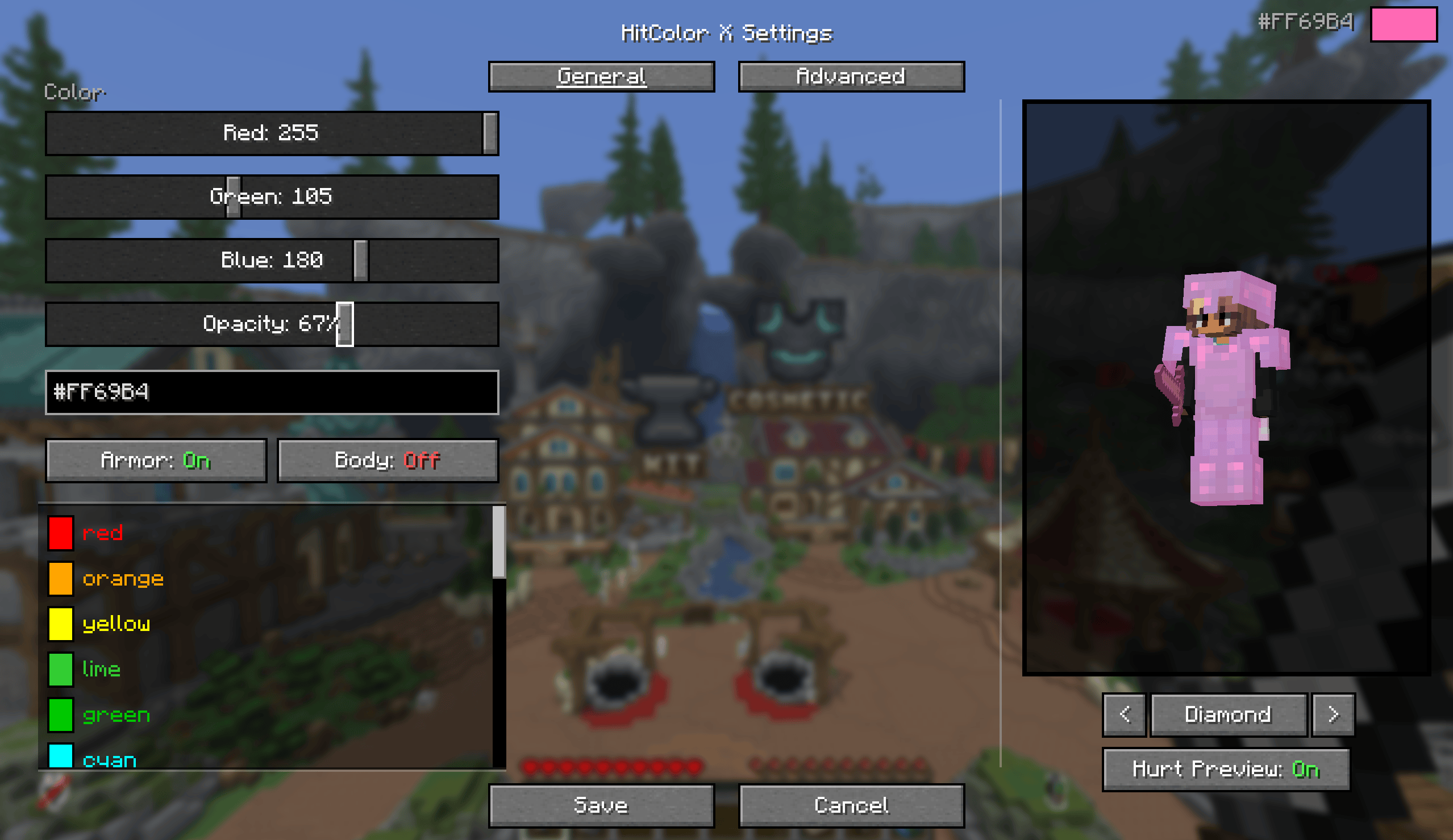
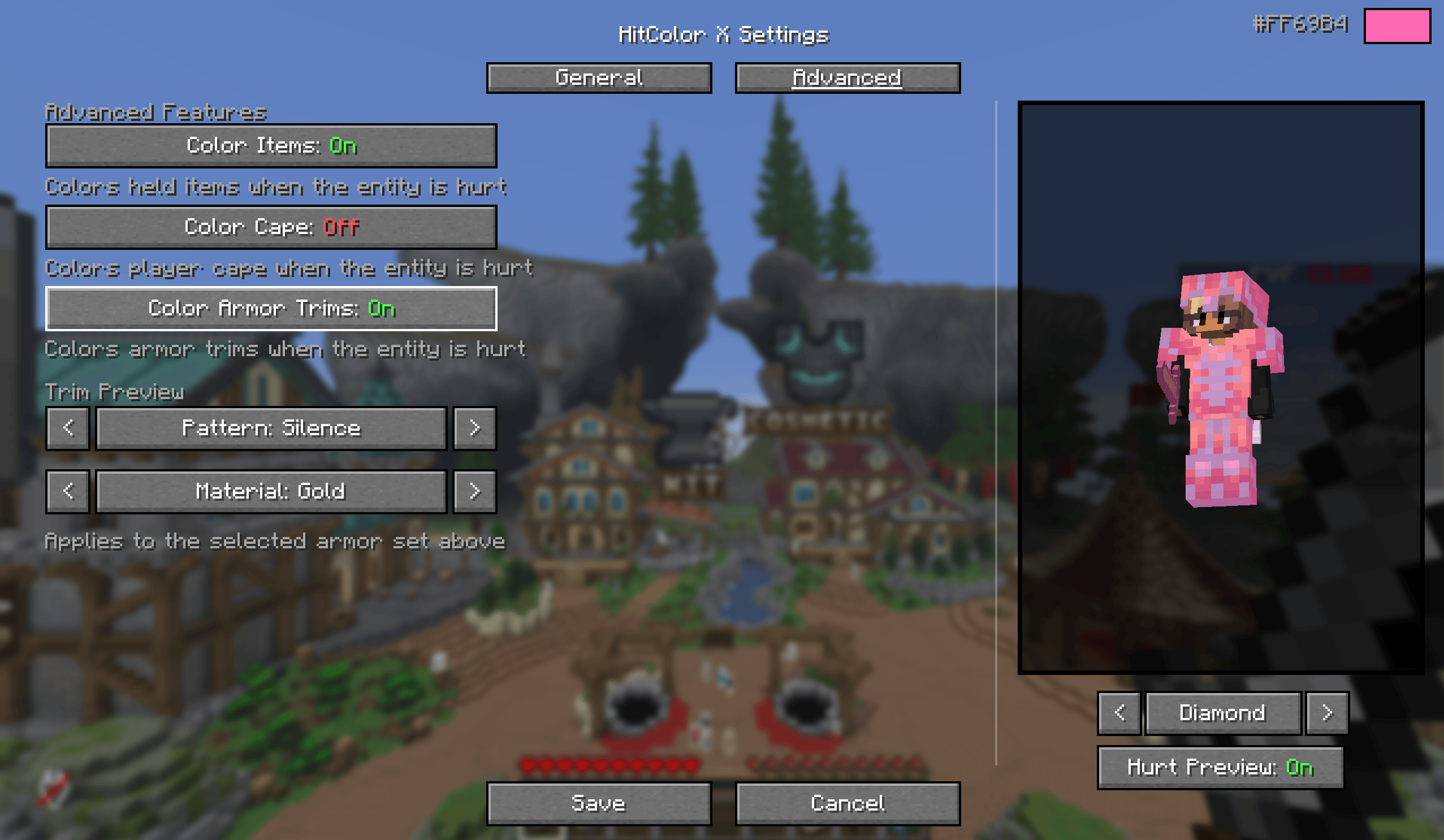
Color picker: RGB sliders, a hex input, or one of 27 built-in presets.
Per-part toggles: body, armor, armor trims, held items, and capes each flash independently. Turn off body and only tint armor, or any other combination.
Opacity slider: 0 to 100%, from no tint at all to fully solid.
Settings screen (needs Mod Menu): live preview using your actual skin while in a world, armor set switcher (Leather through Netherite, with glint) to preview trims and colors, and a hurt-preview toggle so you can compare with the effect on and off. Changes apply instantly.

No ModMenu? No problem. Configure everything via chat commands:
| Command | Description |
|---|---|
/hitcolorx rgb <r> <g> <b> |
Set color by RGB values |
/hitcolorx hex <#RRGGBB> |
Set color by hex code |
/hitcolorx color <preset> |
Use a preset color |
/hitcolorx opacity <0-100> |
Adjust opacity |
/hitcolorx armor <on/off> |
Toggle armor recoloring |
/hitcolorx trims <on/off> |
Toggle armor trim recoloring |
/hitcolorx body <on/off> |
Toggle body recoloring |
/hitcolorx items <on/off> |
Toggle held item recoloring |
/hitcolorx cape <on/off> |
Toggle cape recoloring |
/hitcolorx reset |
Reset to vanilla defaults |
/hitcolorx status |
Show current settings |
| Color | Name | Color | Name | Color | Name |
|---|---|---|---|---|---|
| 🔴 | red |
🟠 | orange |
🟡 | yellow |
| 🟢 | lime |
🟩 | green |
🩵 | cyan |
| 🔵 | lightblue |
💙 | blue |
🌑 | navy |
| 🟣 | purple |
🫐 | darkpurple |
💗 | hotpink |
| 🌸 | pink |
💜 | magenta |
🪻 | lavender |
| ❤️ | crimson |
🩸 | darkred |
🪸 | coral |
| 🏅 | gold |
🩴 | teal |
🩵 | turquoise |
| 🌿 | lightgreen |
🌲 | darkgreen |
🔷 | darkblue |
| 🩶 | silver |
⬜ | white |
⬛ | black |
Project description from Modrinth.
Pick your setup
Choose the version and loader you play, then open the matching release.
Check the dependencies, then try the file in a copied instance before changing a world you care about.
Recent files
HitColorX-1.1.0.jar
4 Jul 2026
HitColorX-1.1.0.jar
4 Jul 2026
HitColorX-1.1.0.jar
4 Jul 2026
HitColorX-1.0.1.jar
29 Apr 2026
HitColorX-1.0.0.jar
12 Apr 2026
Looking for an older file? The official Modrinth project page is in Resources.
 mod
modAdds ambient waves to beaches,oceans and rivers!
 mod
modCameras, Tv, Live feed, cassette, security, gifs, television, mirrors
 mod
modLightweight NPC system that creates realistic player NPCs with custom skins, interactions, and command support.
