Minecraft version
Back to mods 
Modrinth · Minecraft mod
Sodium
A high-performance rendering engine replacement for Minecraft, which greatly improves frame rates and reduces micro-stutter.
Choose a version Pick your version below, then grab the matching file.
Quick answer
Which Sodium release matches Fabric?
beta file mc1.21.11-0.8.13-beta.1-fabric
Game version 1.21.11
Loader Fabric
Sodium mc1.21.11-0.8.13-beta.1-fabric targets 1.21.11 with Fabric. It must be installed on the client. Do not install it on the dedicated server. No extra mods listed for this file.
Where it goes
Is Sodium required on the client, server, or both?
It must be installed on the client. Do not install it on the dedicated server.
Client Required
Dedicated server Not supported
Loader for this release Fabric
Required install it here Optional supported, not mandatory Not supported do not install here Source doesn’t say do not assume
This file is marked client-only.
What else does Sodium mc1.21.11-0.8.13-beta.1-fabric need?
mc1.21.11-0.8.13-beta.1-fabric on Fabric. Every mod below is checked against that same setup.
This file does not list any required mods. Do not add a library just because a different file uses it.
This file does not list any required or optional mods.
Before you install it
Add Sodium without breaking your instance.
Built for Sodium mc1.21.11-0.8.13-beta.1-fabric on Fabric. Pick another file and the loader, install side or required mods may change.
- 01
Stick to this file
Use mc1.21.11-0.8.13-beta.1-fabric. It targets 1.21.11 with Fabric; another release may have different loader, side or dependency requirements.
- 02
Bring the mods it needs
This file does not list any required mods. Do not add a library just because a different file uses it.
- 03
Put it on the correct side
It must be installed on the client. Do not install it on the dedicated server.
- 04
Pick the file you checked
Use the “Get this file” button beside mc1.21.11-0.8.13-beta.1-fabric. It opens that exact file at the source.
About this project
What does Sodium add?
Latest News (June 16, 2026) - Sodium 0.9.x is now available for Minecraft 26.2, with early support for Vulkan! The performance of the Vulkan backend is already in a good place (even faster than before on many devices), and we expect to be able to improve it even further with future updates.
This mod is the result of thousands of hours of development, and is made possible thanks to players like you. If you would like to show a token of your appreciation for my work, and help support the development of Sodium in the process, then consider buying me a coffee.


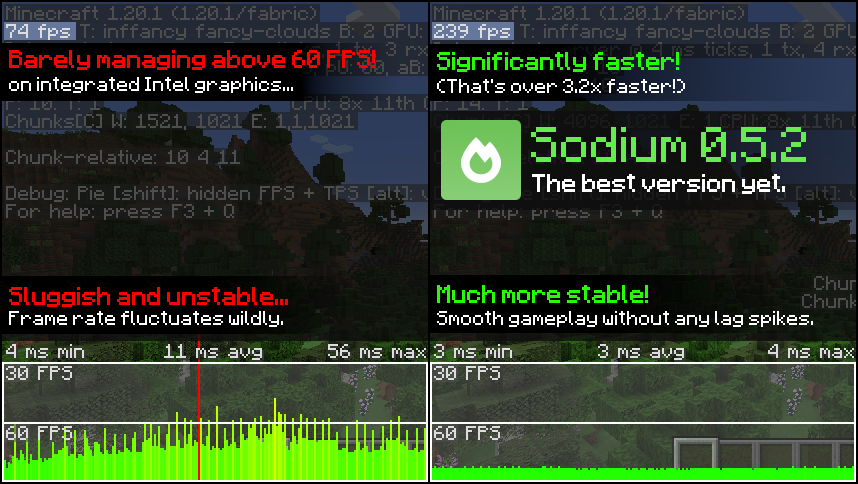
Sodium is a powerful optimization mod for the Minecraft client, which greatly improves frame rates and micro-stutter, while fixing many graphical issues in Minecraft.
Unlike other rendering-focused mods, it boasts wide compatibility with the wider modding ecosystem. And it does so without compromising on how the game looks, giving you that authentic block game feel.


📥 Installation Guide
Sodium is available for multiple mod loaders, but we recommend using Fabric Loader for the most simple and lightweight experience. If you are using a third-party launcher, it probably has built-in functionality to automatically install mod loaders. Once you have installed your mod loader, you can simply place Sodium into your mods folder like anything else.
Not sure if you installed the mod correctly? Check your Video Settings screen in Minecraft, which should show our new and improved user interface for changing settings.
Not sure how to configure the mod? Don't worry, you probably don't need to. By default, Sodium will enable all optimizations which are supported on your system, giving you the best experience possible. You should generally only change video settings related to performance and other advanced features if you are experiencing issues.
Need even more performance? By design, Sodium only optimizes the rendering code of Minecraft. You should also install our other mods, such as Lithium (for MC 1.15+) and Phosphor (for MC <1.19), to optimize the other parts of your game. This is done so that players can pick and choose which mods they want to use, but we generally recommend using our entire collection.
✅ Hardware Compatibility
Android devices (and some Windows-on-ARM devices) which use OpenGL translation layers (such as GL4ES, ANGLE, GLonD3D12 etc) are not supported and will have severe performance issues.
We only provide official support for desktop graphics cards which have up-to-date drivers compatible with OpenGL 4.5 or newer. Most graphics cards released in the past 12 years will meet these requirements, including the following:
- INTEL HD Graphics 500 Series (Skylake) or newer
- NVIDIA GeForce 400 Series (Fermi) or newer
- AMD Radeon HD 7000 Series (GCN 1) or newer
Nearly all desktop graphics cards that are already compatible with Minecraft (which requires OpenGL 3.3) should also work with Sodium. But our team cannot ensure compatibility or provide support for older graphics cards, and they may not work with future versions of Sodium.
If you are running into problems, you should make sure that your graphics drivers are up-to-date. Out-of-date graphics drivers are often the reason for most crashes, rendering bugs, and performance issues.
🐛 How to Report Issues
Please use the issue tracker linked at the top of the page to report bugs, crashes, and other issues. Make sure you include information about the mods you are using, and attach any crash/log files you have.
Note: The level of performance you see while using the Sodium mod will vary depending on exact hardware and software configuration. For all performance comparisons provided on this page, we used a computer with integrated graphics which we believe to be representative of the casual player.
Hardware configuration: Intel Core i7-1165G7 (4c/8t, up to 4.70 GHz) with Intel Xe Graphics (96 EUs, up to 1.30 GHz), 2x16 GB DDR4-3200.
Software configuration: Fedora 41, Linux 6.12.4, Mesa 24.3.4, Prism Launcher 9.1, OpenJDK 21.0.7 runtime (as packaged by distribution), Fabric Loader 0.16.10.
Project description from Modrinth.
Pick your setup
Sodium by Minecraft version and loader
Choose the version and loader you play, then open the matching release.
Check the dependencies, then try the file in a copied instance before changing a world you care about.
Recent files
Sodium versions and loaders
mc1.21.11-0.8.13-beta.1-fabric
sodium-fabric-0.8.13-beta.1+mc1.21.11.jar
15 Jun 2026
Client Required Server Not supported Dependencies No extras listed Listed on Release listing
Check the 1.21.11 · Fabric setup 1.21.11Fabric beta
Looking for an older file? The official Modrinth project page is in Resources.
 mod
mod CurseForge + Modrinth · Minecraft
Easy Model Entities
Turn Blockbench models into simple Minecraft entities without writing Java code.
 mod
mod CurseForge · Minecraft
SpawnFilter
A mod for modpack devs or players to make sure they dont spawn where they arent supposed to…
 mod
mod CurseForge · Minecraft
GriefLogger
A fast mod that uses SQLite or MySQL to log player interactions. Like CoreProtect but for modded.