Minecraft version
Back to mods 
Modrinth · Minecraft mod
Starter Cabin
Starter Cabin is a Minecraft mod that lets you save a player-built structure and automatically place it near the spawn point of any new world.
Choose a version Pick your version below, then grab the matching file.
Quick answer
Which Starter Cabin release should I use?
Latest stable file 1.0.1
Game version 1.21.1
Loader NeoForge
Starter Cabin 1.0.1 targets 1.21.1 with NeoForge. Installation on the client is optional. Installation on the dedicated server is optional. No extra mods listed for this file.
Where it goes
Is Starter Cabin required on the client, server, or both?
Installation on the client is optional. Installation on the dedicated server is optional.
Client Optional
Dedicated server Optional
Loader for this release NeoForge
Required install it here Optional supported, not mandatory Not supported do not install here Source doesn’t say do not assume
The source marks this as usable on both the client and server.
What else does Starter Cabin 1.0.1 need?
1.0.1. Change the file and its required mods may change too.
This file does not list any required mods. Do not add a library just because a different file uses it.
This file does not list any required or optional mods.
Before you install it
Add Starter Cabin without breaking your instance.
Built for Starter Cabin 1.0.1. Pick another file and the loader, install side or required mods may change.
- 01
Stick to this file
Use 1.0.1. It targets 1.21.1 with NeoForge; another release may have different loader, side or dependency requirements.
- 02
Bring the mods it needs
This file does not list any required mods. Do not add a library just because a different file uses it.
- 03
Put it on the correct side
Installation on the client is optional. Installation on the dedicated server is optional.
- 04
Pick the file you checked
Use the “Get this file” button beside 1.0.1. It opens that exact file at the source.
About this project
What does Starter Cabin add?
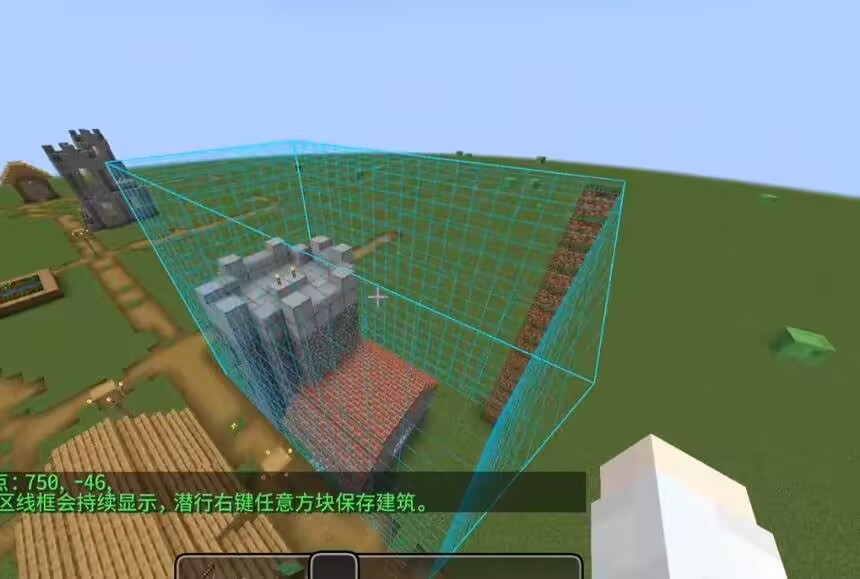
How to use it in 4 s
teps
- 1.Build your structure, then place a Spawn Carpet inside it where you want players to appear.
- 2.Hold the Building Saver item, right‑click one corner of the building, then right‑click the opposite corner – a selection outline appears.
- 3.Sneak + right‑click any block to save the selected area as a template.
- 4.When you create a new world, the mod will automatically find a suitable flat spot near spawn, place your building, and set the world spawn to the carpet position.
Key items
Building Saver – a carrot‑on‑a‑stick styled tool for selecting and saving.
Spawn Carpet – a marker block that records the spawn point; it is removed after saving (configurable).
Notes
- The template is saved to config/starter_cabin/template.nbt
- Each world generates the building only once – delete world data to force regeneration.
- If placement looks off, increase placementSearchRadius or lower maxSurfaceVariation.
- Recommended workflow
- Build and save your structure in a test world.
- Create a new world to verify the generation.
- Tweak config values if needed, then re‑save the template after major changes.
Project description from Modrinth.
Pick your setup
Starter Cabin by Minecraft version and loader
Choose the version and loader you play, then open the matching release.
Minecraft version
1.20.1
1 loader buildCheck the dependencies, then try the file in a copied instance before changing a world you care about.
Recent files
Starter Cabin versions and loaders
1.0.1
starter_cabin-1.0.1.jar
10 Jul 2026
Client Optional Server Optional Dependencies No extras listed Listed on Release listing
Check the 1.21.1 · NeoForge setup 1.21.1NeoForge release
1.0.1
starter_cabin-1.0.1.jar
10 Jul 2026
Client Optional Server Optional Dependencies No extras listed Listed on Release listing
Check the 1.20.1 · Forge setup 1.20.1Forge release
1.0.0
starter_cabin-1.0.0.jar
10 Jul 2026
Client Optional Server Optional Dependencies No extras listed Listed on Release listing
Check the 1.20.1 · Forge setup 1.20.1Forge release
1.0.0
starter_cabin-1.0.0.jar
10 Jul 2026
Client Optional Server Optional Dependencies No extras listed Listed on Release listing
Check the 1.21.1 · NeoForge setup 1.21.1NeoForge release
Looking for an older file? The official Modrinth project page is in Resources.
 mod
CurseForge + Modrinth · Minecraft
GTNH Customizer
A mod that customizes Gregtech: New Horizons to my personal preferences. Fully customizable!
 mod
Modrinth · Minecraft
Just Enough Filtering (JEF)
JEF is a small client-side add-on for JEI/REI/EMI that adds extra search-bar filtering for item stats.
 mod
Modrinth · Minecraft
Grim Anticheat
Fully async, multithreaded, predictive, open source, 3.01 reach, 1.005 timer, 0.01% speed, 99.99% antikb, "bypassable" 1.8-1.21 anticheat