Minecraft version
Back to mods 
Modrinth · Minecraft mod
WhatIsInThatShelf
See exactly what's on display! A Quality of Life HUD mod that shows you the tooltip of any item inside a shelf block just by looking at it
Choose a version Pick your version below, then grab the matching file.
Quick answer
Which WhatIsInThatShelf release matches 26.2 Fabric?
Best match for your filters 1.0.1
Game version 26.2
Loader Fabric
WhatIsInThatShelf 1.0.1 targets 26.2 with Fabric. It must be installed on the client. Do not install it on the dedicated server. No extra mods listed for this file.
Where it goes
Is WhatIsInThatShelf required on the client, server, or both?
It must be installed on the client. Do not install it on the dedicated server.
Client Required
Dedicated server Not supported
Loader for this release Fabric
Required install it here Optional supported, not mandatory Not supported do not install here Source doesn’t say do not assume
This file is marked client-only.
What else does WhatIsInThatShelf 1.0.1 need?
1.0.1 on 26.2 Fabric. Every mod below is checked against that same setup.
This file does not list any required mods. Do not add a library just because a different file uses it.
This file does not list any required or optional mods.
Before you install it
Add WhatIsInThatShelf without breaking your instance.
Built for WhatIsInThatShelf 1.0.1 on 26.2 Fabric. Pick another file and the loader, install side or required mods may change.
- 01
Stick to this file
Use 1.0.1. It targets 26.2 with Fabric; another release may have different loader, side or dependency requirements.
- 02
Bring the mods it needs
This file does not list any required mods. Do not add a library just because a different file uses it.
- 03
Put it on the correct side
It must be installed on the client. Do not install it on the dedicated server.
- 04
Pick the file you checked
Use the “Get this file” button beside 1.0.1. It opens that exact file at the source.
About this project
What does WhatIsInThatShelf add?
WhatIsInThatShelf (WIITS)
Never wonder what's sitting on that shelf again.
WhatIsInThatShelf is a lightweight utility mod that adds a clean, highly houses-configurable HUD tooltip for Shelf blocks. Instead of opening an inventory to check your items, simply look at a shelf to see exactly what is inside.
✨ Primary Features
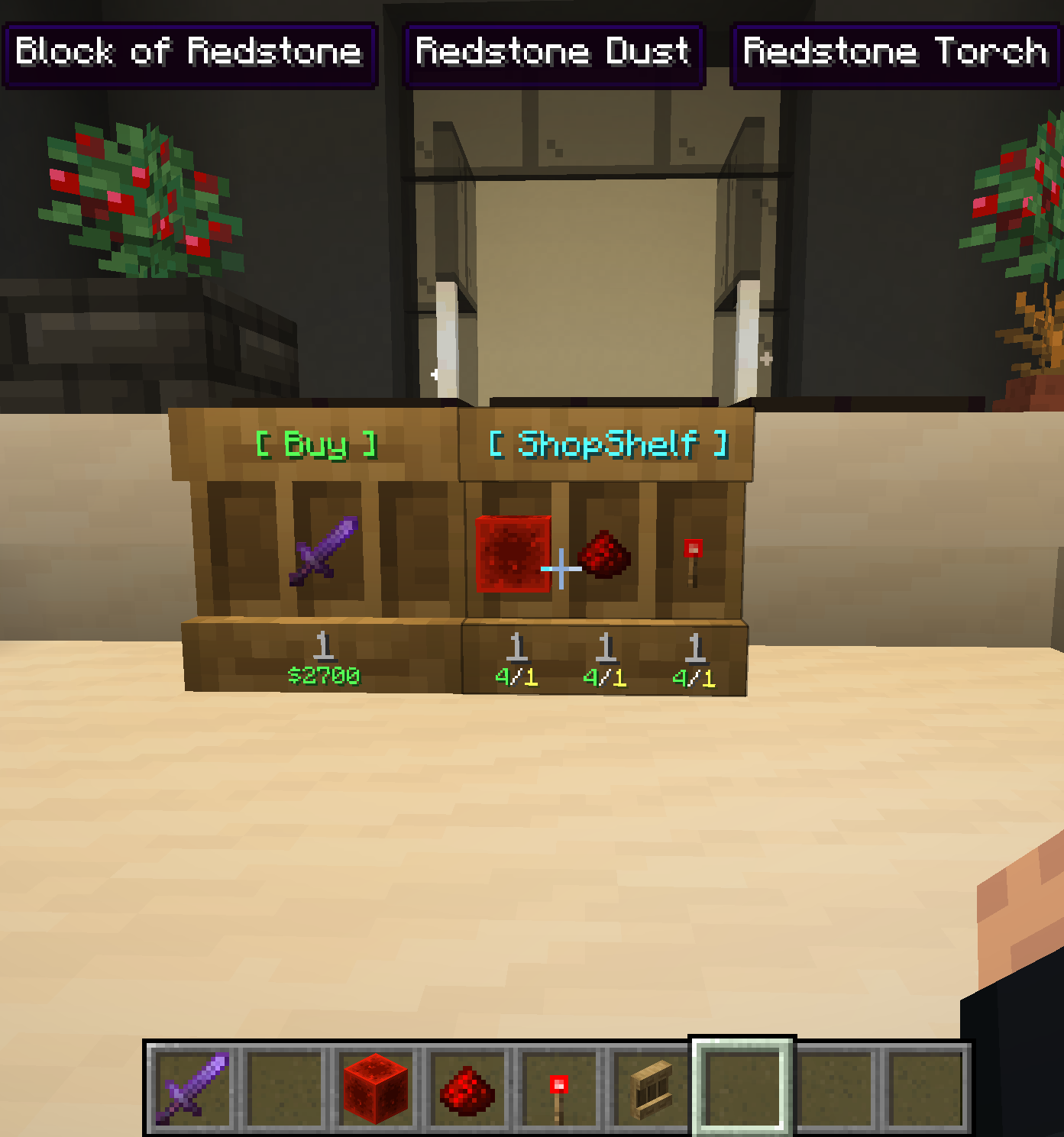
📦 Smart Item Detection
When looking at a shelf, the mod identifies the specific slot your crosshair is targeting and displays its contents instantly.
- Triple Mode: If you prefer to see everything at once, you can enable Triple Mode in the settings. This displays all three shelf slots simultaneously.
- Adjustable Spacing: You can use the "Gap" slider to fine-tune the distance between these three tooltips, whether they are stacked vertically or spread horizontally.
🛠️ Live Configuration
Forget about restarting your game to change settings. Pressing "I" (the default, rebindable key) opens a specialized settings screen.
- Visual Feedback: Because the settings menu can be used while looking at a shelf, you can see HUD changes in real-time as you toggle options or move sliders.
- Dynamic Scaling: The "Scale" slider (0.25x to 3.0x) allows you to resize the tooltip based on your preference.
- Config Folder Access: A dedicated button in the menu opens your configuration folder instantly, making manual edits easy.
📍 Intelligent Positioning
The HUD includes six anchor points: Top Left, Middle, and Right, and Bottom Left, Middle, and Right.
- Chat Awareness: If you use a Bottom position, the tooltip will automatically jump to the Top whenever you open the chat bar so it doesn't block your typing.
- XP Bar Safety: The Bottom-Middle position is pre-configured with a specific margin to sit safely above your experience bar and hotbar.
🎨 Content & Style
You have total control over what information is displayed on the HUD:
- Data Toggles: Choose to show or hide item attributes, potion effects, mod names, and advanced technical info.
- Amount Formatting: Display item counts in seven different positions, such as above the name, after the name, or even relative to the item lore.
- Color Overrides: The mod supports custom Hex codes (
&#RRGGBB), Minecraft color codes (&6), and named colors for mod names, attributes, and more. - Transparency Mode: You can toggle the background box on or off to create a floating text effect for a more minimal UI.
⚙️ Compatibility & Requirements
- WTHIT Integration: Built-in compatibility prevents overlapping tooltips. WIITS tells WTHIT to hide its default block tooltip when looking at a shelf so only the item info is visible.
- Requirements: Requires Minecraft 1.21.x, Fabric Loader, and Fabric API.
Project description from Modrinth.
Pick your setup
WhatIsInThatShelf by Minecraft version and loader
Choose the version and loader you play, then open the matching release.
Minecraft version
26.4-pre-1
1 loader buildMinecraft version
26.3
1 loader buildMinecraft version
26.2
1 loader buildMinecraft version
26.1.2
1 loader buildMinecraft version
26.1.1
1 loader buildMinecraft version
26.1
1 loader buildMinecraft version
1.21.11
1 loader buildMinecraft version
1.21.10
1 loader buildMinecraft version
1.21.9
1 loader buildCheck the dependencies, then try the file in a copied instance before changing a world you care about.
Recent files
WhatIsInThatShelf versions and loaders
1.0.1
WhatIsInThatShelf-1.0.1.jar
16 Jun 2026
Client Required Server Not supported Dependencies No extras listed Listed on Release listing
Check the 26.2 · Fabric setup 26.2Fabric release
Looking for an older file? The official Modrinth project page is in Resources.
 mod
Modrinth · Minecraft
AR1 Animated Typing
A simple mod adding customizable animations when typing in text fields
 mod
Modrinth · Minecraft
MCPFabric
Lets Claude or any other MCP client play Minecraft, build, and run a server. Fabric and NeoForge, Minecraft 1.21.1 to 26.3, 114 tools.
 mod
Modrinth · Minecraft
No Pearl Interpolation
Removes the interpolation on other players' model when their ender pearl lands, so they instantly appear at their pearl's position