Minecraft version
Back to mods 
Modrinth · Minecraft mod
Chromaglow
Automatically grants every player and pet a glowing effect, allowing them to customize their outline color and auto-hide it using contextual settings.
Choose a version Pick your version below, then grab the matching file.
Quick answer
Which Chromaglow release should I use?
Latest stable file 1.1.0+mod
Game version 1.21, 1.21.1, 1.21.10
Loader Fabric, Forge, NeoForge
Chromaglow 1.1.0+mod targets 1.21, 1.21.1, 1.21.10 with Fabric, Forge, NeoForge. Installation on the client is optional. Installation on the dedicated server is optional. No extra mods listed for this file.
Where it goes
Is Chromaglow required on the client, server, or both?
Installation on the client is optional. Installation on the dedicated server is optional.
Client Optional
Dedicated server Optional
Loader for this release Fabric, Forge, NeoForge
Required install it here Optional supported, not mandatory Not supported do not install here Source doesn’t say do not assume
The source marks this as usable on both the client and server.
What else does Chromaglow 1.1.0+mod need?
1.1.0+mod. Change the file and its required mods may change too.
This file does not list any required mods. Do not add a library just because a different file uses it.
This file does not list any required or optional mods.
Before you install it
Add Chromaglow without breaking your instance.
Built for Chromaglow 1.1.0+mod. Pick another file and the loader, install side or required mods may change.
- 01
Stick to this file
Use 1.1.0+mod. It targets 1.21, 1.21.1, 1.21.10 with Fabric, Forge, NeoForge; another release may have different loader, side or dependency requirements.
- 02
Bring the mods it needs
This file does not list any required mods. Do not add a library just because a different file uses it.
- 03
Put it on the correct side
Installation on the client is optional. Installation on the dedicated server is optional.
- 04
Pick the file you checked
Use the “Get this file” button beside 1.1.0+mod. It opens that exact file at the source.
About this project
What does Chromaglow add?
Chromaglow
What it does
Chromaglow automatically gives players and their owned pets a glowing outline and lets players customize how it behaves. Player outlines can use Chromaglow team colors, while pets can either follow their owner's color or use their collar color.
Glowing can also be hidden automatically in different situations, with personal settings available through /trigger chromaglow and global controls available to server admins.
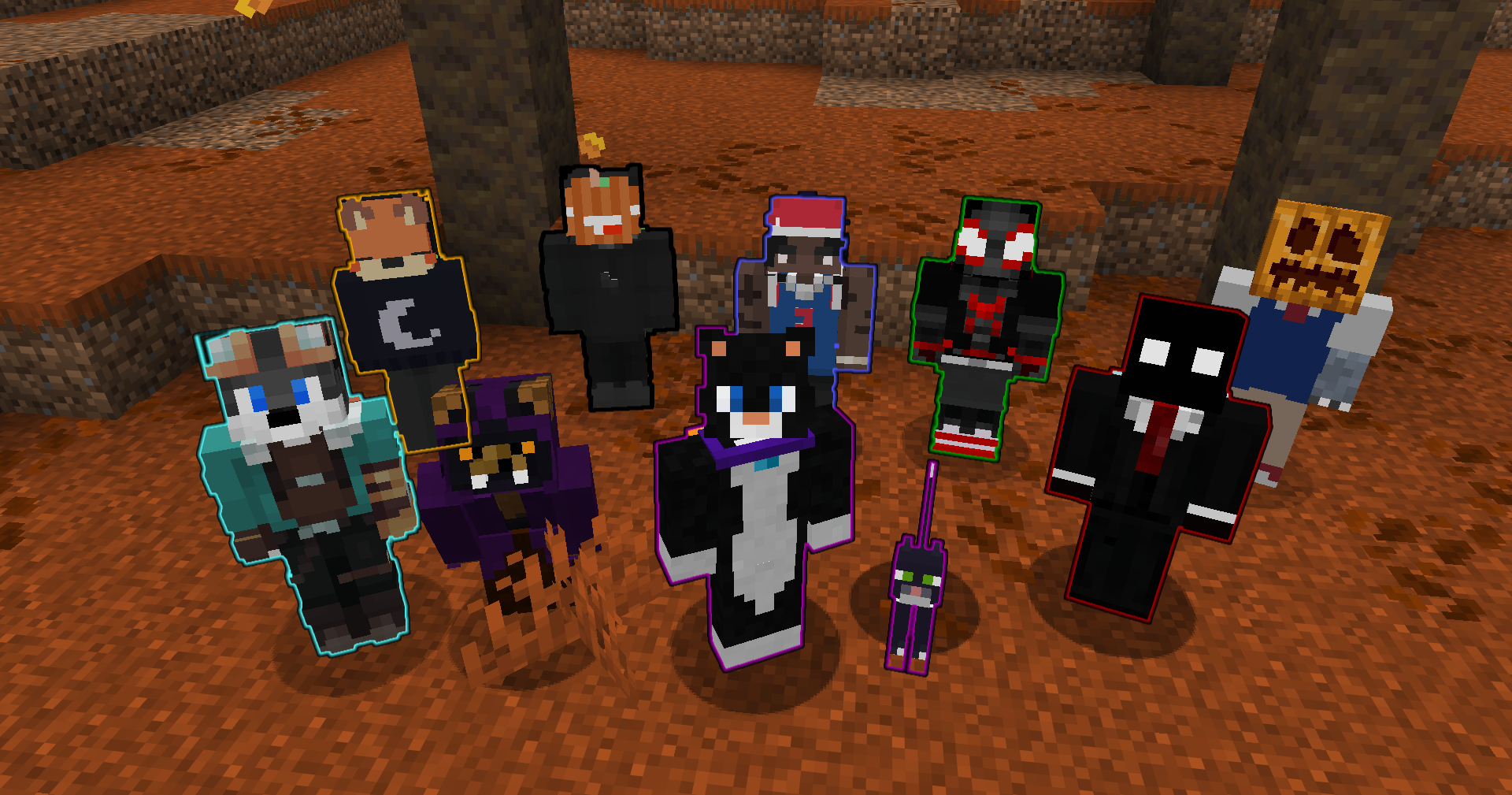
Personal Menu
Run /trigger chromaglow to open your personal menu.
- Colors: Choose from Chromaglow's color teams to change your glowing outline color.
- Player Settings: Choose whether you glow and when your Glowing is hidden.
- Pet Settings: Choose whether your pets glow, when their Glowing is automatically hidden, and where their color comes from.
Personal choices follow the server's global defaults unless overridden, and server admins can force individual settings when needed.
Player Glowing
Players can configure whether Chromaglow applies Glowing and whether it should be hidden in specific situations:
- Crouching: Hide Glowing while sneaking.
- Invisibility: Hide Glowing while under the Invisibility effect.
- Disguises: Hide Glowing while wearing an item from
#chromaglow:disguisesin an armor slot.
These settings can be changed personally unless they are forced by the server configuration.
Pet Glowing
Chromaglow can also automatically apply Glowing to owned pets.
Players can configure:
- Glow Pets: Enable or disable Glowing for their pets.
- Auto Hide: Choose whether pet Glowing is hidden while Sitting, while Standing, or Never automatically hidden.
- Pet Color: Use either the Owner's Chromaglow team color or the pet's Collar color when available.
By default, pets glow using their owner's color and automatically hide their Glowing while sitting.
Customization
Use /function chromaglow:_config to configure global server settings.
Server admins can:
- Control whether players and pets glow by default.
- Force individual player and pet settings.
- Configure contextual player hiding rules.
- Configure pet auto-hide behavior and color source.
- Require the
chromaglow.glowingtag separately for players and pets. - Choose which personal menu categories players can access.
Each setting can be reset individually, while groups and the entire configuration can also be restored to their defaults.
Uninstallation
Use /function chromaglow:uninstall to remove Chromaglow's persistent data before removing the datapack.
What's Next
In a future update I plan to expand glowing granting to other entities by interacting with an item.
Project description from Modrinth.
Pick your setup
Chromaglow by Minecraft version and loader
Choose the version and loader you play, then open the matching release.
Minecraft version
26.3-snapshot-10
5 loader buildsMinecraft version
26.3-snapshot-9
5 loader buildsMinecraft version
26.3-snapshot-8
5 loader buildsMinecraft version
26.3-snapshot-7
5 loader buildsMinecraft version
26.3-rc-3
5 loader buildsMinecraft version
26.3-rc-2
5 loader buildsMinecraft version
26.3-rc-1
5 loader buildsMinecraft version
26.3-pre-3
5 loader buildsMinecraft version
26.3-pre-2
5 loader buildsMinecraft version
26.3-pre-1
5 loader buildsMinecraft version
26.3
5 loader buildsShowing the newest 12 of 28 game versions. Older files are in the list below.
Check the dependencies, then try the file in a copied instance before changing a world you care about.
Recent files
Chromaglow versions and loaders
1.1.0+mod
chromaglow-1.1.0.jar
27 Aug 2026
Client Optional Server Optional Dependencies No extras listed Listed on Release listing
Check the 26.4-snapshot-1 · Fabric setup 1.211.21.11.21.101.21.11 release
1.1.0
Chromaglow v1.1.0 (1.21–26.3).zip
27 Aug 2026
Client Optional Server Optional Dependencies No extras listed Listed on Release listing
Check the 26.4-snapshot-1 · datapack setup 1.211.21.11.21.101.21.11 release
1.0.0+mod
chromaglow-1.0.0.jar
11 Aug 2026
Client Optional Server Optional Dependencies No extras listed Listed on Release listing
Check the 26.3-snapshot-10 · Fabric setup 1.211.21.11.21.101.21.11 release
1.0.0
Chromaglow v1.0.0 (1.21–26.3).zip
11 Aug 2026
Client Optional Server Optional Dependencies No extras listed Listed on Release listing
Check the 26.3-snapshot-10 · datapack setup 1.211.21.11.21.101.21.11 release
Looking for an older file? The official Modrinth project page is in Resources.
 mod
CurseForge + Modrinth · Minecraft
PPE Essentials
A lightweight mod that adds useful commands (like /tpa /repeat) and tweaks
 mod
CurseForge · Minecraft
Dont hurt3d
A mod who had a #$( secrets
 mod
CurseForge · Minecraft
Allay Airstrike
Adds an Allay Remote item that calls in Allays to strike your target with TNT