Back to mods
Stock Market project artwork

CurseForge · Minecraft mod

Stock Market

StockMarket is a Minecraft mod that brings a better way for trading to the game. It enables players to trade items on a virtual stock market, making it ideal for multiplayer servers with active economies.

Choose a version Pick your version below, then grab the matching file.

Quick answer

Which Stock Market release should I use?

Updated 4 days ago
Latest stable file stockmarket-neoforge-1.3.1.jar
Game version 1.21.1
Loader NeoForge

Stock Market stockmarket-neoforge-1.3.1.jar targets 1.21.1 with NeoForge. The project page does not say whether this file belongs on the client, dedicated server, or both. All 2 required mods have matching files.

Where it goes

Is Stock Market required on the client, server, or both?

The project page does not say whether this file belongs on the client, dedicated server, or both.

Client Source doesn’t say
Dedicated server Source doesn’t say
Loader for this release NeoForge
Required install it here Optional supported, not mandatory Not supported do not install here Source doesn’t say do not assume

The source does not explicitly classify this release as client-only or server-only.

What else does Stock Market stockmarket-neoforge-1.3.1.jar need?

stockmarket-neoforge-1.3.1.jar. Change the file and its required mods may change too.

All 2 required mods have matching files

Install Architectury API, BankSystem first. We found matching files for this game-version and loader setup.

Architectury API Needed by Stock Market stockmarket-neoforge-1.3.1.jar
required
Matching file found Matched file: 13.0.11+neoforge
BankSystem Needed by Stock Market stockmarket-neoforge-1.3.1.jar
required
Matching file found Matched file: 1.4.1

We only count dependency files that match this setup. A file for another loader does not fill the gap.

Before you install it

Add Stock Market without breaking your instance.

Built for Stock Market stockmarket-neoforge-1.3.1.jar. Pick another file and the loader, install side or required mods may change.

  1. 01

    Stick to this file

    Use stockmarket-neoforge-1.3.1.jar. It targets 1.21.1 with NeoForge; another release may have different loader, side or dependency requirements.

  2. 02

    Bring the mods it needs

    Install Architectury API, BankSystem first. We found matching files for this game-version and loader setup.

  3. 03

    Put it on the correct side

    The project page does not say whether this file belongs on the client, dedicated server, or both.

  4. 04

    Pick the file you checked

    Use the “Get this file” button beside stockmarket-neoforge-1.3.1.jar. It opens that exact file at the source.

About this project

What does Stock Market add?

Stock Market Mod

Version 2.1.0 is a TEST VERSION — expect bugs and breaking changes. Use in production worlds at your own risk. Stable release: v1.3.1.

StockMarket is a Minecraft mod that brings a virtual stock market to Minecraft. Players trade items on a real-time matching engine with candlestick charts, order books, and market/limit orders — just like a real exchange. Prices react to what players actually buy and sell, and a modular plugin system fills in the rest: baseline liquidity, volatility, target-price bots, and a full news event system that pushes market-moving headlines. Admins get an in-game management console for markets, plugins, presets, and settings; server networks share a single market through a master/slave architecture with trust-based access control.

More info and documentation: GitHub

Requires BankSystem 2.1.0 or newer and Architectury. ModUtilities ships inside the mod — you do not need to download it separately (Quilt users are the exception and still need ModUtilities as its own jar). Both server and client need the mod installed.

Features

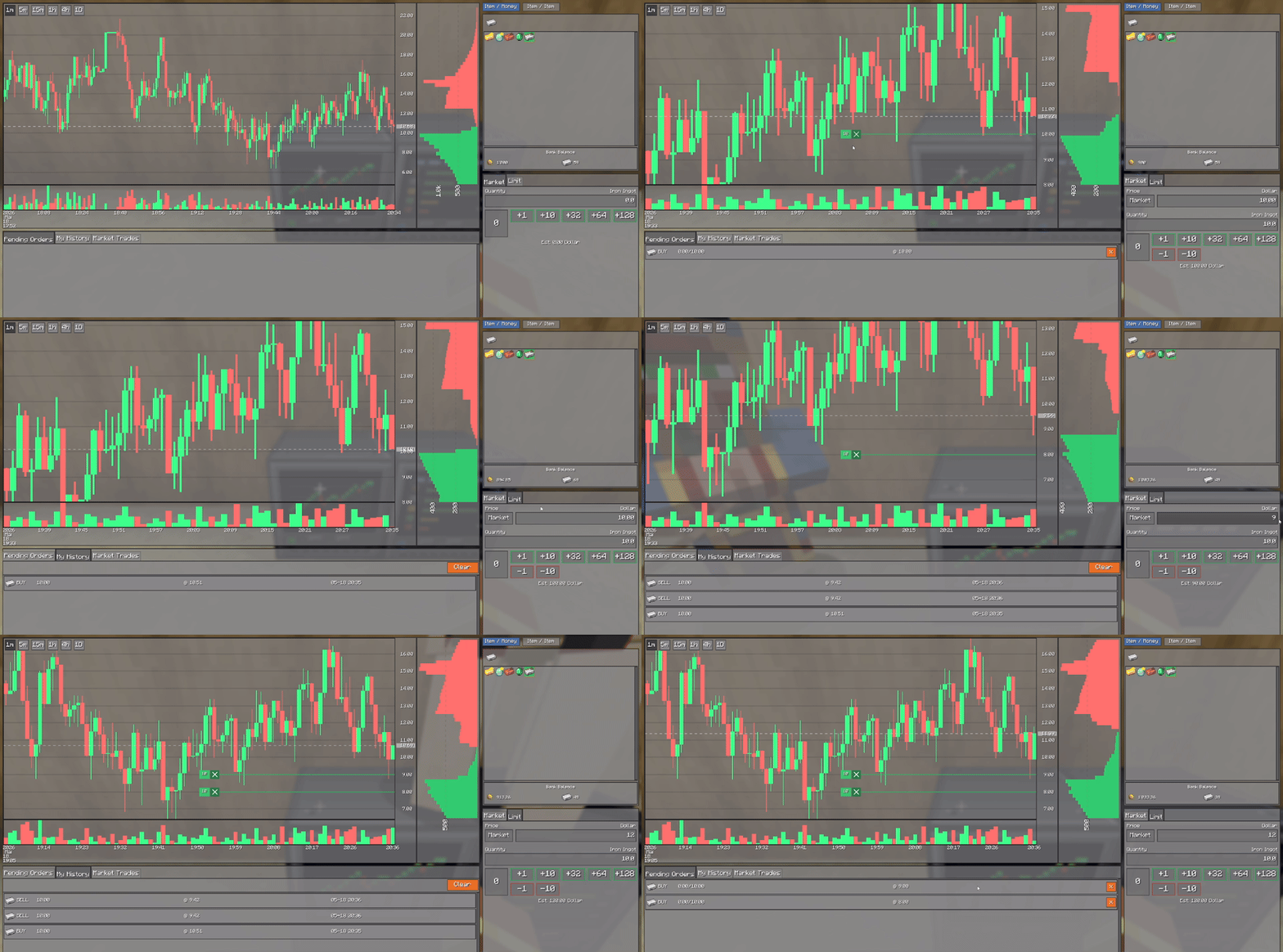
  • Real-time trading with candlestick charts, order-book depth, and per-candle traded-volume bars
  • Full chart history — charts page in older candles as you scroll, all the way back to the market's very first candle, loading only what you actually view
  • Market orders (instant) and limit orders (price-targeted), with draggable order markers on the chart to move an order to a new price
  • Inter-market trading — trade items directly against other items (e.g. iron for diamonds) without a sell → buy roundtrip
  • Company shares — company stock issued through BankSystem trades alongside ordinary items, with a Commodities / Companies filter on the trading block, real company names, and tinted share icons throughout the UI
  • Pending-orders panel with live updates and one-click cancel; full order history and market transaction log per market
  • Bank-account selector on the trade screen — choose which of your bank accounts funds each trade; balances and open-order list are scoped to it
  • Favorites — star markets you trade often for quick access; last-selected market restored per player
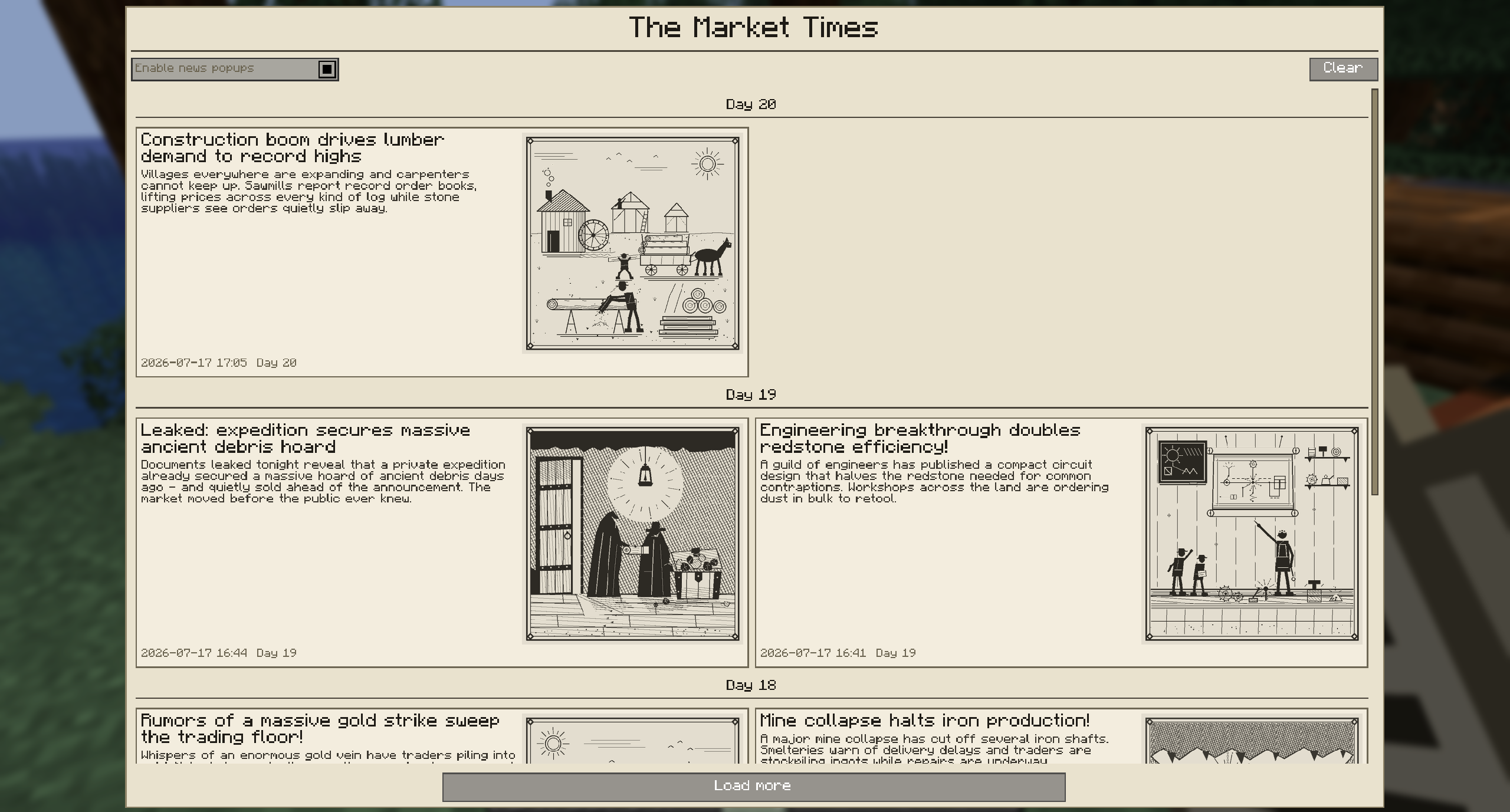
  • News Event System with a craftable newspaper, 72 default bilingual events, per-event woodcut illustrations, multi-step impact sequences (spike → decay → recovery), trigger requirements, event chains, and JSON-configurable custom events
  • Villager trading integration — villager/wandering-trader offers for market-listed items are repriced from the live stock market with configurable buy/sell margins; merchant money costs can be paid with any denomination combination
  • Modular plugin system — VolatilityPlugin (with player-flow price equilibrium), TargetPriceBot (PID), DefaultOrderbookVolumeDistribution, and NewsPlugin. All independently enable/disable, subscribable per market, with a developer SDK for custom plugins
  • In-game Mod Settings screen — every settings.json value editable live, validated and clamped server-side; restart-required settings are labelled
  • Management GUI — create markets, browse 32 default preset categories (blocks, ores, food, tools, armor, enchanted books, potions, tipped arrows, …), edit presets inline, manage plugins with a per-plugin performance profiler bar, and admin the news system
  • Per-market virtual orderbook control — turn the simulated orderbook off for individual markets so their price is driven purely by real player trading, with Clear and Reset actions for the rest
  • Multi-server support — master/slave architecture. Untrusted slaves are locked to read-only browsing; every mutating request (orders, plugin changes, preset edits, mod settings, news ops) is rejected at the master
  • Admin permission flag dedicated to StockMarket — operator level alone no longer grants management access
  • Safe database backups — op-only /stockmarket backup pause|resume|status quiesces the SQLite database so external backup scripts capture a clean snapshot, with a 120 s auto-resume safety net
  • Public integration API — other mods can create, pause, resume and delete markets in-process through a documented server-side service

What's new in 2.1.0

Requires BankSystem 2.1.0 or newer. This release is built around BankSystem's new company feature — older BankSystem versions will not load.

  • Company shares are tradable — company stock issued through BankSystem appears on the market like any other subject. The trade screen, order-book headers, favorites and tooltips all show the real company name instead of a raw item id, and share rows render the company's tinted share icon
  • Commodities / Companies filter on the trading block — a segmented control sits under the trade-mode buttons and filters both the money mode and the item-for-item pair mode, so the flow is mode → group → item, with a live count per group
  • Sort the market list by name, price, shares issued, or 24 h volume
  • Per-market virtual orderbook toggle — switch the simulated orderbook off for a single market so its price comes purely from real player trading. Comes with Clear and Reset actions, plus a matching per-preset flag and a "no plugin autosubscribe" preset option
  • Public integration API for other mods — a documented, server-side service to create, pause, resume, and delete markets in-process. Pausing a market halts trading and refunds every open player order without destroying its price history
  • Preset editor: pick items straight from your inventory — a "+ From Inventory" picker laid out as familiar 3×9 + hotbar grids, which can select items carrying data components (such as stamped company shares) that the flat registry list cannot reach
  • Fixes — market orders with no liquidity now cancel and release the money they reserved, the preset editor no longer crashes when you click an item in a picker, and the trade screen shows the Market Closed label correctly on first open
  • Full changelog for 2.0.1 → 2.1.0 on GitHub

What's new since the last stable release (1.3.1)

  • Modular plugin system replaces the old single bot — VolatilityPlugin, TargetPriceBot, DefaultOrderbookVolumeDistribution, and NewsPlugin, each independently enable/disable, subscribable per market, with a two-class developer SDK for custom plugins (v2.0.1)
  • Plugin management GUI with candlestick + orderbook overlays, per-plugin custom settings screens, and market subscribe/unsubscribe controls (v2.0.1)
  • 32 default preset categories covering vanilla 1.21.1 items — blocks, ores, food, crops, tools, armor, redstone, mob drops, brewing, all enchanted books at max level, potions, splash / lingering potions, and tipped arrows (v2.0.1)
  • Traded volume tracking end-to-end — cumulative volume per candle in the SQL history, live streaming to clients, and green/red volume bars in the chart (v2.0.1)
  • Draggable order markers on the chart — pending limit orders render as horizontal price lines with a drag handle to move an order and an [X] to cancel (v2.0.1)
  • Pending orders panel, order history, and market transaction log tabs on the trade screen (v2.0.1)
  • Favorites and last-market memory per player, persisted server-side (v2.0.1)
  • Inter-market trading — trade items directly against other items on a pair chart (v2.0.1)
  • Preset editor GUI and admin commands — /stockmarket preset add to capture a held item as a preset, /stockmarket <market> remove to delete a market outside the GUI (v2.0.1 / v2.0.3)
  • Locale hardening — every numeric format across the UI is pinned to Locale.ROOT, fixing the TradeScreen crash on ,-decimal-separator locales (v2.0.2)
  • Market lifecycle fixes — deleted markets propagate to every client immediately, drifted or unresolvable markets stay selectable/removable, and duplicate markets from BankSystem ItemID merges are consolidated automatically (v2.0.3)
  • News Event System — craftable newspaper, 72 default bilingual events, per-event woodcut art, multi-step sequences, requirements, chains, and JSON-configurable custom events (v2.0.4)
  • Villager trading — offers repriced from the live market, denomination-agnostic money payment (v2.0.4)
  • In-game Mod Settings screen for admins on the master server (v2.0.4)
  • VolatilityPlugin price equilibrium with player-flow self-balancing and per-item Abundance scaling (v2.0.4)
  • Plugin performance profiler bar in the Plugin Management window (v2.0.4)
  • Bank-account selector on the trade screen — trade from any account you have full permission on (v2.0.4)
  • Trust-based access control and dedicated StockMarket-admin permission flag — untrusted slaves are read-only; management access no longer follows operator level alone (v2.0.4)
  • Fabric build fix — restores the BankSystem dependency on the fabric build (v2.0.5)
  • Paginated chart history — charts load only the window you are viewing and page in older candles as you scroll back, so you can reach the market's first ever candle instead of stopping at roughly five days. Cross-rate charts paginate the same way, and re-visiting a range costs no network traffic (v2.0.7)
  • Faster world join — chart data is no longer fetched for every market on load; a 125-market world previously fired 750 SQL round-trips before you opened a single chart (v2.0.7)
  • /stockmarket backup pause|resume|status — op-only database quiesce so external backup scripts capture a clean stockdata.db, with a 120 s auto-resume safety net and no data loss while paused (v2.0.7)
  • Company share trading — company stock from BankSystem trades alongside items, with a Commodities / Companies filter, real company names, tinted share icons, and market sorting by name / price / shares issued / 24 h volume (v2.1.0)
  • Per-market virtual orderbook toggle with Clear and Reset actions, plus matching preset flags (v2.1.0)
  • Public integration API for other mods to create, pause, resume and delete markets in-process (v2.1.0)
  • Preset editor inventory picker — select items carrying data components, such as stamped company shares (v2.1.0)

Stock Market Terminal Block

The physical terminal block. Right-click to open the full trading interface — chart, order book, order controls, favorites, pending orders, and history — all bound to your currently selected bank account.
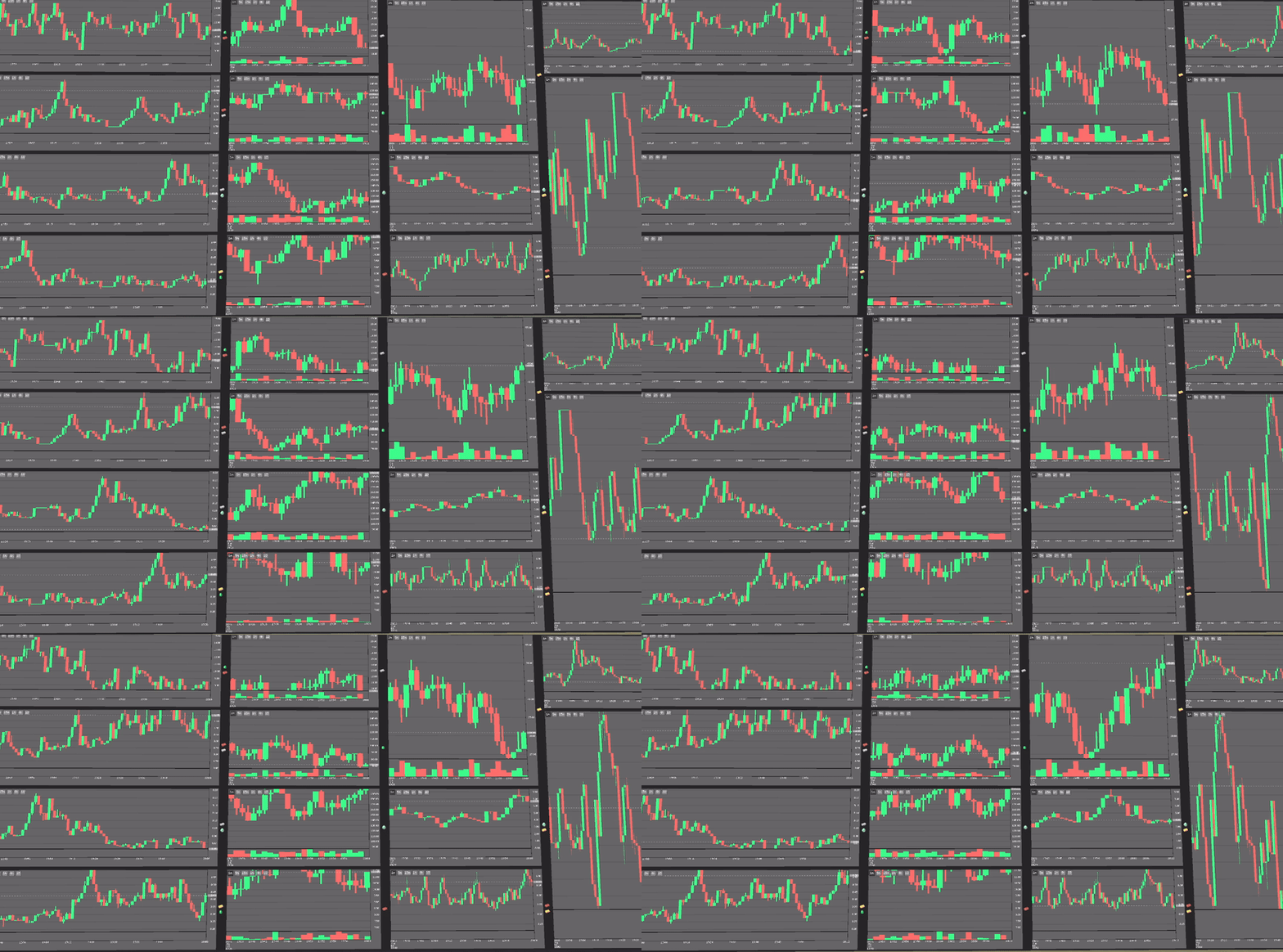

Real-time price chart

Candlestick chart with a traded-volume histogram below. Volumes are colored green/red to match each candle's direction and stream live from the server. Pan, zoom, and switch timeframes.

News Event System

The craftable newspaper is the player-facing feed. Entries are grouped by in-game day with "Day N" separators, and each event carries its own 384×384 grayscale woodcut illustration. Open the newspaper from your inventory, from the Trade or Management screens, or via /stockmarket news.
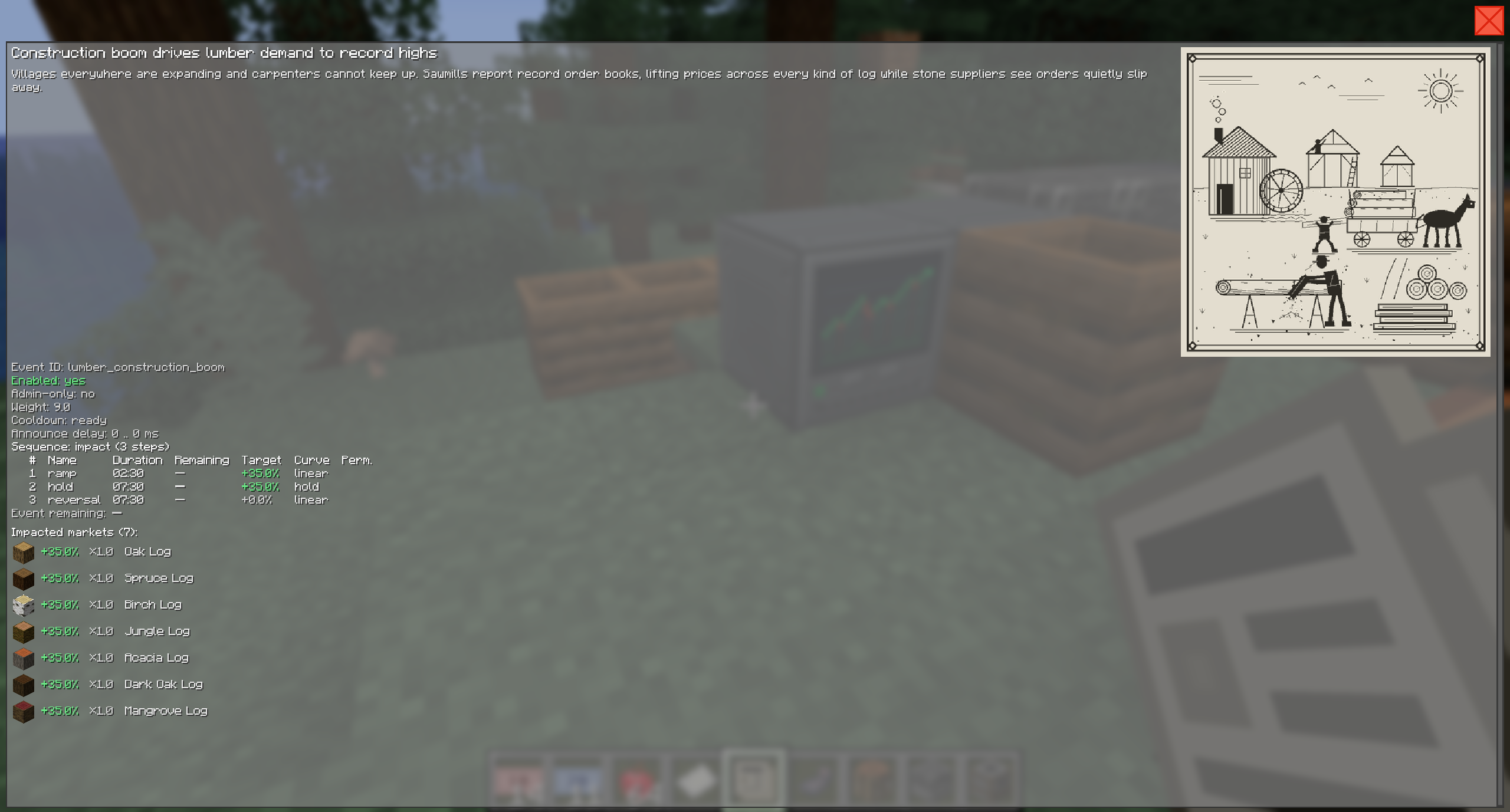
Click any headline to see the full event: category, affected markets with per-market impact percentages, a live-updating sequence breakdown (ramping → holding → reverting → expired) with per-phase durations and a countdown to the next step.
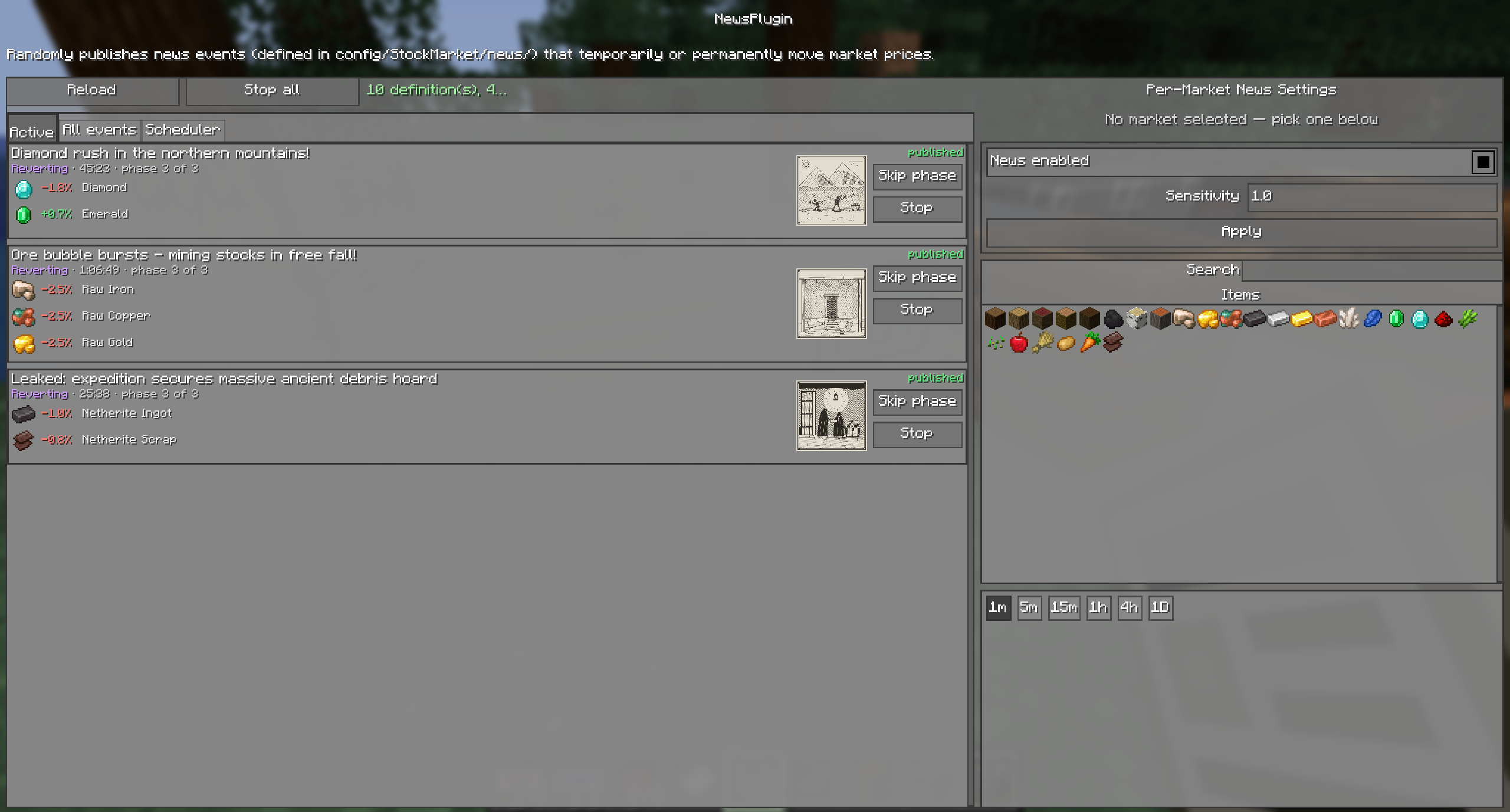

News admin controls

Active — currently running events with per-market impact rows, picture thumbnail, and per-event skip phase / stop controls.
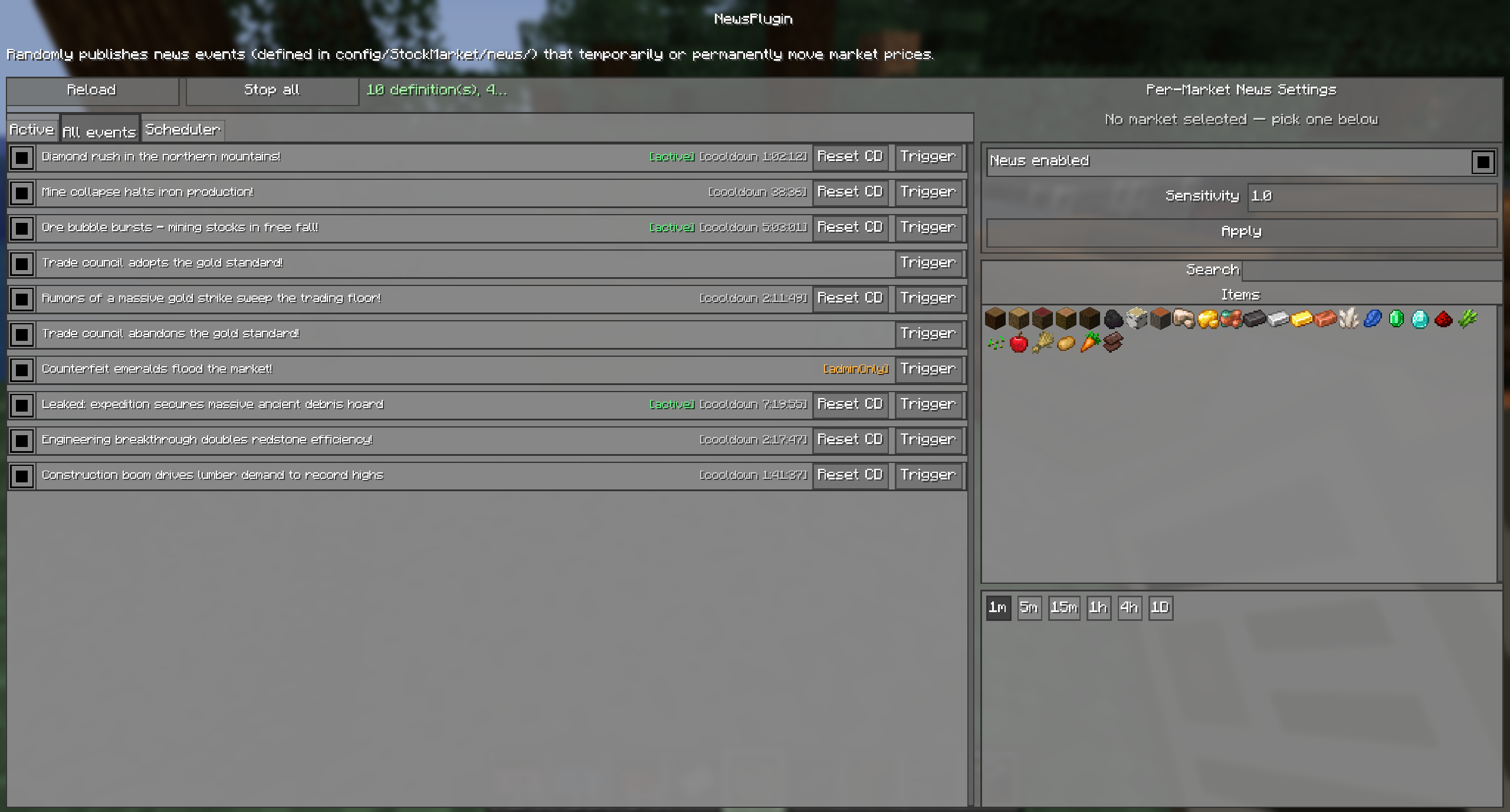
All events — the full event roster with a details popup, per-event enable/disable, and manual trigger.
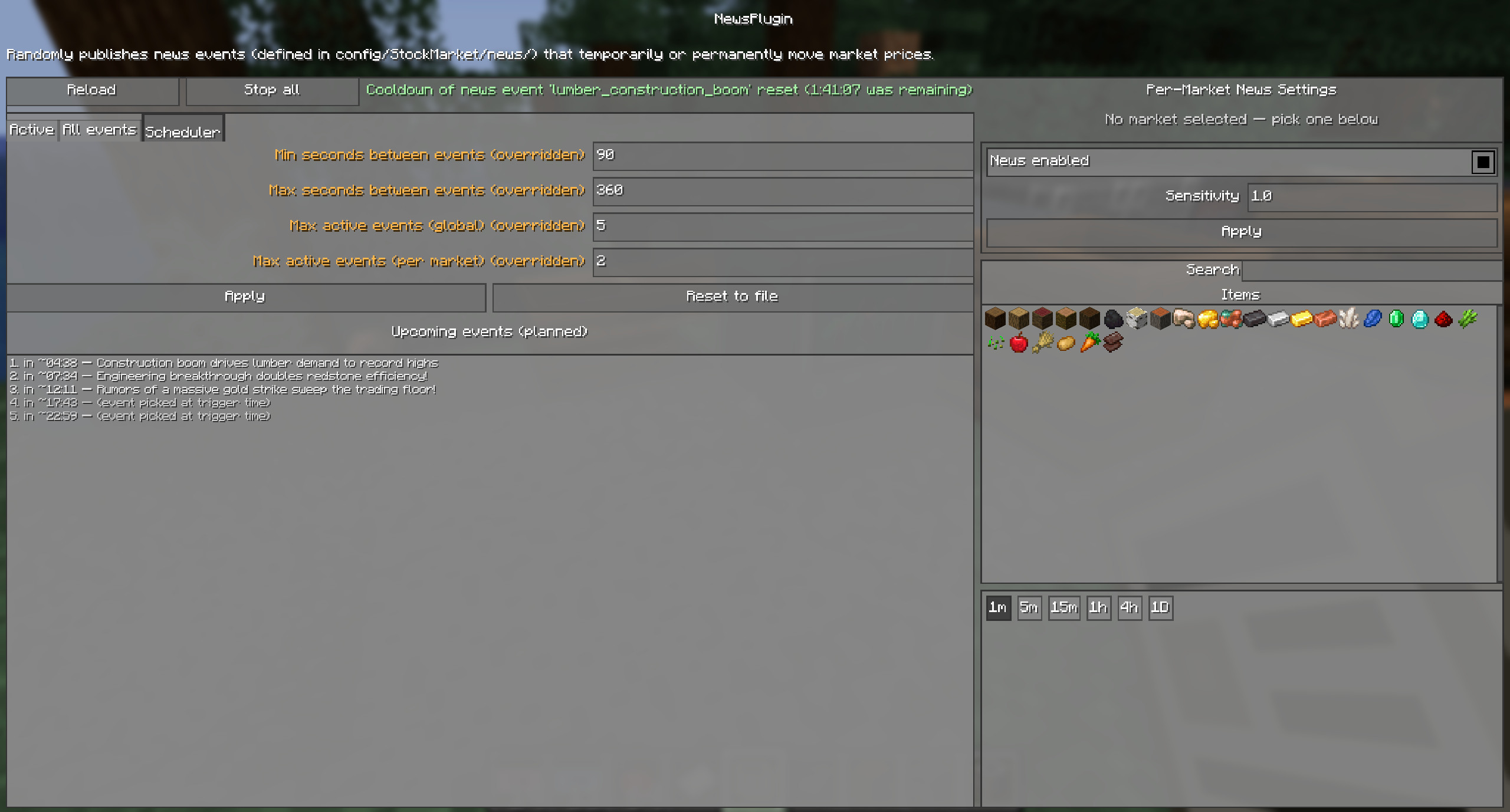
Scheduler — control publish frequency and see the upcoming-events timeline with ETAs.
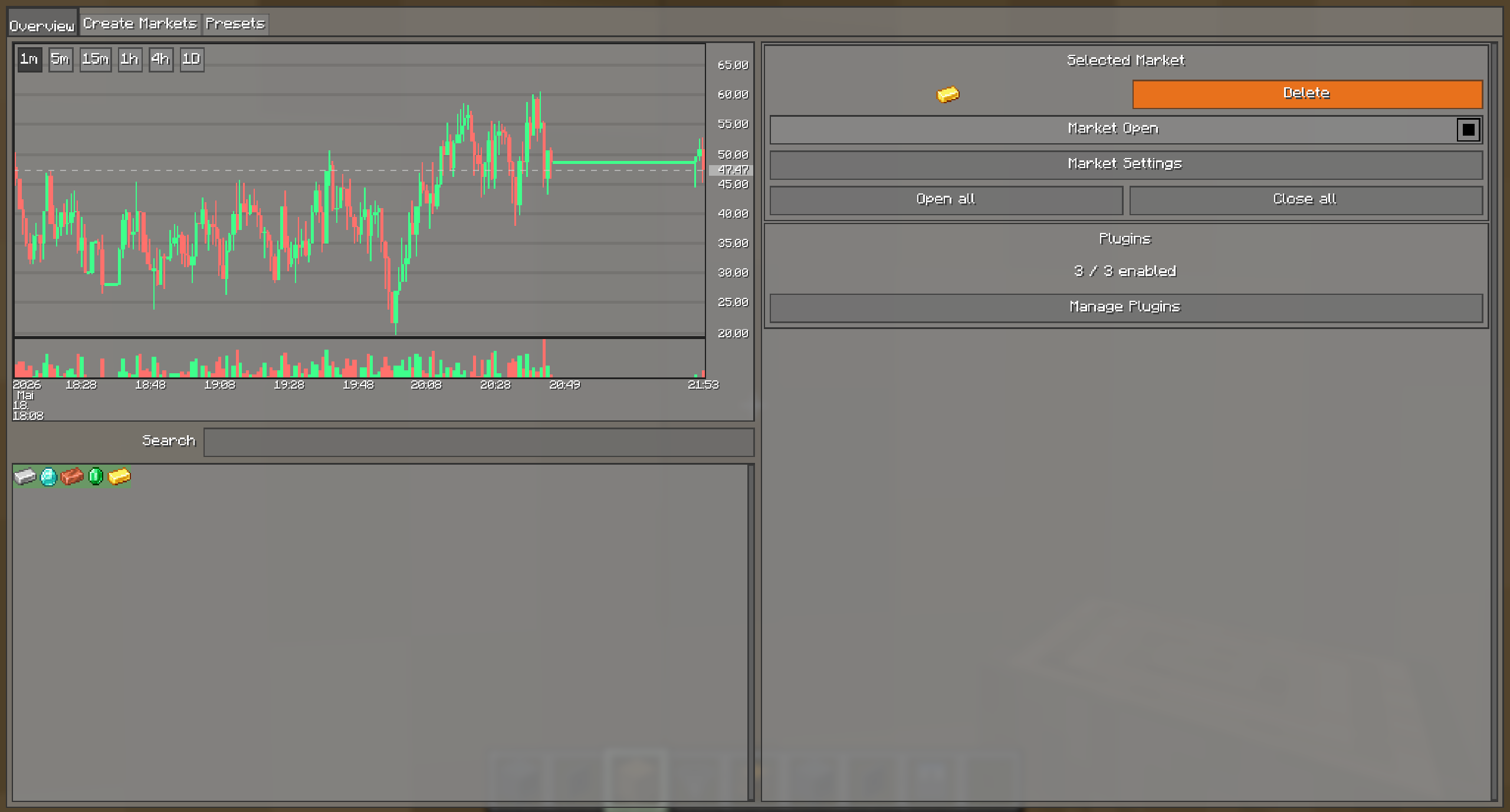

Management GUI

The admin console. Create markets from 32 default preset categories, browse and edit presets inline, manage plugins, edit mod settings, and administer the news system — all without leaving the game.
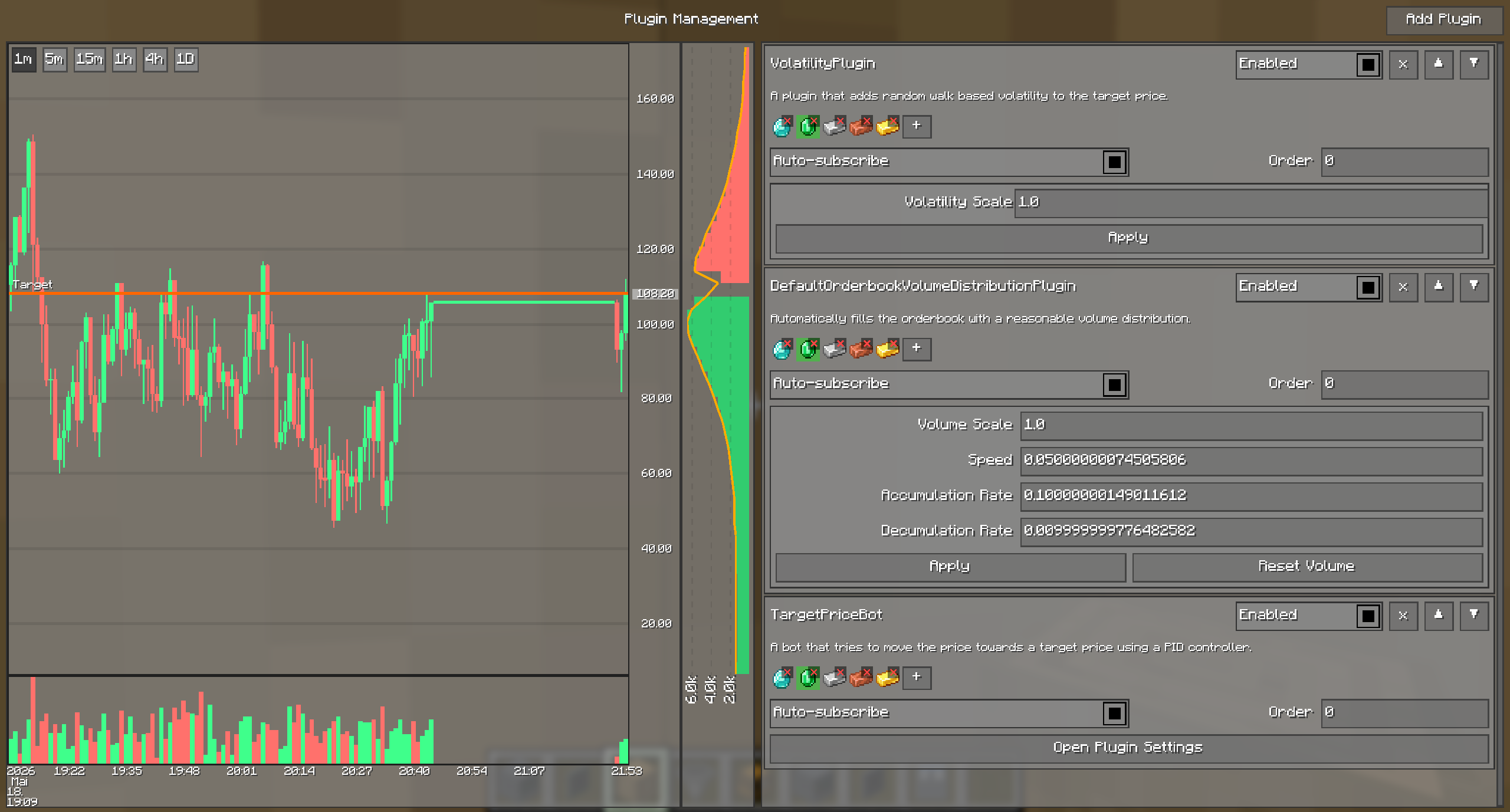

Plugin management with performance profiler

Enable, disable, and reorder plugins. Each plugin has its own settings UI (inline or full-screen) and a subscribable market list. The performance profiler bar across the top shows per-plugin, per-pass execution time against the effective server tick budget, with an overflow warning when the plugin load is too high.
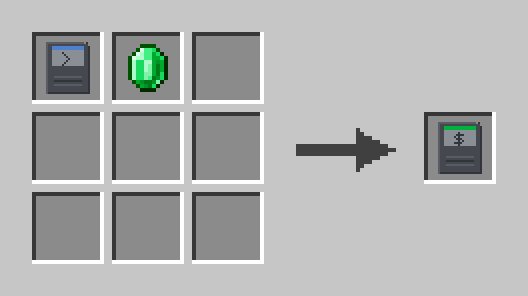

Crafting recipes

Trading Terminal — the block that opens the trading interface.
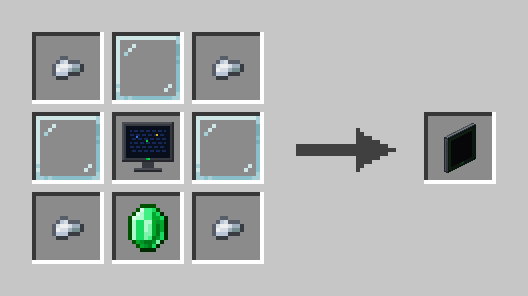
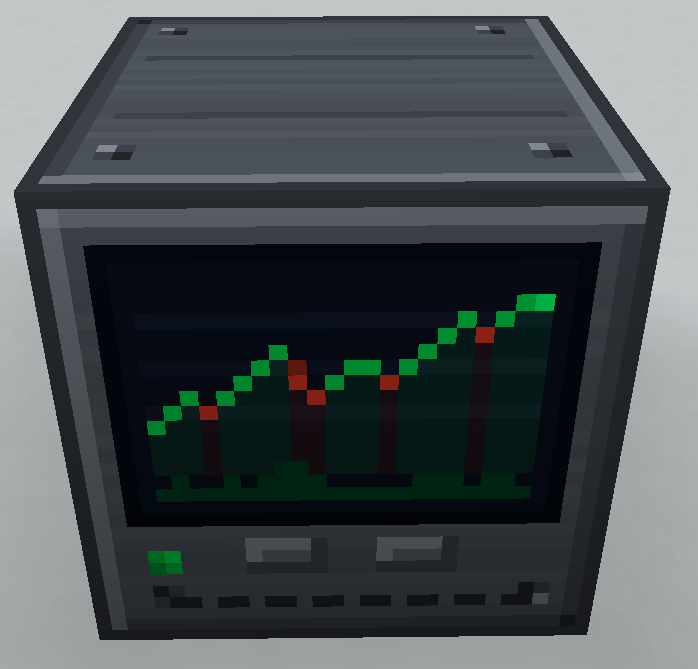
Stock Market Display — in-world display that renders a live chart for a chosen market.
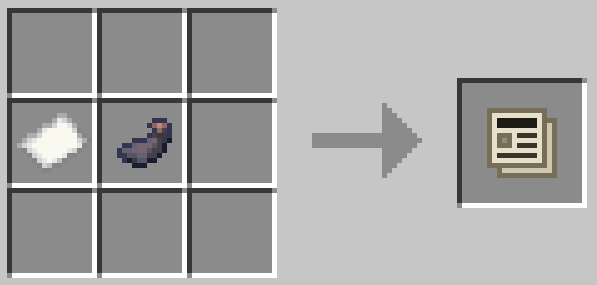
Newspaper — the player-facing news reader.

Project description from CurseForge.

Pick your setup

Stock Market by Minecraft version and loader

Choose the version and loader you play, then open the matching release.

23 available setups

Check the dependencies, then try the file in a copied instance before changing a world you care about.

Recent files

Stock Market versions and loaders

63 of 63 releases match

Looking for an older file? The official CurseForge project page is in Resources.