

Minecraft version
Back to mods 
Modrinth · Minecraft mod
Server Unpacker
Extract Server Resource Packs
Choose a version Pick your version below, then grab the matching file.
Quick answer
Which Server Unpacker release should I use?
Latest stable file 1.4.1
Game version 1.16, 1.16.1, 1.16.2
Loader Fabric
Server Unpacker 1.4.1 targets 1.16, 1.16.1, 1.16.2 with Fabric. It must be installed on the client. Do not install it on the dedicated server. No extra mods listed for this file.
Where it goes
Is Server Unpacker required on the client, server, or both?
It must be installed on the client. Do not install it on the dedicated server.
Client Required
Dedicated server Not supported
Loader for this release Fabric
Required install it here Optional supported, not mandatory Not supported do not install here Source doesn’t say do not assume
This file is marked client-only.
What else does Server Unpacker 1.4.1 need?
1.4.1. Change the file and its required mods may change too.
This file does not list any required mods. Do not add a library just because a different file uses it.
This file does not list any required or optional mods.
Before you install it
Add Server Unpacker without breaking your instance.
Built for Server Unpacker 1.4.1. Pick another file and the loader, install side or required mods may change.
- 01
Stick to this file
Use 1.4.1. It targets 1.16, 1.16.1, 1.16.2 with Fabric; another release may have different loader, side or dependency requirements.
- 02
Bring the mods it needs
This file does not list any required mods. Do not add a library just because a different file uses it.
- 03
Put it on the correct side
It must be installed on the client. Do not install it on the dedicated server.
- 04
Pick the file you checked
Use the “Get this file” button beside 1.4.1. It opens that exact file at the source.
About this project
What does Server Unpacker add?
About
Server Unpacker is a client-side mod that extracts any resource pack files that can be loaded by Minecraft
Usage
In-Game
Drag and drop the mod into your mods/ folder and join any server that has a required resource pack
The extracted files will be in your .minecraft/extracted-packs/ folder
GUI
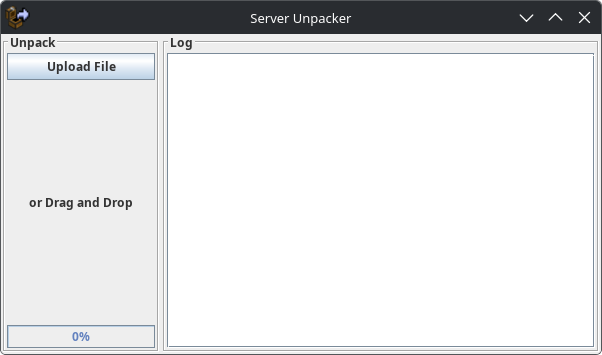
You can execute the .jar file directly to open a GUI
Select or drag and drop file(s) onto the GUI to extract them in the same directory
CLI
You can extract multiple files by using the following command
java -jar server-unpacker-*.jar [files]
Credits
- Thank you to Zardium for writing the original code and creating the GUI
Project description from Modrinth.
Pick your setup
Server Unpacker by Minecraft version and loader
Choose the version and loader you play, then open the matching release.
Minecraft version
26.1.2
1 loader buildMinecraft version
26.1.1
1 loader buildMinecraft version
26.1
1 loader buildMinecraft version
1.21.11
1 loader buildMinecraft version
1.21.10
1 loader buildMinecraft version
1.21.9
1 loader buildMinecraft version
1.21.8
1 loader buildMinecraft version
1.21.7
1 loader buildMinecraft version
1.21.6
1 loader buildMinecraft version
1.21.5
1 loader buildMinecraft version
1.21.4
1 loader buildShowing the newest 12 of 39 game versions. Older files are in the list below.
Check the dependencies, then try the file in a copied instance before changing a world you care about.
Recent files
Server Unpacker versions and loaders
1.4.1
server-unpacker-1.4.1.jar
12 Jul 2026
Client Required Server Not supported Dependencies No extras listed Listed on Release listing
Check the 1.21.11 · Fabric setup 1.161.16.11.16.21.16.3 release
1.4.0
server-unpacker-1.4.0.jar
22 May 2026
Client Required Server Not supported Dependencies No extras listed Listed on Release listing
Check the 1.21.11 · Fabric setup 1.161.16.11.16.21.16.3 release
2.3.2
server-unpacker-2.3.2.jar
22 May 2026
Client Required Server Not supported Dependencies No extras listed Listed on Release listing
Check the 26.2 · Fabric setup 26.126.1.126.1.226.2 release
1.3.2
server-unpacker-1.3.2.jar
22 May 2026
Client Required Server Not supported Dependencies No extras listed Listed on Release listing
Check the 1.21.11 · Fabric setup 1.171.17.11.181.18.1 release
2.0.0
server-unpacker-2.0.0.jar
29 Mar 2026
Client Required Server Not supported Dependencies No extras listed Listed on Release listing
Check the 26.1.2 · Fabric setup 26.126.1.126.1.2Fabric release
1.2.1
server-unpacker-1.2.1.jar
21 Mar 2025
Client Required Server Not supported Dependencies No extras listed Listed on Release listing
Check the 1.21.11 · Fabric setup 1.171.17.11.181.18.1 release
1.2.0
server-unpacker-1.2.0.jar
30 Nov 2024
Client Required Server Not supported Dependencies No extras listed Listed on Release listing
Check the 1.21.4 · Fabric setup 1.171.17.11.181.18.1 release
1.1.5
server-unpacker-1.1.5.jar
27 Oct 2024
Client Required Server Not supported Dependencies No extras listed Listed on Release listing
Check the 1.21.3 · Fabric setup 1.171.17.11.181.18.1 release
1.1.4
server-unpacker-1.1.4.jar
13 Oct 2024
Client Required Server Not supported Dependencies No extras listed Listed on Release listing
Check the 1.21.1 · Fabric setup 1.171.17.11.181.18.1 release
1.1.3
server-unpacker-1.1.3.jar
23 Sept 2024
Client Required Server Not supported Dependencies No extras listed Listed on Release listing
Check the 1.21.1 · Fabric setup 1.171.17.11.181.18.1 release
1.1.0-prerelease.1
server-unpacker-1.1.0-prerelease.1.jar
16 Sept 2024
Client Required Server Not supported Dependencies No extras listed Listed on Release listing
Check the 1.21.1 · Fabric setup 1.171.17.11.181.18.1 beta
1.0.0
server-unpacker-1.0.0.jar
21 Aug 2023
Client Required Server Not supported Dependencies No extras listed Listed on Release listing
Check the 1.20.4 · Fabric setup 1.16.51.171.17.11.18 release
Looking for an older file? The official Modrinth project page is in Resources.
 mod
mod Modrinth · Minecraft
Text Tunnels
A minecraft mod for splitting chat into separate channels on servers such as Hypixel
 mod
mod Modrinth · Minecraft
MinerTrack Anti XRay
The Powerful antixray, help you auto catch X-rayers and punish them according to your configuration.
 mod
mod Modrinth · Minecraft
Forgeborne Odyssey
This project adds metallurgy and technology features to Minecraft, simulating industrial processes from the Bronze Age to the Nuclear Age with metalworking mechanics, tools, weapons, and armor.