Fabric API Needed by Early Loading Bar EarlyLoadingBar-1.0.jar
requiredMatching file found Matched file: [1.21.1] Fabric API 0.116.15+1.21.1
CurseForge · Minecraft mod
Add a pre loading bar for fabric
Quick answer
Early Loading Bar EarlyLoadingBar-1.0.jar targets 1.16-Snapshot, 1.17.1, 1.16.3 with Fabric. The project page does not say whether this file belongs on the client, dedicated server, or both. All 1 required mods have matching files.
Where it goes
The project page does not say whether this file belongs on the client, dedicated server, or both.
The source does not explicitly classify this release as client-only or server-only.
EarlyLoadingBar-1.0.jar. Change the file and its required mods may change too.
Install Fabric API first. We found matching files for this game-version and loader setup.
We only count dependency files that match this setup. A file for another loader does not fill the gap.
Before you install it
Built for Early Loading Bar EarlyLoadingBar-1.0.jar. Pick another file and the loader, install side or required mods may change.
Use EarlyLoadingBar-1.0.jar. It targets 1.16-Snapshot, 1.17.1, 1.16.3 with Fabric; another release may have different loader, side or dependency requirements.
Install Fabric API first. We found matching files for this game-version and loader setup.
The project page does not say whether this file belongs on the client, dedicated server, or both.
Use the “Get this file” button beside EarlyLoadingBar-1.0.jar. It opens that exact file at the source.
About this project
This mod add an early loading bar window for fabric.
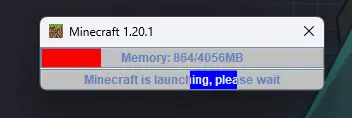
Logically this mod can be used in any Minecraft Version since this mod only use Fabric APIs.
Config file will automatically generate at first launch.
{
  "logoPath": null,//(Optional) Window logo, default use internal Minecraft logo
  "barTitle": "Minecraft %version%",//The title, %version% = game version
  "barMessage": "Minecraft is launching, please wait",//The message, %version% = game version
  "memoryBarColor": "-65536",//Memory bar color in RGB format
  "messageBarColor": "16711935"//Message bar color in RGB format
}
Project description from CurseForge.
Pick your setup
Choose the version and loader you play, then open the matching release.
Showing the newest 12 of 55 game versions. Older files are in the list below.
Check the dependencies, then try the file in a copied instance before changing a world you care about.
Recent files
30 Aug 2024
Looking for an older file? The official CurseForge project page is in Resources.
 mod
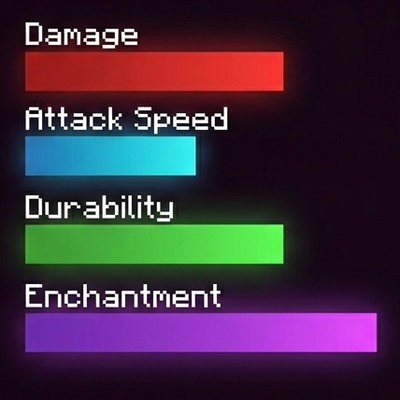
modReplaces vanilla text stats for weapons, armor, food, enchantments, and potions with colored bars.
 mod
modMiscellaneous additions and improvements for Vic's Point Blank.
 mod
modA vanilla enhancing mod that aims to enhance the mining and tool systems, while also adding archaeology.