Minecraft version
Back to mods 
Modrinth · Minecraft mod
Custom Team Manager
Create and manage your teams as an admin
Choose a version Pick your version below, then grab the matching file.
Quick answer
Which Custom Team Manager release matches 26.2 Forge?
Best match for your filters 2.0.0+mod
Game version 1.21.5, 1.21.6, 1.21.7
Loader Fabric, Forge, NeoForge
Custom Team Manager 2.0.0+mod targets 1.21.5, 1.21.6, 1.21.7 with Fabric, Forge, NeoForge. Installation on the client is optional. Installation on the dedicated server is optional. No extra mods listed for this file.
Where it goes
Is Custom Team Manager required on the client, server, or both?
Installation on the client is optional. Installation on the dedicated server is optional.
Client Optional
Dedicated server Optional
Loader for this release Fabric, Forge, NeoForge
Required install it here Optional supported, not mandatory Not supported do not install here Source doesn’t say do not assume
The source marks this as usable on both the client and server.
What else does Custom Team Manager 2.0.0+mod need?
2.0.0+mod on 26.2 Forge. Every mod below is checked against that same setup.
This file does not list any required mods. Do not add a library just because a different file uses it.
This file does not list any required or optional mods.
Before you install it
Add Custom Team Manager without breaking your instance.
Built for Custom Team Manager 2.0.0+mod on 26.2 Forge. Pick another file and the loader, install side or required mods may change.
- 01
Stick to this file
Use 2.0.0+mod. It targets 1.21.5, 1.21.6, 1.21.7 with Fabric, Forge, NeoForge; another release may have different loader, side or dependency requirements.
- 02
Bring the mods it needs
This file does not list any required mods. Do not add a library just because a different file uses it.
- 03
Put it on the correct side
Installation on the client is optional. Installation on the dedicated server is optional.
- 04
Pick the file you checked
Use the “Get this file” button beside 2.0.0+mod. It opens that exact file at the source.
About this project
What does Custom Team Manager add?
English
Menu
With the command /trigger ctm_menu you can open the menu
Join
All teams are listed. Just click on the team you want to join
Leave
Uh yeah you leave the team
AFK
You join in the AFK team. When you change your rotation, you either join your team you was before or just the AFK team.
Menu for admins
Add
Click on a color for suggesting you the command in the chat.
Fill the other 3 arguments.
/function ctm:manage/add/add_team {id:"", name:"", color:"color", trigger:""}
Remove
Select one team, you will get suggested a command for deleting it
Edit
You can edit following arguments:
- name (and the color)
- suffix (and the color)
- player color
- trigger
You cannot edit the id. For that you have to delete and recreate it.
Version 1.0.0
Menu
The command opens the menu.
You can execute it by clicking on the respective text.
/trigger customteammanager_menu

Join

The teams that have been created are listed, and you can join the respective team by clicking on it again.
Leave
You can only leave your current team by clicking on “Leave current team.”
Add team
Only admins can create a team.
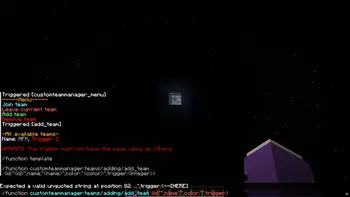
You can click on the template and the /function will be suggested, where you only need to insert the information in the curly brackets.
It is important not to use the same trigger value, as this could lead to confusion in the “code”.
A suffix is created for this purpose -> [] This is displayed after the name.
Remove team
Click on the template and then enter the ID of the team you want to delete.
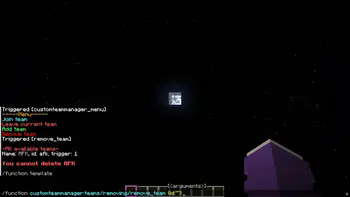
In the future
I still plan to add a feature that allows users to edit teams so that they don't have to delete them just because they made a mistake.
I also plan to add a feature that allows users to edit the suffix.
Project description from Modrinth.
Pick your setup
Custom Team Manager by Minecraft version and loader
Choose the version and loader you play, then open the matching release.
Minecraft version
26.1.2
5 loader buildsMinecraft version
26.1.1
5 loader buildsMinecraft version
26.1
5 loader buildsMinecraft version
1.21.11
5 loader buildsMinecraft version
1.21.10
5 loader buildsMinecraft version
1.21.9
5 loader buildsMinecraft version
1.21.8
5 loader buildsMinecraft version
1.21.7
5 loader buildsMinecraft version
1.21.6
5 loader buildsMinecraft version
1.21.5
5 loader buildsCheck the dependencies, then try the file in a copied instance before changing a world you care about.
Recent files
Custom Team Manager versions and loaders
2.0.0+mod
custom-team-manager-2.0.0.jar
19 Jun 2026
Client Optional Server Optional Dependencies No extras listed Listed on Release listing
Check the 26.2 · Forge setup 1.21.51.21.61.21.71.21.8 release
Looking for an older file? The official Modrinth project page is in Resources.
 mod
mod CurseForge · Minecraft
Mob Loader
An end-game utility block for hostile mob farms that stores XP, automates bottle filling, and keeps your farm active while you are away.
 mod
mod Modrinth · Minecraft
ForgeCraft - Equipment Extension
Inspired by Hypixel Skyblock Reforge System. Upgrade your equipments and enhance the progression! Customizable Vanilla Item stats......
 mod
mod Modrinth · Minecraft
Flat EXP Costs
Enchanting and using the Anvil costs the same amount of EXP regardless of your level