Minecraft version
Back to mods 
Modrinth · Minecraft mod
Day Counter
An easy to read Day Counter
Choose a version Pick your version below, then grab the matching file.
Quick answer
Which Day Counter release matches 26.2-pre-5?
Best match for your filters 1.21.8.0+mod
Game version rd-132211, rd-132328, rd-20090515
Loader Fabric, Forge, NeoForge
Day Counter 1.21.8.0+mod targets rd-132211, rd-132328, rd-20090515 with Fabric, Forge, NeoForge. Installation on the client is optional. Installation on the dedicated server is optional. No extra mods listed for this file.
Where it goes
Is Day Counter required on the client, server, or both?
Installation on the client is optional. Installation on the dedicated server is optional.
Client Optional
Dedicated server Optional
Loader for this release Fabric, Forge, NeoForge
Required install it here Optional supported, not mandatory Not supported do not install here Source doesn’t say do not assume
The source marks this as usable on both the client and server.
What else does Day Counter 1.21.8.0+mod need?
1.21.8.0+mod on 26.2-pre-5. Every mod below is checked against that same setup.
This file does not list any required mods. Do not add a library just because a different file uses it.
This file does not list any required or optional mods.
Before you install it
Add Day Counter without breaking your instance.
Built for Day Counter 1.21.8.0+mod on 26.2-pre-5. Pick another file and the loader, install side or required mods may change.
- 01
Stick to this file
Use 1.21.8.0+mod. It targets rd-132211, rd-132328, rd-20090515 with Fabric, Forge, NeoForge; another release may have different loader, side or dependency requirements.
- 02
Bring the mods it needs
This file does not list any required mods. Do not add a library just because a different file uses it.
- 03
Put it on the correct side
Installation on the client is optional. Installation on the dedicated server is optional.
- 04
Pick the file you checked
Use the “Get this file” button beside 1.21.8.0+mod. It opens that exact file at the source.
About this project
What does Day Counter add?
Day Counter
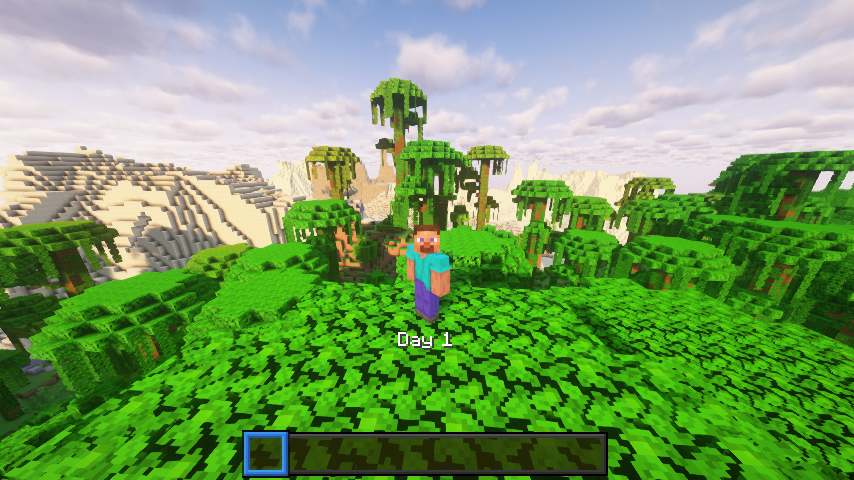
A lightweight Minecraft 1.21.5 datapack that displays the current in‑game day number above your hotbar. No commands, functions, or dependencies, just a simple day tracker.
What It Does
- Shows “Day X” (where X is the current day) in the action bar every time the sun rises.
- Works in any world type (survival, hardcore, creative).
Example Uses
- YouTubers – Let viewers see which day of your survival series they’re watching.
- Challenge runs – Keep track of how many days you’ve survived without building a clock.
- Casual players – Know when to celebrate milestones like Day 100.
Installation
- Download the DayCounter datapack ZIP or clone from the repo.
- Put the
DayCounterfolder into your world’sdatapacks/directory. - Start Minecraft 1.21.5 or newer, then run:
/reload
- Verify it's active:
/datapack list
You should see DayCounter enabled.
Usage
- Load into your world.
- Each new day you’ll see the “Day X” update above your hotbar.
- No further setup needed.
Details
Pack format: 71 (1.21.5)
Namespace: daycounter
License
This datapack is released under the MIT License. Feel free to modify and share.
Project description from Modrinth.
Pick your setup
Day Counter by Minecraft version and loader
Choose the version and loader you play, then open the matching release.
Minecraft version
rd-161348
5 loader buildsMinecraft version
rd-160052
5 loader buildsMinecraft version
rd-132328
5 loader buildsMinecraft version
rd-132211
5 loader buildsMinecraft version
inf-20100618
5 loader buildsMinecraft version
c0.30_01c
5 loader buildsMinecraft version
c0.0.13a_03
5 loader buildsMinecraft version
c0.0.13a
5 loader buildsMinecraft version
c0.0.11a
5 loader buildsMinecraft version
b1.8.1
5 loader buildsMinecraft version
b1.8
5 loader buildsShowing the newest 12 of 901 game versions. Older files are in the list below.
Check the dependencies, then try the file in a copied instance before changing a world you care about.
Recent files
Day Counter versions and loaders
1.21.8.0+mod
day-counter-kxffie-1.21.8.0.jar
21 Aug 2025
Client Optional Server Optional Dependencies No extras listed Listed on Release listing
Check the 26.2-pre-5 · Fabric setup rd-132211rd-132328rd-20090515rd-160052 release
1.21.8.0
DayCounter.zip
31 Jul 2025
Client Optional Server Optional Dependencies No extras listed Listed on Release listing
Check the 26.2-pre-5 · datapack setup rd-132211rd-132328rd-20090515rd-160052 release
Looking for an older file? The official Modrinth project page is in Resources.
 mod
mod Modrinth · Minecraft
Trident Killers 4 Java
Bedrock-style trident killers for Java Edition — no carpets, no gimmicks. Throw a trident, aim a piston at it, farm. Server-side only.
 mod
mod Modrinth · Minecraft
Craftingg
Add new crafting recipes and items to Minecraft 1.20.x - 26.x
 mod
mod Modrinth · Minecraft
Abandoned Camp Backport
This project adds the Abandoned Camp from 26.3 snapshots into many versions below!