Minecraft version
Back to mods 
Modrinth · Minecraft mod
Language Amend
Fallback to some language when selected language translation is missing.
Choose a version Pick your version below, then grab the matching file.
Quick answer
Which Language Amend release should I use?
Latest stable file 1.0.0
Game version 1.20.1, 1.20.2, 1.20.3
Loader Forge
Language Amend 1.0.0 targets 1.20.1, 1.20.2, 1.20.3 with Forge. It must be installed on the client. Do not install it on the dedicated server. No extra mods listed for this file.
Where it goes
Is Language Amend required on the client, server, or both?
It must be installed on the client. Do not install it on the dedicated server.
Client Required
Dedicated server Not supported
Loader for this release Forge
Required install it here Optional supported, not mandatory Not supported do not install here Source doesn’t say do not assume
This file is marked client-only.
What else does Language Amend 1.0.0 need?
1.0.0. Change the file and its required mods may change too.
This file does not list any required mods. Do not add a library just because a different file uses it.
This file does not list any required or optional mods.
Before you install it
Add Language Amend without breaking your instance.
Built for Language Amend 1.0.0. Pick another file and the loader, install side or required mods may change.
- 01
Stick to this file
Use 1.0.0. It targets 1.20.1, 1.20.2, 1.20.3 with Forge; another release may have different loader, side or dependency requirements.
- 02
Bring the mods it needs
This file does not list any required mods. Do not add a library just because a different file uses it.
- 03
Put it on the correct side
It must be installed on the client. Do not install it on the dedicated server.
- 04
Pick the file you checked
Use the “Get this file” button beside 1.0.0. It opens that exact file at the source.
About this project
What does Language Amend add?
Language Amend
Language Amend is a lightweight client-side mod that intelligently manages language fallbacks for Minecraft, ensuring a seamless multilingual experience by letting you define custom fallback chains for any language.
When using resource packs or mods that add translations in multiple languages, missing entries often default to English, breaking immersion. This mod allows you to automatically inject one or more fallback languages whenever a specific language code is detected—so every text remains readable and coherent, exactly as you intend.
✨ Features
- Smart Fallback: Automatically appends user‑defined fallback languages when a configured language code is present in the language list.
- Fully Configurable: Edit
config/lang_amend/lang_amend.jsonto create any number of mappings (e.g., maplzhto["zh_cn", "zh_tw"], oren_usto["en_pt"]). - Non-Intrusive: Works quietly behind the scenes without modifying game files or assets.
- Compatible: Plays nicely with other mods and resource packs.
🔧 How It Works
The mod hooks into Minecraft’s language loading system. If the current language list contains any key defined in your configuration, it appends the corresponding fallback languages—preserving the original order and avoiding duplicates. The result is a merged language list that respects your preferences.
📁 Configuration Example
{
  "lzh": ["zh_cn", "zh_tw"],
  "en_pt": ["en_us"]
}
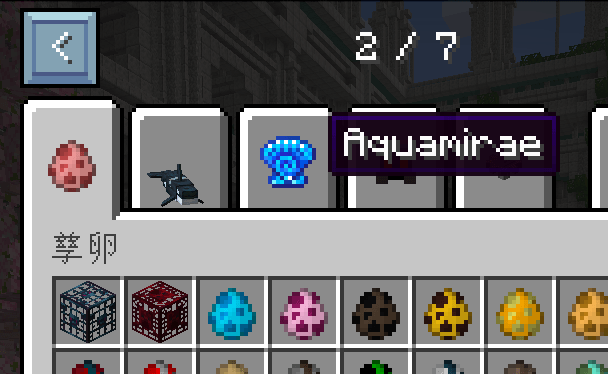
Before: Use English when failed to find Literary Chinese translation
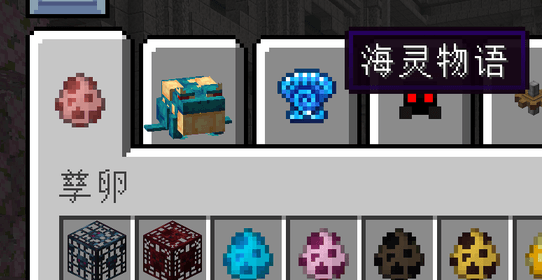
After: Use Chinese Simplfied when failed to find Literary Chinese translation
Project description from Modrinth.
Pick your setup
Language Amend by Minecraft version and loader
Choose the version and loader you play, then open the matching release.
Minecraft version
1.21.10
1 loader buildMinecraft version
1.21.9
1 loader buildMinecraft version
1.21.8
1 loader buildMinecraft version
1.21.7
1 loader buildMinecraft version
1.21.6
1 loader buildMinecraft version
1.21.5
1 loader buildMinecraft version
1.21.4
1 loader buildMinecraft version
1.21.3
1 loader buildMinecraft version
1.21.2
1 loader buildMinecraft version
1.21.1
1 loader buildMinecraft version
1.21
1 loader buildShowing the newest 12 of 18 game versions. Older files are in the list below.
Check the dependencies, then try the file in a copied instance before changing a world you care about.
Recent files
Language Amend versions and loaders
1.0.0
lang_amend-forge1.20.1-1.0.0-all.jar
5 Mar 2026
Client Required Server Not supported Dependencies No extras listed Listed on Release listing
Check the 1.20.6 · Forge setup 1.20.11.20.21.20.31.20.4 release
1.0.0
lang_amend-1.0.0-mc1.21.1-neoforge.jar
5 Mar 2026
Client Required Server Not supported Dependencies No extras listed Listed on Release listing
Check the 1.21.11 · NeoForge setup 1.211.21.11.21.21.21.3 release
Looking for an older file? The official Modrinth project page is in Resources.
 mod
mod CurseForge + Modrinth · Minecraft
Quick Skin
Sick of wasting time with Minecraft’s slow launcher just to change your skin? Quick Skin lets you swap skins instantly even on “offline” servers and gives you access to every official Minecraft cape.
 mod
mod CurseForge + Modrinth · Minecraft
Shoulder Surfing Reloaded
Shoulder Surfing Reloaded is a highly configurable third person camera mod for Minecraft
 mod
mod CurseForge + Modrinth · Minecraft
Packed Up (Backpacks)
Packed Up allows you to pack up all your things into new amazing Backpacks!