Minecraft version
Back to mods 
Modrinth · Minecraft mod
OPBREAK
It started as an Anti-Tool-Break mod. Now it's just a mod for everything.
Choose a version Pick your version below, then grab the matching file.
Quick answer
Which OPBREAK release should I use?
Latest stable file 3.1
Game version 1.21.11
Loader Fabric
OPBREAK 3.1 targets 1.21.11 with Fabric. It must be installed on the client. Do not install it on the dedicated server. No extra mods listed for this file.
Where it goes
Is OPBREAK required on the client, server, or both?
It must be installed on the client. Do not install it on the dedicated server.
Client Required
Dedicated server Not supported
Loader for this release Fabric
Required install it here Optional supported, not mandatory Not supported do not install here Source doesn’t say do not assume
This file is marked client-only.
What else does OPBREAK 3.1 need?
3.1. Change the file and its required mods may change too.
This file does not list any required mods. Do not add a library just because a different file uses it.
This file does not list any required or optional mods.
Before you install it
Add OPBREAK without breaking your instance.
Built for OPBREAK 3.1. Pick another file and the loader, install side or required mods may change.
- 01
Stick to this file
Use 3.1. It targets 1.21.11 with Fabric; another release may have different loader, side or dependency requirements.
- 02
Bring the mods it needs
This file does not list any required mods. Do not add a library just because a different file uses it.
- 03
Put it on the correct side
It must be installed on the client. Do not install it on the dedicated server.
- 04
Pick the file you checked
Use the “Get this file” button beside 3.1. It opens that exact file at the source.
About this project
What does OPBREAK add?
🛡️ OPBREAK — Advanced Item Management 🛡️
Protect Your Gear • Customize Your HUD • Automate the Rest
| Version | v2.0 |
| Loader | Fabric |
| Languages | German / English |
📜 What is OPBREAK?
OPBREAK is an All-in-One Fabric Mod for Item Protection, HUD Widgets, and QoL Utilities. Stop losing gear to breaks, drops, or misclicks, track your Items, customize your HUD, and automate the rest.
Fully configurable via GUI.
Click on any feature below to see it in action 👇
🛡️ Protection
✨ Anti-Tool-Break & Anti-Armor-Break
Never lose an important Tool or piece of Armor to accidental breaking again.
🚫 Anti-Interact & Anti-Drop
Prevent Items from being dropped by accident and block unwanted Interactions to protect your Items and Inventory.
📊 Tracking
📊 Item Stats Tracking
Every protected item is tracked in detail.
Tracked Statistics:
- First Seen
- Last Warning
- Uses
- Prevented Uses
- Warnings
- Broken
- Drops
- Prevented Drops
🎨 Visuals & Animations
🎬 Disable Vanilla Item Animations
Turn off default Minecraft Item Animations for a cleaner, more consistent look.
🌟 Custom Item Animations
Replace Vanilla Animations with custom Item Animations.
🧩 HUD & Widgets
📱 Item Widget
Keep an eye on the condition of your most important Items directly on screen.
🎒 Inventory Widget
Monitor your full Inventory status at a glance.
🥋 Armor Widget
Monitor your full Armor status at a glance.
📏 Resizable Hotbar
Adjust the size and position of your Hotbar to fit your playstyle and screen.
⚙️ Utility
🤚 Hand Transformer (Offhand/Mainhand)
Automatically transform or manage (global oder specific) Items between your Mainhand and Offhand.
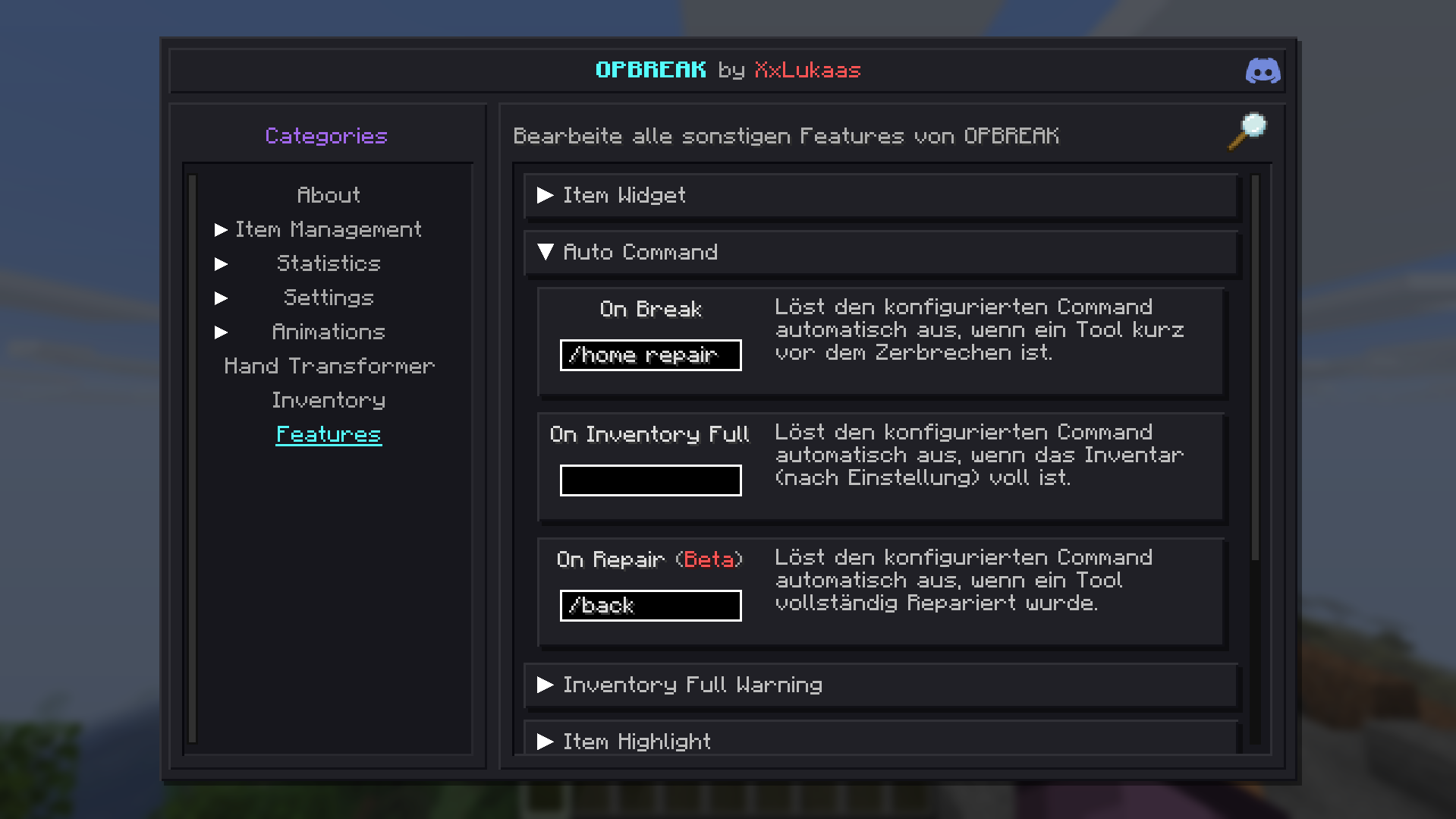
🖥️ Auto Commands
Automatically trigger commands based on custom conditions and Mod events.
❌ Inventory Full Warning
Get notified before your Inventory overflows.
⚙️ Widget Editor Menu
Freely position, resize, and toggle every HUD Widget to fit your setup.
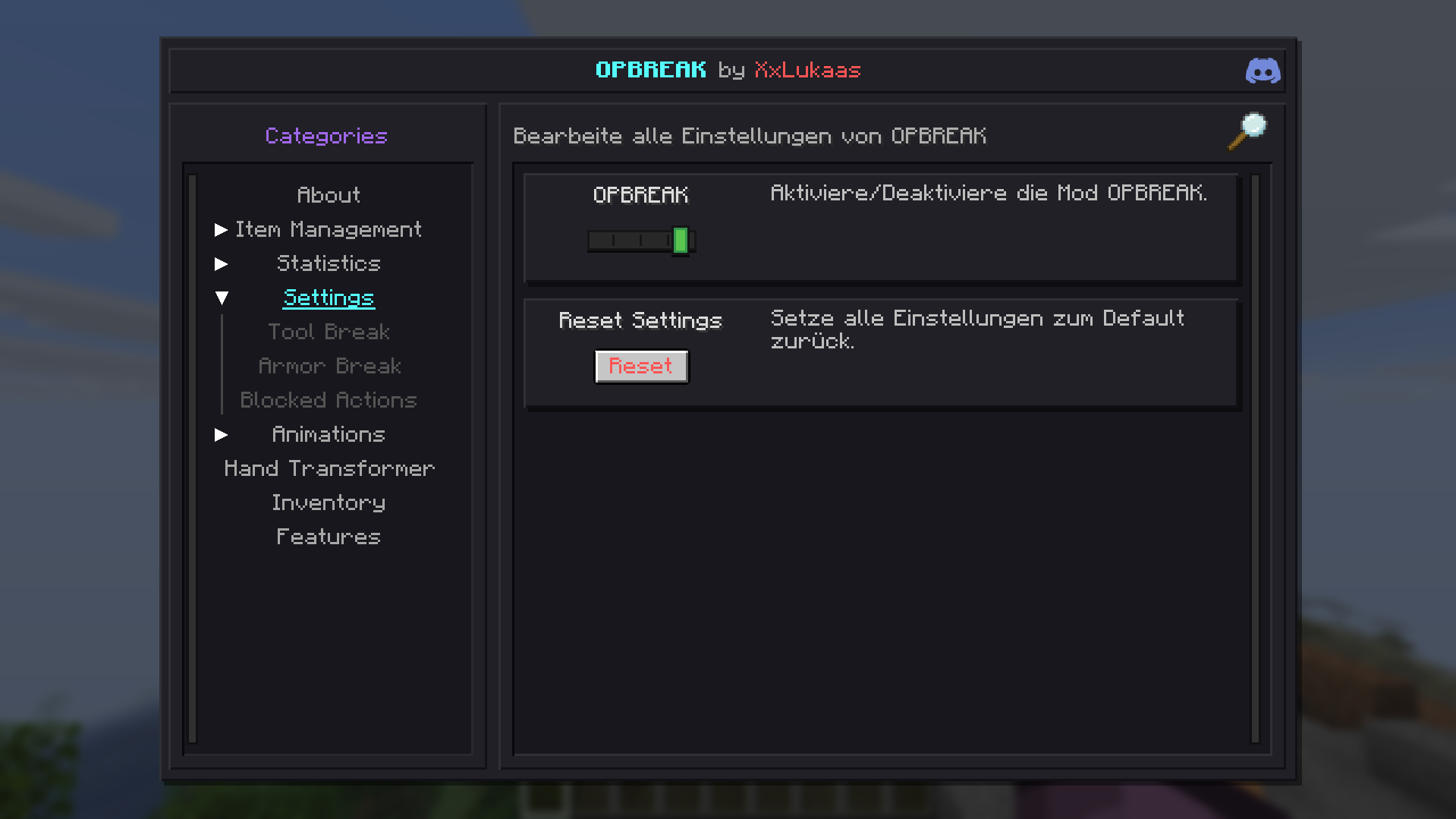
⚙️ Settings
Configure every feature and setting instantly — no commands, no config files. Changes apply immediately in-game.
⚠️ Disclaimer
The OPBREAK Development Team is not responsible for lost or broken Items. Feedback and Bug reports can be submitted via Discord tickets. This Mod is in active development — use responsibly and respect server rules.
The mod contains very little AI-generated content, mainly used to check things and fix minor errors. Everything has been completely reviewed and tested.
This Mod automatically downloads and installs Updates from Modrinth on restart. This feature is enabled by default but can be disabled via GUI.
© 2026 OPBREAK Development Team
Project description from Modrinth.
Pick your setup
OPBREAK by Minecraft version and loader
Choose the version and loader you play, then open the matching release.
Minecraft version
1.21.4
1 loader buildCheck the dependencies, then try the file in a copied instance before changing a world you care about.
Recent files
OPBREAK versions and loaders
3.1
opbreak-3.1.jar
14 Nov 2026
Client Required Server Not supported Dependencies No extras listed Listed on Release listing
Check the 1.21.11 · Fabric setup 1.21.11Fabric release
3.0
opbreak-3.0.jar
7 Nov 2026
Client Required Server Not supported Dependencies No extras listed Listed on Release listing
Check the 1.21.11 · Fabric setup 1.21.11Fabric release
2.4
opbreak-2.4.jar
10 Sept 2026
Client Required Server Not supported Dependencies No extras listed Listed on Release listing
Check the 1.21.11 · Fabric setup 1.21.11Fabric release
2.3
opbreak-2.3.jar
26 Jul 2026
Client Required Server Not supported Dependencies No extras listed Listed on Release listing
Check the 1.21.11 · Fabric setup 1.21.11Fabric release
2.2
opbreak-2.2.jar
18 Jul 2026
Client Required Server Not supported Dependencies No extras listed Listed on Release listing
Check the 1.21.11 · Fabric setup 1.21.11Fabric release
2.1
opbreak-2.1.jar
5 Jul 2026
Client Required Server Not supported Dependencies No extras listed Listed on Release listing
Check the 1.21.11 · Fabric setup 1.21.11Fabric release
2.0
opbreak-2.0.jar
4 Jul 2026
Client Required Server Not supported Dependencies No extras listed Listed on Release listing
Check the 1.21.11 · Fabric setup 1.21.11Fabric release
1.3
opbreak-1.3.jar
4 Apr 2026
Client Required Server Not supported Dependencies No extras listed Listed on Release listing
Check the 1.21.11 · Fabric setup 1.21.11Fabric release
1.2
opbreak-1.2.0-beta+mc1.21.4.jar
22 Mar 2026
Client Required Server Not supported Dependencies No extras listed Listed on Release listing
Check the 1.21.4 · Fabric setup 1.21.4Fabric release
1.1
opbreak-1.1.0-beta+mc1.21.4.jar
27 Feb 2026
Client Required Server Not supported Dependencies No extras listed Listed on Release listing
Check the 1.21.4 · Fabric setup 1.21.4Fabric release
1.0.1
opbreak-1.0.1-beta+mc1.21.4.jar
3 Feb 2026
Client Required Server Not supported Dependencies No extras listed Listed on Release listing
Check the 1.21.4 · Fabric setup 1.21.4Fabric release
1.0
opbreak-1.0.0-beta.jar
1 Feb 2026
Client Required Server Not supported Dependencies 1 required · 1 unchecked Listed on Release listing
Check the 1.21.4 · Fabric setup 1.21.4Fabric beta
Looking for an older file? The official Modrinth project page is in Resources.
 mod
CurseForge + Modrinth · Minecraft
Structure Layout Optimizer
Attempts to optimize the generation of Jigsaw Structures and NBT pieces
 mod
Modrinth · Minecraft
Item Blocker
A client side mod that allows you to stop picking up items you don't want.
 mod
CurseForge + Modrinth · Minecraft
Create: Power Chip
Addon for Create: Power Grid adding nested circuit board chip components.