Collective Needed by Beautified Chat [Server] [Fabric/Forge/Neo] 26.3.0-4.0 | Beautified Chat Server
requiredMatching file found Matched file: [Fabric/Forge/Neo] 26.3.0-8.85 | Collective

CurseForge · Minecraft mod
💬 A highly configurable mod to change the style and colour of chat messages with optional ranks server-wide.
Quick answer
Beautified Chat [Server] [Fabric/Forge/Neo] 26.3.0-4.0 | Beautified Chat Server targets 26.3 with Fabric, Forge, NeoForge. The project page does not say whether this file belongs on the client, dedicated server, or both. All 1 required mods have matching files.
Where it goes
The project page does not say whether this file belongs on the client, dedicated server, or both.
The source does not explicitly classify this release as client-only or server-only.
[Fabric/Forge/Neo] 26.3.0-4.0 | Beautified Chat Server. Change the file and its required mods may change too.
Install Collective first. We found matching files for this game-version and loader setup.
We only count dependency files that match this setup. A file for another loader does not fill the gap.
Before you install it
Built for Beautified Chat [Server] [Fabric/Forge/Neo] 26.3.0-4.0 | Beautified Chat Server. Pick another file and the loader, install side or required mods may change.
Use [Fabric/Forge/Neo] 26.3.0-4.0 | Beautified Chat Server. It targets 26.3 with Fabric, Forge, NeoForge; another release may have different loader, side or dependency requirements.
Install Collective first. We found matching files for this game-version and loader setup.
The project page does not say whether this file belongs on the client, dedicated server, or both.
Use the “Get this file” button beside [Fabric/Forge/Neo] 26.3.0-4.0 | Beautified Chat Server. It opens that exact file at the source.
About this project


This is the server variant of the Beautified Chat mod. It is highly configurable and allows users to change the chat input server-wide. The mod variant you're currently looking at just needs the mod in the server mod list. It will make changes to the chat for all connected players without the need to have it on their clients. There is also a timestamp feature to know when messages were sent.
Version 3.0 adds the ability to create ranks, and set name colours based on those ranks!
**
The client version is also available and is called Beautified Chat [Client].**
Both the client and server mod are compatible with each other, server-side takes priority.
In default Minecraft, all chat is in the format:
<Username> Message
The mod by default changes this to:
Timestamp | Username: Message
The default colours can be seen below in the example image. Both the format and the colour codes can be changed with ease via the config. If you don't want the timestamp, just remove it in the chatMessageFormat config option.
The default timestamp format is 24-hours. If you want AM/PM, just input in the timestampFormat config option "hh:mm a" instead of the default "HH:mm". If your server is hosted in another time zone, it can be set in the timestampTimeZone config option.
Names and colours that other mods give players are kept, such as ranks from FTB Ranks and team colours. Links and item hovers inside messages keep working as well. Other players' names have their own colour by default, so your own name stands out. The mod is compatible with Chat Heads, and with Discord mods like Discord Integration. Command replies are given a colour too, dark green by default.


All available config options:
showRankTitles default true
Whether the rank titles, created in /bcs rank, should be shown before the username.
useRankColours default true
Whether rank colours, set in /bcs rank, should be used as the priority username colour.
chatMessageFormat default "%timestamp% | %username%: %chatmessage%"
Variables: %timestamp% = timestamp set in timestampFormat. %username% = the username of the player who sent the message. %chatmessage% = the message itself.
timestampFormat default "HH:mm"
Example time in formats: 5 seconds past 9 o' clock in the evening. *=Default. *(HH:mm) = 21:00, (HH:mm:ss) = 21:00:05, (hh:mm a) = 9:00 PM
timestampTimeZone default ""
The time zone of the timestamp, like 'Europe/London' or 'GMT+0'. Leave empty to use the server's time zone.
rankTitleFormat default "[%rank] "
The rank format prefixed before %username% when showRankTitles is enabled.
chatTimestampColour default 8, min 0, max 15
The colour of the timestamp in the chat message. The possible values are; 0: black, 1: dark_blue, 2: dark_green, 3: dark_aqua, 4: dark_red, 5: dark_purple, 6: gold, 7: gray, 8: dark_gray, 9: blue, 10: green, 11: aqua, 12: red, 13: light_purple, 14: yellow, 15: white.
chatUsernameColour default 2, min 0, max 15
The colour of your own username in the chat message. The possible values are; 0: black, 1: dark_blue, 2: dark_green, 3: dark_aqua, 4: dark_red, 5: dark_purple, 6: gold, 7: gray, 8: dark_gray, 9: blue, 10: green, 11: aqua, 12: red, 13: light_purple, 14: yellow, 15: white.
chatOtherUsernameColour default 3, min 0, max 15
The colour of other players' usernames in the chat message. chatUsernameColour is used for your own. The possible values are; 0: black, 1: dark_blue, 2: dark_green, 3: dark_aqua, 4: dark_red, 5: dark_purple, 6: gold, 7: gray, 8: dark_gray, 9: blue, 10: green, 11: aqua, 12: red, 13: light_purple, 14: yellow, 15: white.
chatMessageColour default 15, min 0, max 15
The colour of the chat message.
chatOtherSymbolsColour default 7, min 0, max 15
The colour of the other symbols from chatMessageFormat. So everything except the variables.
overwriteOtherModColours default false
Whether colours that other mods or teams give the username and message are replaced by the colours set here.
sendAsPlayerChat default true
Whether messages are sent as player chat instead of system messages, so mods like Chat Heads can see who sent them.
formatCommandFeedback default true
Whether the replies of commands get the colour set in commandFeedbackColour.
commandFeedbackColour default 2, min 0, max 15
The colour of command replies. Parts that already have a colour keep it. The possible values are; 0: black, 1: dark_blue, 2: dark_green, 3: dark_aqua, 4: dark_red, 5: dark_purple, 6: gold, 7: gray, 8: dark_gray, 9: blue, 10: green, 11: aqua, 12: red, 13: light_purple, 14: yellow, 15: white.

Use /bcs (alias: /beautifiedchatserver). Needs cheat-access.
/bcs usage - Show all commands with a short description.
/bcs rank create <rank-name> <colour> - Create or update a rank with the given chat colour.
/bcs rank remove <rank-name> - Delete a rank.
/bcs rank list - List all ranks and their colors.
/bcs player add <player-name> <rank-name> - Assign a rank to a player.
/bcs player remove <player-name> <rank-name> - Remove a rank from a player.
/bcs player list - List all players with assigned ranks.

The default format ("%timestamp% | %username%: %chatmessage%"):
You can also add ranks, and choose colours based on those: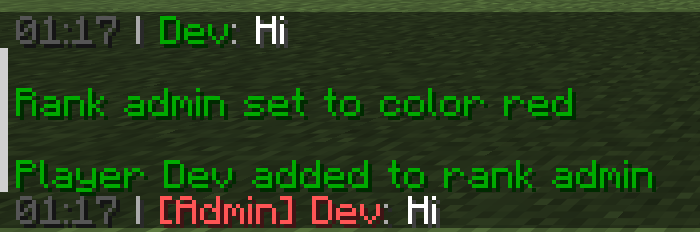
Names keep the colour of their team, or the one other mods give them. Command replies get a colour as well:
Use /bcs to see all available commands: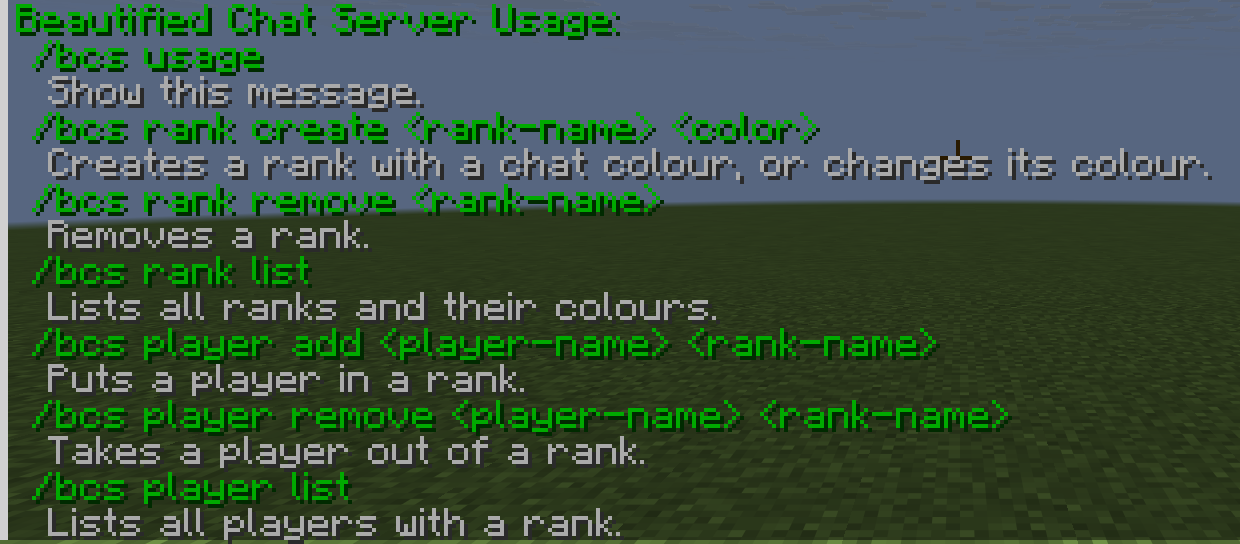

You may freely use this mod in any modpack, as long as the download remains hosted within the CurseForge or Modrinth ecosystem.
Serilum.com contains an overview and more information on all mods available.
Comments are disabled as I'm unable to keep track of them across so many separate mod pages.
For issues, ideas, suggestions or anything else there is the Github repo. Thanks!
Project description from CurseForge.
Pick your setup
Choose the version and loader you play, then open the matching release.
Showing the newest 12 of 29 game versions. Older files are in the list below.
Check the dependencies, then try the file in a copied instance before changing a world you care about.
Recent files
beautifiedchatserver-26.3.0-4.0.jar
3 Nov 2026
beautifiedchatserver-26.1.2-4.0.jar
3 Nov 2026
beautifiedchatserver-1.21.1-4.0.jar
3 Nov 2026
beautifiedchatserver-1.20.1-4.0.jar
3 Nov 2026
beautifiedchatserver-26.1.2-3.3.jar
28 Oct 2026
beautifiedchatserver-26.3.0-3.3.jar
2 Oct 2026
beautifiedchatserver-26.2.0-3.3.jar
2 Oct 2026
beautifiedchatserver-1.21.1-3.3.jar
2 Oct 2026
beautifiedchatserver-1.20.1-3.3.jar
2 Oct 2026
beautifiedchatserver-26.3.0-3.2.jar
20 Sept 2026
beautifiedchatserver-26.2.0-3.2.jar
18 Jun 2026
beautifiedchatserver-26.1.2-3.2.jar
7 Jun 2026
Looking for an older file? The official CurseForge project page is in Resources.
 mod
The custom gameplay core for Ashendawn. Players should install the official Ashendawn modpack for the complete server experience.
 mod
New currency economy provide Ancient Debris, Totem of Undying,Enchanted Golden Apple
 mod
Let's put the GPU to work!