Minecraft version
Back to mods 
Modrinth · Minecraft mod
VartaPack
beta! A support report and diagnostics tool for Minecraft modpack authors.
Choose a version Pick your version below, then grab the matching file.
Quick answer
Which VartaPack release matches 26.1?
beta file 1.1.4-mc26.1.x-beta+neoforge
Game version 26.1, 26.1.1, 26.1.2
Loader NeoForge
VartaPack 1.1.4-mc26.1.x-beta+neoforge targets 26.1, 26.1.1, 26.1.2 with NeoForge. It must be installed on the client. Do not install it on the dedicated server. No extra mods listed for this file.
Where it goes
Is VartaPack required on the client, server, or both?
It must be installed on the client. Do not install it on the dedicated server.
Client Required
Dedicated server Not supported
Loader for this release NeoForge
Required install it here Optional supported, not mandatory Not supported do not install here Source doesn’t say do not assume
This file is marked client-only.
What else does VartaPack 1.1.4-mc26.1.x-beta+neoforge need?
1.1.4-mc26.1.x-beta+neoforge on 26.1. Every mod below is checked against that same setup.
This file does not list any required mods. Do not add a library just because a different file uses it.
This file does not list any required or optional mods.
Before you install it
Add VartaPack without breaking your instance.
Built for VartaPack 1.1.4-mc26.1.x-beta+neoforge on 26.1. Pick another file and the loader, install side or required mods may change.
- 01
Stick to this file
Use 1.1.4-mc26.1.x-beta+neoforge. It targets 26.1, 26.1.1, 26.1.2 with NeoForge; another release may have different loader, side or dependency requirements.
- 02
Bring the mods it needs
This file does not list any required mods. Do not add a library just because a different file uses it.
- 03
Put it on the correct side
It must be installed on the client. Do not install it on the dedicated server.
- 04
Pick the file you checked
Use the “Get this file” button beside 1.1.4-mc26.1.x-beta+neoforge. It opens that exact file at the source.
About this project
What does VartaPack add?
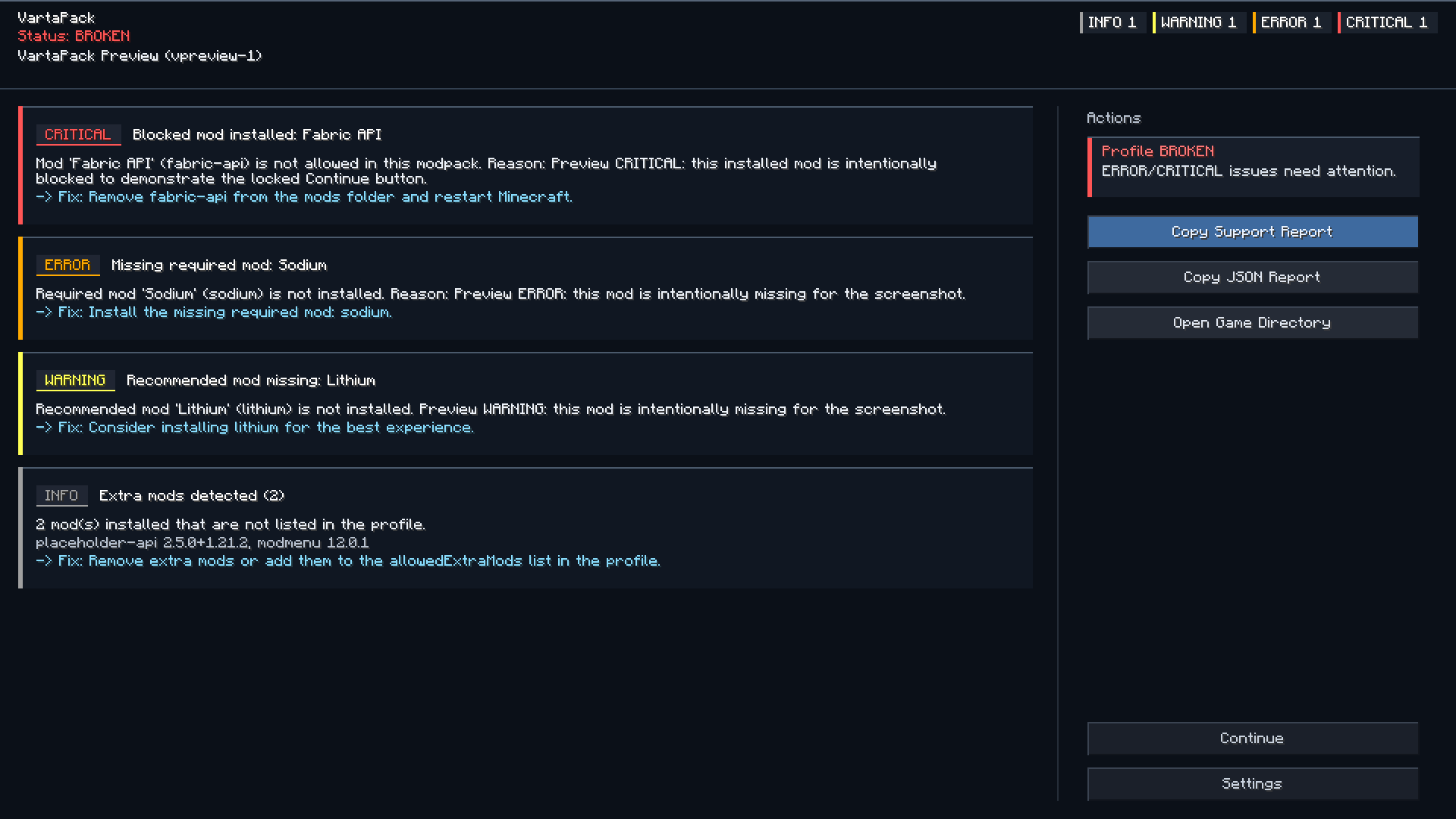
VartaPack
A lightweight diagnostics, integrity, and support-report tool for Minecraft modpacks.
VartaPack helps modpack authors understand whether a player's instance is clean, modified, unsupported, or broken. It validates the local environment, detects common setup problems, and generates structured reports that are easy to share when support is needed.
Purpose
VartaPack is not a performance mod.
It is a support layer for modpacks. It helps players see what is wrong and gives authors a clear overview before requesting full logs or crash reports.
Checks
VartaPack can validate:
- Minecraft version
- mod loader
- Java version
- allocated RAM
- required mods
- recommended mods
- blocked mods
- extra mods
- known conflicts
- selected file integrity
Detected issues can be shown through a startup notification and an in-game issues screen.
Pack status
VartaPack classifies the current instance as:
| Status | Meaning |
|---|---|
| Clean | The instance matches the expected profile. |
| Modified | The player changed something, but no critical issue was detected. |
| Unsupported | The instance may still run, but support should be limited. |
| Broken | A critical issue was detected. |
Support reports
Players can copy a generated support report with one click.
Reports may include:
- pack name and profile version
- Minecraft version
- loader and loader version
- Java version
- allocated RAM
- operating system
- detected issues
- missing required mods
- blocked mods
- extra mods
- installed mods
- suggested fixes
Reports are useful for GitHub issues, Discord support, CurseForge comments, and Modrinth support threads.
Crash analysis
VartaPack can scan local logs and crash reports for common patterns, such as:
- mixin failures
- missing dependencies
- incompatible mod sets
- duplicate mods
- wrong Java version
- out of memory errors
- renderer conflicts
Crash analysis is meant to help with debugging. It does not replace manual investigation.
Configuration
Modpack authors can configure VartaPack through:
config/vartapack/
Common files:
profile.json
rules.json
integrity.json
vartapack.json
These files define the expected environment, mod rules, conflict rules, integrity checks, support links, and report behavior.
Configuration examples and usage guide are available on GitHub.
Privacy
VartaPack does not collect telemetry.
Reports are generated locally. Logs, mod lists, usernames, file paths, and personal data are not uploaded automatically.
The player decides whether to copy and share a report.
Private paths and usernames are redacted where possible.
Limitations
VartaPack is a client-side diagnostics tool.
It cannot prevent every startup crash, because some crashes happen before any mod code can run. For those cases, use crash reports, doctor mode, and proper loader-level dependency or conflict rules.
Companion use
VartaPack can be used together with PackPing.
Recommended setup:
- VartaPack for diagnostics, integrity checks, and support reports
- PackPing for modpack update notifications
They can also be used separately.
Project description from Modrinth.
Pick your setup
VartaPack by Minecraft version and loader
Choose the version and loader you play, then open the matching release.
Minecraft version
26.1.2
2 loader buildsMinecraft version
26.1.1
2 loader buildsMinecraft version
26.1
2 loader buildsMinecraft version
1.21.11
2 loader buildsMinecraft version
1.21.10
2 loader buildsMinecraft version
1.21.9
2 loader buildsMinecraft version
1.21.8
2 loader buildsMinecraft version
1.21.7
2 loader buildsMinecraft version
1.21.6
2 loader buildsMinecraft version
1.21.5
2 loader buildsMinecraft version
1.21.4
2 loader buildsShowing the newest 12 of 20 game versions. Older files are in the list below.
Check the dependencies, then try the file in a copied instance before changing a world you care about.
Recent files
VartaPack versions and loaders
1.1.4-mc26.1.x-beta+neoforge
vartapack-neoforge-1.1.4-mc26.1.x-beta.jar
12 Jun 2026
Client Required Server Not supported Dependencies No extras listed Listed on Release listing
Check the 26.1 · NeoForge setup 26.126.1.126.1.2NeoForge beta
1.1.4-mc26.1.x-beta+fabric
vartapack-fabric-1.1.4-mc26.1.x-beta.jar
12 Jun 2026
Client Required Server Not supported Dependencies No extras listed Listed on Release listing
Check the 26.1 · Fabric setup 26.126.1.126.1.2Fabric beta
1.1.3+neoforge
vartapack-neoforge-mc26.1-1.1.3-beta.jar
10 Jun 2026
Client Required Server Not supported Dependencies No extras listed Listed on Release listing
Check the 26.1 · NeoForge setup 26.126.1.126.1.2NeoForge beta
1.1.3+fabric
vartapack-fabric-mc26.1-1.1.3-beta.jar
10 Jun 2026
Client Required Server Not supported Dependencies No extras listed Listed on Release listing
Check the 26.1 · Fabric setup 26.126.1.126.1.2Fabric beta
1.1.2.5+neoforge
vartapack-neoforge-mc26.1-1.1.2.5.jar
8 Jun 2026
Client Required Server Not supported Dependencies No extras listed Listed on Release listing
Check the 26.1 · NeoForge setup 26.126.1.126.1.2NeoForge beta
1.1.2.5+fabric
vartapack-fabric-mc26.1-1.1.2.5.jar
8 Jun 2026
Client Required Server Not supported Dependencies No extras listed Listed on Release listing
Check the 26.1 · Fabric setup 26.126.1.126.1.2Fabric beta
Looking for an older file? The official Modrinth project page is in Resources.
 mod
CurseForge + Modrinth · Minecraft
Velorise Simple Map
An exploration-focused world map and minimap with cave mapping, waypoints and extensive customization.
 mod
CurseForge + Modrinth · Minecraft
Reach Display
A configurable visual representation of your reach and hit distances
 mod
Modrinth · Minecraft
Perspective Mod Reborn
360 degree third person view