Collective Needed by Vanilla Zoom 1.19.3-2.1-forge+fabric
requiredNo matching file
CurseForge · Minecraft mod
🔍 [Client] Adds an on-the-go zoom functionality hotkey using the spyglass item.
Quick answer
Vanilla Zoom 1.19.3-2.1-forge+fabric targets 1.19.3 with Fabric, Forge, Quilt. It must be installed on the client. Do not install it on the dedicated server. 1 required mod needs a matching file.
Where it goes
It must be installed on the client. Do not install it on the dedicated server.
This file is marked client-only.
1.19.3-2.1-forge+fabric on 1.19.3. Every mod below is checked against that same setup.
Install Collective first, but 1 required mod has no matching file for this setup. Do not mix loader builds to force a match.
We only count dependency files that match this setup. A file for another loader does not fill the gap.
Before you install it
Built for Vanilla Zoom 1.19.3-2.1-forge+fabric on 1.19.3. Pick another file and the loader, install side or required mods may change.
Use 1.19.3-2.1-forge+fabric. It targets 1.19.3 with Fabric, Forge, Quilt; another release may have different loader, side or dependency requirements.
Install Collective first, but 1 required mod has no matching file for this setup. Do not mix loader builds to force a match.
It must be installed on the client. Do not install it on the dedicated server.
Use the “Get this file” button beside 1.19.3-2.1-forge+fabric. It opens that exact file at the source.
About this project


Vanilla Zoom is a client-side mod which adds functionality to zoom on-the-go via a hotkey. In 1.17, the Spyglass item was added to Minecraft. If you're like me, you've probably never found a use for it. It's a hassle to bring with you in the hotbar, and selecting it even more so. The zoom function is incredibly useful though. And with this mod, you'll be able to use it anywhere. Think of it as spawning with a spyglass, in any world.
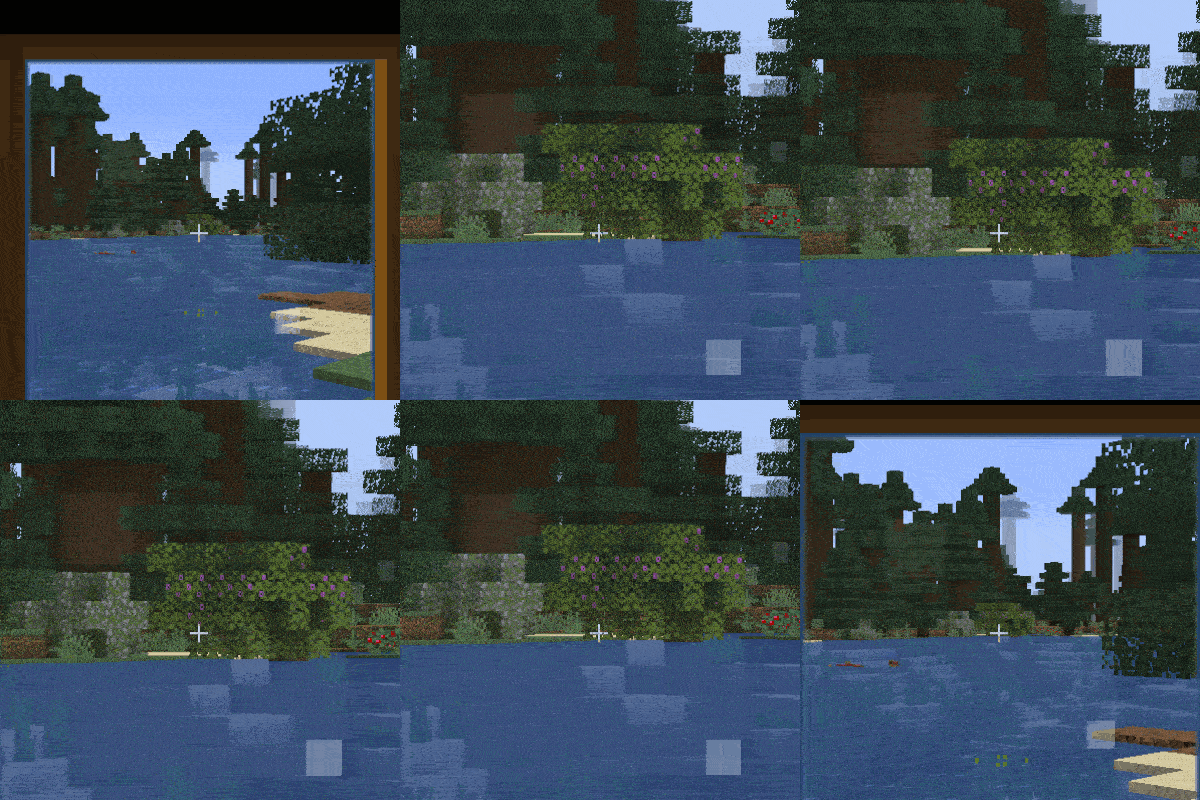
By default the hotkey used to zoom in is Left Alt, but this can be set in the Keybind menu. While pressing this, a spyglass item is temporarily added to the offhand. The spyglass is automatically used, until the hotkey is let go. This will also make the spyglass item disappear again. Any held item in the offhand will return as soon as the hotkey is unpressed.


Zooming in with the hotkey:

The Hotkey:

You may freely use this mod in any modpack, as long as the download remains hosted within the CurseForge or Modrinth ecosystem.
Serilum.com contains an overview and more information on all mods available.
Comments are disabled as I'm unable to keep track of them across so many separate mod pages.
For issues, ideas, suggestions or anything else there is the Github repo. Thanks!
Project description from CurseForge.
Pick your setup
Choose the version and loader you play, then open the matching release.
Showing the newest 12 of 28 game versions. Older files are in the list below.
Check the dependencies, then try the file in a copied instance before changing a world you care about.
Recent files
vanillazoom-1.19.3-2.1.jar
12 Mar 2023
vanillazoom-1.19.3-2.0.jar
5 Jan 2023
vanillazoom_1.19.3-1.0.jar
8 Dec 2022
vanillazoom-fabric_1.19.3-1.2.jar
7 Dec 2022
Looking for an older file? The official CurseForge project page is in Resources.
 mod
BankSystem is a Minecraft mod that brings money in to the game. Players can have a bankacount that can not only hold money but items too.
 mod
StockMarket is a Minecraft mod that brings a better way for trading to the game. It enables players to trade items on a virtual stock market, making it ideal for multiplayer servers with active economies.
 mod
Adds additional golden food items that give the player status effects.