Minecraft version
Back to mods 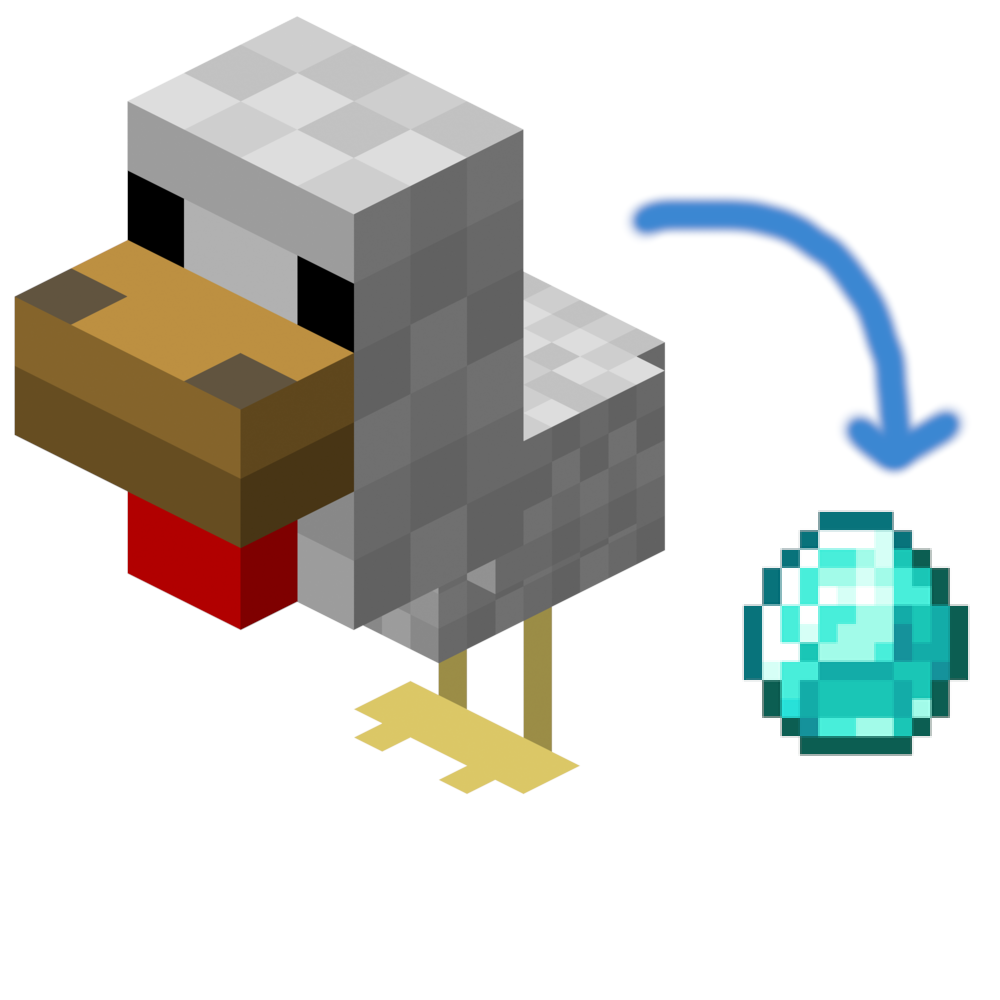
CurseForge · Minecraft mod
Edit Mob Drops
Edit Mob Drops is an easily configurable mod that lets you edit what mobs drop.
Choose a version Pick your version below, then grab the matching file.
Quick answer
Which Edit Mob Drops release should I use?
Latest stable file Edit Mob Drops 1.4.4a for Forge 1.16.5
Game version 1.16.5
Loader Forge
Edit Mob Drops 1.4.4a for Forge 1.16.5 targets 1.16.5 with Forge. The project page does not say whether this file belongs on the client, dedicated server, or both. No extra mods listed for this file.
Where it goes
Is Edit Mob Drops required on the client, server, or both?
The project page does not say whether this file belongs on the client, dedicated server, or both.
Client Source doesn’t say
Dedicated server Source doesn’t say
Loader for this release Forge
Required install it here Optional supported, not mandatory Not supported do not install here Source doesn’t say do not assume
The source does not explicitly classify this release as client-only or server-only.
What else does Edit Mob Drops 1.4.4a for Forge 1.16.5 need?
Edit Mob Drops 1.4.4a for Forge 1.16.5. Change the file and its required mods may change too.
This file does not list any required mods. Do not add a library just because a different file uses it.
This file does not list any required or optional mods.
Before you install it
Add Edit Mob Drops without breaking your instance.
Built for Edit Mob Drops 1.4.4a for Forge 1.16.5. Pick another file and the loader, install side or required mods may change.
- 01
Stick to this file
Use Edit Mob Drops 1.4.4a for Forge 1.16.5. It targets 1.16.5 with Forge; another release may have different loader, side or dependency requirements.
- 02
Bring the mods it needs
This file does not list any required mods. Do not add a library just because a different file uses it.
- 03
Put it on the correct side
The project page does not say whether this file belongs on the client, dedicated server, or both.
- 04
Pick the file you checked
Use the “Get this file” button beside Edit Mob Drops 1.4.4a for Forge 1.16.5. It opens that exact file at the source.
About this project
What does Edit Mob Drops add?
Edit Mob Drops
Edit Mob Drops is an easily configurable mod that lets you edit what mobs drop, including adding items to specific groups of mobs, adding additional items, and even clearing existing drops!
All vanilla and modded items are supported, including NBT data. All mobs should be supported, vanilla and modded.
Editing mob drops is as simple as editing the config file of the mod, config\editmobdrops\editmobdrops.cfg (in 1.7.10 and 1.12.2), or config\editmobdrops\editmobdrops.toml (in 1.14+).
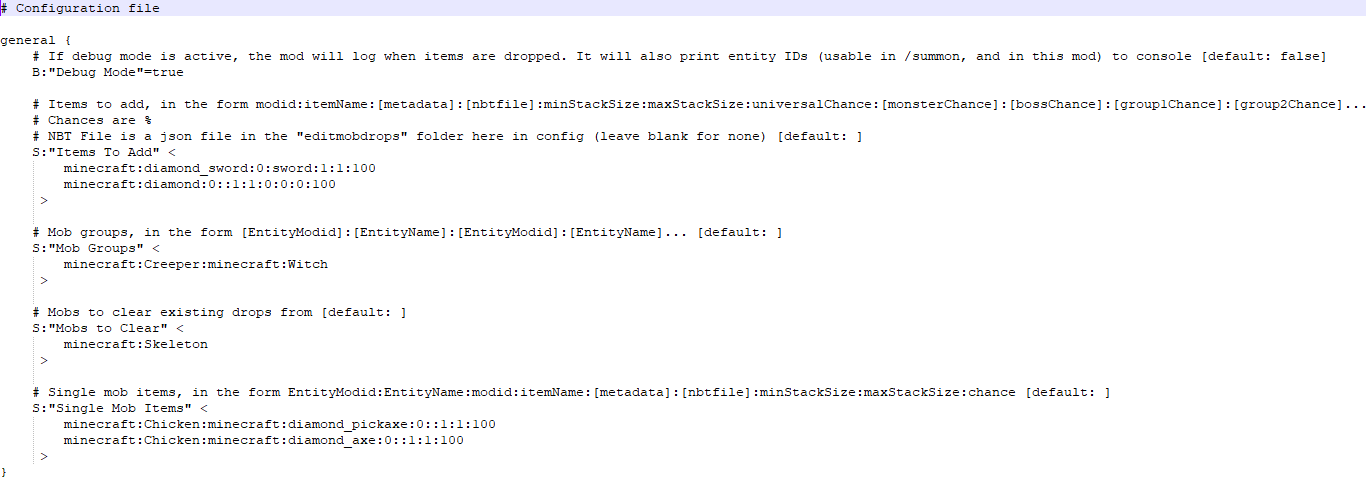
Sample Config (Mod version 1.4+)
Sample config for 1.7.10
Sample config for 1.12.2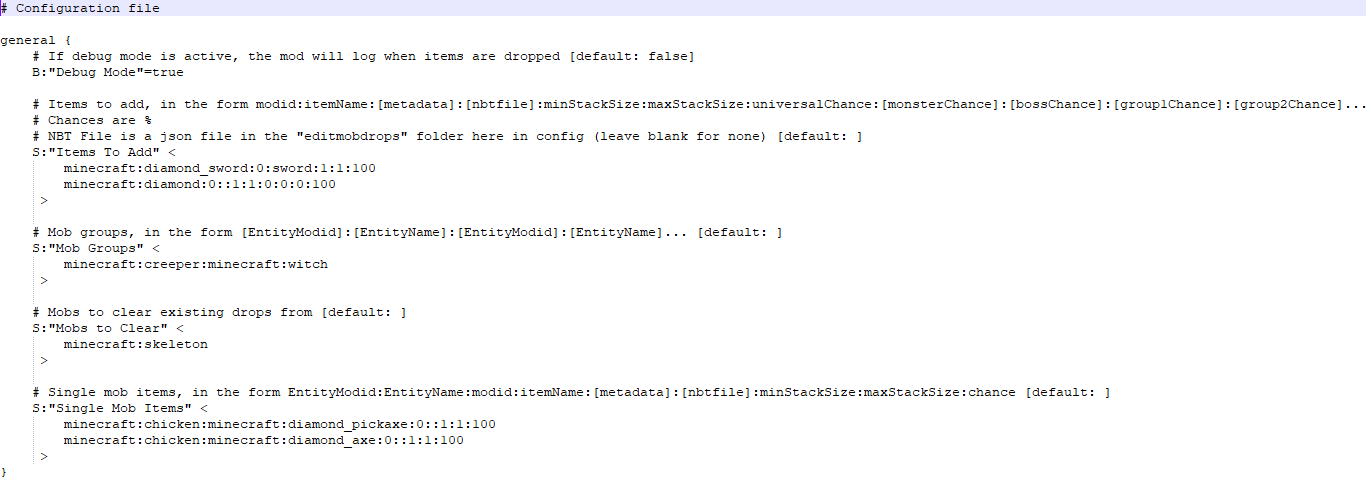
For 1.14+ (1.16.5 and latest)

Both of these configs do the same thing for different versions of Minecraft.
This config adds a chance to drop a stack of minecraft:diamond_sword, with between 1 and 1 (so 1) swords, with metadata 0 (an ordinary diamond sword), using the file "sword.json" for NBT, to everything, with a 100% chance.
"sword.json" contains the following in 1.7.10:
<code>{display:{Name:"A sword"}}</code><br />It contains the following in 1.12.2:<code><br />{"display": {"Name": "A sword"}}</code><br />In 1.16.5 and latest, it instead contains the following:<br />{"display":{"Name":"[{\"text\":\"A sword\"}]"}}
This NBT data gives the sword the name "A sword".
The .json files can contain any valid NBT in json format. Check the syntax with a /give command if you're not sure whether it'll work.
After the sword, this config adds a chance to drop a stack of minecraft:diamond, with 1 diamond of metadata 0, not using an NBT file (as that section is blank).
The diamond has a 0% chance for anything to drop it, a 0% chance for monsters, a 0% chance for bosses, and a 100% chance for group 1, defined lower in the config as Creepers and Witches.
Lower down in the config, skeletons are listed as being a "Mob to Clear". This means default drops are cleared, but this happens before the extra items are added, so skeletons will still drop a diamond sword called "A sword".
Finally, the "Single Mob Items" section adds items to a single type of mob - in this case, adding a diamond pickaxe (metadata 0, no NBT) to chickens with a 100% chance to drop, and the same for a diamond axe.
In 1.7.10, entity names can be found by having debug mode on.
After 1.12.2, metadata was removed entirely, so the 1.14+ version of the config file does not include it.
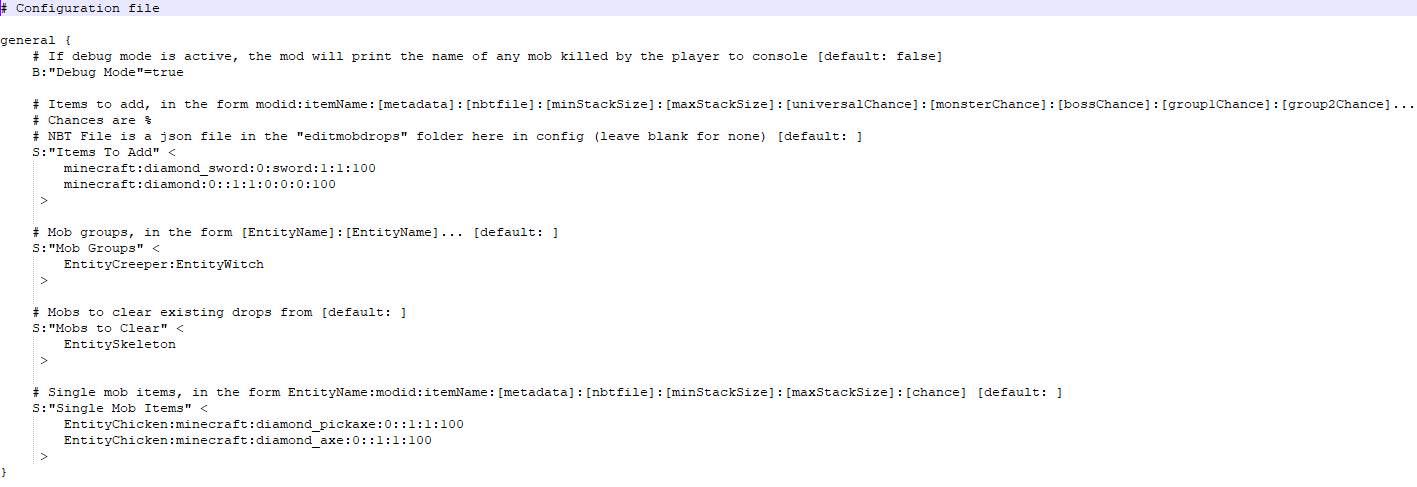
Old Sample Config (Before mod version 1.4.0)
Sample config for 1.7.10 and 1.12.2
For 1.14+

Both of these configs do the same thing for different versions of Minecraft.
This config adds a chance to drop a stack of minecraft:diamond_sword, with between 1 and 1 (so 1) swords, with metadata 0 (an ordinary diamond sword), using the file "sword.json" for NBT, to everything, with a 100% chance.
"sword.json" contains the following:
{"display": {"Name": "A sword"}}
This NBT data gives the sword the name "A sword".
The .json files can contain any valid NBT in json format. Check the syntax with a /give command if you're not sure whether it'll work.
After the sword, this config adds a chance to drop a stack of minecraft:diamond, with 1 diamond of metadata 0, not using an NBT file (as that section is blank).
The diamond has a 0% chance for anything to drop it, a 0% chance for monsters, a 0% chance for bosses, and a 100% chance for group 1, defined lower in the config as Creepers and Witches.
Lower down in the config, skeletons are listed as being a "Mob to Clear". This means default drops are cleared, but this happens before the extra items are added, so skeletons will still drop a diamond sword called "A sword".
Finally, the "Single Mob Items" section adds items to a single type of mob - in this case, adding a diamond pickaxe (metadata 0, no NBT) to chickens with a 100% chance to drop, and the same for a diamond axe.
After 1.12.2, metadata was removed entirely, so the 1.15+ version of the config file does not include it.
Discord Server
Project description from CurseForge.
Pick your setup
Edit Mob Drops by Minecraft version and loader
Choose the version and loader you play, then open the matching release.
Minecraft version
1.19.2
1 loader buildMinecraft version
1.18.2
1 loader buildMinecraft version
1.16.5
1 loader buildMinecraft version
1.16.4
1 loader buildMinecraft version
1.16.3
1 loader buildMinecraft version
1.16.2
1 loader buildMinecraft version
1.16.1
1 loader buildMinecraft version
1.15.2
1 loader buildMinecraft version
1.14.4
1 loader buildMinecraft version
1.12.2
1 loader buildMinecraft version
1.7.10
1 loader buildCheck the dependencies, then try the file in a copied instance before changing a world you care about.
Recent files
Edit Mob Drops versions and loaders
Edit Mob Drops 1.4.4a for Forge 1.16.5
editmobdrops-1.16.5-1.4.4a.jar
14 Oct 2024
Client Source doesn’t say Server Source doesn’t say Dependencies No extras listed Listed on Release listing
Check the 1.16.5 · Forge setup 1.16.5Forge release
Edit Mob Drops 1.4.4 for Forge 1.18.2
editmobdrops-1.18.2-1.4.4.jar
29 Feb 2024
Client Source doesn’t say Server Source doesn’t say Dependencies No extras listed Listed on Release listing
Check the 1.18.2 · Forge setup 1.18.2Forge release
Edit Mob Drops 1.4.4 for Forge 1.16.5
editmobdrops-1.16.5-1.4.4.jar
28 Oct 2023
Client Source doesn’t say Server Source doesn’t say Dependencies No extras listed Listed on Release listing
Check the 1.16.5 · Forge setup 1.16.5Forge release
Edit Mob Drops 1.4.4 for NeoForge 1.20.1
editmobdrops-1.20.1-1.4.4.jar
28 Oct 2023
Client Source doesn’t say Server Source doesn’t say Dependencies No extras listed Listed on Release listing
Check the 1.20.1 · NeoForge setup NeoForge1.20.1Forge release
Edit Mob Drops 1.4.4 for Forge 1.7.10
editmobdrops-1.7.10-1.4.4.jar
25 Mar 2023
Client Source doesn’t say Server Source doesn’t say Dependencies No extras listed Listed on Release listing
Check the 1.7.10 · Forge setup Forge1.7.10 release
Edit Mob Drops 1.4.3 for Forge 1.12.2
editmobdrops-1.12.2-1.4.3.jar
19 Feb 2023
Client Source doesn’t say Server Source doesn’t say Dependencies No extras listed Listed on Release listing
Check the 1.12.2 · Forge setup Forge1.12.2 release
Edit Mob Drops 1.4.3 for Forge 1.7.10
editmobdrops-1.7.10-1.4.3.jar
19 Feb 2023
Client Source doesn’t say Server Source doesn’t say Dependencies No extras listed Listed on Release listing
Check the 1.7.10 · Forge setup Forge1.7.10 release
Edit Mob Drops 1.4.2 for Forge 1.7.10
editmobdrops-1.7.10-1.4.2.jar
27 Dec 2022
Client Source doesn’t say Server Source doesn’t say Dependencies No extras listed Listed on Release listing
Check the 1.7.10 · Forge setup Forge1.7.10 release
Edit Mob Drops 1.4.2 for Forge 1.12.2
editmobdrops-1.12.2-1.4.2.jar
27 Dec 2022
Client Source doesn’t say Server Source doesn’t say Dependencies No extras listed Listed on Release listing
Check the 1.12.2 · Forge setup Forge1.12.2 release
Edit Mob Drops 1.4.1 for Forge 1.19.2
editmobdrops-1.19.2-1.4.1.jar
31 Oct 2022
Client Source doesn’t say Server Source doesn’t say Dependencies No extras listed Listed on Release listing
Check the 1.19.2 · Forge setup 1.19.2Forge release
Edit Mob Drops 1.4.1 for Forge 1.16.5
editmobdrops-1.16.5-1.4.1.jar
30 Oct 2022
Client Source doesn’t say Server Source doesn’t say Dependencies No extras listed Listed on Release listing
Check the 1.16.5 · Forge setup 1.16.5Forge release
Edit Mob Drops 1.4.1 for Forge 1.12.2
editmobdrops-1.12.2-1.4.1.jar
30 Oct 2022
Client Source doesn’t say Server Source doesn’t say Dependencies No extras listed Listed on Release listing
Check the 1.12.2 · Forge setup Forge1.12.2 release
Looking for an older file? The official CurseForge project page is in Resources.