Minecraft version
Back to mods 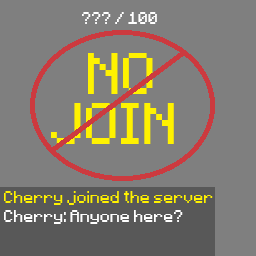
Modrinth · Minecraft mod
No Join
A lightweight server-side Minecraft mod that hides player activity and server population information.
Choose a version Pick your version below, then grab the matching file.
Quick answer
Which No Join release matches 26.3?
Best match for your filters 2.1.1-26.3
Game version 26.3
Loader NeoForge
No Join 2.1.1-26.3 targets 26.3 with NeoForge. Do not install it on the client. It must be installed on the dedicated server. No extra mods listed for this file.
Where it goes
Is No Join required on the client, server, or both?
Do not install it on the client. It must be installed on the dedicated server.
Client Not supported
Dedicated server Required
Loader for this release NeoForge
Required install it here Optional supported, not mandatory Not supported do not install here Source doesn’t say do not assume
This file is marked server-only.
What else does No Join 2.1.1-26.3 need?
2.1.1-26.3 on 26.3. Every mod below is checked against that same setup.
This file does not list any required mods. Do not add a library just because a different file uses it.
This file does not list any required or optional mods.
Before you install it
Add No Join without breaking your instance.
Built for No Join 2.1.1-26.3 on 26.3. Pick another file and the loader, install side or required mods may change.
- 01
Stick to this file
Use 2.1.1-26.3. It targets 26.3 with NeoForge; another release may have different loader, side or dependency requirements.
- 02
Bring the mods it needs
This file does not list any required mods. Do not add a library just because a different file uses it.
- 03
Put it on the correct side
Do not install it on the client. It must be installed on the dedicated server.
- 04
Pick the file you checked
Use the “Get this file” button beside 2.1.1-26.3. It opens that exact file at the source.
About this project
What does No Join add?
Brief Summary
- Hides player leave messages
- Hides player join messages
- Hides player names off the TAB list
- Hides player count off the server list
- Server side install only
- Supported in Fabric and NeoForge
- Can be toggled OFF/ON without restarting the server
Operators are unaffected. Players with OP permissions still see join/leave messages, the TAB player list, and the server player count
Commands
/nojoin
  - /nojoin on
  - /nojoin off
- will toggle on/off the mod for everyone in the server.
/nojoin status
- will display whether the mod is toggled off or on
Application
This mod was intentionally created to be simple, meaning it can by used many in many different ways.
For example, it can help preserve immersion when playing a horror mod with your friends
It also works well with voice chat if you want players to be able to join without immediately giving themselves away
Installation
Fabric
For the Fabric verison you will need:
Fabric Loader
Fabric API
- Make sure the verison of Fabric API matches the version of the mod
NeoForge
For the NeoForge version make sure you install the matching NeoForge version of the mod for your Minecraft version
MISC
Previously mentioned: players joining your server do NOT need to download the mod client-side
Server Operators: Installing No Join client-side as well is recommended for the smoothest experience when using this mod.
Project description from Modrinth.
Pick your setup
No Join by Minecraft version and loader
Choose the version and loader you play, then open the matching release.
Minecraft version
26.2
2 loader buildsCheck the dependencies, then try the file in a copied instance before changing a world you care about.
Recent files
No Join versions and loaders
2.1.1-26.3
1.0.0-26.3-neoforge.jar
30 Sept 2026
Client Not supported Server Required Dependencies No extras listed Listed on Release listing
Check the 26.3 · NeoForge setup 26.3NeoForge release
2.1.0-26.3
nojoin-26.3-1.0.0.jar
16 Sept 2026
Client Not supported Server Required Dependencies 1 required · 1 unchecked Listed on Release listing
Check the 26.3 · Fabric setup 26.3Fabric release
Looking for an older file? The official Modrinth project page is in Resources.
 mod
Modrinth · Minecraft
Nexa AI Chat
The Mod/Plugin Introduces Nexa Ai Agent into the Minecraft. Your sidekick in minecraft! Accessible from the chat. You can talk to it anytime, even ask it to do actions. it has all context of you and environment so when it talks, you better listen.
 mod
CurseForge + Modrinth · Minecraft
Inventory Overlay (HUD)
This mod displays your inventory directly on the HUD without needing to open it.
 mod
CurseForge + Modrinth · Minecraft
Runeborn | Soulslike RPG progression
A soulslike RPG overhaul: earn runes, level eight attributes at Ember Shrines, wield 74 scaling armaments and hunt seven Sovereigns.