Fabric API Needed by Count Macaroon 0.1.1+mc.1.21.5
requiredMatching file found Matched file: 0.141.6+1.21.11

Modrinth · Minecraft mod
tally counter mod to count your villager uhm... workers or something
Quick answer
Count Macaroon 0.1.1+mc.1.21.5 targets 1.21.11, 1.21.10, 1.21.9 with Fabric. It must be installed on the client. Do not install it on the dedicated server. All 1 required mods have matching files.
Where it goes
It must be installed on the client. Do not install it on the dedicated server.
This file is marked client-only.
0.1.1+mc.1.21.5. Change the file and its required mods may change too.
Install Fabric API first. We found matching files for this game-version and loader setup.
We only count dependency files that match this setup. A file for another loader does not fill the gap.
Before you install it
Built for Count Macaroon 0.1.1+mc.1.21.5. Pick another file and the loader, install side or required mods may change.
Use 0.1.1+mc.1.21.5. It targets 1.21.11, 1.21.10, 1.21.9 with Fabric; another release may have different loader, side or dependency requirements.
Install Fabric API first. We found matching files for this game-version and loader setup.
It must be installed on the client. Do not install it on the dedicated server.
Use the “Get this file” button beside 0.1.1+mc.1.21.5. It opens that exact file at the source.
About this project
Client-side tally counter mod for the fabric mod loader, game version 1.21.6.
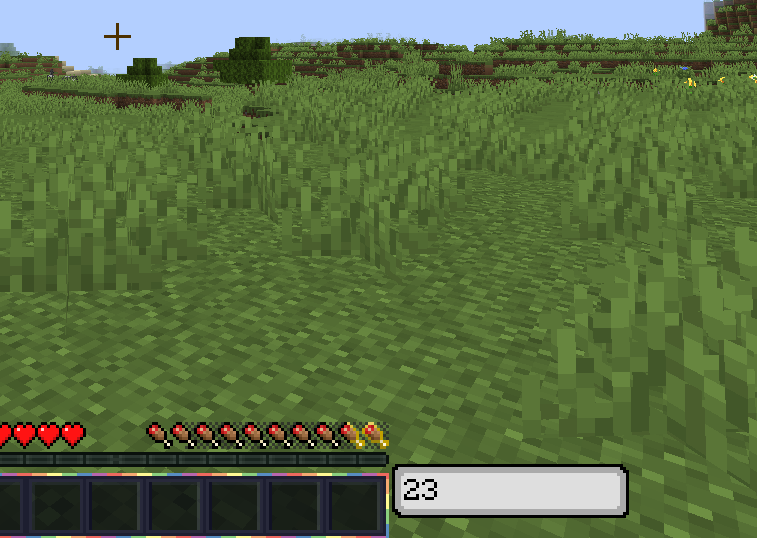
There is no auto saving/loading yet, so please remember to /counter_load <name> on joining and /counter_save on
leaving.
By default, this key increments the current counter by the current counter's step size.
By default, this key decrements the current counter by the current counter's step size.
By default, this key sets the value of the current counter to 0.
/counter_value <value>Sets the current counter's value to value.
/counter_saveSaves the current counter as a JSON file in the counters directory. Its name is determined by the name of the counter
set in game.
// ./counters/leaf_litter.json
{
  "value": 35,
  "step": 2,
  "name": "leaf_litter"
}
/counter_load <name>Loads the counter specified. (The name doesn't need .json at the end)
/counter_listLists the saved counters and when they were last modified.
/counter_step [<step>]With no arguments, it gets the current step size of the current counter.
With the argument named step, it sets the current counter's step size to the specified value.
/counter_name [<new_name>]With no arguments, it gets the current name of the current counter.
With the argument named new_name, it sets the current counter's name to the specified value.
/counter_new <new_name>Discards the current counter and creates a new counter with its name set to the value of new_name, with a step size of 1 and a value of 0.
/counter_help [<command>]If you need help using a help command, then no help command has the means to help you.
Create a resource pack and replace the texture /assets/countmacaroon/textures/gui/counter_background.png. Its dimensions are 79 x 18 pixels.
Project description from Modrinth.
Pick your setup
Choose the version and loader you play, then open the matching release.
Check the dependencies, then try the file in a copied instance before changing a world you care about.
Recent files
countmacaroon-0.1.1+mc.1.21.5.jar
13 Nov 2026
countmacaroon-0.1.0+mc.1.21.5.jar
23 Jun 2025
Looking for an older file? The official Modrinth project page is in Resources.
 mod
Fixes the glitch where players abused ghost blocks to keep their mace damage bonus
 mod
"The ultimate vine-harvesting utility. Quick, server-sided, and works with all vine types!" Ver. 1.0.1 when sneaking normal Minecraft behavior and only the one sheared will drop
 mod
Tired of TNT grief on your server? This mod intercepts every ignited TNT in the Overworld and swaps it out for a randomly generated firework — complete with random colors, shapes, trails and twinkle effects. Fully server-side, no client install required!