Minecraft version
Back to mods 
Modrinth · Minecraft mod
Render Distance+
Automates Chunky + Voxy workflow with a in-game GUI without having the player to run commands manually.
Choose a version Pick your version below, then grab the matching file.
Quick answer
Which Render Distance+ release should I use?
Latest stable file 1.2.1
Game version 26.3, 26.2, 26.1.2
Loader Fabric, Quilt
Render Distance+ 1.2.1 targets 26.3, 26.2, 26.1.2 with Fabric, Quilt. Installation on the client is optional. Installation on the dedicated server is optional. No extra mods listed for this file.
Where it goes
Is Render Distance+ required on the client, server, or both?
Installation on the client is optional. Installation on the dedicated server is optional.
Client Optional
Dedicated server Optional
Loader for this release Fabric, Quilt
Required install it here Optional supported, not mandatory Not supported do not install here Source doesn’t say do not assume
The source marks this as usable on both the client and server.
What else does Render Distance+ 1.2.1 need?
1.2.1. Change the file and its required mods may change too.
This file does not list any required mods. Do not add a library just because a different file uses it.
This file does not list any required or optional mods.
Before you install it
Add Render Distance+ without breaking your instance.
Built for Render Distance+ 1.2.1. Pick another file and the loader, install side or required mods may change.
- 01
Stick to this file
Use 1.2.1. It targets 26.3, 26.2, 26.1.2 with Fabric, Quilt; another release may have different loader, side or dependency requirements.
- 02
Bring the mods it needs
This file does not list any required mods. Do not add a library just because a different file uses it.
- 03
Put it on the correct side
Installation on the client is optional. Installation on the dedicated server is optional.
- 04
Pick the file you checked
Use the “Get this file” button beside 1.2.1. It opens that exact file at the source.
About this project
What does Render Distance+ add?
Render Distance+
Now also available as mod!
Render Distance+ is a powerful Minecraft datapack that completely overhauls the default render distance by leveraging the power of Voxy and Chunky. This datapack 100% automates the Chunky chunk loading workflow, saving you a lot of continuous command inputs.
- Fully customizable directly in-game
- Performance-friendly background loading
- Requires no high-end hardware to run efficiently
- Works seamlessly on Survival & Hardcore without enabling cheats
- User-Friendly GUI designed for effortless configuration
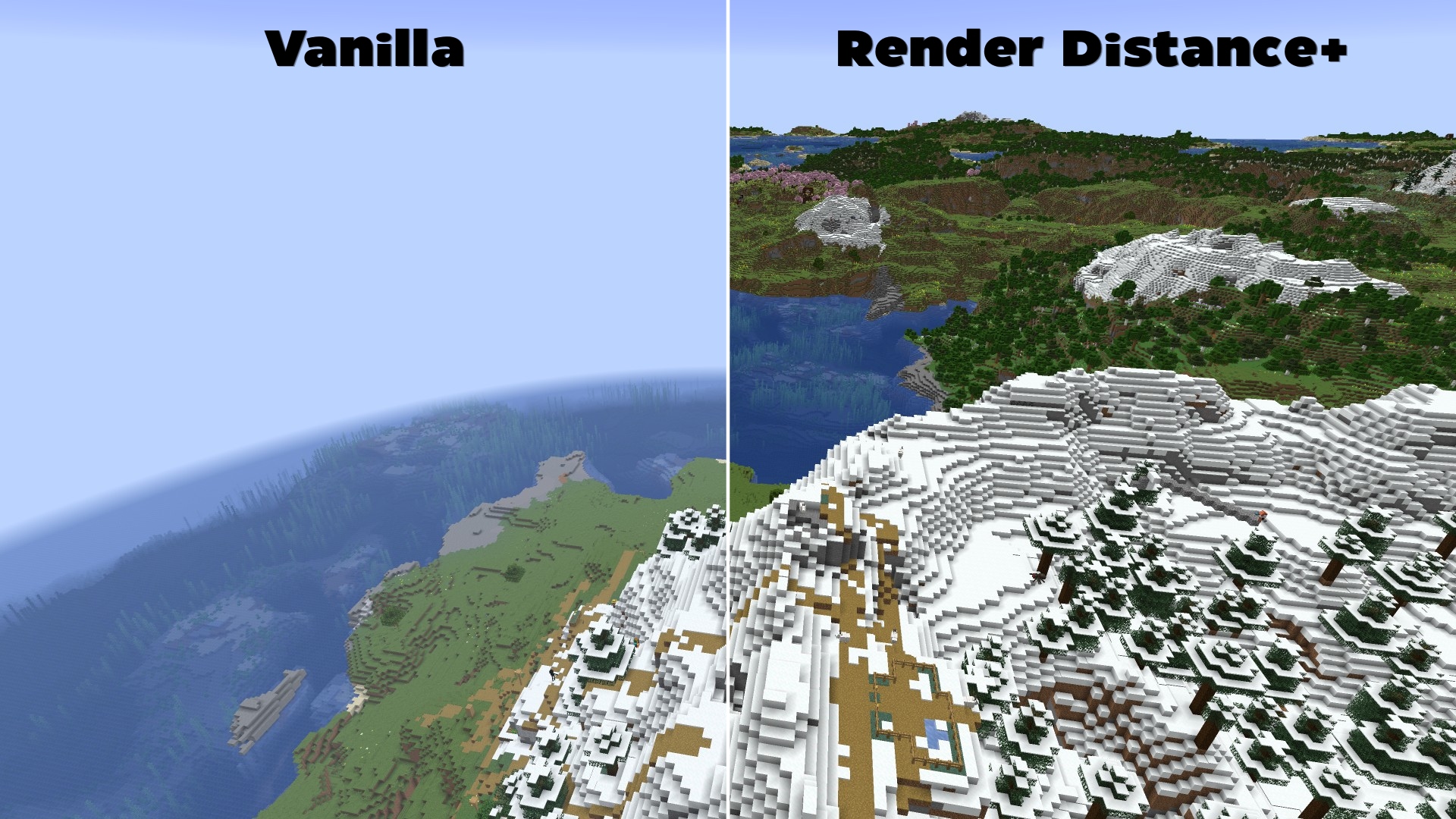
Features & Why Render Distance+ is Essential
To get the absolute most out of Voxy's rendering engine, users normally need to manually configure Chunky to pre-load chunks. Traditionally, this is a tedious and complex process involving multiple terminal commands, radius calculations, and constant server/world reloading.
Render Distance+ solves this problem entirely:
- 100% Automated Background Loading: The datapack dynamically handles all the heavy Chunky commands in the background while the player explores the world.
- Full Dimension Support: Works automatically across all vanilla dimensions (The Overworld, The Nether, and The End).
- In-Game Settings GUI: No need to edit config files. Change your generation speed, maximum target distance, and toggle features directly via an intuitive in-game interactive chat GUI.
📥How to Install Render Distance+ (as datapack)
Before installing, ensure you have both the Voxy and Chunky mods installed in your modpack.
- Download the Render Distance+ datapack
.zipfile. - When creating a new world in Minecraft, click on the Datapacks tab.
- Drag and drop the downloaded
.zipfile into the menu, move it to the selected column, and create your world.
How to install this datapack on an existing world?
- Select your world in the Minecraft singleplayer menu and click on Edit.
- Click on Open World Folder and navigate to the
datapacksfolder. - Copy the Render Distance+
.zipfile directly into this folder. - Join your world and type
/reloadto initialize the system.
How to Check if Render Distance+ is Installed Correctly
Once inside your world, open the chat and type:/reload
If the installation was successful, a custom text-based configuration GUI will immediately pop up in your chat, allowing you to begin your automated chunk-loading setup.
Requirements (Mods)
- Chunky (Required for background generation)
- Voxy (Required for high render distances)
- Sodium (Required by Voxy)
🐛How to Report Issues
Please use the Issue Tracker or go to https://github.com/Kletterstein92/Render-Distance-Plus/issues to report any bugs or other errors
Project description from Modrinth.
Pick your setup
Render Distance+ by Minecraft version and loader
Choose the version and loader you play, then open the matching release.
Minecraft version
26.2
3 loader buildsMinecraft version
26.1.2
3 loader buildsMinecraft version
26.1.1
3 loader buildsMinecraft version
26.1
3 loader buildsMinecraft version
1.21.11
3 loader buildsMinecraft version
1.21.10
3 loader buildsMinecraft version
1.21.9
3 loader buildsMinecraft version
1.21.8
3 loader buildsMinecraft version
1.21.7
1 loader buildMinecraft version
1.21.6
1 loader buildCheck the dependencies, then try the file in a copied instance before changing a world you care about.
Recent files
Render Distance+ versions and loaders
1.2.1
Render Distance+.jar
14 Nov 2026
Client Optional Server Optional Dependencies No extras listed Listed on Release listing
Check the 26.3 · Fabric setup 26.326.226.1.226.1.1 release
1.2.0
Render Distance+.jar
1 Nov 2026
Client Optional Server Optional Dependencies No extras listed Listed on Release listing
Check the 26.3 · Fabric setup 1.21.101.21.111.21.81.21.9 beta
1.1.1
Render Distance+.zip
25 Oct 2026
Client Optional Server Optional Dependencies No extras listed Listed on Release listing
Check the 26.3 · datapack setup 1.21.101.21.111.21.81.21.9 release
1.1.0
Render Distance+.zip
24 Sept 2026
Client Optional Server Optional Dependencies No extras listed Listed on Release listing
Check the 26.2 · datapack setup 1.21.101.21.111.21.81.21.9 release
1.0.14
Render Distance+.zip
1 Sept 2026
Client Optional Server Optional Dependencies No extras listed Listed on Release listing
Check the 26.2 · datapack setup 1.21.101.21.111.21.81.21.9 release
1.0.13
Render Distance+.zip
27 Aug 2026
Client Optional Server Optional Dependencies No extras listed Listed on Release listing
Check the 26.2 · datapack setup 1.21.101.21.111.21.81.21.9 release
1.0.12
Render Distance+.zip
22 Aug 2026
Client Optional Server Optional Dependencies No extras listed Listed on Release listing
Check the 26.2 · datapack setup 1.21.101.21.111.21.81.21.9 release
1.0.11
Render Distance+.zip
19 Aug 2026
Client Optional Server Optional Dependencies No extras listed Listed on Release listing
Check the 26.2 · datapack setup 1.21.101.21.111.21.81.21.9 release
1.0.10
Render Distance+.zip
18 Aug 2026
Client Optional Server Optional Dependencies No extras listed Listed on Release listing
Check the 26.2 · datapack setup 1.21.101.21.111.21.81.21.9 release
1.0.9
Render Distance+.zip
16 Aug 2026
Client Optional Server Optional Dependencies No extras listed Listed on Release listing
Check the 26.2 · datapack setup 1.21.101.21.111.21.81.21.9 release
1.0.8
Render Distance+.zip
15 Aug 2026
Client Optional Server Optional Dependencies No extras listed Listed on Release listing
Check the 26.2 · datapack setup 1.21.101.21.111.21.81.21.9 release
1.0.7
Render Distance+.zip
14 Aug 2026
Client Optional Server Optional Dependencies No extras listed Listed on Release listing
Check the 26.2 · datapack setup 1.21.101.21.111.21.81.21.9 release
Looking for an older file? The official Modrinth project page is in Resources.
 mod
CurseForge + Modrinth · Minecraft
Elytra/Chestplate Swapper
A simple quality of life mod that swaps between chestplate and elytra on a keystroke.
 mod
Modrinth · Minecraft
Insane's Survival Overhaul (aka IguanaTweaks Reborn)
Overhaul survival with many changes to existing mechanics. Weapon rebalance, and much more
 mod
Modrinth · Minecraft
Create: Cyber Goggles
A client-side mod for Create that provides modular assistance features.